1. ບົດແນະນຳ
This manual provides comprehensive instructions for the safe and effective use of the Mastech MS 6520B Infrared Thermometer. This non-contact device is designed for accurate temperature measurement across various applications. Please read this manual thoroughly before operating the device.

ຮູບ 1: ດ້ານຫນ້າ view of the Mastech MS 6520B Infrared Thermometer, showing the display and control buttons.
2. ຂໍ້ມູນຄວາມປອດໄພ
To ensure safe operation and prevent damage to the device, observe the following precautions:
- ຄວາມປອດໄພເລເຊີ: Do not point the laser directly at eyes or indirectly off reflective surfaces. The laser is for targeting purposes only.
- ເງື່ອນໄຂສິ່ງແວດລ້ອມ: Do not use the device in environments with explosive gas, steam, or dust. Avoid extreme temperatures and high humidity.
- ສະ ໜາມ ໄຟຟ້າ: Keep the device away from strong electromagnetic fields, which may affect accuracy.
- ການແຊ່ນ້ໍາ: Do not immerse the device in water or other liquids. It is not waterproof.
- ບໍາລຸງຮັກສາ: Refer to the maintenance section for proper cleaning and care.
3. ຄຸນສົມບັດ ແລະ ອົງປະກອບຂອງຜະລິດຕະພັນ
The Mastech MS 6520B is a handheld infrared thermometer featuring a clear LCD display and intuitive controls.
ຄຸນນະສົມບັດທີ່ສໍາຄັນ:
- ການວັດແທກອຸນຫະພູມອິນຟາເລດທີ່ບໍ່ຕິດຕໍ່
- Wide temperature range: -20°C to 500°C (-4°F to 932°F)
- Selectable °C/°F units
- Built-in laser pointer for accurate targeting
- Backlight display for low-light conditions
- ຟັງຊັ່ນການຖືຂໍ້ມູນ
- MAX/MIN/AVG temperature display modes
- ຕົວຊີ້ບອກແບັດເຕີຣີຕໍ່າ
ການລະບຸອົງປະກອບ:
- ເຊັນເຊີອິນຟາເລດ
- Laser Pointer Aperture
- ຈໍ LCD
- ຜົນກະທົບຕໍ່ການວັດແທກ
- ປຸ່ມໂໝດ (M)
- Unit Selection Button (°F/°C)
- ປຸ່ມ Backlight
- ປຸ່ມເປີດ/ປິດ Laser
- ຊ່ອງໃສ່ຫມໍ້ໄຟ

ຮູບທີ 2: ລາຍລະອຽດ view of the MS 6520B display and control buttons.
4. ຕັ້ງຄ່າ
4.1 ການຕິດຕັ້ງຫມໍ້ໄຟ
The Mastech MS 6520B requires one 9V 6F22 battery for operation.
- Locate the battery compartment cover at the bottom of the handle.
- Gently slide or open the battery compartment cover.
- Connect a new 9V 6F22 battery to the battery connector, ensuring correct polarity.
- ວາງຫມໍ້ໄຟເຂົ້າໄປໃນຊ່ອງແລະປິດຝາປິດຢ່າງປອດໄພ.

Figure 3: The battery compartment of the MS 6520B, showing the 9V battery connection.
5. ຄໍາແນະນໍາການດໍາເນີນງານ
5.1 ການວັດແທກ
- ຊີ້ເຊັນເຊີອິນຟາເຣດໄປຫາວັດຖຸເປົ້າໝາຍ.
- Press and hold the measurement trigger. The display will show the real-time temperature reading.
- Release the trigger to hold the last measured temperature on the display (Data Hold). The device will automatically power off after a period of inactivity to conserve battery.
5.2 ອັດຕາສ່ວນໄລຍະຫ່າງຕໍ່ຈຸດ (D:S)
The MS 6520B has a Distance to Spot Ratio (D:S) of 10:1. This means that at a distance of 10 units from the target, the measurement spot diameter will be 1 unit. For accurate readings, ensure the target area is larger than the measurement spot size.
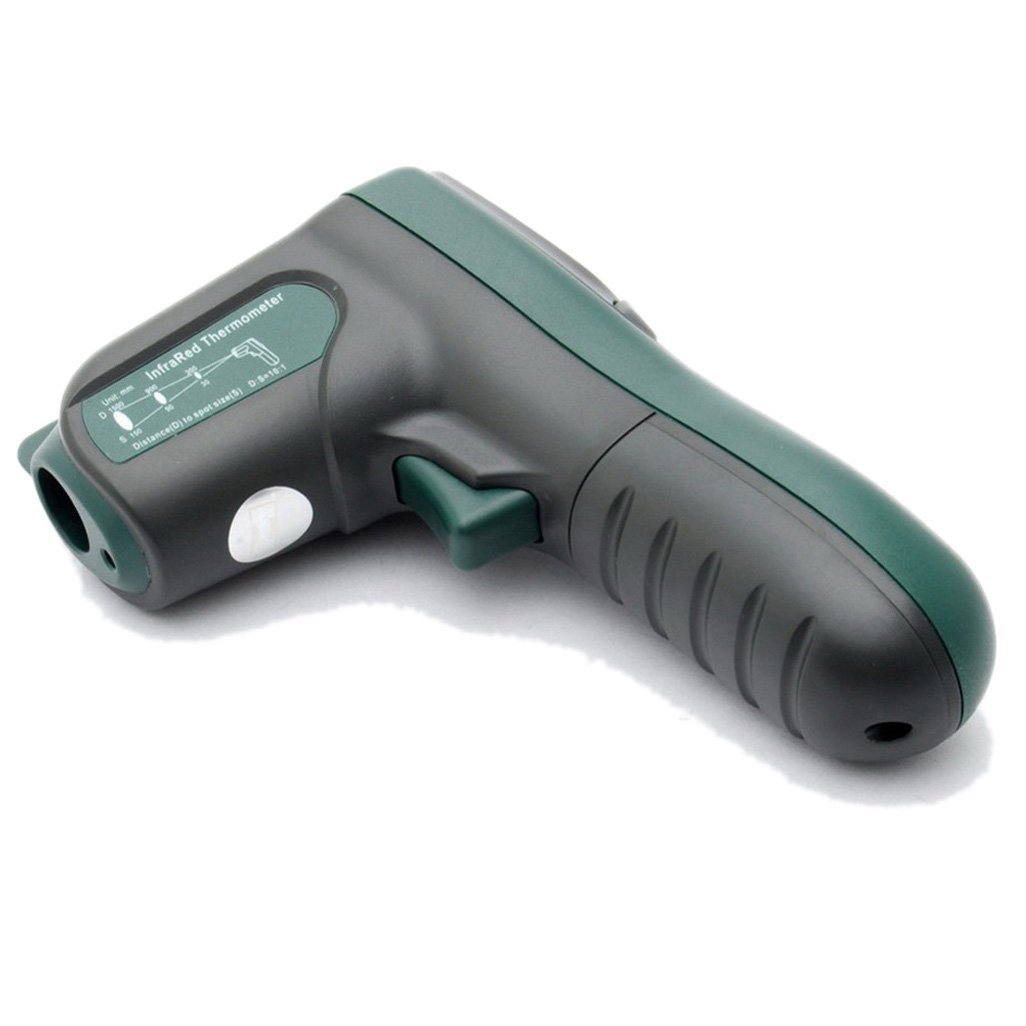
ຮູບ 4: ຂ້າງ view illustrating the 10:1 Distance to Spot Ratio for the infrared thermometer.
5.3 ການປ່ອຍອາຍພິດ
The device has a fixed emissivity setting of 0.95, which is suitable for most organic materials, painted surfaces, and many non-metallic objects. For highly reflective surfaces, readings may be less accurate.
5.4 ການເລືອກໜ່ວຍ (°C/°F)
ກົດ °F/°C button to toggle between Celsius and Fahrenheit temperature units.
5.5 ໄຟ Backlight
ກົດ ແສງຫຼັງ button to turn the display backlight on or off. This feature is useful in dimly lit environments.
5.6 ຕົວຊີ້ເລເຊີ
ກົດ ເລເຊີ button to activate or deactivate the laser pointer. The laser helps in precisely identifying the measurement target.
5.7 MAX/MIN/AVG Modes
ກົດ M (Mode) button to cycle through different display modes while the trigger is held down:
- ສູງສຸດ: Displays the maximum temperature recorded during the current measurement session.
- ນາທີ: Displays the minimum temperature recorded during the current measurement session.
- AVG: Displays the average temperature recorded during the current measurement session.
6. ບໍາລຸງຮັກສາ
6.1 ການທໍາຄວາມສະອາດ
- ເຮັດຄວາມສະອາດອຸປະກອນ casing ມີອ່ອນ, damp ຜ້າ. ຢ່າໃຊ້ເຄື່ອງເຮັດຄວາມສະອາດຂັດຫຼືສານລະລາຍ.
- Carefully clean the infrared lens with a soft cloth or cotton swab, slightly moistened with water or rubbing alcohol. Avoid scratching the lens.
6.2 ການເກັບຮັກສາ
When not in use, store the thermometer in a dry, cool place, away from direct sunlight and extreme temperatures. If storing for an extended period, remove the battery to prevent leakage.
6.3 ການທົດແທນຫມໍ້ໄຟ
Replace the 9V battery when the low battery indicator appears on the display to ensure accurate readings and proper device function. Refer to Section 4.1 for battery installation instructions.
7. ການແກ້ໄຂບັນຫາ
If you encounter issues with your Mastech MS 6520B, refer to the following common problems and solutions:
| ບັນຫາ | ສາເຫດທີ່ເປັນໄປໄດ້ | ການແກ້ໄຂ |
|---|---|---|
| ອຸປະກອນບໍ່ເປີດ | ແບັດເຕີຣີຕາຍ ຫຼື ຕິດຕັ້ງບໍ່ຖືກຕ້ອງ | Replace the 9V battery or ensure it is correctly installed. |
| ການອ່ານບໍ່ຖືກຕ້ອງ |
|
|
| Display shows "ERR" | Temperature outside measurement range | Ensure the target temperature is within -20°C to 500°C. |
8. ຂໍ້ມູນຈໍາເພາະ
The following table outlines the technical specifications for the Mastech MS 6520B Infrared Thermometer:
| ພາລາມິເຕີ | ຂໍ້ມູນຈໍາເພາະ |
|---|---|
| ຊ່ວງອຸນຫະພູມ | -20°C ຫາ 500°C (-4°F ຫາ 932°F) |
| ຄວາມຖືກຕ້ອງ | ±(1.5% + 2°C) or ±(1.5% + 4°F) |
| ການແກ້ໄຂອຸນຫະພູມ | 0.1°C / 0.1°F |
| ການເຮັດຊ້ຳ | ±1°C |
| ອັດຕາສ່ວນໄລຍະຫ່າງຕໍ່ຈຸດ (D:S) | 10:1 |
| ການເຜີຍແຜ່ | 0.95 (ແກ້ໄຂ) |
| ເວລາຕອບສະຫນອງ | 500 ມິນລິວິນາທີ |
| ການສະຫນອງພະລັງງານ | ແບັດເຕີຣີ 1x 9V 6F22 |
| ຂະຫນາດຜະລິດຕະພັນ | 142mm x 92mm x 47mm (5.6 "x 3.6" x 1.85 ") |
| ນ້ຳໜັກສິນຄ້າ | 231 g (0.31 lb) |
| ການຢັ້ງຢືນ | CE, RoHS |

Figure 5: Detailed specifications table for the Mastech MS 6520B.
9. ການຮັບປະກັນແລະການສະຫນັບສະຫນູນ
For warranty information, technical assistance, or customer support regarding your Mastech MS 6520B Infrared Thermometer, please refer to the official Mastech webສະຖານທີ່ຫຼືຕິດຕໍ່ຜູ້ຈັດຈໍາຫນ່າຍທ້ອງຖິ່ນຂອງທ່ານ. ຮັກສາໃບຮັບເງິນການຊື້ຂອງທ່ານໄວ້ເປັນຫຼັກຖານການຊື້.


