1. ບົດແນະນຳ
The Bogen 1126-BG-UTI1 is a single-zone paging controller designed to integrate a paging system with a telephone system. It provides a reliable interface for making announcements over a public address system from a telephone. This manual provides detailed instructions for the proper installation, operation, and maintenance of your Bogen paging controller.
2. ຂໍ້ມູນຄວາມປອດໄພທີ່ສໍາຄັນ
ກະລຸນາອ່ານ ແລະ ເຂົ້າໃຈຄຳແນະນຳດ້ານຄວາມປອດໄພທັງໝົດກ່ອນທີ່ຈະໃຊ້ງານອຸປະກອນນີ້. ເກັບຄູ່ມືນີ້ໄວ້ເພື່ອອ້າງອີງໃນອະນາຄົດ.
- ແຫຼ່ງພະລັງງານ: ເຊື່ອມຕໍ່ຫນ່ວຍບໍລິການພຽງແຕ່ກັບການສະຫນອງພະລັງງານທີ່ລະບຸໄວ້ voltage.
- ຄວາມຊຸ່ມ: ຫ້າມບໍ່ໃຫ້ອຸປະກອນຖືກຝົນ ຫຼື ຄວາມຊຸ່ມຊື່ນ.
- ການລະບາຍອາກາດ: ຮັບປະກັນການລະບາຍອາກາດທີ່ເຫມາະສົມ. ຫ້າມປິດຊ່ອງລະບາຍອາກາດ.
- ການບໍລິການ: ອ້າງອີງການບໍລິການທັງໝົດໃຫ້ກັບພະນັກງານບໍລິການທີ່ມີຄຸນວຸດທິ. ຢ່າພະຍາຍາມໃຫ້ບໍລິການຜະລິດຕະພັນນີ້ຕົວທ່ານເອງ.
- ທໍາຄວາມສະອາດ: ເຮັດຄວາມສະອາດດ້ວຍຜ້າແຫ້ງເທົ່ານັ້ນ.
3. ເນື້ອໃນຊຸດ
ກວດສອບວ່າລາຍການທັງຫມົດແມ່ນມີຢູ່ໃນຊຸດ:
- Bogen 1126-BG-UTI1 Single Zone Paging Controller Unit
- Power Adapter
- ຄູ່ມືຜູ້ໃຊ້ (ເອກະສານນີ້)
- ອຸປະກອນຕິດຕັ້ງ (ຖ້າມີ)
4. ຜະລິດຕະພັນເກີນview
The Bogen 1126-BG-UTI1 features various ports and indicators for seamless integration and operation. Familiarize yourself with the unit's components before installation.
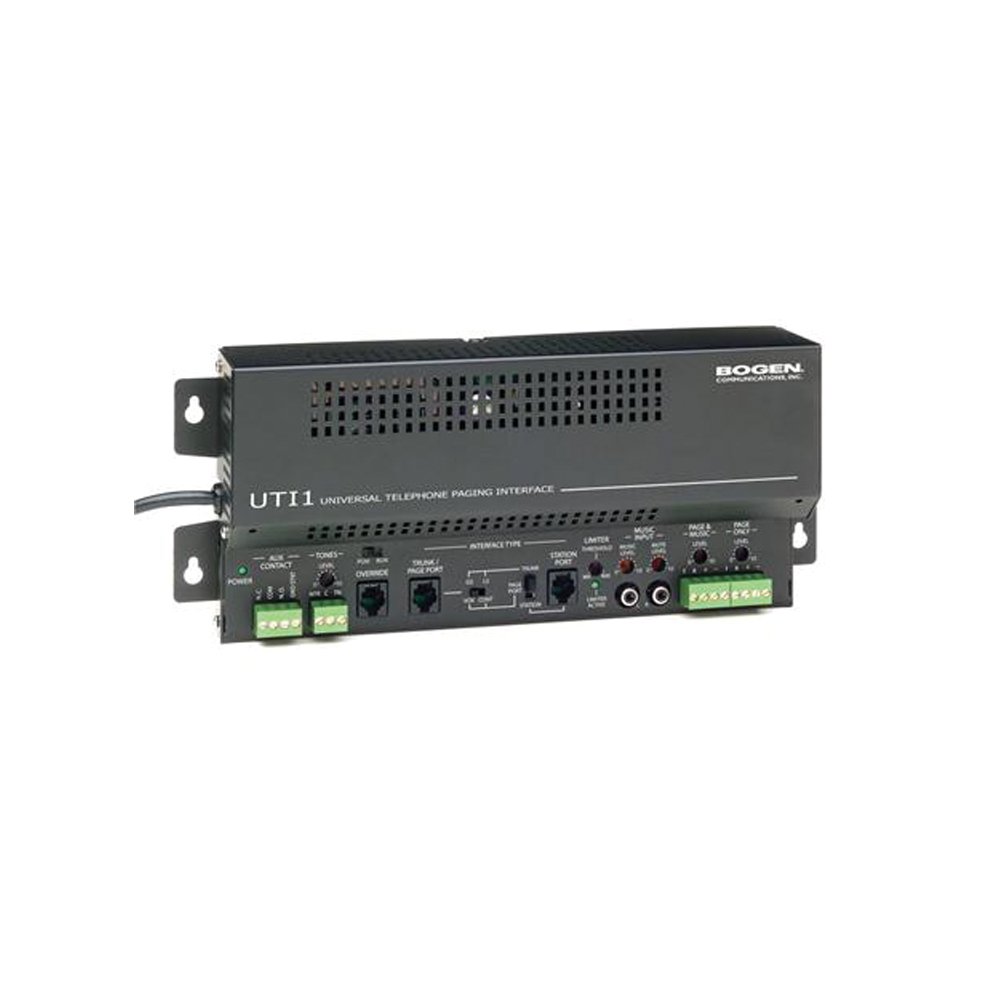
ຮູບທີ 1: ດ້ານໜ້າ view of the Bogen Single Zone Paging Controller. This image displays the main unit, highlighting its compact design and essential connection points for audio input and output, as well as power. The various ports and indicators are visible, crucial for understanding the device's functionality and connectivity.
4.1 ກະດານດ້ານ ໜ້າ
- ໄຟ LED: ສະແດງສະຖານະພະລັງງານ.
- ການຄວບຄຸມລະດັບການປ້ອນຂໍ້ມູນ: Adjusts the audio input sensitivity.
- ການຄວບຄຸມລະດັບຜົນຜະລິດ: ປັບລະດັບສຽງອອກ.
4.2 ແຜງດ້ານຫລັງ
- Telephone Line Input: RJ-11 jack for connecting to the telephone system.
- ສຽງອອກ: RCA or screw terminal connections for connecting to an ampມີຊີວິດຊີວາ.
- ການປ້ອນຂໍ້ມູນພະລັງງານ: Jack for connecting the power adapter.
- MOH Output: Music On Hold output (if applicable).
5. ການຕິດຕັ້ງແລະການຕິດຕັ້ງ
Follow these steps to properly install your paging controller:
- ການຕິດຕັ້ງ: Choose a suitable location for the controller, away from excessive heat or moisture. Secure the unit using appropriate mounting hardware if desired.
- Connect to Telephone System: Connect an RJ-11 cable from your telephone system's paging port or a suitable analog extension to the "Telephone Line Input" on the controller. Consult your telephone system's manual for specific paging port details.
- ເຊື່ອມຕໍ່ຫາ Ampມີຊີວິດຊີວາ: Connect the "Audio Output" of the paging controller to an available input on your paging amplifier. Ensure correct polarity if using screw terminals.
- ເຊື່ອມຕໍ່ພະລັງງານ: Plug the provided power adapter into the "Power Input" jack on the controller, then plug the adapter into a standard electrical outlet. The Power LED should illuminate.
- Initial Level Adjustment: Start with the Input Level and Output Level controls set to their minimum positions.
6. ຄໍາແນະນໍາການດໍາເນີນງານ
Once installed, the Bogen 1126-BG-UTI1 is ready for operation.
6.1 Making a Page
- From a telephone connected to the system, dial the designated paging access code or extension.
- Wait for the confirmation tone or voice prompt from the paging controller.
- Speak clearly into the telephone handset to make your announcement.
- Hang up the telephone when finished.
6.2 Adjusting Audio Levels
- ລະດັບການປ້ອນຂໍ້ມູນ: Slowly increase the "Input Level Control" until the paging audio is clear and distortion-free. If the audio is too loud or distorted, decrease this level.
- ລະດັບຜົນໄດ້ຮັບ: Adjust the "Output Level Control" to achieve the desired volume through the paging speakers. This should be done in conjunction with the ampການຄວບຄຸມປະລິມານຂອງ lifier.
7. ບໍາລຸງຮັກສາ
The Bogen 1126-BG-UTI1 is designed for reliable operation with minimal maintenance.
- ທໍາຄວາມສະອາດ: Periodically wipe the unit with a soft, dry cloth. Do not use liquid cleaners or aerosols.
- ການລະບາຍອາກາດ: Ensure that ventilation openings remain clear of dust and debris.
- ການເຊື່ອມຕໍ່: Occasionally check all cable connections to ensure they are secure.
8. ການແກ້ໄຂບັນຫາ
ຖ້າເຈົ້າພົບບັນຫາ, ເບິ່ງຄູ່ມືການແກ້ໄຂບັນຫາຕໍ່ໄປນີ້:
| ບັນຫາ | ສາເຫດທີ່ເປັນໄປໄດ້ | ການແກ້ໄຂ |
|---|---|---|
| ບໍ່ມີໄຟຊີ້ບອກພະລັງງານ. | Power adapter not connected or faulty; no power at outlet. | Check power adapter connection. Verify outlet has power. Test with another adapter if available. |
| No paging audio. | Incorrect telephone system connection; amplifier off or muted; audio levels too low. | Verify telephone line and audio output connections. Ensure amplifier is on and not muted. Adjust Input and Output Level controls. |
| Paging audio is distorted. | Input or output levels set too high. | Reduce Input Level and/or Output Level controls. |
| Cannot access paging from telephone. | Incorrect paging access code; telephone system not configured correctly. | Confirm the correct paging access code with your telephone system administrator. Verify telephone system programming. |
If the problem persists after attempting these solutions, contact Bogen technical support.
9. ຂໍ້ມູນຈໍາເພາະ
| ຄຸນສົມບັດ | ລາຍລະອຽດ |
|---|---|
| ໝາຍເລກຕົວແບບ | 1126-BG-UTI1 |
| ຍີ່ຫໍ້ | ໂບເຈນ |
| ຂະໜາດແພັກເກັດ | 15 x 9 x 7 ນິ້ວ |
| ນ້ໍາຫນັກລາຍການ | 6.7 ປອນ |
| ASIN | B00P1AOL2C |
| ຜູ້ຜະລິດ | ໂບເຈນ |
| Paging Zones | ເຂດດຽວ |
| ຄວາມເຂົ້າກັນໄດ້ | Telephone systems with analog paging port or extension |
10. ການຮັບປະກັນແລະການສະຫນັບສະຫນູນ
Bogen products are designed for durability and performance. For specific warranty information, please refer to the warranty card included with your product or visit the official Bogen webເວັບໄຊທ໌. ການຊ່ວຍເຫຼືອດ້ານເຕັກນິກແມ່ນມີໃຫ້ເພື່ອຊ່ວຍຕອບຄຳຖາມ ຫຼື ບັນຫາຕ່າງໆທີ່ທ່ານອາດຈະພົບ.
- ສະຫນັບສະຫນູນອອນໄລນ໌: ຢ້ຽມຢາມ www.bogen.com/support for FAQs, documentation, and contact information.
- ຂໍ້ມູນຕິດຕໍ່: Refer to the Bogen website for current telephone numbers and email addresses for technical assistance.


