1. ບົດແນະນຳ
The SK-200 SkylinkNet Connected Wireless Alarm System is an all-in-one solution designed to protect your home with alarm, home control, and video monitoring functions. This system allows you to control and monitor your home remotely via a smartphone application without monthly fees or contracts. It is expandable, supporting over 100 devices, and features easy plug-and-play installation.

ຮູບທີ 1.1: ເກີນview of the SkylinkNet SK-200 system, including the Internet Hub, sensors, keychain remote, and the smartphone application interface.
2. ເນື້ອໃນຊຸດ
Verify that all components are present in your SK-200 SkylinkNet kit:
- Internet Hub (1 unit)
- Door/Window Sensors (2 units)
- Motion Sensor (1 unit)
- Keychain Remote (1 unit)
- Power Adapter
- ສາຍອີເທີເນັດ
- ອຸປະກອນເສີມ

ຮູບທີ 2.1: Visual representation of the components included in the SkylinkNet SK-200 starter kit.
3. ການຕິດຕັ້ງແລະການຕິດຕັ້ງ
3.1 Initial Hub Connection
Follow these steps for the initial setup of your Internet Hub:
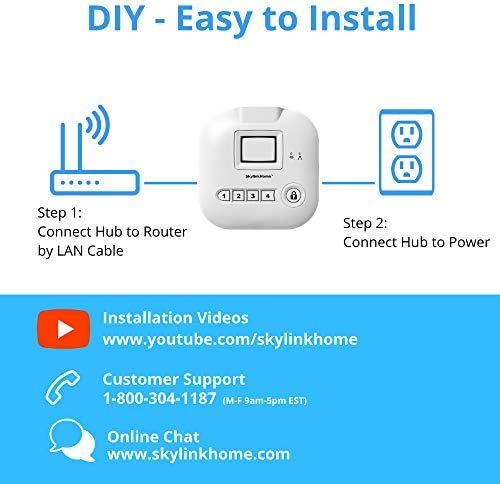
- ເຊື່ອມຕໍ່ກັບ Router: Use the provided Ethernet cable to connect the Internet Hub to your home router.
- ເຊື່ອມຕໍ່ກັບພະລັງງານ: Plug the power adapter into the Internet Hub and then into a standard wall outlet.

ຮູບທີ 3.1: Diagram illustrating the two simple steps for connecting the SkylinkNet Internet Hub to your router and power source.
3.2 Smartphone App Installation
The SkylinkNet system is controlled via a dedicated smartphone application. Download the app for your device:
- For iOS devices (iPhone, iPad): ຊອກຫາ "SkylinkNet" in the Apple App Store.
- ສໍາລັບອຸປະກອນ Android: ຊອກຫາ "SkylinkNet" in the Google Play Store.
Once downloaded, open the app and follow the on-screen instructions to create an account and link it to your Internet Hub.

ຮູບທີ 3.2: A smartphone displaying the SkylinkNet app interface, indicating its availability on the App Store.
3.3 ການຈັບຄູ່ອຸປະກອນ
After setting up the Internet Hub and the app, you can pair the included sensors and remote. Refer to the specific instructions provided with each sensor for detailed pairing procedures. Generally, this involves activating a pairing mode on the sensor and then adding it through the SkylinkNet app.
4. ການດໍາເນີນງານຂອງລະບົບ
4.1 Using the SkylinkNet App
The SkylinkNet app provides comprehensive control and monitoring capabilities:
- ແຂນ/ປົດອາວຸດ: Easily arm or disarm your system from anywhere.
- ສະຖານະເຊັນເຊີ: View the real-time status of all connected sensors (door/window, motion, etc.).
- ການແຈ້ງເຕືອນ: Receive push notifications for any activity detected by your sensors.
- Home Control: Manage connected smart home devices (lights, appliances, garage door, etc.).
- ການຕິດຕາມວິດີໂອ: Access live camera feeds and recorded images if compatible cameras are integrated.

ຮູບທີ 4.1: Screenshots of the SkylinkNet app, showing the Home Screen with device status, Camera Screen for live feeds, and Alarm Screen for system control.
4.2 Keychain Remote Functions
The included keychain remote provides quick access to essential system functions:
- ປຸ່ມລັອກ: ປະກອບອາວຸດລະບົບ.
- ປຸ່ມປົດລັອກ: ປົດອາວຸດລະບົບ.
- ປຸ່ມຫນ້າທໍາອິດ: Arms the system in 'Home' mode (e.g., perimeter protection only).
- ປຸ່ມ Panic: Activates an immediate alarm.
ຮູບທີ 4.2: The SkylinkNet keychain remote, showing its four primary function buttons.
4.3 Smart Home Integration (Alexa)
The SkylinkNet system is IFTTT compatible, allowing integration with various smart home devices, including Amazon Alexa. You can use voice commands to control your system:
- Enable the SkylinkNet skill in your Alexa app.
- Use commands like "Alexa, ask SkylinkNet to Arm Away" or "Alexa, ask SkylinkNet to turn on kitchen light."

ຮູບທີ 4.3: An illustration demonstrating how the SkylinkNet Internet Hub integrates with Amazon Alexa for voice control of the system and connected devices.
5. ບໍາລຸງຮັກສາ
5.1 ການທົດແທນຫມໍ້ໄຟ
Sensors in the SK-200 system typically require 3 AAA batteries. When a sensor's battery is low, you will receive a notification via the SkylinkNet app. To replace batteries:
- ເປີດເຊັນເຊີ c ດ້ວຍຄວາມລະມັດລະວັງasing.
- ເອົາແບດເຕີຣີເກົ່າອອກແລະຖິ້ມມັນຢ່າງຖືກຕ້ອງ.
- ໃສ່ແບັດເຕີຣີ AAA ໃໝ່, ຮັບປະກັນວ່າຂົ້ວຖືກຕ້ອງ.
- ປິດເຊັນເຊີ casing ຢ່າງປອດໄພ.
5.2 ການດູແລເຊັນເຊີ
To ensure optimal performance, keep sensors clean and free from dust. Avoid placing sensors in direct sunlight or areas with extreme temperature fluctuations, as this can affect their operation and battery life.
6. ການແກ້ໄຂບັນຫາ
If you encounter issues with your SkylinkNet system, consider the following common solutions:
- No App Connection: Ensure your Internet Hub is properly connected to your router and power. Check your home internet connection.
- ເຊັນເຊີບໍ່ຕອບສະໜອງ: Verify the sensor's battery level. Re-pair the sensor with the Internet Hub if necessary. Ensure the sensor is within range of the hub.
- ສັນຍານເຕືອນທີ່ບໍ່ຖືກຕ້ອງ: Check sensor placement to avoid accidental triggers (e.g., motion sensor facing a window with moving curtains). Adjust sensitivity settings if available.
- ບໍ່ໄດ້ຮັບການແຈ້ງເຕືອນ: Check your smartphone's notification settings for the SkylinkNet app. Ensure the app is running in the background or has necessary permissions.
- ລະບົບບໍ່ເປີດ/ປິດລະບົບ: Confirm the command is registered by the app or remote. Check the system status in the app for any error messages.
For persistent issues, refer to the customer support section.
7. ຂໍ້ມູນຈໍາເພາະ
| ຄຸນສົມບັດ | ລາຍລະອຽດ |
|---|---|
| ໝາຍເລກຕົວແບບ | SK-200 |
| ຍີ່ຫໍ້ | SKYLINK |
| ເຕັກໂນໂລຊີການເຊື່ອມຕໍ່ | ໄຮ້ສາຍ |
| ອຸປະກອນທີ່ເຂົ້າກັນໄດ້ | ໂທລະສັບສະຫຼາດ (iOS, Android) |
| ແຫຼ່ງພະລັງງານ | Battery Powered (Sensors), AC Adapter (Hub) |
| ຂະໜາດລາຍການ (L x W x H) | 4.2 x 5 x 4.8 ນິ້ວ |
| ນ້ໍາຫນັກລາຍການ | 16 ອອນສ ((1 ປອນ) |
| Battery Type (Sensors) | ຕ້ອງໃຊ້ແບັດເຕີຣີ AAA 3 ອັນ |
| ຊີວິດຫມໍ້ໄຟ | Up to 4320 Hours (Sensors) |
| ຂອບເຂດສູງສຸດ | 300 ຟຸດ |
| ປະເພດການຕິດຕັ້ງ | ກາວດ້ວຍຕົນເອງ |
| ວິທີການຄວບຄຸມ | App, Keychain Remote |
| ການຢັ້ງຢືນ | UL ລາຍຊື່ |
8. ຂໍ້ມູນການຮັບປະກັນ
The SK-200 SkylinkNet Connected Wireless Alarm System comes with a ການຮັບປະກັນ 1 ປີຈໍາກັດ from the date of purchase. This warranty covers defects in materials and workmanship under normal use. Please retain your proof of purchase for warranty claims. For full details regarding warranty terms and conditions, please contact Skylink customer support.
9. ການຊ່ວຍເຫຼືອລູກຄ້າ
For technical assistance, troubleshooting, or general inquiries regarding your SkylinkNet system, please use the following contact methods:
- ສະຫນັບສະຫນູນໂທລະສັບ: 1-800-304-1187 (Monday - Friday, 9 AM - 5 PM EST)
- ສົນທະນາທາງອິນເຕີເນັດ: ຢ້ຽມຢາມ www.skylinkhome.com
- ວິດີໂອການຕິດຕັ້ງ: Find helpful guides on www.youtube.com/skylinkhome


