1. ບົດແນະນຳ
The Contec CMS50F Wrist-worn Pulse Oximeter is designed for monitoring pulse rate and blood oxygen saturation (SpO2). This device features a color, multi-direction OLED display that shows real-time data including pulse rate, SpO2, pulse waveform, pulse bar graph, and battery level. It is intended for sports, aviation, and home use, and is not a medical device for diagnosis or treatment.

Figure 1: Contec CMS50F Pulse Oximeter in use, showing the wrist unit and finger probe.
2. ຄຸນລັກສະນະຂອງຜະລິດຕະພັນ
- Simple and easy to use wrist-worn design.
- Comfortable design suitable for both pediatric and adult users.
- Accurately records pulse rate and SpO2 blood oxygen saturation.
- Equipped with rechargeable batteries for convenience.
- Includes a download cable and software for data analysis on Windows PCs.
- Color, multi-direction OLED display with adjustable brightness.
- Audible alarm function for low pulse rate, low oxygen saturation, incorrect probe positioning, or low battery.

ຮູບ 2: ຂ້າງ view of the CMS50F unit, showing the USB port for charging and data transfer.
3. ການຕິດຕັ້ງແລະການນໍາໃຊ້ເບື້ອງຕົ້ນ
3.1 ການສາກອຸປະກອນ
The CMS50F comes with rechargeable Lithium Ion batteries. Before first use, fully charge the device using the provided USB cable. Connect the cable to the unit's USB port and to a standard USB power source (e.g., computer USB port, wall adapter). A full charge may take a few hours. For optimal battery life, it is recommended to perform a few charge/discharge cycles initially.
3.2 Software Installation (Windows PC Only)
The device includes software for data analysis. This software is compatible with Windows PCs only. The download address and index code are typically provided on a sticker within the product packaging or on a mini-CD. Follow these steps:
- Locate the download address (e.g., www.dlsoftfw.com) and index code (e.g., 01YAG014) from the packaging.
- ເປີດຂອງທ່ານ web browser and enter the download address.
- Enter the provided index code when prompted.
- Click the "Download" button to obtain the software installer.
- Run the installer and follow the on-screen instructions to complete the software installation on your Windows PC.

ຮູບທີ 3: ຕົວຢ່າງample of software download instructions found within the product packaging.
4. ປະຕິບັດການອຸປະກອນ
4.1 Wearing the Oximeter
Attach the wrist unit to your wrist like a watch. Connect the finger probe to the designated port on the wrist unit. Place the finger probe on your index finger, ensuring it is securely but comfortably positioned. A piece of tape or a band-aid around the lower part of the finger unit can help keep it from slipping off or moving, potentially providing more accurate readings, especially during sleep.
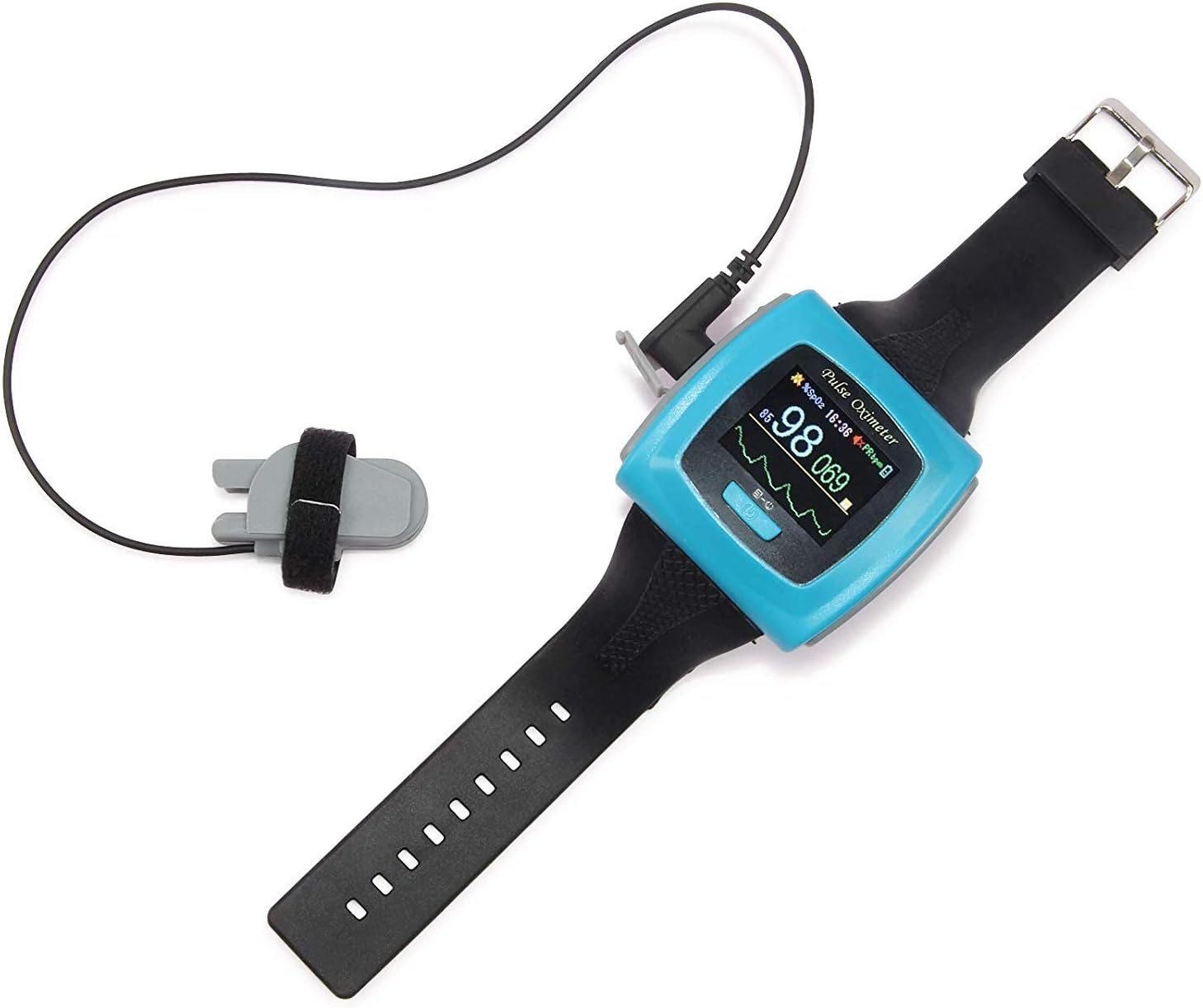
Figure 4: Proper placement of the CMS50F wrist unit and finger probe.
4.2 Powering On and Display Information
Press the power button to turn on the device. The OLED display will illuminate, showing:
- SpO2: Blood Oxygen Saturation percentage.
- PRbpm: Pulse Rate in beats per minute.
- Pulse Waveform: A graphical representation of your pulse.
- Pulse Bar Graph: A visual indicator of pulse strength.
- ຕົວຊີ້ບອກລະດັບແບັດເຕີຣີ: ສະແດງອາຍຸແບັດເຕີຣີທີ່ເຫຼືອ.
The display can be adjusted to be readable either horizontally or vertically. Refer to the device's on-screen menu for navigation and settings adjustments.

Figure 5: The CMS50F display showing SpO2 and PRbpm readings.
4.3 ຟັງຊັນປຸກ
The oximeter can sound an audible alarm under specific conditions. You can set your own parameters for SpO2 and pulse rate (both high and low limits) through the device's menu. Alarms will activate if:
- The pulse rate or oxygen saturation drops below or exceeds a pre-set level.
- The oximeter unit or finger probe is not correctly positioned on the finger.
- ລະດັບຫມໍ້ໄຟແມ່ນຕໍ່າ.
5. Data Management and Software Usage
The CMS50F allows you to record and download data to your Windows PC for detailed analysis. Ensure you have installed the software as described in Section 3.2.
5.1 ການບັນທຶກຂໍ້ມູນ
To record data, you must activate the "Record" mode from the wrist unit's menu. Each time you start a new recording session, previous data stored on the device will be overwritten. Therefore, it is crucial to download recorded data to your computer regularly.
5.2 Downloading and Viewຂໍ້ມູນ
Follow these steps to download and view your recorded data:
- Open the installed CMS50F software program on your Windows PC.
- Connect the wrist unit to your computer using the supplied USB cable.
- Turn on the wrist unit.
- From the computer program's menu, select the option to download recorded data from the wrist unit to your computer.
- Once downloaded, open the desired data file within the computer program to view and analyze your results. The software provides informative reports, including full, oximetry, and summary reports.
Note: The software is designed for Windows operating systems only. Mac users will not be able to install or use the provided software.
6. ບໍາລຸງຮັກສາ
6.1 ການທໍາຄວາມສະອາດ
Clean the device regularly with a soft, dry cloth. For disinfection, use a cloth lightly dampened with a mild disinfectant solution (e.g., 70% isopropyl alcohol). Do not immerse the device in water or any other liquid. Ensure the device is completely dry before storage or next use.
6.2 ການເກັບຮັກສາ
Store the oximeter in a cool, dry place, away from direct sunlight, extreme temperatures, and humidity. Keep it out of reach of children.
7. ການແກ້ໄຂບັນຫາ
| ບັນຫາ | ສາເຫດທີ່ເປັນໄປໄດ້ | ການແກ້ໄຂ |
|---|---|---|
| ອຸປະກອນບໍ່ເປີດ. | ແບັດເຕີຣີເຫຼືອໜ້ອຍ ຫຼືໝົດແລ້ວ. | Charge the device fully. Ensure the charging cable is securely connected. |
| ການອ່ານບໍ່ຖືກຕ້ອງຫຼືບໍ່ສອດຄ່ອງ. | Improper finger probe placement; excessive movement; cold fingers. | Ensure the finger probe is correctly and securely positioned. Minimize movement during measurement. Warm hands if cold. |
| ສຽງປຸກດັງເລື້ອຍໆ. | Pre-set alarm limits are too sensitive; incorrect probe placement. | Adjust alarm parameters in the device settings. Verify correct finger probe placement. |
| Difficulty connecting to PC software. | Driver issues; incorrect connection sequence; software compatibility. | Ensure software is correctly installed on a Windows PC. Try a different USB port. Follow the connection sequence: open software, connect device, turn on device. Restart both PC and oximeter. |
| Short battery life after initial use. | New battery conditioning. | Perform a few full charge/discharge cycles to optimize battery performance. |
8. ຂໍ້ມູນຈໍາເພາະ
- ຊື່ຕົວແບບ: CMS50F
- ຍີ່ຫໍ້: ຄອນເທກ
- ຂະໜາດຜະລິດຕະພັນ: 2.13 x 0.69 x 2.06 ນິ້ວ
- ນ້ໍາຫນັກລາຍການ: 1.76 ອອນ
- ແບັດເຕີຣີ: ແບດເຕີຣີ້ Lithium Ion 1 ໜ່ວຍ (ລວມ, ສາມາດສາກໄດ້)
- Measuring Range (Pulse Rate): 60-100 beats per minute (typical range, device may display wider range)
- Measuring Range (Blood Oxygen Saturation): 95-100% (typical range, device may display wider range)
- ຈໍສະແດງຜົນ: Color, multi-direction OLED
- ຄວາມເຂົ້າກັນໄດ້ຂອງຊອບແວ: Windows PC only
- ຜູ້ຜະລິດ: Facelake
- ວັນທີທີ່ມີໃຫ້ທໍາອິດ: ວັນທີ 3 ພຶດສະພາ 2011
9. Important Information and Disclaimer
ການປະຕິເສດທາງກົດໝາຍ: ຖະແຫຼງການກ່ຽວກັບການເສີມອາຫານບໍ່ໄດ້ຖືກປະເມີນໂດຍ FDA ແລະບໍ່ໄດ້ມີຈຸດປະສົງເພື່ອວິນິດໄສ, ປິ່ນປົວ, ປິ່ນປົວ, ຫຼືປ້ອງກັນພະຍາດຫຼືສະພາບສຸຂະພາບໃດໆ.
This device is intended for general wellness and sports/aviation use. It is not a medical device and should not be used for medical diagnosis or treatment. Consult with a healthcare professional for any health concerns.
10. ການຮັບປະກັນແລະການສະຫນັບສະຫນູນ
For warranty information and technical support, please refer to the documentation included with your purchase or contact CONTEC customer service directly. Contact details can typically be found on the manufacturer's official webສະຖານທີ່ຫຼືຢູ່ໃນການຫຸ້ມຫໍ່ຜະລິດຕະພັນ.


