1. ບົດແນະນຳ
Thank you for choosing the Mastech MS2115B True RMS Digital Clamp Meter. This instrument is designed for safe and accurate measurement of various electrical parameters. This manual provides essential information for the proper and safe operation, maintenance, and troubleshooting of your device. Please read this manual thoroughly before use and retain it for future reference.
2. ຂໍ້ມູນຄວາມປອດໄພ
ເພື່ອຮັບປະກັນການໃຊ້ງານ ແລະ ການບໍລິການເຄື່ອງວັດແທກຢ່າງປອດໄພ, ໃຫ້ປະຕິບັດຕາມຂໍ້ຄວນລະວັງດ້ານຄວາມປອດໄພເຫຼົ່ານີ້:
- ປະຕິບັດຕາມລະຫັດຄວາມປອດໄພໃນທ້ອງຖິ່ນ ແລະລະດັບຊາດສະເໝີ.
- ຢ່າໃຊ້ມິເຕີຖ້າມັນເບິ່ງຄືວ່າເສຍຫາຍ ຫຼື ຖ້າຊັ້ນກັນຄວາມຮ້ອນຂອງສາຍທົດສອບຖືກທຳລາຍ.
- ບໍ່ເຄີຍໃຊ້ຫຼາຍກ່ວາສະບັບທີ່ຈັດອັນດັບtage, as marked on the meter, between terminals or between any terminal and ground.
- ໃຊ້ຄວາມລະມັດລະວັງທີ່ສຸດໃນເວລາທີ່ເຮັດວຽກກັບ voltages above 60V DC or 30V AC RMS. These voltages ເຮັດໃຫ້ເກີດອັນຕະລາຍຊ໊ອກ.
- Keep your fingers behind the probe barriers when making measurements.
- Disconnect the test leads from the circuit before changing functions.
- Remove the test leads from the meter before opening the battery cover.
- ປ່ຽນແບດເຕີຣີທັນທີທີ່ຕົວຊີ້ວັດຫມໍ້ໄຟຕ່ໍາປະກົດຂຶ້ນເພື່ອຫຼີກເວັ້ນການອ່ານທີ່ບໍ່ຖືກຕ້ອງ.
- ຢ່າໃຊ້ມິເຕີໃນສະພາບແວດລ້ອມທີ່ມີອາຍແກັສ, ໄອນ້ຳ ຫຼື ຝຸ່ນລະອອງທີ່ລະເບີດໄດ້.
- ຮັບປະກັນ clamp jaw is fully closed when taking current measurements.
3. ຜະລິດຕະພັນເກີນview
The Mastech MS2115B is a True RMS digital clamp meter designed for professional and home use. It offers a wide range of measurement capabilities and features for electrical testing.
3.1 ລັກສະນະທີ່ສໍາຄັນ
- Dual Display with 6000 counts for clear readings.
- Jaw size up to Ø40mm (1.6 inch) for various conductor sizes.
- Auto Ranging and Manual Ranging capabilities.
- DC/AC current measurement up to 1000A.
- Tests AC/DC voltage and current, resistance, capacitance, frequency, and duty cycle.
- True RMS (Root Mean Square) measurement for accurate readings on non-sinusoidal waveforms.
- NCV (ບໍ່ຕິດຕໍ່ Voltage Detector) for identifying live wires without direct contact.
- Inrush current measurement for motor startup analysis.
- Data Hold, MAX/MIN Value Measurement, and Relative Measurement functions.
- Diode test and Continuity Buzzer (<50 ohm).
- Display Backlight and Work Light for use in dimly lit areas.
- Low Battery Display and Auto Power Off for extended battery life.
- USB interface for data communication with Windows OS.
3.2 ອົງປະກອບ
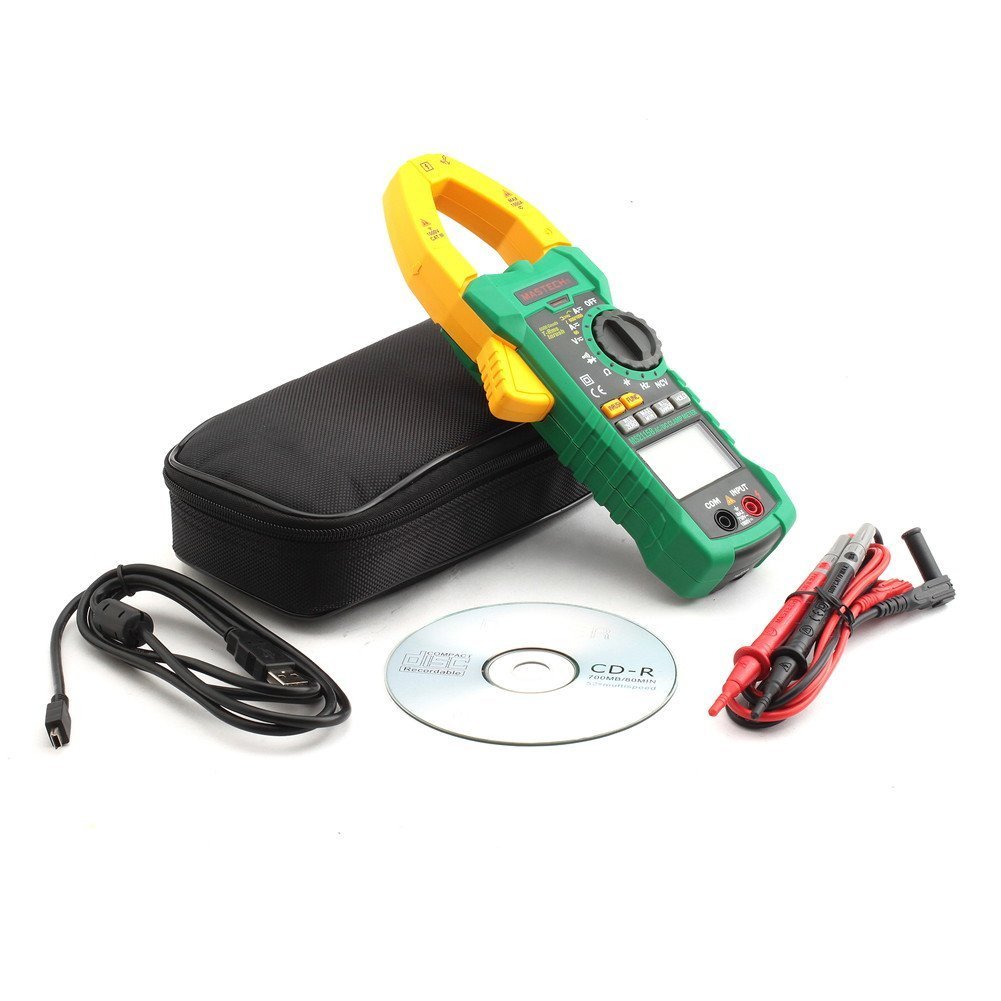
Familiarize yourself with the main components of the MS2115B clamp ແມັດ:


4. ຕັ້ງຄ່າ
4.1 ການຕິດຕັ້ງຫມໍ້ໄຟ
The Mastech MS2115B requires batteries for operation. Please note that batteries are not included in the package.
- Ensure the meter is turned OFF and disconnect all test leads.
- ຊອກຫາຝາປິດຊ່ອງໃສ່ຫມໍ້ໄຟຢູ່ດ້ານຫຼັງຂອງເຄື່ອງວັດແທກ.
- ໃຊ້ໄຂຄວງເພື່ອຄາຍສະກູທີ່ຍຶດຝາປິດແບັດເຕີຣີອອກ.
- ເອົາຝາປິດຫມໍ້ໄຟອອກຢ່າງລະມັດລະວັງ.
- ໃສ່ແບັດເຕີຣີທີ່ຕ້ອງການ, ໂດຍສັງເກດຂົ້ວທີ່ຖືກຕ້ອງ (+ ແລະ -).
- ປ່ຽນຝາປິດຫມໍ້ໄຟແລະຍຶດມັນດ້ວຍສະກູ.

4.2 ການເຊື່ອມຕໍ່ຜູ້ນໍາການທົດສອບ
ສໍາລັບ voltage, ຄວາມຕ້ານທານ, ຄວາມຈຸ, ຄວາມຖີ່, ໄດໂອດ, ແລະ ການວັດແທກຄວາມຕໍ່ເນື່ອງ, ເຊື່ອມຕໍ່ສາຍທົດສອບ:
- ໃສ່ສາຍທົດສອບສີແດງເຂົ້າໄປໃນຂົ້ວຕໍ່ "INPUT".
- Insert the black test lead into the "COM" (common) terminal.
4.3 USB Interface Setup (for Windows OS)
The MS2115B features a USB interface for data logging and analysis on a computer running Windows OS.
- Install the provided communication software from the included CD onto your Windows computer.
- Connect the USB communication cable to the meter's USB port and to an available USB port on your computer.
- Follow the software instructions to establish communication and begin data transfer.
5. ຄໍາແນະນໍາການດໍາເນີນງານ
5.1 ເປີດ/ປິດ ແລະ ປິດອັດຕະໂນມັດ
- To power on, rotate the rotary switch from "OFF" to any desired measurement function.
- To power off, rotate the rotary switch back to "OFF".
- The meter features an Auto Power Off function to conserve battery life. It will automatically turn off after approximately 15 minutes of inactivity. To disable this feature temporarily, refer to the full user manual for specific button combinations during power-on.
5.2 ປຸ່ມຟັງຊັນ
- FUNC: Selects between different measurement modes within a single rotary switch position (e.g., AC/DC voltagອີ, ໄດໂອດ/ຄວາມຕໍ່ເນື່ອງ).
- ຊ່ອງຫວ່າງ: Toggles between auto-ranging and manual ranging. In manual ranging, press repeatedly to cycle through ranges.
- ຖື: Freezes the current display reading. Press again to release.
- MAX / MIN: Displays the maximum or minimum reading recorded since activation. Press repeatedly to cycle through MAX, MIN, and current readings.
- REL/ສູນ: Activates relative measurement mode, displaying the difference between the current reading and a stored reference value. Also used for zeroing DC current readings.
- ເລັ່ງ: Measures the inrush current (startup current) of motors or other inductive loads.
- ໄຟພື້ນຫຼັງ/ໄຟເຮັດວຽກ: Activates the display backlight and work light for improved visibility.
5.3 ຂັ້ນຕອນການວັດແທກ
5.3.1 ຊິງຕັນດີຊີ/AC Voltage ການວັດແທກ
- Connect the red test lead to the "INPUT" terminal and the black test lead to the "COM" terminal.
- Rotate the rotary switch to the V (ປີທີtage) position. Press FUNC to select between DC V= ຫຼື AC V~.
- Touch the test probes to the desired test points in the circuit.
- ອ່ານ voltage ມູນຄ່າໃນການສະແດງຜົນ.
5.3.2 DC/AC Current Measurement (Clamp)
- Rotate the rotary switch to the A (Current) position. Press FUNC to select between DC A= ຫຼື AC A~.
- ເປີດ clamp ຄາງກະໄຕ ແລະ ປິດພຽງຕົວນຳດຽວຂອງວົງຈອນ. ຮັບປະກັນວ່າຄາງກະໄຕປິດສະໜິດແລ້ວ.
- For DC current, press REL/ZERO to zero the display before measurement if needed.
- ອ່ານຄ່າປັດຈຸບັນຢູ່ໜ້າຈໍ.
5.3.3 ການວັດແທກຄວາມຕ້ານທານ
- Connect test leads as for voltage.
- Rotate the rotary switch to the Ω ຕຳແໜ່ງ (ຄວາມຕ້ານທານ).
- Ensure the circuit under test is de-energized.
- Touch the test probes across the component or circuit to measure resistance.
- ອ່ານຄ່າການຕໍ່ຕ້ານໃນຈໍສະແດງຜົນ.
5.3.4 ການວັດແທກຄວາມຈຸ
- Connect test leads as for voltage.
- Rotate the rotary switch to the CAP ຕຳແໜ່ງ (ຄວາມຈຸ).
- ໃຫ້ແນ່ໃຈວ່າຕົວເກັບປະຈຸຖືກປ່ອຍອອກຢ່າງເຕັມທີ່ກ່ອນທີ່ຈະວັດແທກ.
- ແຕະທີ່ເຄື່ອງທົດສອບໃນທົ່ວປ້ຳຂອງຕົວເກັບປະຈຸ.
- ອ່ານຄ່າ capacitance ເທິງ ໜ້າ ຈໍ.
5.3.5 ການວັດແທກຮອບວຽນຄວາມຖີ່ ແລະໜ້າທີ່
- Connect test leads as for voltage.
- Rotate the rotary switch to the Hz /% ຕຳແໜ່ງ (ຄວາມຖີ່/ຮອບວຽນໜ້າທີ່).
- ກົດ FUNC to toggle between Frequency (Hz) and Duty Cycle (%).
- ແຕະໂພຣບທົດສອບໃສ່ແຫຼ່ງສັນຍານ.
- ອ່ານຄ່າຄວາມຖີ່ ຫຼື ຄ່າຮອບວຽນໜ້າທີ່ຢູ່ເທິງຈໍສະແດງຜົນ.
5.3.6 ການທົດສອບໄດໂອດ ແລະ ຄວາມຕໍ່ເນື່ອງ
- Connect test leads as for voltage.
- Rotate the rotary switch to the ໄດໂອດ/ຄວາມຕໍ່ເນື່ອງ ຕໍາແຫນ່ງ.
- ກົດ FUNC to select between Diode test or Continuity test.
- For Diode Test: Touch the red probe to the anode and the black probe to the cathode. The display shows the forward voltagປ່ອຍ e. ປີ້ນໂພຣບເພື່ອກວດສອບວົງຈອນເປີດ.
- For Continuity Test: Touch the probes to the circuit. A continuous beep indicates continuity (resistance less than 50 ohms).
5.3.7 NCV (Non-Contact Voltage) ການຊອກຄົ້ນຫາ
- Rotate the rotary switch to the NCV ຕໍາແຫນ່ງ.
- ຍ້າຍສ່ວນເທິງຂອງ clamp meter near a conductor or outlet.
- The meter will emit an audible beep and the NCV indicator will light up if AC voltage ຖືກກວດພົບ.
5.3.8 ການວັດແທກກະແສໄຟຟ້າໄຫຼເຂົ້າ
- Rotate the rotary switch to the A~ ຕຳແໜ່ງ (ກະແສໄຟຟ້າ AC).
- ກົດ ຟ້າວ ປຸ່ມ.
- ເປີດ clamp jaw and enclose only one conductor of the circuit where the inrush current is to be measured.
- Turn on the device or motor. The meter will capture and display the peak inrush current.
6. ບໍາລຸງຮັກສາ
6.1 ການທໍາຄວາມສະອາດ
- ເຊັດກໍລະນີທີ່ມີໂຄສະນາເປັນໄລຍະamp ຜ້າແລະເຄື່ອງຊັກຜ້າອ່ອນ mild. ຢ່າໃຊ້ສານຂັດຫຼືສານລະລາຍ.
- ຮັກສາຂົ້ວຕໍ່ເຂົ້າໃຫ້ບໍ່ມີຝຸ່ນ ແລະ ຄວາມຊຸ່ມຊື່ນ.
6.2 ການທົດແທນຫມໍ້ໄຟ
ເມື່ອຕົວຊີ້ບອກແບັດເຕີຣີອ່ອນປະກົດຂຶ້ນເທິງໜ້າຈໍ, ໃຫ້ປ່ຽນແບັດເຕີຣີທັນທີເພື່ອຮັບປະກັນການອ່ານທີ່ຖືກຕ້ອງ. ອ້າງອີງເຖິງພາກທີ 4.1 ສຳລັບຄຳແນະນຳໃນການຕິດຕັ້ງແບັດເຕີຣີ.
6.3 ການເກັບຮັກສາ
- If the meter is not used for an extended period, remove the batteries to prevent leakage and damage.
- ເກັບຮັກສາມິເຕີໄວ້ໃນບ່ອນທີ່ເຢັນ, ແຫ້ງ, ຫ່າງຈາກແສງແດດໂດຍກົງ ແລະ ອຸນຫະພູມສູງສຸດ.
7. ການແກ້ໄຂບັນຫາ
If you encounter issues with your Mastech MS2115B, refer to the following common troubleshooting steps:
| ບັນຫາ | ສາເຫດທີ່ເປັນໄປໄດ້ | ການແກ້ໄຂ |
|---|---|---|
| ເຄື່ອງວັດແທກບໍ່ເປີດ. | ແບັດເຕີຣີຕາຍ ຫຼື ຕິດຕັ້ງບໍ່ຖືກຕ້ອງ. | ກວດເບິ່ງຂົ້ວຂອງຫມໍ້ໄຟ; ປ່ຽນແບັດເຕີລີ. |
| ບໍ່ມີການອ່ານ ຫຼື "OL" ສະແດງຢູ່. | Open circuit, out of range, or incorrect function selected. | Check circuit connections, select appropriate range/function, ensure continuity. |
| ການອ່ານບໍ່ຖືກຕ້ອງ. | Low battery, dirty test leads/terminals, external interference. | Replace batteries, clean leads/terminals, move away from strong electromagnetic fields. |
| Auto Power Off activates too quickly. | ການເຮັດວຽກປົກກະຕິ (ບໍ່ມີການເຄື່ອນໄຫວ 15 ນາທີ). | Press any button or rotate the switch to reset the timer. Refer to the full manual to disable this feature if needed. |
| Clamp current reading is zero or incorrect. | Multiple conductors in jaw, jaw not fully closed, DC current not zeroed. | Ensure only one conductor is in the jaw, close jaw completely, press REL/ZERO for DC current. |
If the problem persists after trying these steps, please contact Mastech customer support or your local distributor for assistance.
8. ຂໍ້ກໍານົດດ້ານວິຊາການ
The following table outlines the technical specifications for the Mastech MS2115B Digital Clamp ແມັດ:
| ໜ້າ ທີ່ການວັດແທກ | ຊ່ວງ | ຄວາມຖືກຕ້ອງ |
|---|---|---|
| ຊິງຕັນດີຊີ Voltage | 600mV / 6V / 60V / 600V / 1000V | ±(0.5% + 3) for 600mV-600V, ±(0.8% + 2) for 1000V |
| AC Voltage | 600mV / 6V / 60V / 600V / 750V | ±(0.8% + 3) for 600mV-600V, ±(1% + 4) for 750V |
| ກະແສໄຟຟ້າ DC | 60A/600A/1000A | ± (3.0% + 3) |
| AC ປັດຈຸບັນ | 60A/600A/1000A | ± (2.5% + 3) |
| ການຕໍ່ຕ້ານ | 600Ω / 6kΩ / 60kΩ / 600kΩ / 6MΩ / 60MΩ | ±(1.0% + 3) for 600Ω-6MΩ, ±(1.5% + 3) for 60MΩ |
| ຄວາມຈຸ | 6nF / 60nF / 600nF / 6uF / 60uF / 600uF / 6mF / 60mF | ± (4.0% + 3) |
| Frequency (from Clamp) | 0 ~ 10kHz | ± (1.5% + 5) |
| Frequency (AC Voltage) | 0 ~ 10kHz | ± (1.5% + 5) |
| ຄວາມຖີ່ຂອງເຫດຜົນ | 0 ~ 60MHz | ± (0.5% + 3) |
| ວົງຈອນຫນ້າທີ່ | 10% ~ 90% | ±3.0% |
| ທົດສອບ Diode | 2.7V | Vol ຕໍ່tage ຫຼຸດລົງ |
| Buzzer ຄວາມຕໍ່ເນື່ອງ | <50 ohm | ສຽງບີບທີ່ໄດ້ຍິນ |
ຂໍ້ມູນຈໍາເພາະທົ່ວໄປ:
- ຈໍສະແດງຜົນ: Dual Display, 6000 counts
- ການເປີດຄາງກະໄຕ: Ø 40 ມມ (1.6 ນິ້ວ)
- RMS ທີ່ແທ້ຈິງ: ແມ່ນແລ້ວ
- NCV: ແມ່ນແລ້ວ
- Inrush: ແມ່ນແລ້ວ
- ການຖືຂໍ້ມູນ: ແມ່ນແລ້ວ
- MAX / MIN: ແມ່ນແລ້ວ
- ການວັດແທກພີ່ນ້ອງ: ແມ່ນແລ້ວ
- ໄຟພື້ນຫຼັງ/ໄຟເຮັດວຽກ: ແມ່ນແລ້ວ
- ຕົວຊີ້ບອກແບັດເຕີຣີຕໍ່າ: ແມ່ນແລ້ວ
- ປິດເຄື່ອງອັດຕະໂນມັດ: ແມ່ນແລ້ວ
- ການໂຕ້ຕອບ USB: Yes (Windows OS compatible)
- ແຫຼ່ງພະລັງງານ: ສາກແບັດເຕີຣີ (ບໍ່ລວມແບັດເຕີຣີ)
- ຂະໜາດ: ຂະໜາດປະມານ 26 x 14 x 6.6 cm
- ນ້ຳໜັກ: ປະມານ 720g
- ຜູ້ຜະລິດ: MASTECH
- ໝາຍເລກຕົວແບບ: MS2115B
- ASIN: B00LD8IIJS
- UPC: 702382755386, 702382755881, 706551142168
9. ການຮັບປະກັນແລະການສະຫນັບສະຫນູນ
For warranty information, please refer to the documentation provided with your purchase or contact the seller directly. Mastech products typically come with a manufacturer's warranty against defects in materials and workmanship.
For technical support, troubleshooting assistance beyond this manual, or inquiries about replacement parts, please contact Mastech customer service or your authorized Mastech distributor. Contact details can usually be found on the manufacturer's official webເວັບໄຊທ໌ ຫຼື ໃນໃບແຈ້ງໜີ້ການຊື້ຂອງທ່ານ.