1. ບົດແນະນຳ
The Mastech MS6612 is a digital luxmeter designed for measuring illuminance. It features a large LCD display with backlight and a bar graph for easy reading. This device offers automatic and manual range switching, data hold, peak value measurement, relative value measurement, and zero calibration functions. It is capable of measuring up to 200,000 Lux or 20,000 Foot-Candles (Fc).
2. ຂໍ້ມູນຄວາມປອດໄພ
Please read and understand all safety instructions before operating the device. Failure to follow these instructions may result in injury or damage to the meter.
- Do not operate the meter in environments with explosive gas, vapor, or dust.
- ຫຼີກລ່ຽງການໃຫ້ແມັດຖືກອຸນຫະພູມສູງ ຫຼື ຄວາມຊຸ່ມຊື່ນສູງ.
- Remove batteries if the meter is not used for an extended period to prevent leakage.
- Do not attempt to repair or modify the meter. Refer all servicing to qualified personnel.
- ຮັກສາແມັດໃຫ້ສະອາດແລະແຫ້ງ.
3. ຜະລິດຕະພັນເກີນview
The Mastech MS6612 Digital Luxmeter consists of a main unit with an LCD display and control buttons, and a silicon photoelectric diode sensor for light detection.
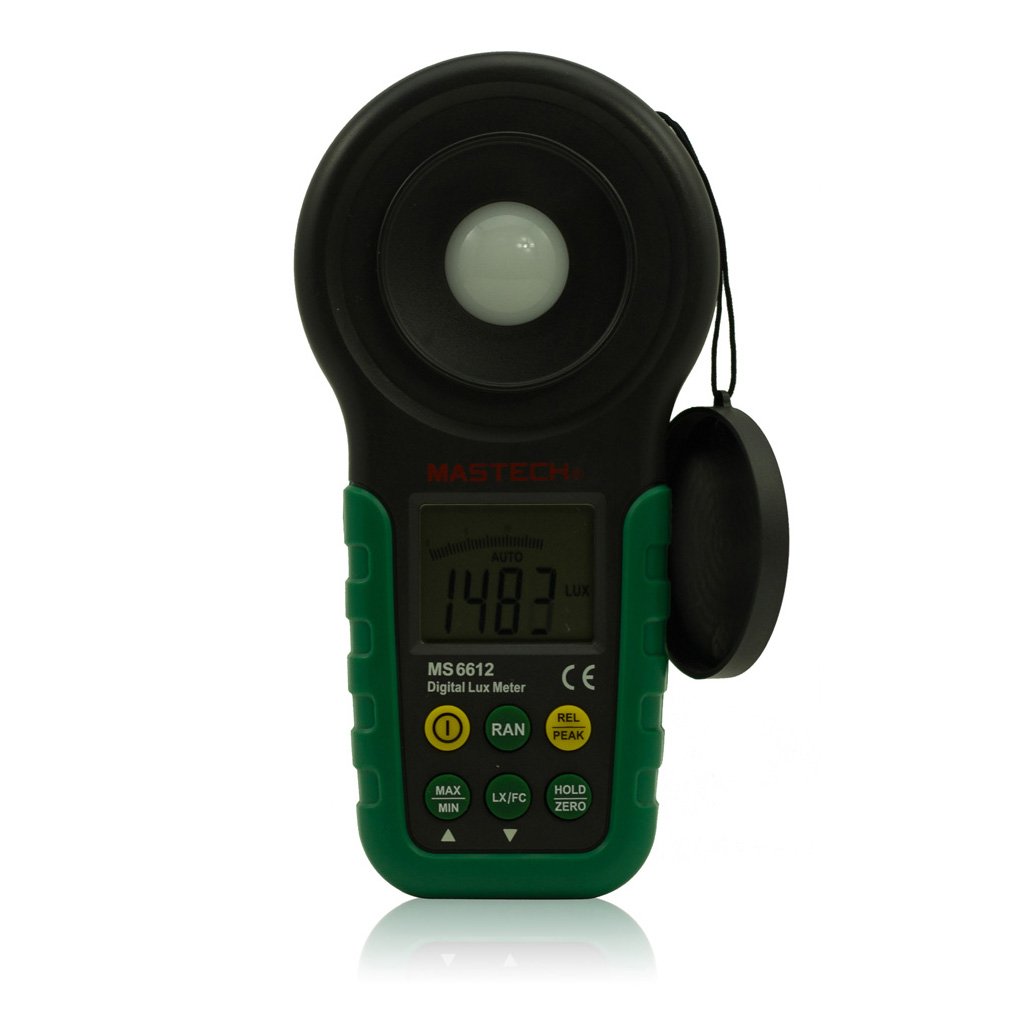
ຮູບທີ 1: ດ້ານໜ້າ view of the Mastech MS6612 Digital Luxmeter. This image shows the main body of the device, including the large LCD screen, control buttons, and the light sensor located at the top.
ອົງປະກອບທີ່ສໍາຄັນ:
- ຈໍ LCD: 3½ digits with analog bar display for clear readings.
- ປຸ່ມຄວບຄຸມ: For various functions such as power, range, hold, peak, relative, zero, unit conversion, and mute.
- ເຊັນເຊີແສງ: Silicon photoelectric diode for accurate light measurement.
- ຊ່ອງໃສ່ຫມໍ້ໄຟ: ຕັ້ງຢູ່ດ້ານຫຼັງສຳລັບແບັດເຕີຣີ 9V.
4. ຕັ້ງຄ່າ
4.1 ການຕິດຕັ້ງຫມໍ້ໄຟ
- ຊອກຫາຝາປິດຊ່ອງໃສ່ຫມໍ້ໄຟຢູ່ດ້ານຫຼັງຂອງເຄື່ອງວັດແທກ.
- ໃຊ້ໄຂຄວງ (ຖ້າຈຳເປັນ) ເພື່ອເປີດຊ່ອງໃສ່ແບັດເຕີຣີ.
- Insert one 9V (IEC 6LR61) battery, observing the correct polarity (+/-).
- ປ່ຽນຝາປິດຊ່ອງໃສ່ໝໍ້ໄຟ ແລະຮັບປະກັນມັນ.
Note: A low battery indicator will appear on the display when the battery needs replacement.
5. ຄໍາແນະນໍາການດໍາເນີນງານ
5.1 ເປີດ/ປິດ
- ກົດ ພະລັງງານ ປຸ່ມເພື່ອເປີດເຄື່ອງວັດ.
- ກົດ ພະລັງງານ ກົດປຸ່ມອີກຄັ້ງເພື່ອປິດມິເຕີ.
- The meter features an automatic power-off function, which will turn off the device if no keys are operated for more than 10 minutes.
5.2 ການວັດແທກພື້ນຖານ
- ເປີດແມັດ.
- Point the light sensor towards the light source to be measured.
- The illuminance value will be displayed on the LCD. The meter automatically selects the appropriate range.
5.3 Range Switching (Auto/Manual)
The MS6612 supports both automatic and manual range switching.
- In auto-ranging mode, the meter automatically selects the best measurement range.
- ກົດ ຫາຍາກ button to switch between auto and manual ranging modes. In manual mode, you can cycle through available ranges.
- If the measured value exceeds the current range in manual mode, the LCD will display "OL" (Overload).
5.4 ຟັງຊັນການຖືຂໍ້ມູນ
ເພື່ອຢຸດການອ່ານປັດຈຸບັນຢູ່ໜ້າຈໍ:
- ກົດ ຖື button. The "HOLD" indicator will appear on the display.
- ກົດ ຖື button again to release the data hold and resume live measurement.
5.5 Maximum/Minimum Value Measurement
ເຖິງ view the maximum or minimum illuminance recorded during a measurement session:
- ກົດ MAX/MIN button. The display will show the maximum recorded value.
- ກົດ MAX/MIN again to cycle to the minimum recorded value.
- ກົດ MAX/MIN a third time to exit this mode and return to live measurement.
5.6 Peak Value Measurement
This function captures the highest instantaneous illuminance value.
- ກົດ ສູງສຸດ button to activate peak measurement. The "PEAK" indicator will appear.
- The display will show the highest illuminance detected since activating the function.
- ກົດ ສູງສຸດ ອີກຄັ້ງເພື່ອອອກຈາກໂໝດນີ້.
5.7 Relative Value Measurement
This function allows you to set a reference point and measure the difference from that point.
- In a stable light environment, press the REL button. The current reading becomes the reference, and the display will show "0".
- Subsequent measurements will show the difference (positive or negative) from this reference value.
- ກົດ REL again to exit relative measurement mode.
5.8 Zero Calibration Function
To ensure accuracy, especially in low light conditions, perform a zero calibration.
- Place the light sensor in a completely dark environment (e.g., cover it with an opaque cap).
- ກົດ ZERO button. The display should read "0.00".
- This calibrates the meter to account for any residual sensor output in darkness.
5.9 Unit Conversion (Fc/Lux)
The meter can display measurements in Lux or Foot-Candles (Fc).
- ກົດ ໜ່ວຍ button to toggle between Lux and Fc units.
- The selected unit will be indicated on the LCD.
- ການແປງ: 1 Fc = 10.764 Lux; 1 Lux = 0.09290 Fc.
5.10 Touch Tone and Mute Function
The meter may emit a touch tone when buttons are pressed. This can be muted.
- Refer to the specific button on your device for muting the touch tone.
6. ບໍາລຸງຮັກສາ
6.1 ການທໍາຄວາມສະອາດ
- ເຊັດແມັດຄasing ມີອ່ອນ, damp ຜ້າ. ຢ່າໃຊ້ເຄື່ອງເຮັດຄວາມສະອາດຂັດຫຼືສານລະລາຍ.
- Keep the light sensor clean and free from dust or smudges to ensure accurate readings. Use a soft, lint-free cloth.
6.2 ການທົດແທນຫມໍ້ໄຟ
Replace the 9V battery when the low battery indicator appears on the display. Follow the steps in Section 4.1 for battery installation.
6.3 ການເກັບຮັກສາ
- If storing the meter for an extended period, remove the battery to prevent leakage and potential damage.
- ເກັບຮັກສາມິເຕີໄວ້ໃນບ່ອນທີ່ເຢັນ, ແຫ້ງ, ຫ່າງຈາກແສງແດດໂດຍກົງ ແລະ ອຸນຫະພູມສູງສຸດ.
7. ການແກ້ໄຂບັນຫາ
| ບັນຫາ | ສາເຫດທີ່ເປັນໄປໄດ້ | ການແກ້ໄຂ |
|---|---|---|
| ເຄື່ອງວັດແທກບໍ່ເປີດ. | ແບັດເຕີຣີຕາຍ ຫຼື ຕິດຕັ້ງບໍ່ຖືກຕ້ອງ. | ກວດສອບຂົ້ວແບັດເຕີຣີ, ປ່ຽນແບັດເຕີຣີ. |
| "OL" displayed on screen. | Measurement value exceeds current range (manual mode). | Switch to a higher range or enable auto-ranging. |
| ການອ່ານບໍ່ຖືກຕ້ອງ. | Dirty sensor, uncalibrated zero, or incorrect range. | Clean sensor, perform zero calibration, ensure correct range. |
| ຕົວຊີ້ວັດແບັດເຕີຣີຕໍ່າ. | ພະລັງງານຫມໍ້ໄຟຕໍ່າ. | ປ່ຽນແບັດເຕີຣີ 9V. |
8. ຂໍ້ມູນຈໍາເພາະ
| ພາລາມິເຕີ | ມູນຄ່າ |
|---|---|
| ໄລຍະການວັດແທກ | 20, 200, 2000, 20000, 200000 Lux 20, 200, 2000, 20000 Fc |
| ຈໍສະແດງຜົນ | 3½ digits, max reading of 1999, with analog bar display |
| ເຊັນເຊີ | ໄດໂອດໂຟໂຕເອເລັກຕຣິກຊິລິກອນ |
| Measured Spectral Range | 320-730nm |
| Sampອັດຕາການລິງ | ≥2 times/s |
| ອຸນຫະພູມປະຕິບັດການ | -10~50 °C, max 80% RH (Non-Condensed) |
| ອຸນຫະພູມການເກັບຮັກສາ | -10~50 °C, max 80% RH (Non-Condensed, removing batteries) |
| ສະພາບແວດລ້ອມການດໍາເນີນງານ | ການນໍາໃຊ້ພາຍໃນ |
| ຄວາມສູງ | ສູງສຸດ 2000 ແມັດ |
| ການສະຫນອງພະລັງງານ | 1 x 9V, IEC 6LR61 battery |
| ຊີວິດຫມໍ້ໄຟ | ປະມານ. 200 ຊົ່ວໂມງ |
| ຂະໜາດ (HxWxD) | 190 ມມ x 89 ມມ x 42.5 ມມ (7.48 x 3.50 x 1.67 ນິ້ວ) |
| ນ້ຳໜັກ (ບໍ່ມີແບັດ) | ປະມານ. 360 g (12.7 ອໍ) |
| ນ້ຳໜັກ (ພ້ອມແບັດ) | ປະມານ. 420 g (14.8 ອໍ) |
ການແປງຫົວໜ່ວຍຄວາມສະຫວ່າງ:
- 1 Foot-Candle (Fc) = 10.764 Lux
- 1 Lux = 0.09290 Foot-Candle (Fc)
9. ການຮັບປະກັນແລະການສະຫນັບສະຫນູນ
Mastech products are designed for reliability and performance. For specific warranty information, please refer to the warranty card included with your purchase or visit the official Mastech webເວັບໄຊທ໌. ສຳລັບການຊ່ວຍເຫຼືອດ້ານເຕັກນິກ ຫຼື ການສອບຖາມກ່ຽວກັບການບໍລິການ, ກະລຸນາຕິດຕໍ່ບໍລິການລູກຄ້າ Mastech ຜ່ານຊ່ອງທາງທາງການຂອງເຂົາເຈົ້າ.
ກະລຸນາເກັບຮັກສາໃບຮັບເງິນການຊື້ຂອງທ່ານເປັນຫຼັກຖານຂອງການຊື້ສໍາລັບການຮ້ອງຂໍການຮັບປະກັນ.


