ແນະນຳ
The Vivitar Tag & Blast Wireless Bluetooth Speaker is designed for portable audio enjoyment. This speaker features Bluetooth technology for wireless connectivity with compatible devices, offering a digital stereo sound experience. Its compact design makes it suitable for use in various outdoor and indoor settings. The speaker includes a rechargeable battery for extended use.
ແມ່ນຫຍັງຢູ່ໃນກ່ອງ
- ວີວີຕ້າ Tag & Blast Wireless Bluetooth Speaker
ສິນຄ້າເກີນview
The Vivitar Tag & Blast speaker is engineered for simplicity and portability. Below is an image of the speaker, highlighting its general appearance.
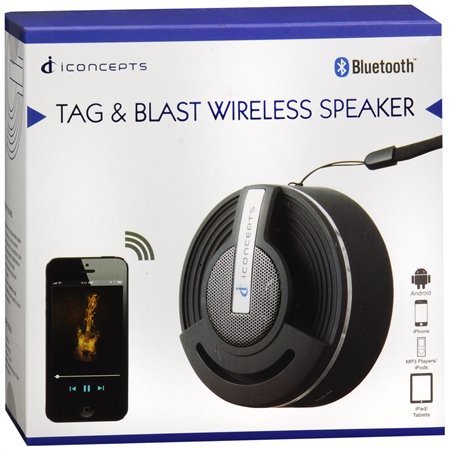
ຄຸນນະສົມບັດທີ່ສໍາຄັນປະກອບມີ:
- Bluetooth technology for wireless audio streaming.
- Compatibility with various Bluetooth-enabled devices such as iPod, iPhone, iPad, smartphones, and tablets.
- Designed for ultimate portability, allowing you to take your music anywhere.
ຕັ້ງຄ່າ
ກຳລັງສາກລຳໂພງ
The Vivitar Tag & Blast speaker is powered by a rechargeable battery. Before initial use, ensure the speaker is fully charged.
- ຊອກຫາຊ່ອງສຽບສາຍສາກຢູ່ລຳໂພງ.
- Connect the appropriate charging cable (not specified in product details, typically USB) to the speaker and a power source.
- ປ່ອຍໃຫ້ລຳໂພງສາກໄຟຈົນກວ່າຕົວຊີ້ບອກການສາກ (ຖ້າມີ) ຈະສະແດງການສາກເຕັມ.
ການຈັບຄູ່ Bluetooth
ເພື່ອເຊື່ອມຕໍ່ລຳໂພງຂອງທ່ານກັບອຸປະກອນທີ່ເປີດໃຊ້ Bluetooth:
- Ensure the speaker is powered on and in pairing mode. (Refer to the speaker's physical controls for specific pairing button/indicator, if available).
- ໃນອຸປະກອນຂອງທ່ານ (ໂທລະສັບສະຫຼາດ, ແທັບເລັດ, ແລະອື່ນໆ), ທ່ອງໄປຫາການຕັ້ງຄ່າ Bluetooth.
- ເປີດໃຊ້ Bluetooth ແລະຊອກຫາອຸປະກອນທີ່ມີຢູ່.
- Select "Vivitar Tag & Blast" or a similar name from the list of found devices.
- Once connected, the speaker will indicate a successful pairing (e.g., an audible tone or LED indicator).
ຄໍາແນະນໍາການດໍາເນີນງານ
ເປີດ/ປິດ
To power the speaker on or off, locate the power button (control method is 'Touch' as per specifications) and press and hold it until the speaker indicates power status (e.g., LED light, sound cue).
ການຫຼິ້ນສຽງ
Once paired with your device, audio played on your device will stream through the Vivitar Tag & Blast speaker. Use your connected device to control playback (play/pause, skip tracks) and volume.
ບໍາລຸງຮັກສາ
To ensure the longevity and optimal performance of your Vivitar Tag & Blast speaker:
- Keep the speaker clean by wiping it with a soft, dry cloth. Avoid using harsh chemicals or abrasive cleaners.
- ຢ່າເຮັດໃຫ້ລໍາໂພງຖືກອຸນຫະພູມທີ່ຮຸນແຮງ, ແສງແດດໂດຍກົງ, ຫຼືຄວາມຊຸ່ມຊື່ນສູງ.
- While designed for outdoor use, the speaker is not waterproof. Avoid submerging it in water or exposing it to heavy rain.
- ເກັບຮັກສາລໍາໂພງໄວ້ໃນບ່ອນທີ່ເຢັນ, ແຫ້ງເມື່ອບໍ່ໄດ້ໃຊ້.
ການແກ້ໄຂບັນຫາ
If you encounter issues with your Vivitar Tag & Blast speaker, try the following solutions:
- ບໍ່ມີພະລັງງານ: Ensure the speaker is fully charged. Connect it to a power source and allow it to charge for at least 30 minutes before attempting to power it on again.
- ບໍ່ສາມາດຈັບຄູ່ກັບອຸປະກອນ:
- ກວດໃຫ້ແນ່ໃຈວ່າລຳໂພງຢູ່ໃນໂໝດຈັບຄູ່.
- ໃຫ້ແນ່ໃຈວ່າ Bluetooth ເປີດໃຊ້ງານຢູ່ໃນອຸປະກອນຂອງທ່ານແລະມັນຢູ່ໃນລະດັບ (ໂດຍປົກກະຕິ 10 ແມັດຫຼື 33 ຟຸດ).
- ປິດ ແລະເປີດທັງລຳໂພງ ແລະ Bluetooth ຂອງອຸປະກອນຂອງທ່ານ.
- If previously paired, try forgetting the speaker from your device's Bluetooth list and re-pairing.
- ບໍ່ມີສຽງ ຫຼືສຽງຕໍ່າ:
- ກວດເບິ່ງລະດັບສຽງໃນທັງລຳໂພງ ແລະອຸປະກອນທີ່ເຊື່ອມຕໍ່ຂອງທ່ານ.
- ກວດໃຫ້ແນ່ໃຈວ່າລຳໂພງຖືກຈັບຄູ່ຢ່າງຖືກຕ້ອງ ແລະເຊື່ອມຕໍ່ກັບອຸປະກອນຂອງທ່ານ.
- ລອງຫຼິ້ນສຽງຈາກແອັບພລິເຄຊັນ ຫຼືແຫຼ່ງອື່ນໃນອຸປະກອນຂອງທ່ານ.
- ຄຸນະພາບສຽງບໍ່ດີ:
- ຍ້າຍລຳໂພງເຂົ້າໃກ້ອຸປະກອນຂອງທ່ານເພື່ອຫຼຸດຜ່ອນການລົບກວນ.
- ໃຫ້ແນ່ໃຈວ່າບໍ່ມີສິ່ງກີດຂວາງລະຫວ່າງລໍາໂພງແລະອຸປະກອນຂອງທ່ານ.
- Check for other active Bluetooth devices in the vicinity that might cause interference.
ຂໍ້ມູນຈໍາເພາະ
| ຄຸນສົມບັດ | ລາຍລະອຽດ |
|---|---|
| ຊື່ຕົວແບບ | BTSP-TAG |
| ຍີ່ຫໍ້ | ວີວີຕ້າ |
| ເຕັກໂນໂລຊີການເຊື່ອມຕໍ່ | Bluetooth |
| ເຕັກໂນໂລຊີການສື່ສານໄຮ້ສາຍ | Bluetooth |
| ປະເພດລຳໂພງ | ຊັ້ນວາງປຶ້ມ (ພົກພາໄດ້) |
| ຮູບແບບການອອກສຽງ | ສະເຕຣິໂອ |
| ການຕັ້ງຄ່າຊ່ອງສຽງອ້ອມຮອບ | 2.0 |
| ວິທີການຄວບຄຸມ | ແຕະ |
| ແຫຼ່ງພະລັງງານ | ພະລັງງານຫມໍ້ໄຟ |
| ໝໍ້ໄຟ | 2 ແບດເຕີຣີ Lithium Ion ຕ້ອງການ (ລວມ) |
| ອຸປະກອນທີ່ເຂົ້າກັນໄດ້ | ເຄື່ອງຫຼິ້ນ MP3, ໂທລະສັບສະຫຼາດ, ແທັບເລັດ |
| ການນໍາໃຊ້ທີ່ແນະນໍາ | For Smartphones or Tablets, For Outdoor Use |
| ສີ | ເງິນ |
| ຂະໜາດສິນຄ້າ | 5 x 2.5 x 5 ນິ້ວ |
| ນ້ໍາຫນັກລາຍການ | 7.2 ອອນສ໌ (0.45 ປອນ) |
| ແມ່ນກັນນ້ໍາ | ຜິດ |
| ຜູ້ຜະລິດ | Sakar International, Inc. |
ການຮັບປະກັນແລະການສະຫນັບສະຫນູນ
The Vivitar Tag & Blast Wireless Bluetooth Speaker comes with a ການຮັບປະກັນຈໍາກັດ. For specific details regarding warranty coverage, duration, and how to obtain service, please refer to the warranty card included with your product or contact Vivitar customer support directly. Contact information for support can typically be found on the manufacturer's official webສະຖານທີ່ຫຼືຢູ່ໃນການຫຸ້ມຫໍ່ຜະລິດຕະພັນ.


