ແນະນຳ
This manual provides essential instructions for the safe and efficient operation, maintenance, and care of your Quest 35200 Stainless Steel Cordless Electric Coffee Percolator. Please read all instructions carefully before first use and retain this manual for future reference.

Image: The Quest 35200 Stainless Steel Cordless Electric Coffee Percolator, featuring a polished stainless steel body, black handle, and a black base with a power button.
ຄໍາແນະນໍາຄວາມປອດໄພທີ່ສໍາຄັນ
ເມື່ອນຳໃຊ້ເຄື່ອງໃຊ້ໄຟຟ້າ, ຄວນລະມັດລະວັງຄວາມປອດໄພຂັ້ນພື້ນຖານສະເໝີ ເພື່ອຫຼຸດຜ່ອນຄວາມສ່ຽງຕໍ່ການເກີດອັກຄີໄພ, ໄຟຟ້າຊອດ, ແລະ/ຫຼື ການບາດເຈັບຕໍ່ຄົນ, ລວມທັງສິ່ງຕໍ່ໄປນີ້:
- ອ່ານຄໍາແນະນໍາທັງຫມົດ.
- ຢ່າແຕະພື້ນຜິວທີ່ຮ້ອນ. ໃຊ້ດ້າມຈັບ ຫຼື ບິດ.
- To protect against fire, electric shock, and injury to persons, do not immerse cord, plugs, or the percolator base in water or other liquid.
- ການເບິ່ງແຍງຢ່າງໃກ້ຊິດແມ່ນມີຄວາມຈໍາເປັນໃນເວລາທີ່ອຸປະກອນໃດໆຖືກນໍາໃຊ້ໂດຍຫຼືຢູ່ໃກ້ກັບເດັກນ້ອຍ.
- ຖອດປລັກອອກຈາກປລັກສຽບໃນເວລາທີ່ບໍ່ໄດ້ໃຊ້ແລະກ່ອນທີ່ຈະເຮັດຄວາມສະອາດ. ປ່ອຍໃຫ້ເຢັນກ່ອນທີ່ຈະໃສ່ຫຼືຖອດຊິ້ນສ່ວນ, ແລະກ່ອນທີ່ຈະເຮັດຄວາມສະອາດເຄື່ອງໃຊ້.
- ຫ້າມນຳໃຊ້ເຄື່ອງໃຊ້ທີ່ມີສາຍໄຟ ຫຼື ປລັກສຽບທີ່ເສຍຫາຍ, ຫຼື ຫຼັງຈາກເຄື່ອງໃຊ້ງານຜິດປົກກະຕິ ຫຼືໄດ້ຮັບຄວາມເສຍຫາຍໃນທຸກຮູບແບບ. ສົ່ງຄືນເຄື່ອງໃຊ້ກັບສະຖານທີ່ບໍລິການທີ່ໄດ້ຮັບອະນຸຍາດທີ່ໃກ້ທີ່ສຸດເພື່ອກວດສອບ, ສ້ອມແປງ, ຫຼືປັບ.
- ການນໍາໃຊ້ອຸປະກອນເສີມທີ່ບໍ່ແນະນໍາໂດຍຜູ້ຜະລິດເຄື່ອງໃຊ້ອາດຈະເຮັດໃຫ້ເກີດໄຟໄຫມ້, ໄຟຟ້າຊອດ, ຫຼືການບາດເຈັບຕໍ່ບຸກຄົນ.
- ຢ່າໃຊ້ນອກ.
- ຢ່າປ່ອຍໃຫ້ສາຍໄຟແຂວນໃສ່ຂອບໂຕະ ຫຼືໂຕະ, ຫຼືແຕະພື້ນຜິວທີ່ຮ້ອນ.
- ຢ່າວາງໃສ່ ຫຼືຢູ່ໃກ້ກັບເຕົາແກ໊ສຮ້ອນ ຫຼືເຕົາໄຟຟ້າ, ຫຼືໃນເຕົາອົບທີ່ມີຄວາມຮ້ອນ.
- ສຽບປລັກສຽບໃສ່ເຄື່ອງທຸກຄັ້ງກ່ອນ, ຈາກນັ້ນສຽບສາຍໃສ່ປລັກສຽບໃສ່ຝາ. ເພື່ອຕັດການເຊື່ອມຕໍ່, ເຮັດໃຫ້ການຄວບຄຸມໃດໆ "ປິດ", ຫຼັງຈາກນັ້ນເອົາປລັກອອກຈາກເຕົ້າສຽບຝາ.
- ຢ່າໃຊ້ເຄື່ອງໃຊ້ອື່ນນອກເໜືອໄປຈາກການໃຊ້ທີ່ຕັ້ງໃຈ.
- ບາດແຜອາດເກີດຂຶ້ນໄດ້ຖ້າຝາປິດອອກໃນລະຫວ່າງຮອບການຜະລິດ.
- ເຄື່ອງໃຊ້ນີ້ແມ່ນໃຊ້ໃນຄົວເຮືອນເທົ່ານັ້ນ.
ສິນຄ້າເກີນview ແລະຄຸນສົມບັດ
The Quest 35200 Electric Coffee Percolator is designed for convenient coffee brewing. Key features include:
- ການອອກແບບໄຮ້ສາຍ: Allows for easy pouring and serving.
- ການກໍ່ສ້າງສະແຕນເລດ: ທົນທານແລະງ່າຍຕໍ່ການ ທຳ ຄວາມສະອາດ.
- ຕົວກອງໃນຕົວ: ລົບລ້າງຄວາມຕ້ອງການຕົວກອງເຈ້ຍທີ່ໃຊ້ແລ້ວຖິ້ມ.
- ຄວາມຈຸ 1.5 ລິດ: Brews multiple cups of coffee.
- ພະລັງງານ 1100W: Ensures quick brewing.
- ຮັກສາຄວາມອົບອຸ່ນ: Maintains coffee temperature for 30-45 minutes.
- ປິດອັດຕະໂນມັດ: Enhances safety and energy efficiency.
- 360° Detachable Base: For flexible placement and easy lifting.
- ແສງສະຫວ່າງຕົວຊີ້ວັດພະລັງງານ: ຊີ້ບອກສະຖານະການປະຕິບັດງານ.
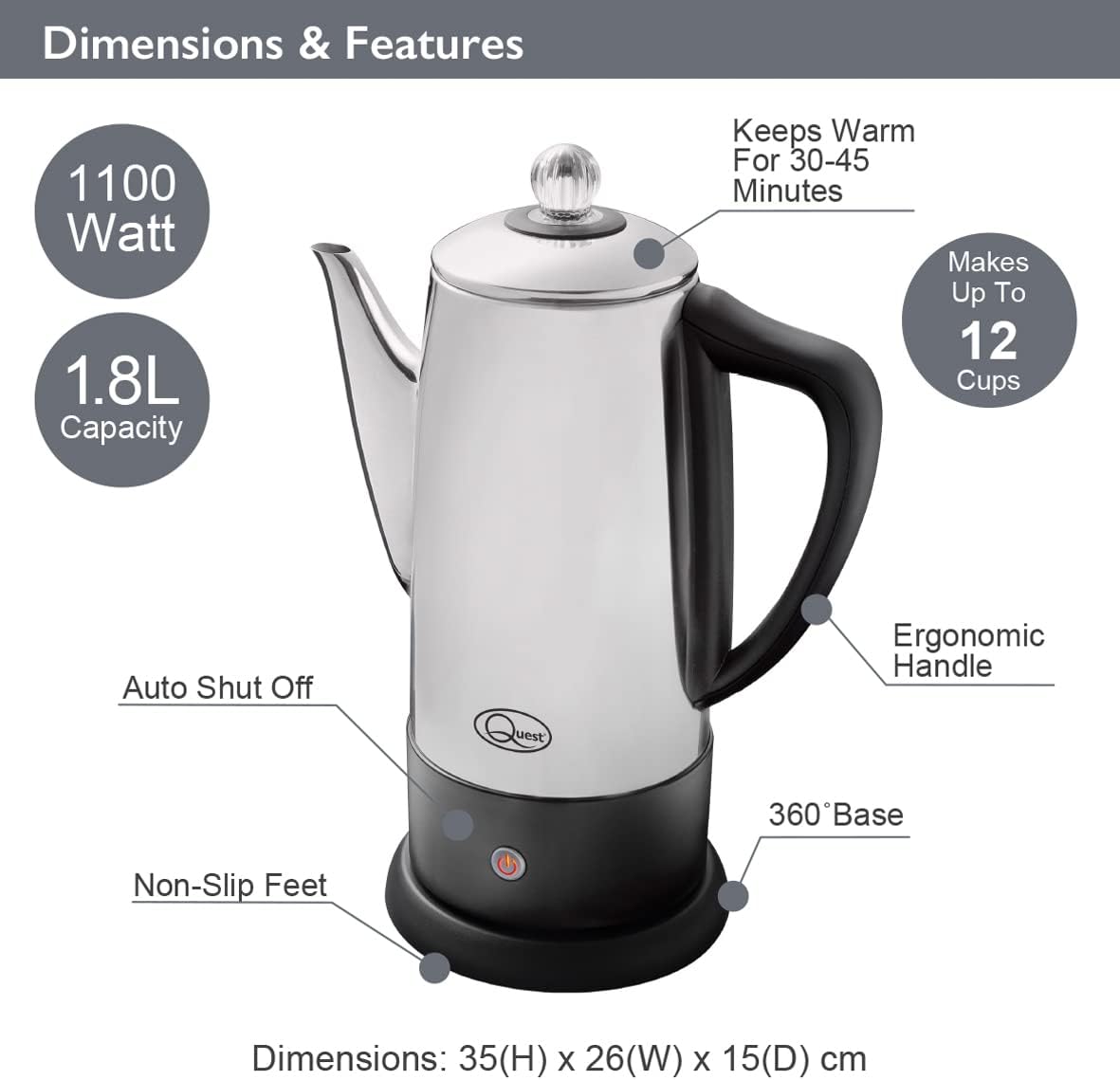
Image: Diagram illustrating the Quest 35200 percolator with callouts for its features: 1100 Watt power, 1.8L capacity (note: product title states 1.5L, using 1.8L from image), auto shut-off, non-slip feet, 360° base, ergonomic handle, keeps warm for 30-45 minutes, and makes up to 12 cups. Dimensions are 35(H) x 26(W) x 15(D) cm.

Image: A collage of four close-up views of the percolator: the interior with water level markings up to 12 cups, the removable filter basket filled with ground coffee, the illuminated power indicator light on the base, and the transparent lid knob.
ຕັ້ງຄ່າ
- ແກະກ່ອງ: ເອົາວັດສະດຸຫຸ້ມຫໍ່ທັງໝົດອອກຢ່າງລະມັດລະວັງ ແລະ ກວດກາເຄື່ອງກອງນ້ຳຢາເພື່ອຊອກຫາຄວາມເສຍຫາຍ.
- ທໍາຄວາມສະອາດເບື້ອງຕົ້ນ: Before first use, wash the interior of the percolator, the filter basket, and the stem in warm, soapy water. Rinse thoroughly and dry. Wipe the exterior with a damp ຜ້າ.
- ການຈັດວາງ: Place the percolator base on a stable, flat, heat-resistant surface, away from the edge of the counter.
- ການເຊື່ອມຕໍ່ພະລັງງານ: ໃຫ້ແນ່ໃຈວ່າສາຍໄຟສາມາດເຂົ້າເຖິງໄດ້ງ່າຍແລະບໍ່ມີສິ່ງກີດຂວາງ.
ຄໍາແນະນໍາການດໍາເນີນງານ
Follow these steps to brew coffee with your Quest 35200 percolator:
- ຕື່ມນ້ໍາ: Fill the percolator with cold, fresh water to your desired level, observing the internal markings. Do not exceed the maximum fill line.
- Insert Stem and Basket: Place the percolator stem into the center well of the percolator. Then, place the filter basket onto the stem.
- ເພີ່ມພື້ນທີ່ກາເຟ: Add your preferred amount of coarse-ground coffee into the filter basket. Do not use fine-ground coffee as it may seep through the filter.
- ຝາປິດທີ່ປອດໄພ: Place the lid firmly on the percolator.
- ເຊື່ອມຕໍ່ພະລັງງານ: Place the percolator onto its 360° detachable power base. Plug the power cord into a suitable electrical outlet.
- ເລີ່ມເບຍ: Press the power button on the base. The indicator light will illuminate, signifying that brewing has begun.
- Percolation Cycle: The water will heat and begin to percolate through the coffee grounds. The brewing process typically takes several minutes, depending on the amount of water.
- ຮັກສາຄວາມອົບອຸ່ນ: Once the brewing cycle is complete, the percolator will automatically switch to a keep-warm mode, indicated by the power light changing color or remaining illuminated. This function keeps coffee warm for approximately 30-45 minutes.
- ໃຫ້ບໍລິການ: Carefully remove the percolator from its base and pour coffee into cups. Be cautious of hot surfaces and steam.
- ຕັດການເຊື່ອມຕໍ່: After serving, unplug the percolator from the wall outlet.

Image: A visual guide showing four steps for using the percolator: 1. Adding cold water to the pot. 2. Adding ground coffee to the filter basket. 3. Pressing the power switch on the base. 4. Pouring the brewed coffee into a cup.

Image: A diagram highlighting the percolator's keep warm functionality, stating it keeps coffee warm for up to 45 minutes, has a 1.8L capacity, and makes up to 12 cups.

ຮູບພາບ: A close-up view of the percolator's 360° detachable base, showing the central electrical connector.
ການບໍາລຸງຮັກສາແລະການທໍາຄວາມສະອາດ
ການເຮັດຄວາມສະອາດເປັນປະຈຳຮັບປະກັນປະສິດທິພາບທີ່ດີທີ່ສຸດ ແລະ ອາຍຸການໃຊ້ງານທີ່ຍາວນານຂອງເຄື່ອງກອງນ້ຳຂອງທ່ານ.
- ຖອດປລັກອອກສະເໝີ: Before cleaning, ensure the percolator is unplugged from the power outlet and has cooled down completely.
- Disassemble: Remove the lid, filter basket, and stem.
- ລ້າງອົງປະກອບ: Wash the lid, filter basket, and stem in warm, soapy water. Rinse thoroughly and dry.
- ພາຍໃນສະອາດ: Wash the interior of the percolator with warm, soapy water and a soft sponge or brush. Rinse thoroughly to remove all soap residue.
- ພາຍນອກສະອາດ: Wipe the exterior of the percolator with a damp cloth. Do not use abrasive cleaners or scouring pads, as these can damage the stainless steel finish.
- ທໍາຄວາມສະອາດພື້ນຖານ: ເຊັດພື້ນຖານພະລັງງານດ້ວຍການໂຄສະນາamp cloth. Never immerse the power base in water or any other liquid.
- ການອົບແຫ້ງ: Ensure all parts are completely dry before reassembling or storing the percolator.
- ການປັບຂະ ໜາດ: Over time, mineral deposits may build up. To descale, fill the percolator with a mixture of equal parts water and white vinegar. Bring to a boil and let it sit for an hour before emptying and rinsing thoroughly. Repeat if necessary.
- ຄວາມປອດໄພເຄື່ອງລ້າງຈານ: The percolator is ບໍ່ແມ່ນ dishwasher safe. Hand wash all components.
ການແກ້ໄຂບັນຫາ
If you encounter issues with your percolator, refer to the following common problems and solutions:
| ບັນຫາ | ສາເຫດທີ່ເປັນໄປໄດ້ | ການແກ້ໄຂ |
|---|---|---|
| ເຄື່ອງປັ່ນນ້ຳຕົ້ມບໍ່ເປີດ. | Not plugged in; power button not pressed; no power at outlet. | Ensure unit is plugged in and power button is pressed. Check outlet with another appliance. |
| ກາເຟອ່ອນເກີນໄປ. | ຜົງກາເຟບໍ່ພຽງພໍ; ຜົງກາເຟຫຍາບເກີນໄປ; ລະດັບນໍ້າສູງເກີນໄປ. | Increase coffee grounds. Use medium-coarse grounds. Reduce water level. |
| ກາເຟແຂງແຮງເກີນໄປ. | Too many coffee grounds; coffee grounds too fine; water level too low. | Reduce coffee grounds. Use coarser grounds. Increase water level. |
| ຜົງກາເຟໃນກາເຟທີ່ປຸງແຕ່ງແລ້ວ. | Coffee grounds too fine; filter basket not seated correctly. | Use coarser grounds. Ensure filter basket is properly seated on the stem. |
| ເຄື່ອງກອງນ້ຳຮົ່ວ. | Overfilled; lid not seated correctly. | Do not fill above the maximum line. Ensure lid is firmly and correctly placed. |
ຖ້າບັນຫາຍັງຄົງຢູ່ຫຼັງຈາກພະຍາຍາມແກ້ໄຂເຫຼົ່ານີ້, ກະລຸນາຕິດຕໍ່ຝ່າຍຊ່ວຍເຫຼືອລູກຄ້າ.
ຂໍ້ມູນຈໍາເພາະ
| ຄຸນສົມບັດ | ລາຍລະອຽດ |
|---|---|
| ໝາຍເລກຕົວແບບ | 35200 |
| ຍີ່ຫໍ້ | QUEST |
| ສີ | ເງິນ |
| ຄວາມອາດສາມາດ | 1.5 ລິດ (ປະມານ 12 ຈອກ) |
| ພະລັງງານ | 1100W |
| ສະບັບtage | 240V |
| ຄຸນນະສົມບັດພິເສດ | Cordless, Built-in Filter, Keep Warm Function |
| ຂະໜາດ (L x W x H) | 13.19 x 9.25 x 6.1 ນິ້ວ (33.5 x 23.5 x 15.5 cm) |
| ນ້ໍາຫນັກລາຍການ | 2.2 ປອນ (1 ກິໂລ) |
| ເຄື່ອງລ້າງຈານປອດໄພ | ບໍ່ |
ການຮັບປະກັນແລະການສະຫນັບສະຫນູນ
ສໍາລັບຂໍ້ມູນການຮັບປະກັນແລະການຊ່ວຍເຫຼືອລູກຄ້າ, ກະລຸນາເບິ່ງເອກະສານທີ່ສະຫນອງໃຫ້ໃນເວລາຊື້ຫຼືຕິດຕໍ່ຮ້ານຂາຍຍ່ອຍຂອງທ່ານ. ຮັກສາຫຼັກຖານການຊື້ຂອງທ່ານສໍາລັບການຮຽກຮ້ອງການຮັບປະກັນໃດໆ.


