ແນະນຳ
Welcome and thank you for choosing the AUNA CM280 USB Condenser Microphone. This manual provides essential information for setting up, operating, and maintaining your microphone. Please read it thoroughly to ensure proper use and to maximize your recording experience.
The AUNA CM280 is a high-quality USB studio microphone designed for recording, podcasting, and other audio applications. It features a 32mm electric membrane, a cardioid polar pattern, and a direct monitoring headphone output. Its plug-and-play compatibility with Windows and macOS ensures easy setup without the need for manual driver installation.
ຂໍ້ມູນຄວາມປອດໄພ
ເພື່ອປ້ອງກັນຄວາມເສຍຫາຍແລະຮັບປະກັນການດໍາເນີນງານທີ່ປອດໄພ, ກະລຸນາປະຕິບັດການລະມັດລະວັງດ້ານຄວາມປອດໄພດັ່ງຕໍ່ໄປນີ້:
- Do not expose the microphone to water, moisture, or extreme temperatures.
- ຫຼີກລ່ຽງການລຸດລົງ ຫຼື ວາງໄມໂຄຣໂຟນຕໍ່ກັບຜົນກະທົບທີ່ຮຸນແຮງ.
- ຢ່າພະຍາຍາມເປີດ ຫຼື ດັດແປງໄມໂຄຣໂຟນ. ໃຫ້ສົ່ງບໍລິການທັງໝົດໄປຫາພະນັກງານທີ່ມີຄຸນວຸດທິ.
- ໃຊ້ສະເພາະສາຍ USB ທີ່ສະໜອງໃຫ້ສຳລັບການເຊື່ອມຕໍ່ ແລະ ພະລັງງານເທົ່ານັ້ນ.
- ຮັກສາໄມໂຄຣໂຟນຢູ່ຫ່າງຈາກສະໜາມແມ່ເຫຼັກທີ່ເຂັ້ມແຂງ.
- Clean the microphone with a soft, dry cloth. Do not use liquid cleaners.
ເນື້ອໃນຊຸດ
Carefully unpack your AUNA CM280 microphone and ensure all items are present:
- AUNA CM280 Microphone Unit
- ຂາຕັ້ງໂຕະ
- ສາຍ USB
- Transport Pouch
- User Manual (German and English)

Image: The AUNA CM280 microphone shown with its table tripod, USB connection cable, and a soft blue transport pouch.
ສິນຄ້າເກີນview
Familiarize yourself with the main components and features of your AUNA CM280 microphone:
- 32mm Electric Membrane: High-quality condenser capsule for clear audio capture.
- ຮູບແບບ Cardioid Polar: Primarily picks up sound from the front, reducing unwanted noise from the sides and rear.
- ພອດ USB: For connecting to your computer and receiving power.
- ຮູຫູຟັງ 3.5 ມມ: For direct, latency-free monitoring of your audio.
- ການຄວບຄຸມລະດັບສຽງຂອງຫູຟັງ: Adjust the monitoring level directly on the microphone.
- Mute Circuit: Quickly mute the microphone output.
- ສະຖານະພາບ LED: Indicates microphone status (ready, mute, overdrive).
- Integrated Wind Protection: Helps reduce plosives and breath noise.
- 5/8" Tripod Thread: For mounting on the included table tripod or other compatible stands.
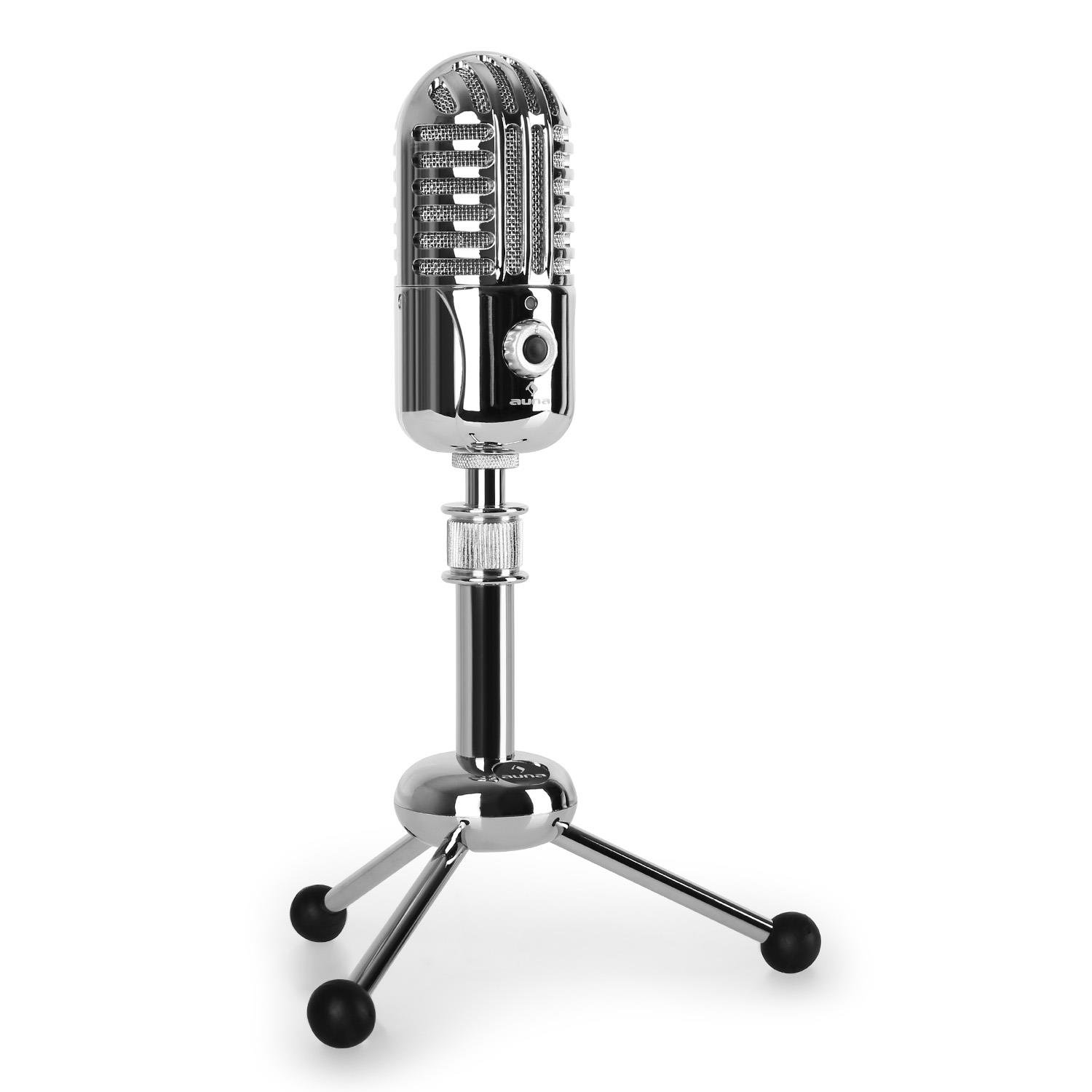
ຮູບພາບ: ທາງຫນ້າ view of the AUNA CM280 microphone on its stand.

ຮູບພາບ: ດ້ານຫລັງ view of the AUNA CM280 microphone, highlighting the USB connection port and the 3.5mm headphone output for direct monitoring.
ການຕິດຕັ້ງແລະການຕິດຕັ້ງ
1. ການເຊື່ອມຕໍ່ກັບຄອມພິວເຕີຂອງທ່ານ
- Place the AUNA CM280 microphone on a stable surface using the included table tripod.
- Connect one end of the supplied USB cable to the USB port on the back of the microphone.
- Connect the other end of the USB cable to an available USB port on your computer (Windows PC or Mac).
2. ການຕິດຕັ້ງໄດເວີ
The AUNA CM280 is a Plug & Play device. Your operating system (Windows or macOS) will automatically detect and install the necessary drivers upon connection. No manual driver installation is required.
3. Initial Configuration (Windows/macOS)
After connecting, you may need to select the AUNA CM280 as your default audio input and output device in your system settings and recording software.
- Windows: Go to Control Panel > Sound > Recording tab. Select "AUNA CM280" as the default device. In the Playback tab, you can also select it for headphone monitoring.
- macOS: Go to System Preferences > Sound > Input tab. Select "AUNA CM280". Do the same in the Output tab for headphone monitoring.
Ensure your recording software (e.g., Audacity, GarageBand, OBS) is also configured to use the AUNA CM280 as its audio input device.
ຄໍາແນະນໍາການດໍາເນີນງານ
ການຈັດວາງໄມໂຄຣໂຟນ
For optimal sound quality, position the microphone directly in front of the sound source (e.g., your mouth) within a few inches. The cardioid polar pattern means it is most sensitive to sounds coming from the front.
ການກວດສອບຫູຟັງ
Connect your headphones to the 3.5mm jack on the back of the microphone. Use the headphone volume control knob on the microphone to adjust your monitoring level. This provides direct, latency-free monitoring of your audio.
ຟັງຊັນປິດສຽງ
The microphone features a mute circuit. Press the dedicated button (if available, or refer to the specific control on your model) to mute or unmute the microphone. This is useful for temporary pauses during recording or calls.
ຕົວຊີ້ວັດສະຖານະ LED
The microphone's status LED provides visual feedback:
- ສີຟ້າ: Microphone is ready for use.
- ສີເຫຼືອງ: ໄມໂຄຣໂຟນຖືກປິດສຽງໄວ້.
- ສີແດງ: Indicates an overdrive or clipping signal. Adjust your input gain or move further from the microphone to prevent distortion.
ຄຳ ແນະ ນຳ ໃນການບັນທຶກ
- ສຽງຫ້ອງ: ບັນທຶກໃນສະພາບແວດລ້ອມທີ່ງຽບໆເພື່ອຫຼຸດຜ່ອນສຽງລົບກວນໃນພື້ນຫຼັງ.
- Pop Filter: Consider using an external pop filter to further reduce plosive sounds (P, B) and protect the microphone capsule.
- ໄດ້ຮັບ S.tagໃນ: Set your input gain in your software to a level where the signal is strong but does not peak into the red (overdrive).
ການບໍາລຸງຮັກສາແລະການດູແລ
Proper care will extend the life of your AUNA CM280 microphone:
- ທໍາຄວາມສະອາດ: Wipe the microphone body with a soft, dry, lint-free cloth. Do not use abrasive cleaners, solvents, or chemical sprays.
- ການເກັບຮັກສາ: When not in use, store the microphone in its transport pouch to protect it from dust and scratches. Keep it in a cool, dry place.
- ການຈັດການ: Always handle the microphone with care. Avoid touching the microphone grille directly.
ການແກ້ໄຂບັນຫາ
If you encounter issues with your AUNA CM280 microphone, try the following solutions:
- ກວດບໍ່ພົບສຽງ/ໄມໂຄຣໂຟນ:
- ໃຫ້ແນ່ໃຈວ່າສາຍ USB ໄດ້ເຊື່ອມຕໍ່ກັບທັງໄມໂຄຣໂຟນ ແລະ ຄອມພິວເຕີຂອງທ່ານຢ່າງແໜ້ນໜາແລ້ວ.
- ລອງໃຊ້ພອດ USB ອື່ນໃນຄອມພິວເຕີຂອງທ່ານ.
- ປິດເປີດຄອມພິວເຕີຂອງທ່ານຄືນໃໝ່.
- Verify that the AUNA CM280 is selected as the default input device in your operating system's sound settings and your recording software.
- ຄຸນະພາບສຽງບໍ່ດີ / ການບິດເບືອນ:
- Check the status LED. If it's red, the signal is overdriving. Reduce the input gain in your software or move further from the microphone.
- Ensure the microphone is positioned correctly and not too close to the sound source.
- Check for environmental noise or vibrations that might be picked up.
- ບັນຫາການຕິດຕາມຫູຟັງ:
- ໃຫ້ແນ່ໃຈວ່າຫູຟັງສຽບເຂົ້າກັບຊ່ອງສຽບ 3.5 ມມ ຢ່າງຄົບຖ້ວນແລ້ວ.
- Adjust the headphone volume knob on the microphone.
- Verify that the AUNA CM280 is selected as the output device for monitoring in your system's sound settings or recording software.
ຂໍ້ມູນຈໍາເພາະ
| ຄຸນສົມບັດ | ຂໍ້ມູນຈໍາເພາະ |
|---|---|
| ການເຊື່ອມຕໍ່ | USB port, 3.5 mm headphone jack |
| ການຕິດຕັ້ງໄດເວີ | Automatic (Plug & Play) |
| ການຕອບສະໜອງຄວາມຖີ່ | 20 Hz – 20 KHz |
| ຄວາມກົດດັນສຽງສູງສຸດ | 120 dB |
| ອັດຕາສ່ວນສັນຍານເຖິງສຽງດັງ | 96 dB |
| D/A-A/D Converter | 44.1/48 kHz, 16 bit |
| ປະລິມານຫູຟັງ | ສາມາດປັບໄດ້ |
| ປິດວົງຈອນ | ແມ່ນແລ້ວ |
| ຂໍ້ Tripod | 5/8 ນິ້ວ |
| ສະຖານະພາບ LED | Three colors (Blue: Ready, Yellow: Mute, Red: Overdrive) |
| ການສະຫນອງພະລັງງານ | ຜ່ານ USB |
| ວັດສະດຸ | ໂລຫະ, Polycarbonate |
| ນ້ຳໜັກ | 300 ກຣາມ |
| ຂະໜາດ (L x W x H) | 50 x 50 x 110 ມີລີແມັດ |
| ຮູບແບບຂົ້ວໂລກ | Unidirectional (Cardioid) |
| ອຸປະກອນທີ່ເຂົ້າກັນໄດ້ | ຄອມພິວເຕີສ່ວນບຸກຄົນ, ແລັບທັອບ |
ການຮັບປະກັນແລະການສະຫນັບສະຫນູນ
AUNA products are designed for reliability and performance. For information regarding warranty coverage, technical support, or service, please refer to the warranty card included with your product or visit the official AUNA webເວັບໄຊ. ຮັກສາຫຼັກຖານການຊື້ຂອງທ່ານສໍາລັບການຮ້ອງຂໍການຮັບປະກັນ.


