1. ບົດແນະນຳ
1.1 ຜະລິດຕະພັນເກີນview
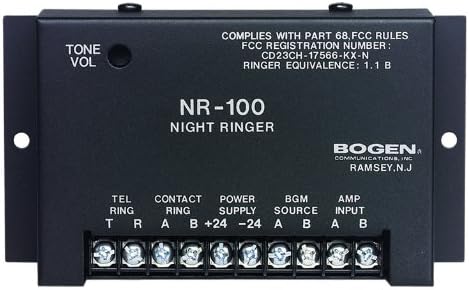
The Bogen BG-NR100 Night Ringer is an essential component for integrating telephone ringing into a paging or public address system. It is engineered to detect incoming telephone ring signals or external contact closures and generate a loud, clear electronic ringer tone. Its compact design and low current draw make it an efficient and reliable solution for various commercial and industrial applications.
1.2 ລັກສະນະທີ່ສໍາຄັນ
- Responds to 90V ring signals or external contact closures.
- Produces a clear dual-frequency electronic ringer tone.
- Easily connects to any standard paging system.
- Automatically mutes background music while ringing.
- Features a 0-level ringer volume control for adjustable output.
- Compact size for convenient installation.
- Low current draw for energy efficiency.
2. ຂໍ້ມູນຄວາມປອດໄພ
Please read all safety instructions carefully before installing or operating the Bogen BG-NR100 Night Ringer. Failure to follow these instructions may result in electric shock, fire, or other hazards.
2.1 ຂໍ້ຄວນລະວັງຄວາມປອດໄພທົ່ວໄປ
- ຢ່າເຮັດໃຫ້ອຸປະກອນນີ້ຖືກຝົນຫຼືຄວາມຊຸ່ມຊື່ນ.
- ຫ້າມປິດຊ່ອງລະບາຍອາກາດໃດໆ.
- ຢ່າຕິດຕັ້ງຢູ່ໃກ້ກັບແຫຼ່ງຄວາມຮ້ອນເຊັ່ນ: radiators, heat registers, stoves, ຫຼືອຸປະກອນອື່ນໆທີ່ຜະລິດຄວາມຮ້ອນ.
- ໃຊ້ໄຟລ໌ແນບ/ອຸປະກອນເສີມທີ່ຜູ້ຜະລິດລະບຸໄວ້ເທົ່ານັ້ນ.
- ອ້າງອີງການບໍລິການທັງໝົດໃຫ້ກັບພະນັກງານບໍລິການທີ່ມີຄຸນວຸດທິ.
2.2 ຄວາມປອດໄພທາງໄຟຟ້າ
- ຮັບປະກັນການສະຫນອງພະລັງງານ voltage matches the requirements specified for the device.
- ຕັດການເຊື່ອມຕໍ່ໄຟຟ້າກ່ອນເຮັດການເຊື່ອມຕໍ່ ຫຼື ປະຕິບັດການບຳລຸງຮັກສາໃດໆ.
- Avoid touching exposed wires or terminals when the unit is powered.
- ການໃສ່ພື້ນດິນທີ່ເຫມາະສົມແມ່ນຈໍາເປັນສໍາລັບການດໍາເນີນງານທີ່ປອດໄພ.
3. ຕັ້ງຄ່າ
3.1 ການຫຸ້ມຫໍ່
Carefully remove the Night Ringer from its packaging. Inspect the unit for any signs of damage that may have occurred during shipping. If damage is found, contact your supplier immediately.
3.2 ການຕິດຕັ້ງ
The BG-NR100 is designed for surface mounting. Use appropriate screws (not supplied) to secure the unit to a wall or other stable surface using the mounting tabs on either side of the enclosure. Ensure the mounting location allows for adequate ventilation and access to connections.
3.3 ການເຊື່ອມຕໍ່ສາຍໄຟ
All connections are made via the screw terminal block located on the front of the unit. Ensure power is disconnected before making any wiring connections.
| ປ້າຍ ກຳ ກັບປາຍທາງ | ລາຍລະອຽດ | ຟັງຊັນ |
|---|---|---|
| TEL RING (T, R) | Telephone Ring Input | Connect to the tip (T) and ring (R) lines of a standard 90V telephone ring signal source. |
| CONTACT RING (A, B) | External Contact Closure Input | Connect to a dry contact closure (e.g., from a relay or switch) to trigger the ringer. |
| POWER SUPPLY (+24, -24) | ການປ້ອນຂໍ້ມູນພະລັງງານ | Connect to a regulated 24V DC power supply. Observe polarity (+24V to +24, -24V to -24). |
| BGM SOURCE (A, B) | ການປ້ອນຂໍ້ມູນເພງໃນພື້ນຫຼັງ | Connect the background music source here. The unit will mute this input during a ring event. |
| AMP INPUT (A, B) | Amplifier Input / Output to Paging System | Connect this output to the input of your paging amplifier or public address system. This carries the ringer tone and the muted BGM. |
4. ການເຮັດວຽກ
4.1 ການດໍາເນີນງານພື້ນຖານ
Once properly connected and powered, the BG-NR100 will automatically detect an incoming 90V telephone ring signal or a closure on the Contact Ring terminals. Upon detection, the unit will generate a dual-frequency electronic ringer tone and simultaneously mute any background music connected to the BGM Source input. The ringer tone will be sent to the Amp Input terminals for connection to your paging system.
4.2 ການຄວບຄຸມປະລິມານ
The ringer volume can be adjusted using the TONE VOL knob located on the top left of the unit. Rotate the knob clockwise to increase the volume and counter-clockwise to decrease it. Adjust the volume to a suitable level for your environment.
5. ບໍາລຸງຮັກສາ
5.1 ການທໍາຄວາມສະອາດ
To clean the unit, wipe the exterior with a soft, dry cloth. Do not use liquid cleaners or aerosol cleaners. Ensure the unit is powered off and disconnected from all sources before cleaning.
5.2 ການເບິ່ງແຍງທົ່ວໄປ
The BG-NR100 is designed for reliable operation and requires minimal maintenance. Ensure it is installed in a location free from excessive dust, moisture, and extreme temperatures. Periodically check all wiring connections to ensure they are secure.
6. ການແກ້ໄຂບັນຫາ
If you experience issues with your Bogen BG-NR100 Night Ringer, refer to the following table for common problems and solutions.
| ບັນຫາ | ສາເຫດທີ່ເປັນໄປໄດ້ | ການແກ້ໄຂ |
|---|---|---|
| No ringer tone output. | ບໍ່ມີພະລັງງານກັບຫນ່ວຍບໍລິການ. | Check power supply connections and ensure 24V DC is present. |
| Incorrect or no input signal (TEL RING or CONTACT RING). | Verify 90V ring signal on TEL RING or proper contact closure on CONTACT RING. | |
| ປຸ່ມປັບສຽງຖືກຕັ້ງໄວ້ຕໍ່າເກີນໄປ. | Adjust the TONE VOL knob clockwise. | |
| Ringer tone is distorted or weak. | Improper connection to paging ampມີຊີວິດຊີວາ. | ຮັບປະກັນ AMP INPUT is correctly connected to the amplifier input. Check ampການຕັ້ງຄ່າ lifier. |
| Background music does not mute. | BGM SOURCE not connected correctly. | Verify BGM SOURCE connections. Ensure the music source is routed through the Night Ringer. |
If the problem persists after attempting these solutions, please contact Bogen technical support or a qualified service technician.
7. ຂໍ້ມູນຈໍາເພາະ
Technical specifications for the Bogen BG-NR100 Night Ringer:
| ຄຸນລັກສະນະ | ມູນຄ່າ |
|---|---|
| ຜູ້ຜະລິດ | ໂບເຈນ |
| ຍີ່ຫໍ້ | ໂບເຈນ |
| ໝາຍເລກຕົວແບບ | BG-NR100 |
| ນ້ໍາຫນັກລາຍການ | 1 ປອນ |
| ຂະໜາດສິນຄ້າ | 1 x 5 x 3 ນິ້ວ |
| FCC Registration Number | CD23CH-17566-KX-N |
| Ringer Equivalence | 1.1 ບ |
| ວັນທີທໍາອິດທີ່ມີ | ວັນທີ 27 ພະຈິກ 2013 |
8. ການຮັບປະກັນແລະການສະຫນັບສະຫນູນ
8.1 ຂໍ້ມູນການຮັບປະກັນ
For specific warranty terms and conditions, please refer to the warranty card included with your product or visit the official Bogen website. Bogen Communications, Inc. typically provides a limited warranty against defects in materials and workmanship for a specified period from the date of purchase.
8.2 ສະຫນັບສະຫນູນດ້ານວິຊາການ
If you require technical assistance or have questions regarding the installation or operation of your BG-NR100 Night Ringer, please contact Bogen technical support. Contact information can usually be found on the Bogen webສະຖານທີ່ຫຼືຢູ່ໃນການຫຸ້ມຫໍ່ຜະລິດຕະພັນ.


