1. ບົດແນະນຳ
This manual provides essential instructions for the proper use, installation, and maintenance of your Oticon 10 mm Open Domes. These domes are designed to be used with various Oticon Receiver-In-The-Ear (RITE) hearing aid models, including Agil, Agil Pro, Acto, Acto Pro, Dual, Epoq, Delta, Vigo, Vigo Pro, INO, Intiga, and Hit. Regular replacement of domes is crucial for maintaining optimal sound quality and hygiene of your hearing aids.
2. ຜະລິດຕະພັນເກີນview
The Oticon 10 mm Open Domes are small, soft, and flexible silicone tips that attach to the receiver of your Oticon RITE hearing aid. They are designed to sit comfortably in the ear canal, providing a secure fit while allowing natural sounds to enter the ear alongside amplified sound. This "open" design helps to reduce the occlusion effect (the sensation of your own voice sounding hollow or boomy).
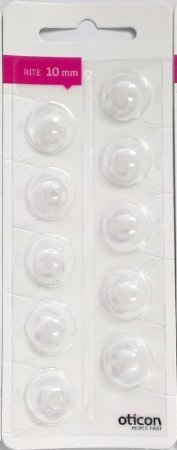
This image displays the packaging for the Oticon 10 mm Open Domes, showing multiple domes ready for use.
Each pack contains 10 individual 10 mm Open Domes, ensuring you have a supply for regular replacements.
3. ການຕິດຕັ້ງແລະການທົດແທນ
It is recommended to replace your domes regularly to maintain hygiene and optimal hearing aid performance. Follow these steps for safe installation:
- ການກະກຽມ: Ensure your hands are clean and dry before handling the domes and hearing aid.
- Remove Old Dome: Gently grasp the old dome at its base, where it connects to the receiver. Pull it straight off the receiver. Avoid twisting, as this may damage the receiver.
- Inspect Receiver: Check the receiver for any wax or debris. If necessary, gently clean it with a soft, dry cloth. Ensure the wax filter is clear.
- Attach New Dome: Take a new 10 mm Open Dome from its packaging. Align the opening of the dome with the tip of the receiver. Push the dome firmly onto the receiver until it is securely seated. You should feel a slight click or resistance, indicating it is properly attached.
- ຢືນຢັນຄວາມປອດໄພ: Gently tug on the dome to ensure it is firmly attached and will not detach in your ear.
If you experience difficulty or are unsure about the process, consult your hearing care professional.
4. ຂໍ້ແນະນຳການນຳໃຊ້
Once installed, the domes should sit comfortably in your ear canal. They are designed for daily wear with your Oticon RITE hearing aids. Ensure the dome is fully inserted into your ear canal for the best sound experience and to prevent it from falling out.
- ຄວາມສະດວກສະບາຍ: The dome should feel comfortable and not cause any pain or irritation. If it does, consult your hearing care professional.
- ຄຸນະພາບສຽງ: A properly fitted dome ensures optimal sound delivery from your hearing aid.
- ຄວາມປອດໄພ: The dome helps to keep the hearing aid receiver securely in place within your ear.
5. ບໍາລຸງຮັກສາ
Regular maintenance of your domes and hearing aids is essential for hygiene and performance:
- ທໍາຄວາມສະອາດປະຈໍາວັນ: Gently wipe the domes with a clean, dry cloth daily to remove any earwax or debris. Do not use water or cleaning solutions directly on the domes while they are attached to the hearing aid, as moisture can damage the receiver.
- ຄວາມຖີ່ຂອງການທົດແທນ: Oticon recommends changing these dome tips regularly. The exact frequency depends on individual earwax production and usage, but generally, domes should be replaced every 2-4 weeks, or sooner if they appear discolored, stiff, or damaged.
- Wax Filters: Always ensure the wax filter on your hearing aid receiver is also clean and replaced as needed, typically when changing the dome.
6. ການແກ້ໄຂບັນຫາ
If you experience issues with your hearing aid after changing the dome, consider the following:
- ບໍ່ມີສຽງ ຫຼື ສຽງອ່ອນ:
- Ensure the dome is securely attached to the receiver.
- Check if the wax filter is clogged. Replace the wax filter if necessary.
- Verify that the hearing aid battery is working correctly.
- Whistling or Feedback:
- The dome might not be fully inserted into your ear canal. Re-insert the hearing aid.
- The dome might be the wrong size or damaged. Try a new dome.
- ບໍ່ສະບາຍ ຫຼື ລະຄາຍເຄືອງ:
- Ensure the dome is correctly positioned and not pressing uncomfortably against your ear canal.
- If discomfort persists, you might need a different size or type of dome. Consult your hearing care professional.
For persistent issues, contact your hearing care professional for assistance.
7. ຂໍ້ມູນຈໍາເພາະ
| ປະເພດຜະລິດຕະພັນ | Hearing Aid Open Domes |
| ຂະໜາດ | 10 ມມ |
| ຄວາມເຂົ້າກັນໄດ້ | Oticon RITE hearing aids (Agil, Agil Pro, Acto, Acto Pro, Dual, Epoq, Delta, Vigo, Vigo Pro, INO, Intiga, Hit) |
| ປະລິມານ | 10 domes per pack |
| ຜູ້ຜະລິດ | Oticon |
| ASIN | B00FZPMIZ0 |
| ຂະໜາດແພັກເກັດ | 5.51 x 2.09 x 0.35 ນິ້ວ |
| ນ້ໍາຫນັກລາຍການ | 0.21 ອອນ |
8. ການຮັບປະກັນແລະການສະຫນັບສະຫນູນ
Due to hygiene reasons, this product is not refundable or exchangeable after opening. This policy is in place for your health and safety. Ensure you have selected the correct size and type of dome before opening the package.
For any questions regarding the use, compatibility, or performance of your Oticon 10 mm Open Domes, please contact your authorized Oticon hearing care professional or the retailer from whom you purchased the product. They can provide personalized advice and support.


