1. ຜະລິດຕະພັນເກີນview
The Gioteck EX-05S High Definition Headset is designed to deliver superior stereo game sound and crystal-clear voice communication. It is compatible with multiple platforms including PS4, PS3, Xbox 360, PC, and Mac. This headset features 40mm high-quality stereo drivers, a noise-isolating microphone, and breathable micro-fibre ear cups for extended comfort.
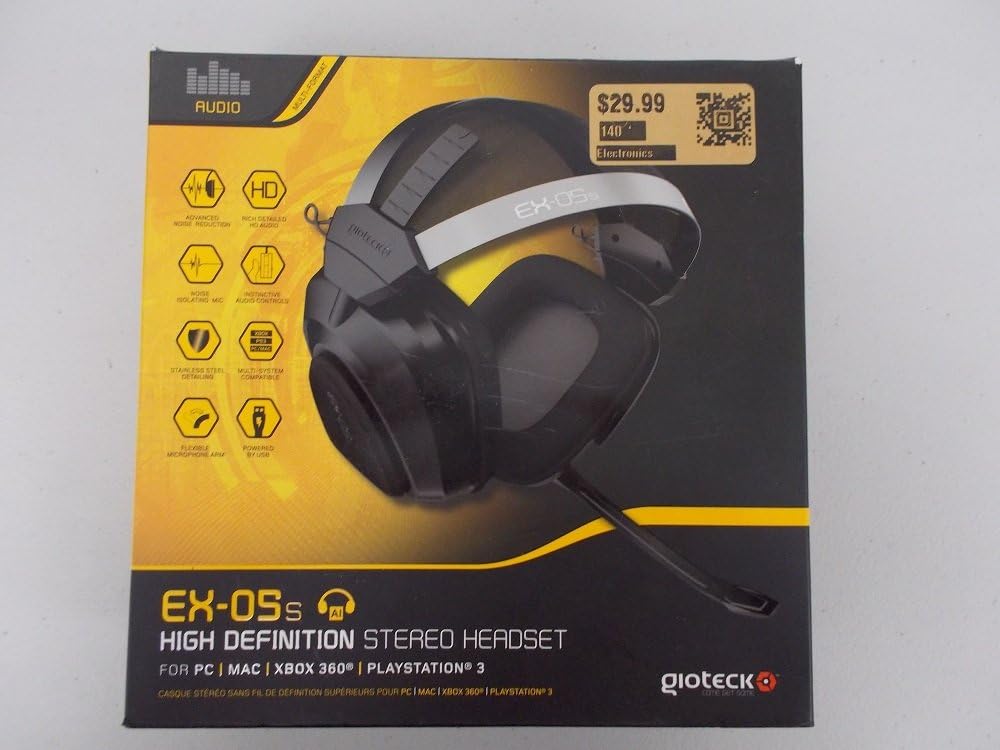
Figure 1.1: Gioteck EX-05S Headset packaging, highlighting key features and compatibility.

ຮູບ 1.2: ຂ້າງ view of the Gioteck EX-05S Headset, showing the ear cup and microphone arm.
2. ຄຸນສົມບັດ
- 40mm High Quality Stereo Drivers: Delivering rich, detailed audio for an immersive gaming experience.
- Noise Isolating Microphone: Designed to eliminate echo and external noise for clear communication.
- Breathable Micro-Fibre Ear Cups: Ensures comfort during long gaming sessions.
- ການຫຼຸດສຽງລົບກວນຂັ້ນສູງ: Minimizes game sound interference from external speakers.
- Flexible and 180-Degree Rotating Microphone Arm: Allows for optimal microphone positioning.
- Instinctive and Accessible Controls: Conveniently located controls for voice and game sound adjustments.
- Stainless Steel Detailing: Provides durability and a premium finish.
- ຄວາມເຂົ້າກັນໄດ້ຫຼາຍເວທີ: Works with PS4, PS3, Xbox 360, PC, and Mac.
3. ເນື້ອໃນຊຸດ
ກະລຸນາກວດໃຫ້ແນ່ໃຈວ່າທຸກລາຍການຕໍ່ໄປນີ້ມີຢູ່ໃນຊຸດຂອງທ່ານ:
- Gioteck EX-05S Universal High Definition Stereo Headset
4. ຄູ່ມືການຕິດຕັ້ງ
4.1 Connecting to Gaming Consoles (PS4, PS3, Xbox 360)
- Locate the 3.5mm audio jack on your gaming controller or console.
- Insert the 3.5mm connector from the EX-05S headset firmly into the audio jack.
- Ensure your console's audio settings are configured to output game audio and chat through the connected headset. Refer to your console's system settings for specific audio output configurations.
4.2 ການເຊື່ອມຕໍ່ກັບ PC/Mac
- For PCs with separate audio and microphone jacks, you may need a PC splitter cable (not included) to connect the single 3.5mm headset jack to your computer's audio output and microphone input ports.
- For devices with a combined 3.5mm audio/microphone jack, simply plug the headset's 3.5mm connector directly into the port.
- Adjust your computer's sound settings to select the EX-05S headset as the default playback and recording device.
5. ຄໍາແນະນໍາການດໍາເນີນງານ
5.1 ການຄວບຄຸມປະລິມານ
The EX-05S headset features an inline control box on the cable. Use the volume dial to adjust the overall audio level of your game and chat sound.
5.2 ປິດສຽງໄມໂຄຣໂຟນ
A switch or button on the inline control box allows you to quickly mute or unmute your microphone. Ensure the microphone is unmuted when you wish to communicate.
5.3 ການວາງຕຳແໜ່ງໄມໂຄຣໂຟນ
The flexible microphone arm can be rotated 180 degrees. Position the microphone approximately 1-2 inches from your mouth for optimal voice clarity and to minimize background noise.
6. ການບໍາລຸງຮັກສາແລະການດູແລ
- ທໍາຄວາມສະອາດ: Use a soft, dry cloth to clean the headset. For ear cups, a slightly damp ຜ້າສາມາດນໍາໃຊ້ໄດ້, ແຕ່ໃຫ້ແນ່ໃຈວ່າບໍ່ມີຄວາມຊຸ່ມຊື່ນເຂົ້າໄປໃນ grilles ລໍາໂພງ. ຢ່າໃຊ້ສານເຄມີທີ່ຮຸນແຮງຫຼືເຄື່ອງເຮັດຄວາມສະອາດຂັດ.
- ການເກັບຮັກສາ: ເກັບຮັກສາຊຸດຫູຟັງໄວ້ໃນບ່ອນທີ່ເຢັນ, ແຫ້ງ ແລະ ຫ່າງຈາກແສງແດດໂດຍກົງ ແລະ ອຸນຫະພູມສູງເກີນໄປ. ຫຼີກລ່ຽງການພັນກັນຂອງສາຍ.
- ການຈັດການ: Always grasp the plug when disconnecting the cable, rather than pulling on the cable itself, to prevent damage to the wiring.
- ຈອກຫູ: The breathable micro-fibre ear cups can be gently wiped clean. Avoid excessive pressure or stretching.
7. ການແກ້ໄຂບັນຫາ
7.1 ບໍ່ມີສຽງຈາກຫູຟັງ
- ກວດໃຫ້ແນ່ໃຈວ່າສຽບຮູສຽບ 3.5 ມມ ເຂົ້າໄປໃນຮູສຽບສຽງ.
- Check the inline volume control on the headset cable and ensure it is turned up.
- Verify your device's (console, PC, Mac) audio output settings are configured to send sound to the headset.
- ທົດສອບຊຸດຫູຟັງໃນອຸປະກອນອື່ນເພື່ອແກ້ໄຂບັນຫາສະເພາະອຸປະກອນ.
7.2 ໄມໂຄຣໂຟນບໍ່ເຮັດວຽກ
- Check the microphone mute switch on the inline control box and ensure it is unmuted.
- Verify your device's (console, PC, Mac) microphone input settings are configured to receive input from the headset.
- Ensure the microphone arm is positioned correctly and not obstructed.
- Test the microphone on another device or application to confirm functionality.
7.3 Static or Distorted Audio
- Ensure the connection is secure and free from debris.
- Try adjusting the volume levels on both the headset and the connected device.
- Move away from potential sources of electromagnetic interference (e.g., Wi-Fi routers, cordless phones).
- ທົດສອບກັບແຫຼ່ງສຽງ ຫຼືອຸປະກອນອື່ນ.
8. ຂໍ້ມູນຈໍາເພາະ
| ຄຸນສົມບັດ | ລາຍລະອຽດ |
|---|---|
| ຊື່ຕົວແບບ | E5SUNI-11-MU |
| ເຕັກໂນໂລຊີການເຊື່ອມຕໍ່ | ມີສາຍ |
| ອົງປະກອບລວມ | ຫູຟັງ |
| ຊ່ວງອາຍຸ (ລາຍລະອຽດ) | ຜູ້ໃຫຍ່ |
| ວັດສະດຸ | ສະແຕນເລດ |
| ການນໍາໃຊ້ສະເພາະສໍາລັບຜະລິດຕະພັນ | ເກມ |
| ອຸປະກອນທີ່ເຂົ້າກັນໄດ້ | Gaming Consoles, Computers |
| ປະເພດການຄວບຄຸມ | ການຄວບຄຸມປະລິມານ |
| ຄຸນສົມບັດສາຍ | ຖອດຖອນໄດ້ |
| ນ້ໍາຫນັກລາຍການ | 669 ກຣາມ (1.47 ປອນ) |
| ວິທີການຄວບຄຸມ | ສຽງ |
| ປະເພດໄດເວີສຽງ | ໄດນາມິກໄດເວີ |
| ຮູບຮ່າງຫູຫູ | ເກີນຫູ |
| Jack ຫູຟັງ | Jack ຂະ ໜາດ 3.5 ມມ |
| ຂະໜາດສິນຄ້າ | 8.46 x 7.87 x 3.94 ນິ້ວ |
9. ການຮັບປະກັນແລະການສະຫນັບສະຫນູນ
Gioteck products are manufactured to high standards and undergo rigorous testing. For information regarding warranty coverage, technical support, or service, please refer to the official Gioteck website ຫຼືຕິດຕໍ່ສະຫນັບສະຫນູນລູກຄ້າຂອງເຂົາເຈົ້າໂດຍກົງ. ຮັກສາຫຼັກຖານການຊື້ຂອງທ່ານສໍາລັບການຮຽກຮ້ອງການຮັບປະກັນໃດໆ.
ສໍາລັບຂໍ້ມູນການຊ່ວຍເຫຼືອລ້າສຸດ, ກະລຸນາເຂົ້າໄປທີ່: www.gioteck.com/support


