ສິນຄ້າເກີນview
The Sagemcom Sixty Cordless Telephone and Answer Machine combines modern technology with a classic design. Its unique aesthetic, smooth finish, and touchscreen functionality make it a distinctive addition to any environment. Designed for user comfort, the Sixty offers a range of features including hands-free mode, extended battery life, and an intuitive interface for easy communication.
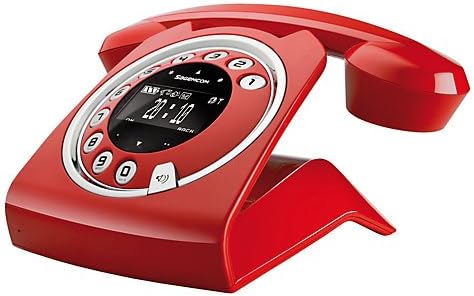
Image: The Sagemcom Sixty Cordless Telephone and Answer Machine in red, showcasing its unique retro-modern design with a circular dial and digital display.

ຮູບພາບ: ຂ້າງ view of the Sagemcom Sixty Cordless Telephone, highlighting its sleek profile and the cradle design.
ຄູ່ມືການຕິດຕັ້ງ
1. ການຫຸ້ມຫໍ່
Carefully remove all components from the packaging. Ensure you have the base unit, handset, power adapter, and telephone line cord.
2. ການເຊື່ອມຕໍ່ຫນ່ວຍງານພື້ນຖານ
- Connect the power adapter to the 'DC IN' port on the back of the base unit and plug the other end into a wall outlet.
- Connect one end of the telephone line cord to the 'LINE' port on the base unit and the other end to your telephone wall jack.
3. ການຕິດຕັ້ງ ແລະສາກແບັດເຕີຣີ
- ເປີດຊ່ອງໃສ່ຫມໍ້ໄຟໃນມືຖື.
- ໃສ່ແບັດເຕີລີທີ່ສາມາດສາກໄດ້, ສັງເກດການຂົ້ວທີ່ຖືກຕ້ອງ (+ ແລະ -).
- ປິດຊ່ອງໃສ່ຫມໍ້ໄຟ.
- Place the handset on the base unit. The display will indicate charging. Allow the handset to charge for at least 16 hours before first use to ensure optimal battery performance.
ຄໍາແນະນໍາການດໍາເນີນງານ
ໂທອອກ ແລະຮັບສາຍ
- ໂທອອກ: ຍົກມືຖືຂຶ້ນ ຫຼືກົດປຸ່ມ ໂທ button. Dial the number using the touchscreen keypad.
- ເພື່ອຮັບສາຍ: ຍົກມືຖືຂຶ້ນ ຫຼືກົດປຸ່ມ ໂທ ກົດປຸ່ມເມື່ອໂທລະສັບດັງ.
- ເພື່ອວາງສາຍ: ວາງຫູຟັງກັບຄືນໃສ່ໜ່ວຍພື້ນຖານ ຫຼື ກົດປຸ່ມ ສິ້ນສຸດການໂທ ປຸ່ມ.
ການໃຊ້ Touchscreen
The Sixty features a responsive touchscreen for navigation and input. Tap icons or numbers to select functions or dial. Swipe to scroll through lists or menus.
ໂໝດແຮນຟຣີ
ໃນລະຫວ່າງການໂທ, ກົດປຸ່ມ ລໍາໂພງ ເພື່ອເປີດໃຊ້ໂໝດແຮນຟຣີ. ກົດມັນອີກຄັ້ງເພື່ອກັບຄືນສູ່ໂໝດຫູຟັງ.
ການຄຸ້ມຄອງປື້ມໂທລະສັບ
- ເພີ່ມລາຍຊື່ຕິດຕໍ່: Navigate to the Phonebook menu, select 'Add New Contact', enter the name and number using the touchscreen, and save. The phonebook can store up to 150 names.
- ກຳລັງຊອກຫາລາຍຊື່ຜູ້ຕິດຕໍ່: Access the Phonebook and use the search function or scroll through the list.
- Editing/Deleting a Contact: Select the desired contact from the Phonebook and choose the 'Edit' or 'Delete' option.
Answering Machine Functions
The integrated answering machine has a recording capacity of 10 minutes.
- ການເປີດໃຊ້/ປິດການໃຊ້ງານ: Access the Answering Machine menu to turn it on or off.
- ກຳລັງຫຼິ້ນຂໍ້ຄວາມ: Select 'Play Messages' from the Answering Machine menu.
- ການບັນທຶກຂໍ້ຄວາມທີ່ສົ່ງອອກ: Follow the prompts in the Answering Machine menu to record a personalized outgoing message.
ບໍາລຸງຮັກສາ
ທໍາຄວາມສະອາດໂທລະສັບຂອງທ່ານ
ເພື່ອທຳຄວາມສະອາດໂທລະສັບ, ໃຫ້ເຊັດມັນດ້ວຍຜ້າອ່ອນໆ, ເຊັດອອກດ້ວຍນ້ຳຢາທຳຄວາມສະອາດ.amp cloth. Do not use abrasive cleaners or solvents, as these can damage the surface. Ensure the phone is disconnected from power before cleaning.
ການດູແລຫມໍ້ໄຟ
- ໃຫ້ໃຊ້ແບັດເຕີຣີທີ່ສາມາດສາກໄຟໄດ້ທີ່ສະໜອງໃຫ້ສະເໝີ.
- ຖ້າໂທລະສັບຈະບໍ່ຖືກໃຊ້ເປັນເວລາດົນ, ໃຫ້ຖອດແບັດເຕີຣີອອກເພື່ອປ້ອງກັນການຮົ່ວໄຫຼ.
- ຖິ້ມແບດເຕີຣີເກົ່າຢ່າງມີຄວາມຮັບຜິດຊອບຕາມກົດລະບຽບທ້ອງຖິ່ນ.
ການແກ້ໄຂບັນຫາ
| ບັນຫາ | ການແກ້ໄຂທີ່ເປັນໄປໄດ້ |
|---|---|
| ບໍ່ມີສຽງໂທອອກ | Check if the telephone line cord is securely connected to both the base unit and the wall jack. Ensure the power adapter is plugged in. |
| ມືຖືບໍ່ໄດ້ສາກ | Ensure the handset is correctly placed on the base unit. Clean the charging contacts on both the handset and base unit with a dry cloth. Verify the power adapter is working. |
| ຄຸນນະພາບສຽງບໍ່ດີ | ຍ້າຍເຂົ້າໃກ້ໜ່ວຍພື້ນຖານ. ກວດສອບການລົບກວນຈາກອຸປະກອນເອເລັກໂຕຣນິກອື່ນໆ. ຮັບປະກັນວ່າສາຍໂທລະສັບບໍ່ເສຍຫາຍ. |
| ຈໍສະແດງຜົນແມ່ນຫວ່າງເປົ່າ | Check if the handset battery is charged. If not, place it on the base unit to charge. Ensure the power adapter is connected to the base unit. |
| ບໍ່ສາມາດໂທ ຫຼືຮັບສາຍໄດ້ | Verify that the telephone line is active. Check all cable connections. Restart the base unit by unplugging and replugging the power adapter. |
ຂໍ້ມູນຈໍາເພາະ
| ຄຸນສົມບັດ | ຂໍ້ມູນຈໍາເພາະ |
|---|---|
| ຍີ່ຫໍ້ | Sagemcom |
| ຕົວແບບ | ຫົກສິບ |
| ສີ | ສີແດງ |
| ປະເພດໂທລະສັບ | ບໍ່ມີສາຍ |
| ເວລາລົມໂທລະສັບ | ສູງສຸດ 10 ຊົ່ວໂມງ |
| ເວລາສະແຕນບາຍ | ສູງສຸດ 120 ຊົ່ວໂມງ |
| Recording Capacity (Answering Machine) | 10 ນາທີ |
| ຄວາມອາດສາມາດຂອງປື້ມໂທລະສັບ | 150 ຊື່ |
| ASIN | B00DX64LPI |
| ວັນທີທີ່ມີໃຫ້ທໍາອິດ | ວັນທີ 15 ເມສາ 2014 |
ການຮັບປະກັນແລະການສະຫນັບສະຫນູນ
For warranty information and customer support, please refer to the documentation included with your purchase or visit the official Sagemcom webເວັບໄຊ. ຮັກສາຫຼັກຖານການຊື້ຂອງທ່ານສໍາລັບການຮຽກຮ້ອງການຮັບປະກັນໃດໆ.


