ແນະນຳ
This manual provides essential information for the safe and effective use of your Fowler FOW72-520-110 Dial Indicator. Please read these instructions thoroughly before operation and retain them for future reference.
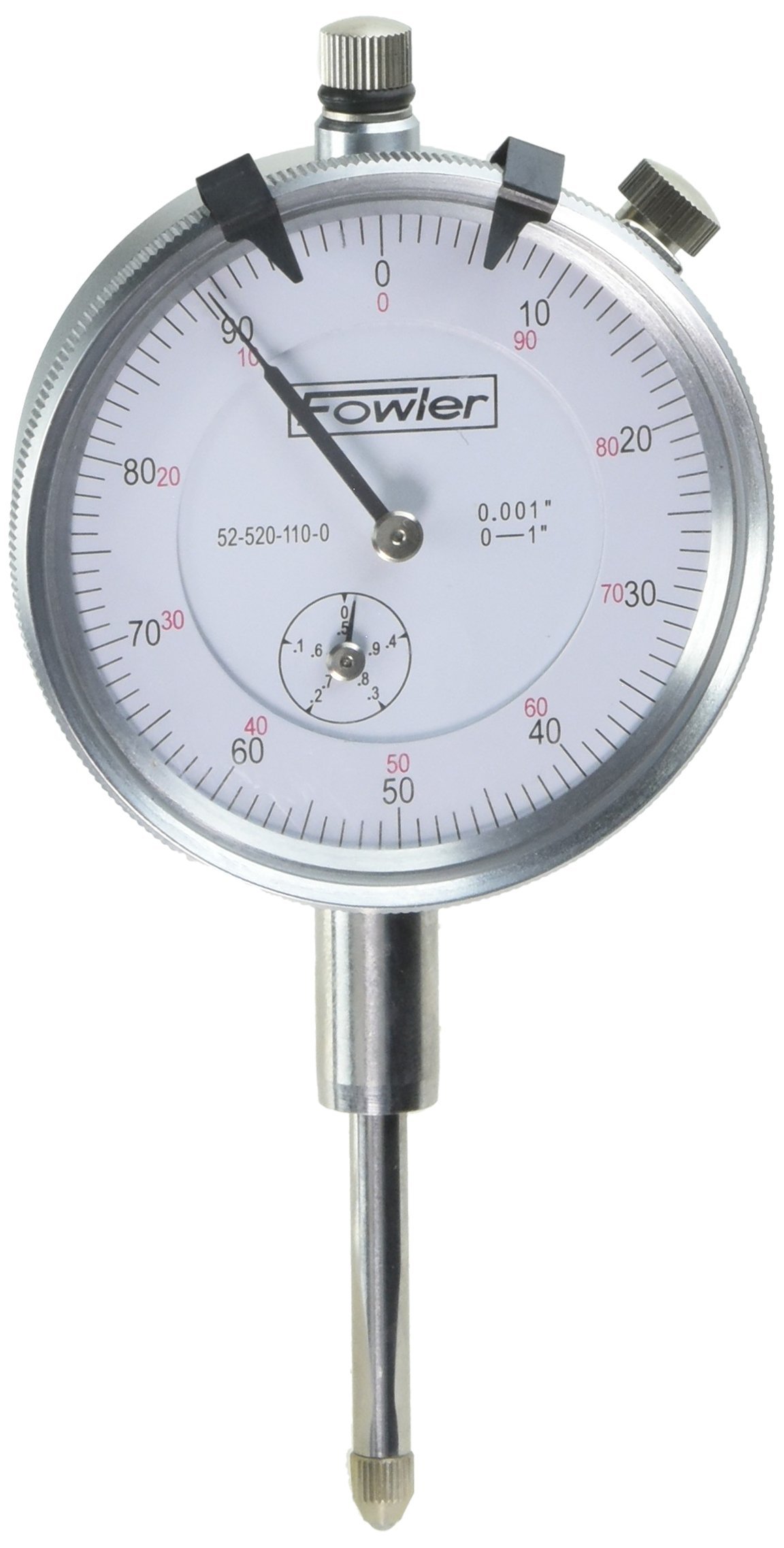
Image: The Fowler FOW72-520-110 Dial Indicator, a precision measuring tool.
ຂໍ້ມູນຄວາມປອດໄພ
- Always handle the dial indicator with care to prevent damage to its precision components.
- Avoid dropping the instrument or subjecting it to impact.
- Keep the dial indicator clean and free from dust, oil, and other contaminants.
- ເກັບຮັກສາເຄື່ອງມືໄວ້ໃນກໍລະນີປ້ອງກັນຂອງມັນເມື່ອບໍ່ໄດ້ໃຊ້.
- Do not attempt to disassemble the instrument beyond routine maintenance as this may void the warranty and affect accuracy.
ເນື້ອໃນຊຸດ
ຊຸດຂອງທ່ານຄວນມີລາຍການຕໍ່ໄປນີ້:
- Fowler FOW72-520-110 Dial Indicator
- ກໍລະນີເກັບຮັກສາປ້ອງກັນ
ຄຸນສົມບັດຜະລິດຕະພັນ
The Fowler FOW72-520-110 Dial Indicator is designed for precise dimensional measurement with the following key features:
- Revolution counter hand: For tracking full rotations of the main hand.
- Lug backs: Supplied with lug backs positioned through 90-degree increments for versatile mounting.
- ການກໍ່ສ້າງທົນທານ: Spindle rack and contact points are made of hardened stainless steel for long wear.
- ແຂງແຮງ casing: Cases are forged brass, satin chromed for durability and aesthetic appeal.
- Precision gearing: Gear wheels are made of hard brass, and pinions of silver steel, hardened, tempered, burnished on pivots, and lapped on teeth for smooth and accurate movement.
- Clear graduations: Microfine graduations in black for continuous readings and red for balanced readings, ensuring clear readability.
ວິດີໂອ: ຫຼາຍກວ່າview of Fowler AGD Dial Indicators, highlighting their robust construction and precision components. This video demonstrates the general features and quality of Fowler dial indicators.
ຕັ້ງຄ່າ
Before using your dial indicator, ensure it is properly set up:
- ການຫຸ້ມຫໍ່: Carefully remove the dial indicator from its protective case.
- ການຕິດຕັ້ງ: Attach the dial indicator to a suitable stand or fixture using its lug back. Ensure the mounting is secure and stable to prevent movement during measurement.
- ຈຸດຕິດຕໍ່: Verify that the contact point is clean and free from debris. The contact point is interchangeable, allowing for different applications.
Video: Demonstration of a Fowler AGD Dial Indicator, showing its components and how it can be mounted. This video illustrates the physical aspects of the indicator relevant to setup.
ຄໍາແນະນໍາການດໍາເນີນງານ
Follow these steps for accurate measurement:
- ຕຳແໜ່ງ: Position the dial indicator so that its contact point touches the surface to be measured. Ensure the spindle is perpendicular to the surface for optimal accuracy.
- ສູນ: Rotate the bezel to align the '0' mark with the main hand. This sets the reference point for your measurement.
- ການວັດແທກ: Gently move the object or the indicator to measure variations. The main hand will indicate fractions of an inch (or millimeter), and the revolution counter hand will track full rotations.
- ການອ່ານ: Read the measurement from the dial. Black graduations are for continuous readings, and red graduations are for balanced readings.
Video: A demonstration of a Fowler AGD Dial Indicator in use, showing how to take measurements and observe variations. This video provides practical guidance on operating the indicator.
ບໍາລຸງຮັກສາ
Proper maintenance ensures the longevity and accuracy of your dial indicator:
- ທໍາຄວາມສະອາດ: After each use, wipe the instrument with a clean, soft cloth. For stubborn grime, use a cloth lightly dampened with a mild, non-corrosive cleaning solution.
- ການລະບາຍສີ: The internal mechanisms are factory-lubricated. Avoid applying additional lubricants unless specifically instructed by a qualified technician.
- ການເກັບຮັກສາ: Store the dial indicator in its original protective case in a dry, temperature-controlled environment to prevent corrosion and damage.
- ການປັບທຽບ: Regular calibration by a certified laboratory is recommended to maintain measurement accuracy, especially in professional or industrial settings.
ການແກ້ໄຂບັນຫາ
| ບັນຫາ | ສາເຫດທີ່ເປັນໄປໄດ້ | ການແກ້ໄຂ |
|---|---|---|
| ການອ່ານບໍ່ຖືກຕ້ອງ | Dirty contact point or spindle; loose mounting; instrument damage; out of calibration. | Clean contact point and spindle; secure mounting; inspect for damage; recalibrate. |
| Sticking spindle | Accumulation of dirt or debris; lack of lubrication. | Clean the spindle thoroughly; if problem persists, consult a technician. |
| Bezel does not rotate smoothly | Dirt or debris under the bezel. | Gently clean around the bezel. Do not force rotation. |
ຂໍ້ມູນຈໍາເພາະ
- ຍີ່ຫໍ້: ຟາວເລີ
- ຕົວແບບ: FOW72-520-110
- ນ້ໍາຫນັກລາຍການ: 3.04 ອອນ
- ຂະໜາດຜະລິດຕະພັນ: 6.5 x 3.1 x 2.2 ນິ້ວ
- ໝາຍເລກພາກສ່ວນຜູ້ຜະລິດ: FOW72-520-110
- ຮຽນຈົບ: Microfine, black for continuous, red for balanced readings.
- Spindle/Contact Points: Hardened stainless steel.
- ວັດສະດຸກໍລະນີ: Forged brass, satin chromed.
- Gear Wheels: Hard brass.
- Pinions: Silver steel, hardened, tempered, burnished on pivots, lapped on teeth.
ການຮັບປະກັນແລະການສະຫນັບສະຫນູນ
For warranty information or technical support, please refer to the documentation included with your product or visit the official Fowler webເວັບໄຊ. ຮັກສາໃບຮັບເງິນການຊື້ຂອງທ່ານໄວ້ເປັນຫຼັກຖານການຊື້.


