1. ບົດແນະນຳ
This manual provides comprehensive instructions for the installation, operation, and maintenance of the Supermicro X10SLM+-LN4F motherboard. Designed for server applications, this motherboard features an LGA1150 socket, Intel C224 PCH, DDR3 memory support, and multiple Gigabit Ethernet ports. Please read this manual thoroughly before proceeding with installation to ensure proper setup and optimal performance.
2. ຜະລິດຕະພັນເກີນview
The Supermicro X10SLM+-LN4F is a microATX server motherboard built for reliability and performance. Key features include:
- LGA1150 Socket for Intel Xeon E3-1200 v3/v4 and 4th Gen Core i3 processors.
- Intel C224 PCH chipset.
- Four DDR3 DIMM slots supporting up to 64GB ECC/non-ECC UDIMM.
- Multiple SATA3 (6Gbps) ports.
- Integrated quad Gigabit Ethernet ports.
- USB 3.0 and USB 2.0 support.
- VGA output for integrated graphics.
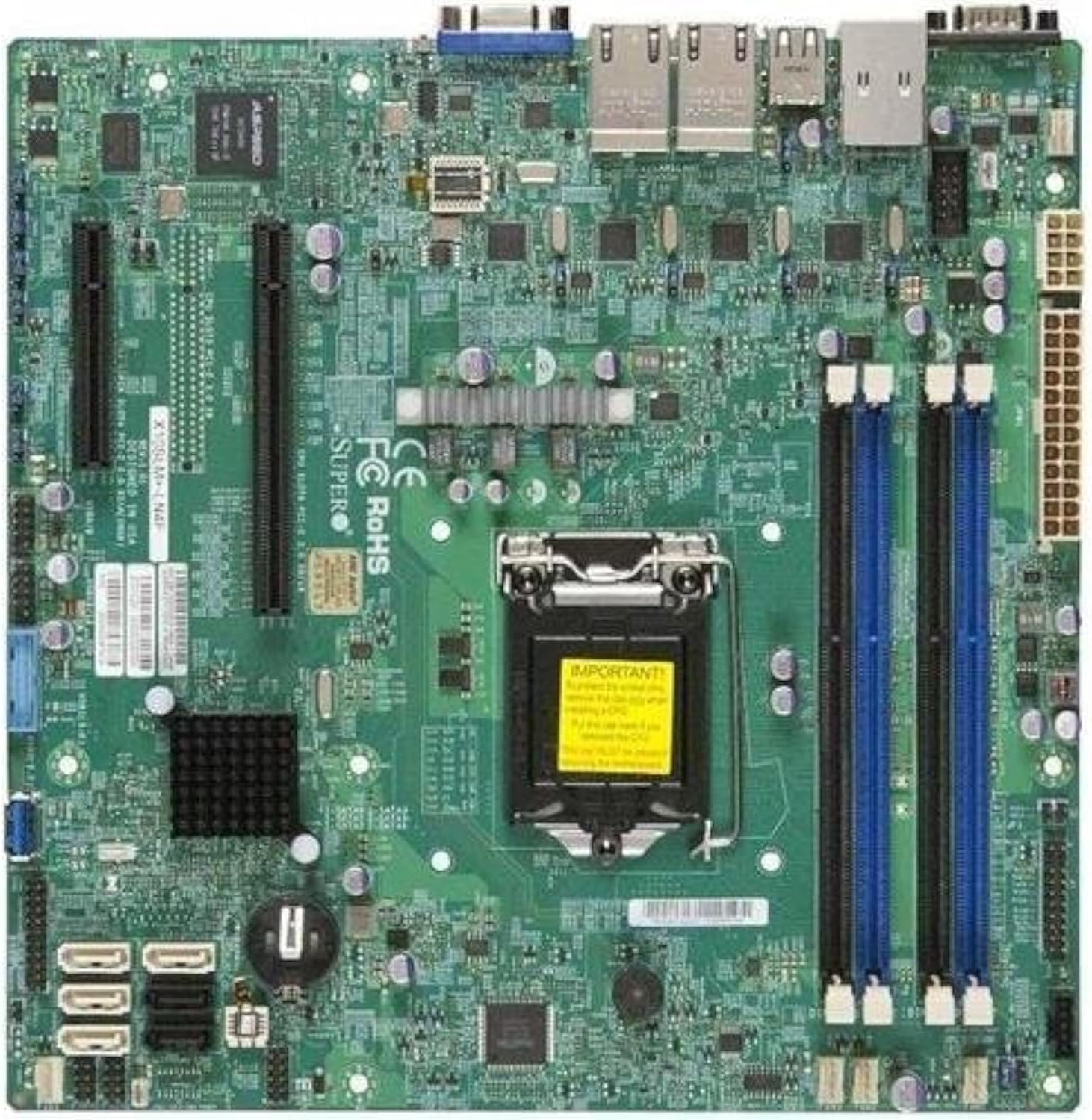
ຮູບທີ 2.1: ລົງລຸ່ມ view of the Supermicro X10SLM+-LN4F motherboard, showing the CPU socket, DIMM slots, PCIe slots, and various connectors.

ຮູບທີ 2.2: ມຸມ view of the motherboard, highlighting the layout of components and expansion slots.
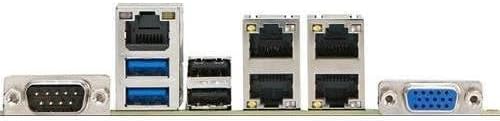
ຮູບທີ 2.3: Rear I/O panel of the Supermicro X10SLM+-LN4F motherboard, featuring multiple LAN ports, USB ports, and serial ports.
3. ການຕິດຕັ້ງແລະການຕິດຕັ້ງ
Before beginning installation, ensure your system is powered off and disconnected from the power source. Wear an anti-static wrist strap to prevent electrostatic discharge (ESD) damage to components.
3.1. ການຕິດຕັ້ງ CPU
- ຊອກຫາຊັອກເກັດ CPU LGA1150 ຢູ່ໃນເມນບອດ.
- ຄ່ອຍໆກົດຄັນຍົກລົງ ແລະ ດຶງມັນໄປທາງຂ້າງເພື່ອເປີດກອບຮັກສາຊັອກເກັດ CPU.
- ວາງເຄື່ອງໝາຍສາມຫຼ່ຽມໃສ່ CPU ຢ່າງລະມັດລະວັງດ້ວຍເຄື່ອງໝາຍທີ່ສອດຄ້ອງກັນຢູ່ໃນເຕົ້າຮັບ.
- ໃສ່ CPU ເຂົ້າໄປໃນຊັອກເກັດໂດຍບໍ່ຕ້ອງບັງຄັບມັນ.
- ປິດກອບການເກັບຮັກສາແລະຮັບປະກັນມັນດ້ວຍ lever ໂຫຼດ.
- ນຳໃຊ້ແຜ່ນລະບາຍຄວາມຮ້ອນບາງໆ, ແມ້ແຕ່ຊັ້ນໃສ່ເຄື່ອງກະຈາຍຄວາມຮ້ອນລວມຂອງ CPU (IHS).
- ຕິດຕັ້ງ CPU cooler ຕາມຄໍາແນະນໍາຂອງຜູ້ຜະລິດ.
3.2. ການຕິດຕັ້ງຫນ່ວຍຄວາມຈໍາ (RAM).
- Locate the four DDR3 DIMM slots. For optimal performance, refer to the motherboard's specific memory population guidelines, typically starting with slots closest to the CPU or specific colored slots for dual-channel configurations.
- ເປີດຄລິບເກັບຮັກສາໄວ້ຢູ່ທັງສອງສົ້ນຂອງຊ່ອງສຽບ DIMM.
- ວາງຈຸດໃສ່ໃນໂມດູນຄວາມຈຳ DDR3 ດ້ວຍກະແຈໃນຊ່ອງສຽບ DIMM.
- ໃສ່ໂມດູນໜ່ວຍຄວາມຈຳເຂົ້າໄປໃນຊ່ອງໃຫ້ແໜ້ນຈົນກວ່າຄລິບຈະຕິດເຂົ້າທີ່.
- Ensure both clips are fully closed and the module is seated correctly.
3.3. ການຕິດຕັ້ງອຸປະກອນການເກັບຮັກສາ
Connect SATA storage devices (HDDs/SSDs) to the SATA ports on the motherboard using SATA data cables. Connect the power cables from your power supply unit (PSU) to the storage devices.
3.4. ການຕິດຕັ້ງບັດຂະຫຍາຍ
This motherboard features PCI Express (PCIe) slots. To install an expansion card:
- Remove the corresponding slot cover from your chassis.
- ຈັດວາງແຜ່ນຂະຫຍາຍດ້ວຍຊ່ອງສຽບ PCIe.
- ກົດລົງໃຫ້ແໜ້ນຈົນກວ່າບັດຈະໃສ່ລົງໃນຊ່ອງໝົດແລ້ວ.
- Secure the card with a screw or retention clip from your chassis.
3.5. ການເຊື່ອມຕໍ່ພະລັງງານ
- ຕົວເຊື່ອມຕໍ່ໄຟ ATX 24-pin: Connect the main 24-pin power cable from your PSU to the ATX power connector on the motherboard.
- 8-pin EPS/CPU Power Connector: Connect the 8-pin (or 4+4 pin) CPU power cable from your PSU to the EPS connector near the CPU socket.
3.6. ແຜງໜ້າ ແລະ ການເຊື່ອມຕໍ່ I/O ດ້ານຫຼັງ
- ຕົວເຊື່ອມຕໍ່ແຜງໜ້າ: Connect the power switch, reset switch, power LED, and HDD activity LED cables from your chassis to the corresponding pins on the motherboard's front panel header. Refer to the motherboard's silkscreen labels for correct orientation.
- ສ່ວນຫົວ USB: Connect front panel USB ports to the onboard USB headers.
- ສ່ວນຫົວສຽງ: Connect front panel audio jacks to the onboard audio header.
- ແຜງ I/O ດ້ານຫຼັງ: Connect peripherals such as keyboard, mouse, monitor (via VGA), and network cables (to the Gigabit Ethernet ports) to the rear I/O panel.
4. ຄໍາແນະນໍາການດໍາເນີນງານ
4.1. Initial Power On and BIOS/UEFI Setup
- After all components are installed and connected, connect the power cord to the PSU and turn on the power switch on the PSU.
- ກົດປຸ່ມເປີດປິດຢູ່ເທິງຕົວເຄື່ອງຂອງທ່ານ.
- ໃນລະຫວ່າງການທົດສອບດ້ວຍຕົນເອງ Power-On (POST), ຊ້ໍາກົດປຸ່ມ DEL or F2 key (or as indicated on screen) to enter the BIOS/UEFI setup utility.
- In the BIOS/UEFI, configure essential settings such as date and time, boot order, and enable/disable specific features as required for your operating system and hardware.
- ບັນທຶກການປ່ຽນແປງ ແລະອອກຈາກ BIOS/UEFI. ລະບົບຈະປິດເປີດໃໝ່.
4.2. ການຕິດຕັ້ງລະບົບປະຕິບັດການ
To install an operating system (e.g., Windows, Linux, VMware ESXi):
- Insert the operating system installation media (USB drive or DVD) into the system.
- Boot from the installation media (you may need to adjust the boot order in BIOS/UEFI).
- Follow the on-screen prompts to install the operating system on your chosen storage device.
- After installation, install all necessary drivers for the motherboard components (chipset, LAN, VGA, etc.) from the Supermicro website or the provided driver disc.
5. ບໍາລຸງຮັກສາ
ການບຳລຸງຮັກສາແບບປົກກະຕິຈະຊ່ວຍຮັບປະກັນການໃຊ້ງານທີ່ຍາວນານ ແລະ ຄວາມໝັ້ນຄົງຂອງເມນບອດ ແລະລະບົບຂອງທ່ານ.
5.1. ທໍາຄວາມສະອາດ
- Periodically clean dust from the motherboard and system components using compressed air. Ensure the system is powered off and unplugged before cleaning.
- ຫຼີກເວັ້ນການນໍາໃຊ້ເຄື່ອງເຮັດຄວາມສະອາດຂອງແຫຼວໂດຍກົງໃສ່ອົງປະກອບ.
- Ensure proper airflow within the chassis by keeping fan vents clear.
5.2. Firmware and Driver Updates
- ກວດເບິ່ງ Supermicro website periodically for updated BIOS/UEFI firmware and drivers for your motherboard model.
- Follow the provided instructions carefully when updating firmware to avoid system instability.
5.3. ການພິຈາລະນາດ້ານສິ່ງແວດລ້ອມ
- ໃຫ້ໃຊ້ງານເມນບອດພາຍໃນລະດັບອຸນຫະພູມ ແລະ ຄວາມຊຸ່ມຊື່ນທີ່ແນະນຳເພື່ອປ້ອງກັນຄວາມເສຍຫາຍ.
- Ensure adequate ventilation in the server chassis.
6. ການແກ້ໄຂບັນຫາ
ພາກນີ້ສະຫນອງການແກ້ໄຂບັນຫາທົ່ວໄປທີ່ທ່ານອາດຈະພົບ.
6.1. ບໍ່ມີພະລັງງານ / ບໍ່ມີ POST (Power-On Self-Test)
- Verify that the power supply unit (PSU) is connected correctly to the motherboard (24-pin ATX and 8-pin EPS connectors).
- Ensure the PSU is switched on and receiving power from the wall outlet.
- Check that the front panel power switch cable is correctly connected to the motherboard header.
- Reseat the CPU, RAM modules, and any expansion cards.
- ລອງບູດດ້ວຍພຽງແຕ່ອົງປະກອບທີ່ຈຳເປັນ (CPU, RAM stick ໜຶ່ງອັນ, ຕົວເຮັດຄວາມເຢັນ CPU) ເພື່ອແຍກບັນຫາ.
- Listen for beep codes from the system speaker, which can indicate specific hardware failures. Refer to the Supermicro website for beep code interpretations.
6.2. ສະແດງບັນຫາ
- Ensure the monitor is properly connected to the motherboard's VGA port.
- ກວດສອບວ່າຈໍພາບເປີດຢູ່ ແລະຕັ້ງເປັນແຫຼ່ງປ້ອນຂໍ້ມູນທີ່ຖືກຕ້ອງ.
- If using a discrete graphics card, ensure it is properly seated and connected to power (if required).
6.3. ລະບົບປະຕິບັດການບໍ່ເປີດ
- Check the boot order in the BIOS/UEFI to ensure the correct storage device is prioritized.
- Verify that the operating system is installed correctly on the storage device.
- Ensure SATA data and power cables are securely connected to the storage device and motherboard.
7. ຂໍ້ມູນຈໍາເພາະ
Below are the technical specifications for the Supermicro X10SLM+-LN4F motherboard:
| ຄຸນສົມບັດ | ລາຍລະອຽດ |
|---|---|
| ຍີ່ຫໍ້ | ຊຸບເປີໄມໂຄ |
| ຊື່ຕົວແບບ | X10SLM+-LN4F-B |
| ເຕົ້າສຽບ CPU | LGA1150 |
| ປະເພດຊິບເຊັດ | Intel C224 |
| ເທກໂນໂລຍີຫນ່ວຍຄວາມຈໍາ RAM | DDR3 SDRAM |
| ຄວາມໄວຄວາມຈໍາ | 1600 MHz |
| ຄວາມອາດສາມາດເກັບຮັກສາຫນ່ວຍຄວາມຈໍາ | ສູງສຸດ 64 GB |
| ຈຳນວນຂອງ USB 2.0 Ports | 2 (I/O ຫລັງ) |
| ການໂຕ້ຕອບບັດກາຟິກ | Integrated, PCI |
| ອຸປະກອນທີ່ເຂົ້າກັນໄດ້ | ເຊີບເວີ |
| ເວທີ | Windows 10 |
| ນ້ໍາຫນັກລາຍການ | 5.8 ປອນ |
| ຂະໜາດສິນຄ້າ (LxWxH) | 10 x 10 x 2 ນິ້ວ |
| ວັນທີທໍາອິດທີ່ມີ | ວັນທີ 4 ມິຖຸນາ 2013 |
Note: Specifications are subject to change without notice. For the most current information, please refer to the official Supermicro product page.
8. ການຮັບປະກັນແລະການສະຫນັບສະຫນູນ
For detailed warranty information, please refer to the warranty card included with your product or visit the official Supermicro website. Technical support is available through Supermicro's customer service channels, including their support portal, email, and phone. Please have your product model number (X10SLM+-LN4F) and serial number ready when contacting support.
For the latest drivers, BIOS updates, and additional documentation, please visit: www.supermicro.com


