ແນະນຳ
This manual provides essential information for the safe and effective use of your Olympus PEN E-PL6 Mirrorless SLR Camera. Please read it thoroughly before operating the camera and keep it for future reference. The Olympus PEN E-PL6 is designed to deliver superior image quality and performance, featuring a 16 MP Live MOS Sensor and TruePic VI image processing engine.
ສິນຄ້າເກີນview
The Olympus PEN E-PL6 offers advanced photographic capabilities in a compact mirrorless body. Key features include:
- 16 Megapixel Live MOS Sensor: For high-resolution images with rich detail.
- TruePic VI Image Processing Engine: Ensures vibrant colors and fast performance.
- 3-Axis In-Body Image Stabilization: Reduces blur from camera shake, especially in low light.
- ISO Range from 100 to 25,600: Excellent low-light performance.
- 8 fps Sequential Shooting: Capture fast-moving subjects with ease.
- Full HD Video 1080i: ບັນທຶກວິດີໂອຄວາມລະອຽດສູງ.
- 12 Art Filters and Effects: Enhance creativity directly in-camera.
- Customizable Settings (My Set) and Self-Timer: Personalize your shooting experience.
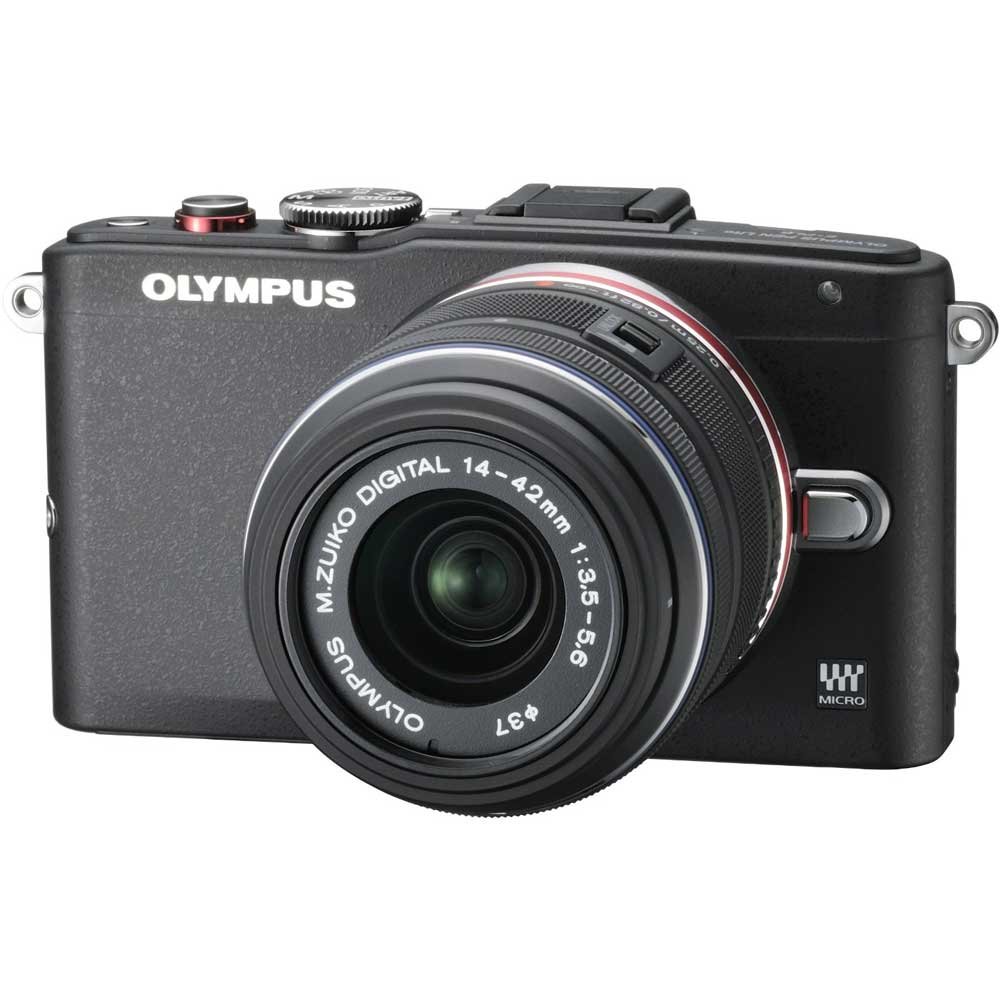
Figure 1: Olympus PEN E-PL6 Mirrorless SLR Camera with M.Zuiko Digital 14-42mm Lens attached.
ຕັ້ງຄ່າ
1. ການຕິດຕັ້ງຫມໍ້ໄຟ
- ເປີດຝາປິດຊ່ອງໃສ່ຫມໍ້ໄຟທີ່ຕັ້ງຢູ່ດ້ານລຸ່ມຂອງກ້ອງຖ່າຍຮູບ.
- Insert the supplied Lithium-Ion battery, ensuring the correct orientation.
- ປິດຝາປິດຊ່ອງໃສ່ຫມໍ້ໄຟຢ່າງປອດໄພ.
- Charge the battery using the provided charger before first use.
2. ແນບເລນ
- Remove the body cap from the camera and the rear lens cap from the M.Zuiko Digital 14-42mm lens.
- ວາງເຄື່ອງໝາຍດັດຊະນີສີຂາວຢູ່ກ້ອງເລນດ້ວຍເຄື່ອງໝາຍດັດຊະນີສີຂາວຢູ່ໃນຕົວກ້ອງ.
- ຕິດເລນໂດຍການໝຸນຕາມເຂັມໂມງຈົນກວ່າມັນຈະກົດໃສ່ບ່ອນ.
3. ການໃສ່ກາດຫນ່ວຍຄວາມຈໍາ
- ເປີດຝາປິດຊ່ອງໃສ່ກາດໜ່ວຍຄວາມຈຳ.
- Insert an SD/SDHC/SDXC memory card with the label facing the front of the camera until it clicks.
- ປິດຝາປິດຊ່ອງສຽບກາດຄວາມຈຳ.
ປະຕິບັດການກ້ອງຖ່າຍຮູບ
ຮູບແບບການຖ່າຍຮູບພື້ນຖານ
Turn the mode dial to select your desired shooting mode (e.g., Program Auto, Aperture Priority, Shutter Priority, Manual, Art Filter, Scene Mode).
ສຸມໃສ່
- ໂຟກັສອັດຕະໂນມັດ (AF): ກ້ອງຖ່າຍຮູບຈະໂຟກັສອັດຕະໂນມັດເມື່ອກົດປຸ່ມຊັດເຕີລົງເຄິ່ງໜຶ່ງ.
- Manual Focus (MF): Rotate the focus ring on the lens to adjust focus manually. Use the magnified view or focus peaking for precision.
ການຕັ້ງຄ່າການຮັບແສງ
- ISO: Adjust sensitivity to light (ISO 100-25600). Higher ISO allows shooting in darker conditions but may introduce noise.
- ຮູຮັບແສງ: Controls the amount of light entering the lens and the depth of field.
- ຄວາມໄວຊັດເຕີ: Controls the duration the sensor is exposed to light. Faster speeds freeze motion, slower speeds allow for motion blur.
ສະຖຽນລະພາບຮູບພາບ
The 3-axis in-body image stabilization system helps reduce blur. Activate or deactivate it via the camera's menu settings.
Art Filters and Effects
Explore the 12 built-in Art Filters to add creative effects to your photos and videos. Select 'ART' on the mode dial to access these options.
ການບັນທຶກວິດີໂອ
To record Full HD 1080i video, switch the mode dial to the video recording setting and press the dedicated video record button.
ການຕັ້ງຄ່າທີ່ສາມາດປັບແຕ່ງໄດ້
Utilize the 'My Set' feature to save your preferred camera settings for quick recall. The customizable self-timer allows for delayed shooting.
ບໍາລຸງຮັກສາ
ການທຳຄວາມສະອາດກ້ອງຖ່າຍຮູບ ແລະ ເລນ
- ໃຊ້ຜ້າທີ່ອ່ອນໆ, ບໍ່ມີສານດ່າງເພື່ອເຮັດຄວາມສະອາດຕົວກ້ອງຖ່າຍຮູບ.
- For the lens and sensor, use a blower brush to remove dust, followed by a lens cleaning solution and cloth if necessary. Avoid touching the lens surface directly.
ການດູແລຫມໍ້ໄຟ
- ເກັບຮັກສາຫມໍ້ໄຟໃນບ່ອນທີ່ເຢັນ, ແຫ້ງໃນເວລາທີ່ບໍ່ໄດ້ໃຊ້.
- Avoid fully discharging batteries regularly to prolong their lifespan.
ການເກັບຮັກສາ
When storing the camera for extended periods, remove the battery and memory card. Store the camera in a dry, dust-free environment, preferably with a desiccant to prevent mold.
ການແກ້ໄຂບັນຫາ
ກ້ອງຖ່າຍຮູບບໍ່ເປີດ
- ກວດໃຫ້ແນ່ໃຈວ່າໄດ້ສາກແບັດເຕີຣີເຕັມ ແລະໃສ່ຢ່າງຖືກຕ້ອງ.
- ກວດເບິ່ງວ່າຕົວຕິດຕໍ່ຫມໍ້ໄຟແມ່ນສະອາດຫຼືບໍ່.
ຮູບພາບມົວ
- Verify that the lens is properly focused.
- Check shutter speed; use a faster speed or tripod in low light.
- Ensure image stabilization is active if needed.
ກາດຄວາມຈຳຜິດພາດ
- ໃສ່ກາດໜ່ວຍຄວາມຈຳຄືນໃໝ່.
- Try a different memory card to rule out card malfunction.
- ຟໍແມັດກາດໜ່ວຍຄວາມຈຳ (ໝາຍເຫດ: ນີ້ຈະລຶບຂໍ້ມູນທັງໝົດ).
ຂໍ້ມູນຈໍາເພາະ
| ຄຸນສົມບັດ | ຂໍ້ມູນຈໍາເພາະ |
|---|---|
| ໝາຍເລກຕົວແບບ | PEN E-PL6 |
| ເຊັນເຊີ | 16 Megapixel Live MOS |
| ໂປເຊດເຊີຮູບພາບ | TruePic VI |
| ສະຖຽນລະພາບຮູບພາບ | 3-Axis In-Body, Sensor-shift |
| ຊ່ວງ ISO | 100 to 25,600 (Expanded Minimum 100) |
| ການບັນທຶກວິດີໂອ | Full HD 1080i |
| ສະຫນັບສະຫນູນ File ຮູບແບບ | RAW (Olympus ARW), JPEG, MPO (3D still) |
| ການຕິດຕັ້ງທີ່ເຂົ້າກັນໄດ້ | ຈຸນລະພາກສີ່ສ່ວນສາມ |
| Optical Zoom (with 14-42mm lens) | 3x |
| Maximum Focal Length (with 14-42mm lens) | 42 ມິນລິແມັດ |
| ລາຍລະອຽດການວັດແທກ | ຫຼາຍ, ສູນນ້ຳໜັກ, ຈຸດ |
| ຂະໜາດສິນຄ້າ | 4.37 x 1.5 x 2.52 ນິ້ວ |
| ນ້ໍາຫນັກລາຍການ | 9.8 ອອນ |
| ໝໍ້ໄຟ | ແບັດເຕີຣີ Lithium Ion 1 ອັນ (ລວມ) |
| ຜູ້ຜະລິດ | ໂອລິມປັສ |
ການຮັບປະກັນແລະການສະຫນັບສະຫນູນ
Your Olympus PEN E-PL6 camera is covered by a manufacturer's warranty. For specific details regarding warranty coverage, duration, and terms, please refer to the warranty card included with your product or visit the official Olympus support website. For technical assistance, troubleshooting, or service inquiries, please contact Olympus customer support.