ແນະນຳ
This manual provides instructions for the Vivanco RR 220 remote control, designed for compatibility with Samsung Smart TVs. Please read this manual thoroughly before using the device to ensure proper operation and to understand its features.
ເນື້ອໃນຊຸດ
- Vivanco RR 220 Remote Control
- ຄູ່ມືຜູ້ໃຊ້ນີ້
ຫມາຍເຫດ: ຫມໍ້ໄຟບໍ່ໄດ້ລວມແລະຕ້ອງໄດ້ຮັບການຊື້ແຍກຕ່າງຫາກ.
ຕັ້ງຄ່າ
1. ການຕິດຕັ້ງຫມໍ້ໄຟ
- ຊອກຫາຊ່ອງໃສ່ຫມໍ້ໄຟຢູ່ດ້ານຫຼັງຂອງການຄວບຄຸມໄລຍະໄກ.
- ເລື່ອນຝາປິດແບັດເຕີຣີລົງລຸ່ມ ຫຼື ກົດສະກູແລະຍົກຂຶ້ນເພື່ອເປີດ.
- ໃສ່ແບັດເຕີຣີ AAA ສອງ (2) ກ້ອນ, ຮັບປະກັນວ່າຂົ້ວບວກ (+) ແລະຂົ້ວລົບ (-) ສອດຄ່ອງກັບເຄື່ອງໝາຍພາຍໃນຊ່ອງ.
- ປິດຝາປິດແບັດເຕີຣີຄືນ, ຮັບປະກັນວ່າມັນເຂົ້າທີ່ຢ່າງແໜ້ນໜາແລ້ວ.
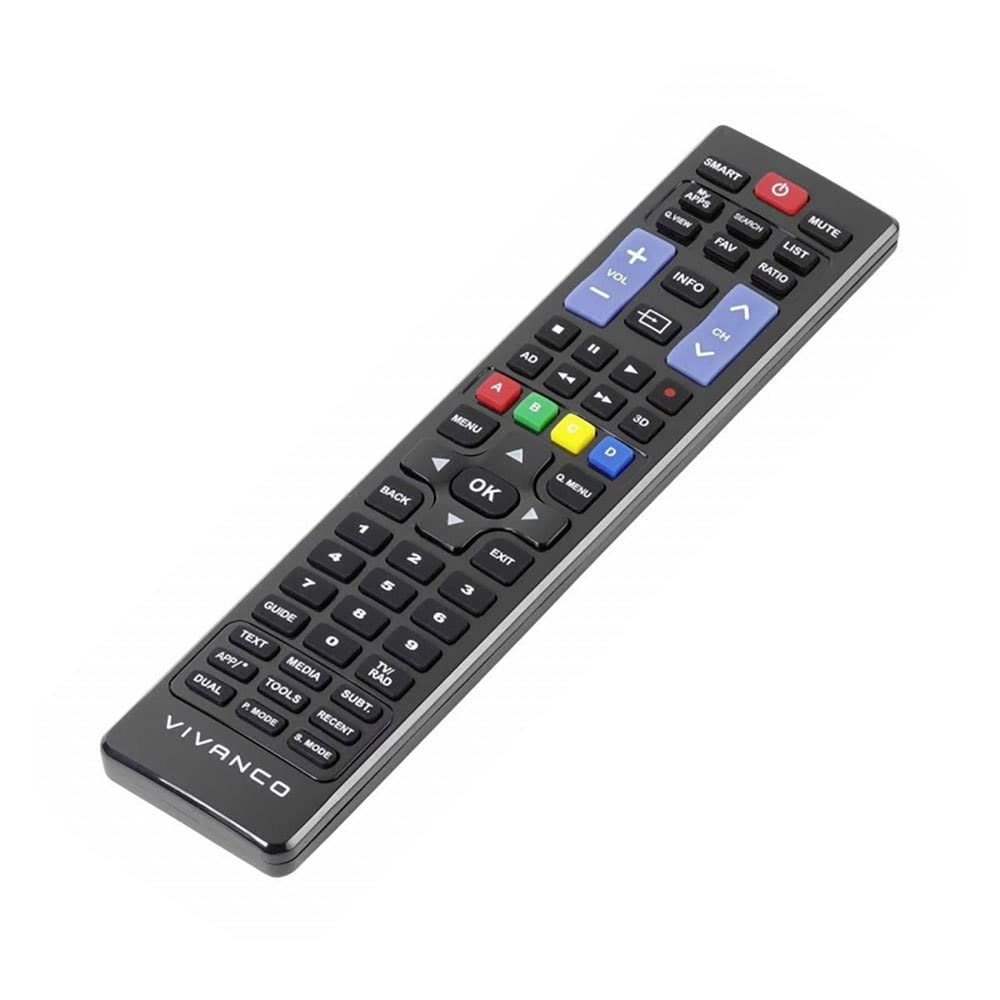
ຮູບພາບ 1: Vivanco RR 220 remote control. This image displays the front of the remote control, highlighting its 57 buttons and ergonomic design. The battery compartment is located on the reverse side.
2. ການນໍາໃຊ້ເບື້ອງຕົ້ນ
The Vivanco RR 220 is pre-programmed for Samsung Smart TVs. No additional setup or pairing is typically required. Once batteries are installed, point the remote control towards your Samsung Smart TV and press the Power button to test functionality.
ຄໍາແນະນໍາການດໍາເນີນງານ
The remote control features 57 buttons, providing comprehensive control over your Samsung Smart TV and compatible devices. Below are common button functions:
- ປຸ່ມເປີດປິດ: ເປີດ ຫຼືປິດໂທລະພາບ.
- ປຸ່ມຕົວເລກ (0-9): For direct channel selection or data input.
- ປະລິມານຂຶ້ນ/ລົງ: ປັບລະດັບສຽງ.
- ຊ່ອງຂຶ້ນ/ລົງ: ປ່ຽນຊ່ອງໂທລະພາບ.
- ປິດສຽງ: ປິດສຽງໂທລະພາບ.
- Navigation Pad (ຂຶ້ນ, ລົງ, ຊ້າຍ, ຂວາ, ໃສ່): ໃຊ້ເພື່ອນໍາທາງເມນູແລະເລືອກທາງເລືອກ.
- ປຸ່ມກັບຄືນ/ກັບຄືນ: ກັບຄືນໄປຫາໜ້າຈໍ ຫຼືເມນູກ່ອນໜ້າ.
- Smart Hub/Home Button: Accesses the Smart Hub or main menu of your Samsung Smart TV.
- ທີ່ມາ/ປຸ່ມປ້ອນຂໍ້ມູນ: ເລືອກແຫຼ່ງປ້ອນຂໍ້ມູນ (HDMI, AV, ແລະອື່ນໆ).
- ປຸ່ມສີ (ສີແດງ, ສີຂຽວ, ສີເຫຼືອງ, ສີຟ້າ): For specific functions within certain applications or menus, as indicated on-screen.
- ການຄວບຄຸມການຫຼິ້ນຄືນ (ຫຼິ້ນ, ຢຸດຊົ່ວຄາວ, ຢຸດ, ເລື່ອນໄປໜ້າຢ່າງໄວ, ຖອຍຫຼັງ): ຄວບຄຸມການຫຼິ້ນສື່ໃນອຸປະກອນ ຫຼືແອັບທີ່ເຂົ້າກັນໄດ້.
For specific functions related to your TV model, refer to your Samsung TV's user manual.
ບໍາລຸງຮັກສາ
ການເຮັດຄວາມສະອາດການຄວບຄຸມໄລຍະໄກ
- ໃຊ້ຜ້າປຽກອ່ອນໆເຊັດພື້ນຜິວຂອງຣີໂໝດ.
- ສໍາລັບຝຸ່ນ stubborn, ເລັກນ້ອຍ dampໃສ່ຜ້າດ້ວຍນ້ໍາຫຼືຢາເຮັດຄວາມສະອາດອ່ອນໆ, ບໍ່ມີສານຂັດ.
- ຢ່າໃຊ້ສານເຄມີທີ່ຮຸນແຮງ, ຕົວລະລາຍ ຫຼື ຜ້າເຊັດທຳຄວາມສະອາດທີ່ມີສານຂັດ, ເພາະວ່າສິ່ງເຫຼົ່ານີ້ສາມາດທຳລາຍໜ້າຜິວ ຫຼື ອົງປະກອບພາຍໃນຂອງຣີໂໝດໄດ້.
- Ensure no liquid enters the remote control through button gaps or the battery compartment.
ການປ່ຽນແບັດ
Replace batteries when the remote's response becomes sluggish or it stops functioning. Always replace both batteries simultaneously with new AAA alkaline batteries. Do not mix old and new batteries or different types of batteries.
ການແກ້ໄຂບັນຫາ
| ບັນຫາ | ສາເຫດທີ່ເປັນໄປໄດ້ | ການແກ້ໄຂ |
|---|---|---|
| ການຄວບຄຸມໄລຍະໄກບໍ່ເຮັດວຽກ. |
|
|
| ບາງປຸ່ມໃຊ້ບໍ່ໄດ້. |
|
|
ຂໍ້ມູນຈໍາເພາະ
- ຍີ່ຫໍ້: Vivanco
- ຊື່ຕົວແບບ: RR 220
- ໝາຍເລກຕົວແບບຜະລິດຕະພັນ: 38016
- ອຸປະກອນທີ່ເຂົ້າກັນໄດ້: Home cinema, DVD/Blu-ray player, Television (Samsung Smart TV compatible)
- ເຕັກໂນໂລຍີການເຊື່ອມຕໍ່: Wireless IR (Infrared)
- ຈໍານວນປຸ່ມ: 57
- ປະເພດຫມໍ້ໄຟ: 2 x AAA (Alkaline recommended)
- ແບດເຕີຣີທີ່ປະກອບມີ: ບໍ່
- ຂະໜາດຜະລິດຕະພັນ: 18 x 4.8 x 2.3 cm
- ນ້ຳໜັກສິນຄ້າ: 80 g
- ໄລຍະສູງສຸດ: 15 ແມັດ
- ຄຸນນະສົມບັດພິເສດ: IPTV, DVB-T, HDTV compatibility


