ແນະນຳ
The Logitech MK270 Wireless Keyboard and Mouse Combo provides a reliable and convenient wireless solution for your computing needs. This combo features a 2.4 GHz wireless connection, offering a range of up to 10 meters with minimal delays or dropouts. Designed for ease of use, it includes a full-size keyboard with media hotkeys and a compact, ambidextrous mouse. This manual provides instructions for setup, operation, maintenance, and troubleshooting to ensure optimal performance of your device.
ແມ່ນຫຍັງຢູ່ໃນກ່ອງ
ເມື່ອເປີດແພັກເກັດ, ໃຫ້ກວດເບິ່ງວ່າອົງປະກອບທັງໝົດມີຢູ່:
- Logitech MK270 Wireless Keyboard
- ເມົາສ໌ Logitech ໄຮ້ສາຍ
- ຕົວຮັບ USB Nano
- 2 AAA batteries (for keyboard)
- 1 AA battery (for mouse)


ຄໍາແນະນໍາການຕິດຕັ້ງ
- ຕິດຕັ້ງ ໝໍ້ ໄຟ: Open the battery compartments on the underside of both the keyboard and the mouse. Insert the included AAA batteries into the keyboard and the AA battery into the mouse, ensuring correct polarity (+/-).
- ເຊື່ອມຕໍ່ຕົວຮັບ USB: Locate an available USB port on your computer. Plug the tiny Logitech Nano Receiver into the USB port. The system should automatically detect the receiver and install necessary drivers.
- ເປີດໃຊ້ອຸປະກອນ: Locate the ON/OFF switch on the top right of the keyboard and on the underside of the mouse. Slide both switches to the 'ON' position.
- ການທົດສອບການເຊື່ອມຕໍ່: Once powered on, the keyboard and mouse should be ready for use. Test by typing on the keyboard and moving the mouse cursor. If they do not respond, ensure the receiver is securely plugged in and the devices are powered on.
The Logitech MK270 is designed for plug-and-play simplicity and is compatible with Windows 10 or later, Windows 8, 7, Windows Vista, Windows XP, and Chrome OS. It is not Bluetooth compatible.
ຄໍາແນະນໍາການດໍາເນີນງານ
ຄຸນນະສົມບັດແປ້ນພິມ
- ໂຄງຮ່າງຂະໜາດເຕັມ: The keyboard features a standard full-size layout with deep-profile, quiet keys for comfortable typing.
- Eight Hot Keys: Access frequently used functions instantly with the dedicated hotkeys located above the function row. These include controls for movies, music, internet, email, volume adjustment, and play/pause.
- ປຸ່ມເປີດ/ປິດ: Conserve battery life by using the ON/OFF switch located on the top right of the keyboard when not in use.


ຄຸນນະສົມບັດຫນູ
- Compact and Ambidextrous Design: The mouse is designed for comfortable control, suitable for both left and right-handed users.
- ການຕິດຕາມທີ່ລຽບງ່າຍ: Provides responsive and accurate cursor control.
- 10m Wireless Range: Maintain a reliable connection up to 10 meters from your computer.
- ການເກັບຮັກສາຜູ້ຮັບ: The USB Nano Receiver can be conveniently stored inside the mouse when not in use, making it ideal for portability.
- ປຸ່ມເປີດ/ປິດ: An ON/OFF switch on the underside of the mouse helps conserve battery power.


ບໍາລຸງຮັກສາ
ການຄຸ້ມຄອງຫມໍ້ໄຟ
The Logitech MK270 combo is designed for extended battery life:
- ອາຍຸການໃຊ້ງານແບັດເຕີຣີຂອງແປ້ນພິມ: Up to 36 months (3 years) with typical use.
- ອາຍຸການໃຊ້ງານແບັດເຕີຣີຂອງເມົ້າ: Up to 12 months with typical use.
Battery life may vary based on user and computing conditions. To maximize battery life, always use the ON/OFF switches on both the keyboard and mouse when not in use. The devices also feature an auto-sleep function to conserve power during periods of inactivity.

ທໍາຄວາມສະອາດ
To clean your devices, use a soft, damp cloth. Avoid using harsh chemicals or abrasive cleaners, as these can damage the surfaces. Ensure devices are powered off before cleaning.
ການແກ້ໄຂບັນຫາ
- ບໍ່ມີການຕອບສະໜອງຈາກແປ້ນພິມ/ເມົາສ໌:
- Ensure both the keyboard and mouse are switched 'ON'.
- Check that the USB Nano Receiver is securely plugged into a working USB port on your computer.
- Replace the batteries in both the keyboard and mouse. Low batteries are a common cause of connectivity issues.
- ລອງສຽບຕົວຮັບ USB ເຂົ້າໄປໃນຜອດ USB ອື່ນ.
- ການເຊື່ອມຕໍ່ທີ່ບໍ່ຕໍ່ເນື່ອງ ຫຼື ການຊັກຊ້າ:
- Move the keyboard and mouse closer to the USB receiver. The optimal range is up to 10 meters, but environmental factors (e.g., metal objects, other wireless devices) can reduce this.
- Avoid placing the receiver near other electrical devices that may cause interference (e.g., speakers, monitors, Wi-Fi routers).
- If using a USB hub, try connecting the receiver directly to a USB port on your computer.
- Hotkeys Not Working:
- ໃຫ້ແນ່ໃຈວ່າລະບົບປະຕິບັດການຂອງທ່ານອັບເດດແລ້ວ.
- While plug-and-play, some advanced functions or specific hotkey behaviors might benefit from Logitech's optional software, available on their official support webເວັບໄຊ.
ຂໍ້ມູນຈໍາເພາະ
| ຍີ່ຫໍ້ | Logitech |
| ໝາຍເລກຕົວແບບ | 920-004536 |
| ເຕັກໂນໂລຊີການເຊື່ອມຕໍ່ | ໄຮ້ສາຍ (ຄວາມຖີ່ວິທະຍຸ 2.4 GHz) |
| Range ໄຮ້ສາຍ | ສູງເຖິງ 10 ແມັດ (33 ຟຸດ) |
| ອາຍຸແບັດເຕີຣີຂອງແປ້ນພິມ | ສູງສຸດ 36 ເດືອນ (3 ປີ) |
| ຊີວິດຫມໍ້ໄຟຂອງຫນູ | ເຖິງ 12 ເດືອນ |
| ຄວາມເຂົ້າກັນໄດ້ຂອງລະບົບປະຕິບັດການ | Windows 10, Windows 7, Windows 8, Windows Vista, Windows XP, Chrome OS |
| ຂະໜາດແປ້ນພິມ (ຍxກxສ) | 441 mm x 149 mm x 18 mm (ປະມານ 17.36 x 5.87 x 0.71 ນິ້ວ) |
| ນ້ຳໜັກແປ້ນພິມ | 481 g (ປະມານ 1.06 lbs) |
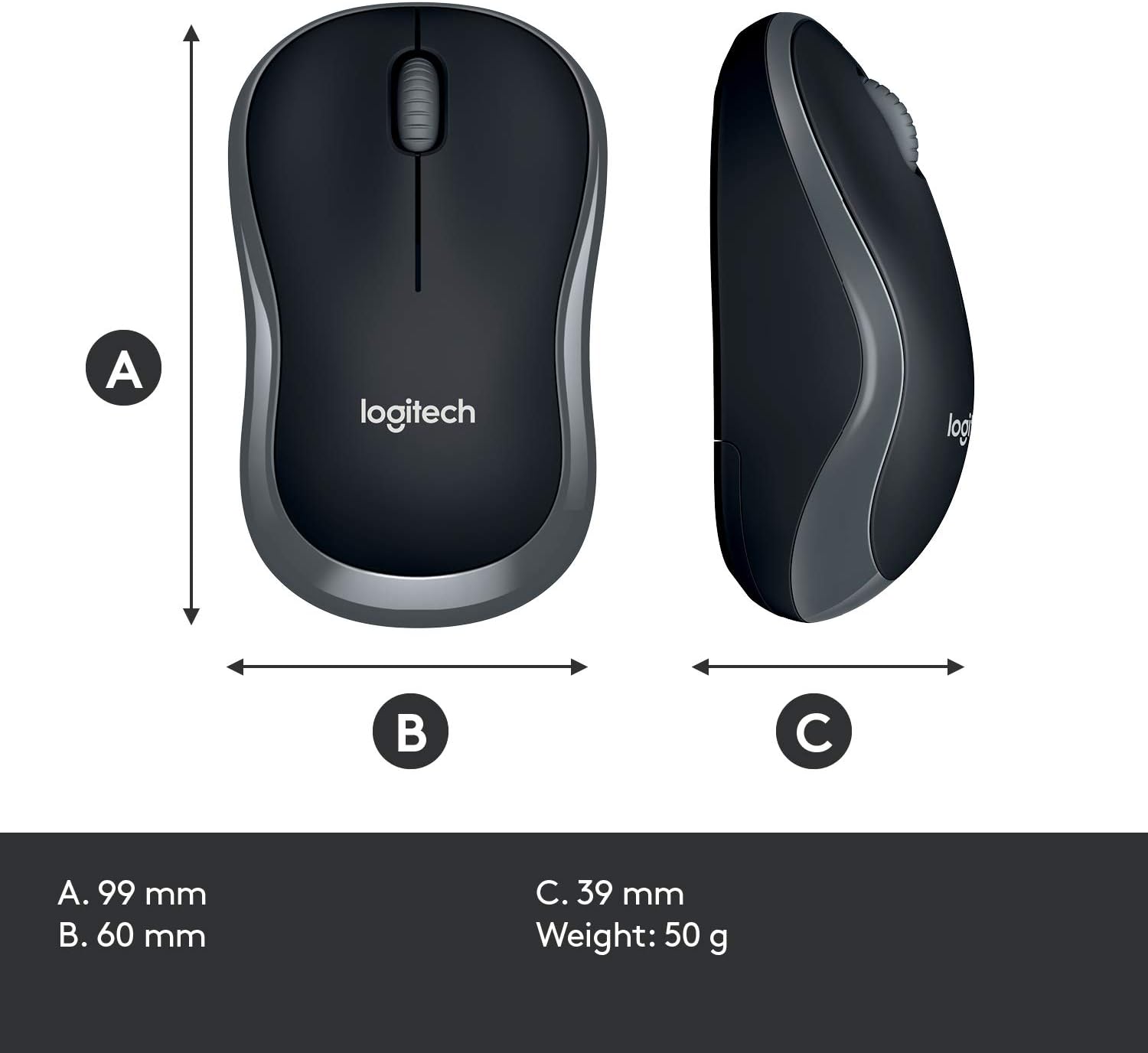
| ຂະໜາດເມົ້າ (ຍxກxສ) | 99 mm x 60 mm x 39 mm (ປະມານ 3.90 x 2.36 x 1.54 ນິ້ວ) |
| ນ້ຳໜັກຫນູ | 50 g (ປະມານ 0.11 lbs) |
| ສີ | ດຳ |

ການຮັບປະກັນແລະການສະຫນັບສະຫນູນ
Warranty information for the Logitech MK270 Wireless Keyboard and Mouse Combo is typically provided with your product packaging or can be found on the official Logitech website. Please refer to these resources for specific warranty terms and conditions.
ສຳລັບການຊ່ວຍເຫຼືອເພີ່ມເຕີມ, ການສະໜັບສະໜູນດ້ານເຕັກນິກ, ຫຼື ເພື່ອດາວໂຫຼດໄດຣເວີ ແລະ ຊອບແວລ່າສຸດ, ກະລຸນາເຂົ້າເບິ່ງທີ່ຝ່າຍສະໜັບສະໜູນ Logitech ຢ່າງເປັນທາງການ webເວັບໄຊ:


