ແນະນຳ
ຂອບໃຈສໍາລັບການຊື້asing the iCES IBT-1 Portable Bluetooth Speaker. This manual provides essential information for setting up, operating, and maintaining your device. Please read it carefully before use to ensure optimal performance and longevity.
ເນື້ອໃນຊຸດ
ໃຫ້ແນ່ໃຈວ່າທຸກລາຍການຢູ່ໃນຊຸດ:
- iCES IBT-1 Portable Bluetooth Speaker
- Mini USB Charging Cable
- ຄູ່ມືຜູ້ໃຊ້ (ເອກະສານນີ້)
ສິນຄ້າເກີນview
The iCES IBT-1 is a compact and versatile portable speaker designed for wireless audio playback via Bluetooth. It also supports audio playback from Micro SD cards and external devices via its AUX input.

Image: Two iCES IBT-1 speakers, one red and one silver, highlighting the product's design and portability.
ການລະບຸອົງປະກອບ
Familiarize yourself with the speaker's various ports and controls:
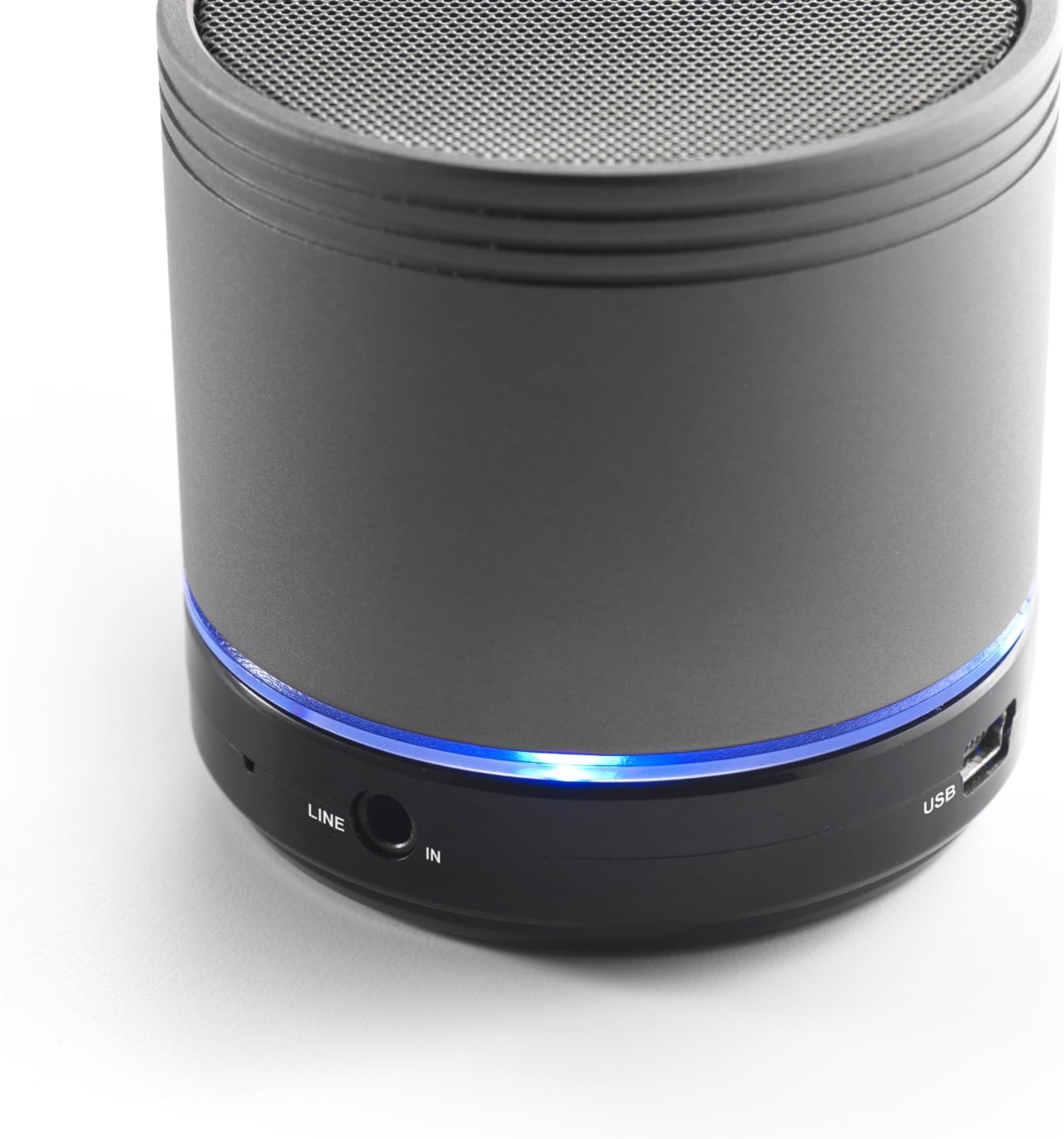
Image: Bottom section of the iCES IBT-1 speaker, displaying the LINE IN and USB ports, along with a glowing blue LED indicator.
- ພອດ USB: ສໍາລັບການຊາດຫມໍ້ໄຟພາຍໃນ.
- ພອດ LINE IN (AUX): ສຳລັບການເຊື່ອມຕໍ່ອຸປະກອນສຽງພາຍນອກໂດຍໃຊ້ສາຍສຽງ 3.5 ມມ.
- ຊ່ອງໃສ່ Micro SD Card: ສໍາລັບການຫຼິ້ນສຽງ files directly from a Micro SD card.
- ສັບປ່ຽນພະລັງງານ: ON/OFF control for the speaker.
- ປຸ່ມຄວບຄຸມ: Play/Pause, Volume Up/Next Track, Volume Down/Previous Track.
- ຕົວຊີ້ວັດ LED: ສະແດງສະຖານະການພະລັງງານ, ສະຖານະການສາກໄຟ, ແລະສະຖານະການຈັບຄູ່ Bluetooth.
ຕັ້ງຄ່າ
ກຳລັງສາກແບັດເຕີຣີ
Before first use, fully charge the speaker's internal battery. Use the provided Mini USB cable.
- Connect the Mini USB end of the cable to the USB port on the speaker.
- ເຊື່ອມຕໍ່ປາຍ USB ມາດຕະຖານຂອງສາຍກັບອະແດັບເຕີໄຟ USB (ບໍ່ລວມ) ຫຼືພອດ USB ຂອງຄອມພິວເຕີ.
- ໄຟ LED ຈະສະຫວ່າງຂຶ້ນເພື່ອສະແດງສະຖານະການສາກໄຟ. ມັນຈະປ່ຽນ ຫຼື ປິດລົງເມື່ອສາກເຕັມແລ້ວ.
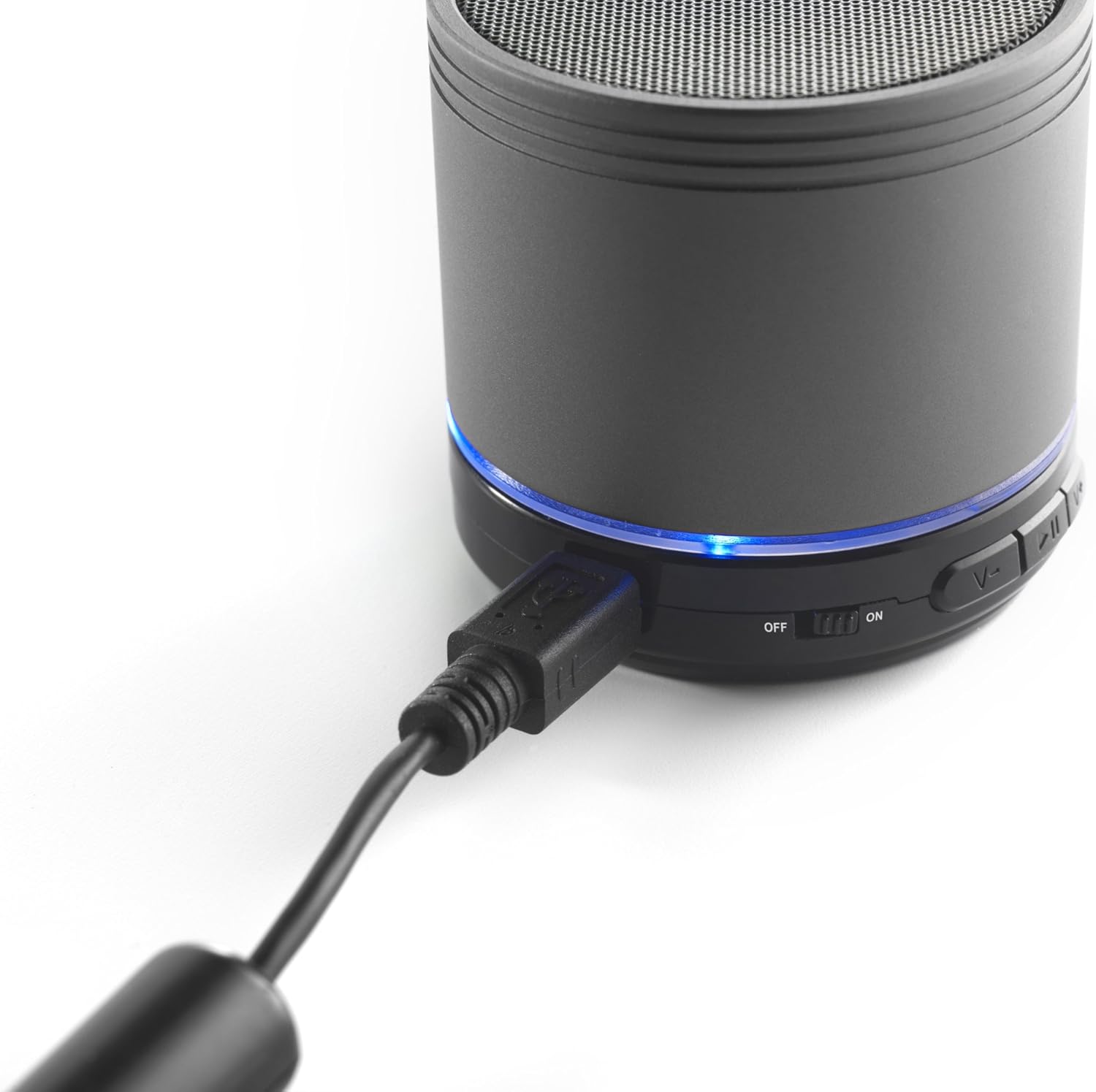
Image: The iCES IBT-1 speaker with the mini USB charging cable connected, illustrating the charging process.
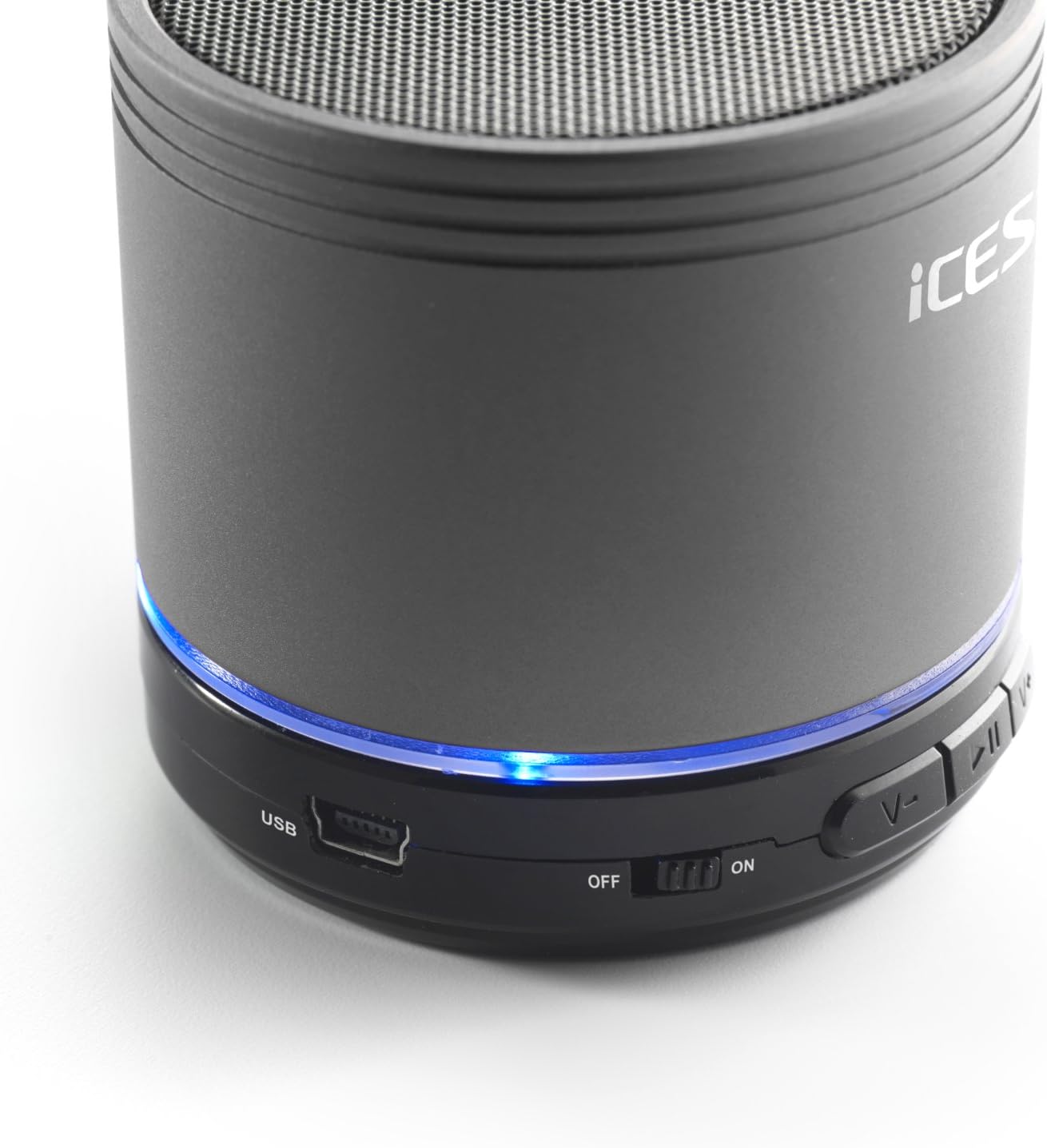
Image: The iCES IBT-1 speaker's base, highlighting the USB port and the power switch in the 'ON' position.
ຄໍາແນະນໍາການດໍາເນີນງານ
ເປີດ/ປິດ
- To power on, slide the power switch to the "ON" position. The LED indicator will light up.
- To power off, slide the power switch to the "OFF" position. The LED indicator will turn off.
ການເຊື່ອມຕໍ່ Bluetooth
- Ensure the speaker is powered on. The LED indicator will flash, indicating it's in pairing mode.
- ໃນອຸປະກອນທີ່ເປີດໃຊ້ Bluetooth ຂອງທ່ານ (ໂທລະສັບສະຫຼາດ, ແທັບເລັດ, ແລະອື່ນໆ), ໄປທີ່ການຕັ້ງຄ່າ Bluetooth.
- ຊອກຫາ available devices. You should see "IBT-1" in the list.
- Select "IBT-1" to pair. Once connected, the LED indicator will stop flashing and remain solid.
- You can now play audio from your device through the iCES IBT-1 speaker.
ການຫຼີ້ນບັດ SD Micro
The speaker supports Micro SD cards up to 32 GB.
- Insert a Micro SD card (with audio files) into the Micro SD card slot on the speaker.
- The speaker will automatically switch to Micro SD card mode and begin playing audio.
- Use the control buttons on the speaker to play/pause, skip tracks, or adjust volume.

Image: The iCES IBT-1 speaker's base, illustrating the Micro SD card slot and the LINE IN port.
AUX Input Playback
Connect external audio devices without Bluetooth capability.
- Connect one end of a 3.5mm audio cable (not included) to the LINE IN port on the speaker.
- Connect the other end of the 3.5mm audio cable to the headphone jack or audio output of your external device (e.g., MP3 player).
- ລຳໂພງຈະປ່ຽນເປັນໂໝດ AUX ໂດຍອັດຕະໂນມັດ.
- ຄວບຄຸມການຫຼິ້ນ ແລະລະດັບສຽງຈາກອຸປະກອນພາຍນອກຂອງທ່ານ.
ປຸ່ມຄວບຄຸມ
- ປຸ່ມຫຼິ້ນ/ຢຸດຊົ່ວຄາວ: ກົດຄັ້ງດຽວເພື່ອຫຼິ້ນ ຫຼືຢຸດສຽງ.
- ປະລິມານຂຶ້ນ / ປຸ່ມຕິດຕາມຕໍ່ໄປ:
- ກົດສັ້ນ: ເພີ່ມປະລິມານ.
- Long press: Skip to the next track.
- ປະລິມານລົງ / ປຸ່ມຕິດຕາມທີ່ຜ່ານມາ:
- ກົດສັ້ນ: ຫຼຸດສຽງລົງ.
- Long press: Go to the previous track.
ບໍາລຸງຮັກສາ
- ຮັກສາລຳໂພງໃຫ້ແຫ້ງ. ຢ່າປ່ອຍໃຫ້ມັນເຂົ້າໄປໃນນ້ໍາຫຼືຄວາມຊຸ່ມຊື່ນຫຼາຍເກີນໄປ.
- ເຮັດຄວາມສະອາດລໍາໂພງດ້ວຍຜ້າອ່ອນໆ, ແຫ້ງ. ຢ່າໃຊ້ເຄື່ອງເຮັດຄວາມສະອາດຂັດຫຼືສານລະລາຍ.
- Avoid extreme temperatures. Store the speaker in a cool, dry place.
- ຢ່າພະຍາຍາມຖອດປະກອບ ຫຼື ສ້ອມແປງລຳໂພງດ້ວຍຕົນເອງ. ນີ້ຈະເຮັດໃຫ້ການຮັບປະກັນເປັນໂມຄະ.
- ສາກແບັດເຕີລີເປັນປະຈຳ, ເຖິງແມ່ນວ່າບໍ່ໄດ້ໃຊ້, ເພື່ອຮັກສາສຸຂະພາບຂອງແບັດເຕີຣີ.
ການແກ້ໄຂບັນຫາ
| ບັນຫາ | ການແກ້ໄຂ |
|---|---|
| ລຳໂພງບໍ່ເປີດ. | ໃຫ້ແນ່ໃຈວ່າໄດ້ສາກໄຟແລ້ວ. ເຊື່ອມຕໍ່ລຳໂພງກັບແຫຼ່ງພະລັງງານໂດຍໃຊ້ສາຍ USB. |
| ບໍ່ສາມາດຈັບຄູ່ຜ່ານ Bluetooth ໄດ້. |
|
| ບໍ່ມີສຽງຈາກລຳໂພງ. |
|
| ຄຸນະພາບສຽງບໍ່ດີ. |
|
ຂໍ້ມູນຈໍາເພາະ
| ຕົວແບບ | IBT-1 |
| ການເຊື່ອມຕໍ່ | Bluetooth, Micro SD Card, AUX Input (3.5mm) |
| ພະລັງງານຜົນຜະລິດ | 3 ວັດ (RMS) |
| ປະເພດຫມໍ້ໄຟ | Integrated Lithium-Polymer |
| ຄວາມອາດສາມາດຫມໍ້ໄຟ | 500 mAh |
| ການສະຫນອງພະລັງງານ | 5V / 1A (via Mini USB) |
| ຂະໜາດ (L x W x H) | 60 x 60 x 58 ມມ |
| ນ້ຳໜັກ | 180 g |
| Supported Micro SD Card Size | ສູງສຸດ 32 GB |
ການຮັບປະກັນແລະການສະຫນັບສະຫນູນ
For warranty information and technical support, please refer to the documentation provided at the time of purchase or visit the official iCES webເວັບໄຊ. ຢ່າພະຍາຍາມສ້ອມແປງອຸປະກອນດ້ວຍຕົນເອງ, ເພາະວ່ານີ້ອາດຈະເຮັດໃຫ້ການຮັບປະກັນຂອງທ່ານເປັນໂມຄະ.


