1. ບົດແນະນຳ
The Samyang 8mm f/3.5 Aspherical IF MC Fisheye lens is an ultra-wide angle lens designed for cameras with APS-C or smaller sensors. Its optical construction features 10 elements in 7 groups, including an aspherical hybrid lens. The lens incorporates a multilayer anti-reflection coating (UMC) to enhance optical performance, minimize flare, and reduce ghosting. The aperture consists of six diaphragm blades and can be set to f/22 for extensive depth-of-field. A built-in lens hood helps prevent unwanted light. This lens provides a 180-degree diagonal field of view, offering unique photographic perspectives.
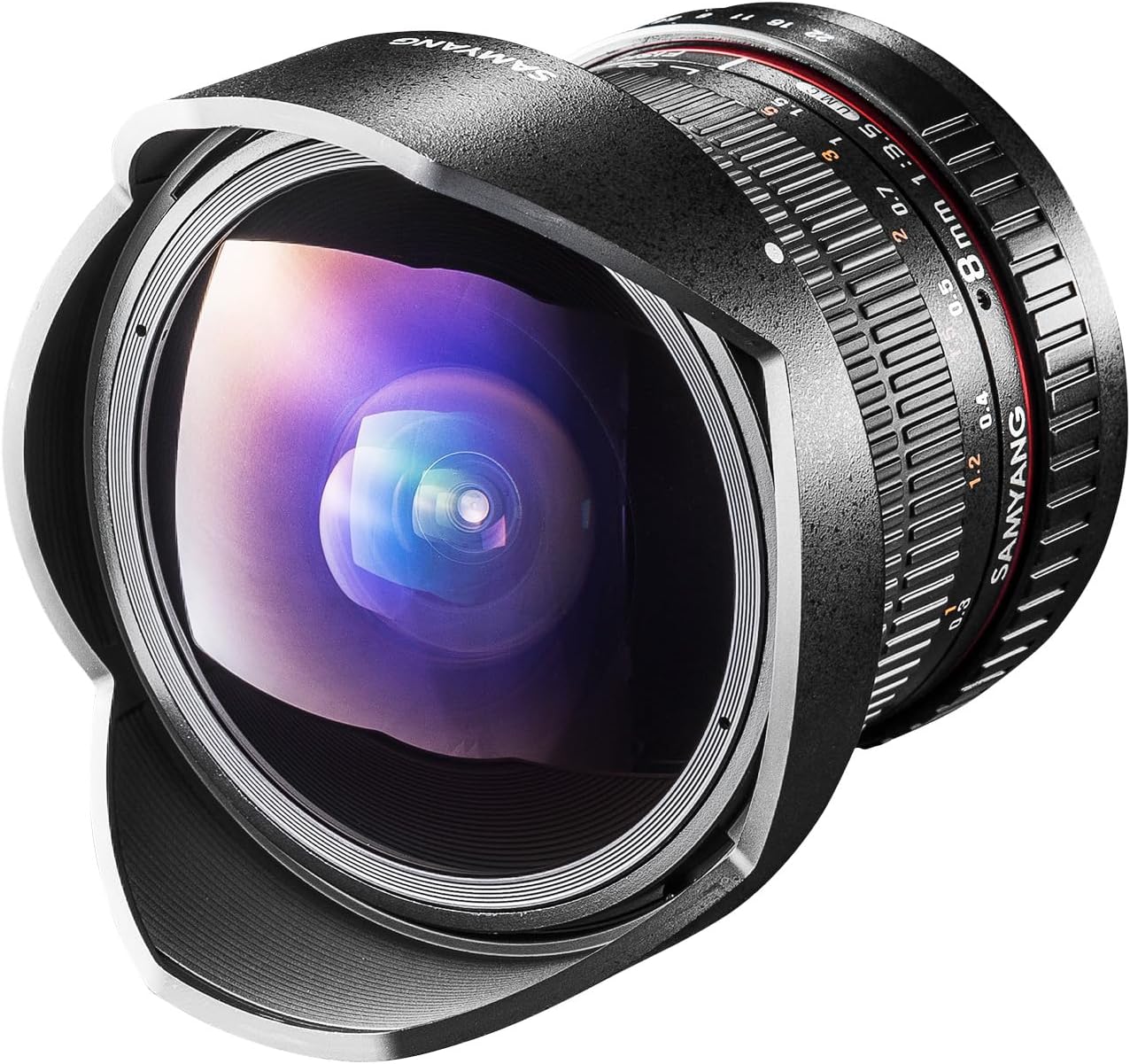
ຮູບພາບ 1.1: ດ້ານຫນ້າ view of the Samyang 8mm f/3.5 UMC CS II Fisheye Lens with its integrated lens hood.
2. ເນື້ອໃນຊຸດ
ກະລຸນາກວດສອບວ່າລາຍການທັງໝົດທີ່ລະບຸໄວ້ຂ້າງລຸ່ມນີ້ລວມຢູ່ໃນຊຸດຜະລິດຕະພັນຂອງທ່ານແລ້ວ:
- 1x Samyang 8mm f/3.5 UMC CS II Fisheye Lens (for Canon EF-S mount)
- 1x Front Lens Cap
- 1x Rear Lens Cap
- 1x Lens Pouch

Image 2.1: Illustration of the items included in the lens package, showing the lens, front and rear caps, and a lens pouch.
3. ຄຸນນະສົມບັດທີ່ສໍາຄັນ
- Ultra Wide-Angle Fisheye: 8mm focal length with an exaggerated perspective for dramatic photographic effects.
- Broad Field-of-View: Offers an ultra-wide 180° diagonal field-of-view, optimized for APS-C size image sensors.
- ການອອກແບບ Optical ຂັ້ນສູງ: Constructed with hybrid aspherical lenses to deliver sharp, well-defined images.
- UMC Coating: Features a multi-layer anti-reflection ultra multi-coating (UMC) to effectively minimize lens flare and ghosting.
- Close-Up Capability: Minimum focusing distance of 0.3 meters (12 inches) for enhanced close-up photography.
4. ຄໍາຮ້ອງສະຫມັກ
The Samyang 8mm f/3.5 UMC CS II Fisheye Lens is particularly well-suited for capturing unique perspectives in various photographic genres due to its ultra-wide field of view and distinct fisheye effect. It excels in situations where a broad, immersive view ຕ້ອງການ.
- ສະຖາປັດຕະຍະກໍາ: Capture entire buildings or interior spaces with dramatic distortion.
- Artistic Photography: Create surreal and imaginative images with exaggerated perspectives.
- ທຳມະຊາດ: Encompass vast landscapes, forests, or celestial scenes.
- ການເດີນທາງ: Document travel experiences with a wide, encompassing view of locations.
- ພູມສັນຖານ: Ideal for expansive landscape shots, adding a creative twist.

ຮູບພາບ 4.1: ຕົວຢ່າງamples of photographic applications for the Samyang 8mm Fisheye Lens, including architecture, nature, and travel scenes.
5. ການຕິດຕັ້ງແລະການຕິດຕັ້ງ
5.1 ການຕິດເລນ
- ໃຫ້ແນ່ໃຈວ່າກ້ອງຖ່າຍຮູບຂອງທ່ານຖືກປິດ.
- Remove the rear lens cap from the Samyang 8mm lens and the body cap from your camera.
- Align the red index mark on the lens barrel with the corresponding red index mark on your camera's lens mount.
- ສຽບເລນໃສ່ກ້ອງຕິດກ້ອງ ແລະ ໝຸນຕາມເຂັມໂມງຈົນກວ່າມັນຈະກົດໃສ່ບ່ອນ. ຢ່າບັງຄັບເລນ.
5.2 ການຖອດເລນ
- ໃຫ້ແນ່ໃຈວ່າກ້ອງຖ່າຍຮູບຂອງທ່ານຖືກປິດ.
- While pressing the lens release button on your camera body, rotate the lens counter-clockwise until it stops.
- ເອົາເລນອອກຈາກບ່ອນຕິດກ້ອງຢ່າງລະມັດລະວັງ.
- Attach the rear lens cap to the lens and the body cap to your camera to protect them from dust and damage.

ຮູບພາບ 5.1: ດ້ານຫລັງ view of the Samyang 8mm lens, showing the Canon EF-S mount interface.
6. ການເຮັດວຽກຂອງເລນ
6.1 ການສຸມໃສ່ຄູ່ມື
This is a manual focus lens. To achieve sharp images, rotate the focus ring on the lens barrel until your subject appears clear in the viewfinder or on the camera's LCD screen. For fisheye lenses, a common technique is to set the focus to a specific distance (e.g., 1 meter or 3 feet) and rely on the extensive depth of field to keep most of the scene in focus, especially at smaller apertures.
6.2 ການຄວບຄຸມ Aperture
The lens features an aperture ring on the barrel. To control the aperture directly from your camera body (if supported), set the lens's aperture ring to its smallest aperture value (f/22). This allows the camera to electronically control the aperture setting. If your camera does not support electronic aperture control with this lens, you will need to adjust the aperture manually using the ring on the lens.
6.3 ການຕັ້ງຄ່າການຮັບແສງ
Since this is a manual lens, you may need to set your camera to Manual (M) or Aperture Priority (Av/A) mode. In Manual mode, you control both aperture (via the lens ring or camera, as described above) and shutter speed. In Aperture Priority mode, you set the aperture, and the camera automatically selects the appropriate shutter speed.
7. ການບໍາລຸງຮັກສາແລະການດູແລ
7.1 ການເຮັດຄວາມສະອາດເລນ
- ໃຊ້ຜ້າອ່ອນໆທີ່ບໍ່ມີຂົນ ຫຼື ແປງທາເລນເພື່ອກຳຈັດຝຸ່ນອອກຈາກໜ້າຜິວເລນ.
- For smudges or fingerprints, apply a small amount of lens cleaning solution to a clean microfiber cloth and gently wipe the lens in a circular motion from the center outwards.
- ຢ່າໃຊ້ວັດສະດຸທີ່ມີສີຂັດ ຫຼື ສານເຄມີຮຸນແຮງໃສ່ອົງປະກອບເລນ.
7.2 ການເກັບຮັກສາ
- ແນບຝາແວ່ນດ້ານໜ້າ ແລະ ຫລັງທຸກຄັ້ງເມື່ອບໍ່ໄດ້ໃຊ້ເລນ.
- ເກັບຮັກສາເລນໄວ້ໃນບ່ອນທີ່ເຢັນ, ແຫ້ງ, ຫ່າງຈາກແສງແດດໂດຍກົງແລະອຸນຫະພູມທີ່ຮຸນແຮງ.
- ຖ້າເກັບຮັກສາໄວ້ເປັນເວລາດົນ, ໃຫ້ພິຈາລະນານໍາໃຊ້ຕົວແທນ dehumidifying ເພື່ອປ້ອງກັນການຂະຫຍາຍຕົວຂອງ mold.
8. ການແກ້ໄຂບັນຫາ
8.1 Images are blurry or out of focus
- ໂຟກັສດ້ວຍມື: Ensure you are manually focusing correctly. Rotate the focus ring until your subject is sharp.
- ການຕັ້ງຄ່າກ້ອງຖ່າຍຮູບ: Verify your camera is set to a manual focus mode.
- ຄວາມເລິກຂອງພາກສະຫນາມ: At wider apertures (smaller f-numbers), the depth of field is shallower, requiring more precise focus. Try stopping down the aperture (larger f-number) to increase the depth of field.
8.2 Cannot control aperture from camera
- Aperture Ring Setting: For electronic aperture control via the camera, ensure the lens's aperture ring is set to its smallest aperture (f/22).
- ໂໝດກ້ອງຖ່າຍຮູບ: Ensure your camera is in an appropriate mode (e.g., Aperture Priority or Manual) that allows aperture control.
8.3 Dark or underexposed images
- ການຕັ້ງຄ່າການຮັບແສງ: As this is a manual lens, the camera may not automatically set the correct exposure. Adjust your camera's ISO, shutter speed, or aperture to achieve proper exposure.
- ໂໝດການວັດແທກ: Experiment with different metering modes on your camera.
9. ຂໍ້ກໍານົດດ້ານວິຊາການ
| ຄຸນສົມບັດ | ລາຍລະອຽດ |
|---|---|
| ໝາຍເລກຕົວແບບ | 7616 |
| ຄວາມຍາວໂຟກັສ | 8ມມ |
| ຮູຮັບແສງສູງສຸດ | f/3.5 |
| Aperture ຂັ້ນຕ່ ຳ | f/22 |
| ການກໍ່ສ້າງເລນ | 10 elements in 7 groups (1 Aspherical) |
| ມຸມຂອງ View | 180 degrees (diagonal for APS-C) |
| ໄລຍະຫ່າງຈຸດສຸມຕ່ ຳ ສຸດ | 0.3 ແມັດ (12 ນິ້ວ) |
| ປະເພດຈຸດສຸມ | ຄູ່ມືການສຸມໃສ່ |
| Diaphragm Blades | 6 |
| ເສັ້ນຜ່າສູນກາງການກັ່ນຕອງ | N/A (Built-in lens hood) |
| ຂະໜາດ (ສູງສຸດ) | 75 x 74.8 mm (2.95 x 3.07 x 3.07 inches) |
| ນ້ຳໜັກ | 14.1 ອອນສ໌ (ປະມານ 400g) |
| ການຕິດຕັ້ງທີ່ເຂົ້າກັນໄດ້ | Canon EF-S |

Image 9.1: Technical specifications and dimensions of the Samyang 8mm f/3.5 UMC CS II Fisheye Lens.
10. ຄວາມເຂົ້າກັນໄດ້ຂອງກ້ອງຖ່າຍຮູບ
This lens is designed for Canon EF-S mount cameras with APS-C sensors. Compatible models include, but are not limited to:
- Canon EOS 850D
- Canon EOS 90D
- Canon EOS 250D
- Canon EOS 2000D
- Canon EOS 4000D
- Canon EOS 200D
- Canon EOS 77D
- Canon EOS 800D
- Canon EOS 1300D
- Canon EOS 80D
- Canon EOS 750D/EOS 760D

Image 10.1: Visual representation of compatible Canon EF-S mount cameras for the Samyang 8mm Fisheye Lens.
11. ການຮັບປະກັນແລະການສະຫນັບສະຫນູນ
For information regarding warranty coverage, technical support, or service, please refer to the official Samyang website or contact your local authorized Samyang dealer. Keep your purchase receipt as proof of purchase for warranty claims.


