ແນະນຳ
This manual provides detailed instructions for the operation and maintenance of your PENTAX Q10 digital interchangeable lens camera. The PENTAX Q10 is a super-compact and lightweight camera designed to deliver high-quality photography with a 12.4MP CMOS image sensor and improved autofocus performance.
ແມ່ນຫຍັງຢູ່ໃນກ່ອງ
- PENTAX Q10 Camera Body
- 02 Standard Zoom Lens (5-15mm)
- ແບັດເຕີຣີ Lithium-Ion ສາມາດສາກໄດ້
- ເຄື່ອງສາກແບັດເຕີຣີ
- ສາຍ USB
- ສາຍຮັດ
- Body Mount Cap
- ຝາປິດເລນ (ດ້ານໜ້າ ແລະ ດ້ານຫຼັງ)
- ຊອບແວ CD-ROM
- ຄູ່ມືແນະ ນຳ (ເອກະສານນີ້)
ກ້ອງຜ່ານview

ຮູບ 1: ດ້ານຫນ້າ View (Lens Removed) - This image displays the front of the Pentax Q10 camera body with the lens detached, revealing the image sensor and the Q-mount for interchangeable lenses. The 'PENTAX' logo is visible at the top, and 'SR' (Shake Reduction) is indicated on the grip.
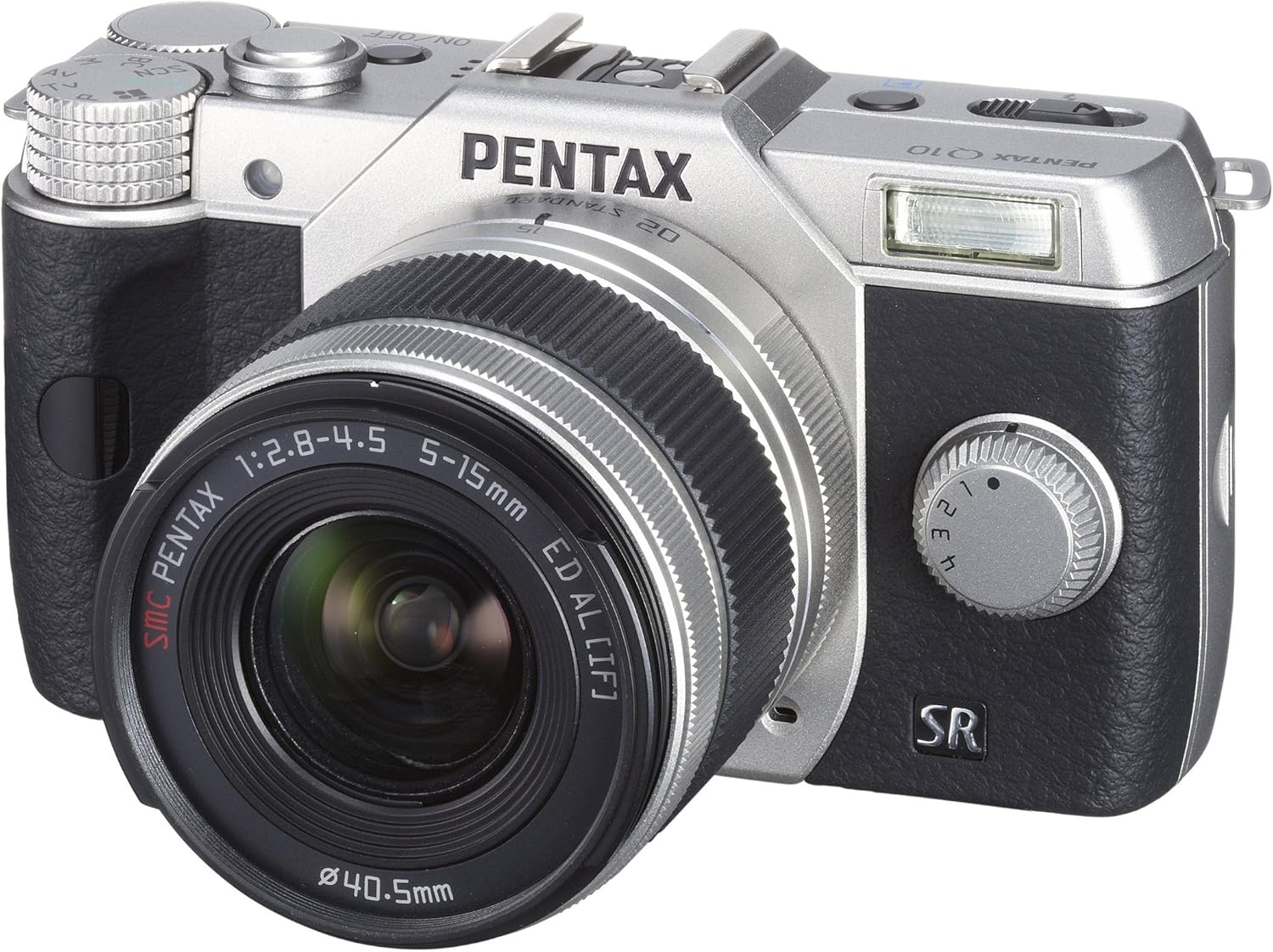
ຮູບ 2: ດ້ານຫນ້າ View with Lens Attached - The Pentax Q10 camera is shown with the 02 Standard Zoom Lens (5-15mm) mounted. This view highlights the compact size of the camera with its standard kit lens.

ຮູບທີ 3: ທາງເທິງ View - This overhead view of the Pentax Q10 shows the main controls on the top panel, including the mode dial (with Auto, P, Av, Tv, M, SCN settings), the power ON/OFF button, the shutter release button, and the hot shoe for external flash units.

ຮູບ 4: ດ້ານຫນ້າ View with Flash Activated - The Pentax Q10 is depicted with its built-in pop-up flash extended, ready for use. This view also shows the 02 Standard Zoom Lens attached.

ຮູບ 5: ດ້ານຫລັງ View - The back of the Pentax Q10 camera features the 3-inch LCD screen, along with various control buttons such as the playback button, delete button, ISO, OK, WB, and menu navigation buttons.
ການຕັ້ງຄ່າພື້ນຖານ
1. ການສາກແບັດເຕີຣີ
Insert the provided rechargeable battery into the battery charger. Connect the charger to a power outlet. The charging indicator light will show the charging status. Once fully charged, remove the battery.
2. ການໃສ່ແບັດເຕີລີ ແລະ ກາດໜ່ວຍຄວາມຈຳ
Open the battery/memory card compartment cover located at the bottom of the camera. Insert the charged battery with the correct orientation until it clicks into place. Insert an SD/SDHC/SDXC memory card into the card slot until it locks. Close the compartment cover securely.
3. ການຕິດເລນ
Align the red dot on the lens with the red dot on the camera's lens mount. Rotate the lens clockwise until it clicks into place. To remove the lens, press the lens release button on the camera body and rotate the lens counter-clockwise.
4. ການຕັ້ງຄ່າເບື້ອງຕົ້ນ
Upon first power-on, the camera may prompt you to set the date, time, and language. Follow the on-screen instructions using the control buttons and LCD screen.
ປະຕິບັດການກ້ອງຖ່າຍຮູບ
ເປີດ/ປິດ
ກົດ ເປີດ/ປິດ button located on the top panel to power the camera on or off.
ໂໝດຍິງ
ໝຸນປຸ່ມໂໝດຢູ່ດ້ານເທິງຂອງກ້ອງເພື່ອເລືອກໂໝດການຖ່າຍຮູບທີ່ທ່ານຕ້ອງການ:
- ອັດຕະໂນມັດ: ການຖ່າຍຮູບອັດຕະໂນມັດຢ່າງເຕັມທີ່ເພື່ອຄວາມສະດວກໃນການນໍາໃຊ້.
- P (ໂຄງການ AE): Camera sets aperture and shutter speed, but allows for program shift.
- Av (Aperture Priority AE): ທ່ານຕັ້ງຮູຮັບແສງ, ກ້ອງຖ່າຍຮູບກໍານົດຄວາມໄວຊັດເຕີ.
- Tv (Shutter Priority AE): ເຈົ້າຕັ້ງຄວາມໄວຊັດເຕີ, ກ້ອງຖ່າຍຮູບຕັ້ງຮູຮັບແສງ.
- M (ຄູ່ມື): ທ່ານຕັ້ງທັງຮູຮັບແສງ ແລະຄວາມໄວຊັດເຕີ.
- SCN (Scene Modes): Pre-set modes for specific situations (e.g., Portrait, Landscape, Night Scene, Macro, Blue Sky, Forest, Blur control).
ຖ່າຍຮູບ
- Select a shooting mode using the mode dial.
- ຈັດກອບຮູບຂອງທ່ານໂດຍໃຊ້ຈໍ LCD.
- Press the shutter release button halfway down to focus. The camera will confirm focus.
- Press the shutter release button fully to take the picture.
ການບັນທຶກວິດີໂອ
The PENTAX Q10 supports Full 1080p HD video recording at 30 frames per second with H.264 compression. To record video:
- Switch the camera to movie mode (if available on the mode dial or via menu setting).
- Press the dedicated movie recording button (if present) or the shutter release button to start recording.
- ກົດປຸ່ມອີກເທື່ອຫນຶ່ງເພື່ອຢຸດການບັນທຶກ.
ການດໍາເນີນງານ Flash
The camera features a built-in pop-up flash. To activate the flash, slide the flash release lever. The flash has various modes (e.g., Auto, Flash On, Red-eye Reduction) which can be selected via the camera's menu or dedicated flash button.
ລະບົບໂຟກັສອັດຕະໂນມັດ
The PENTAX Q10 utilizes a contrast detection autofocus system with 25 autofocus points. Available AF modes include Continuous, Face Detection, Multi-area, Selective single-point, Single, and Tracking. Select the appropriate AF mode from the camera's menu to suit your shooting conditions.
ສະຖຽນລະພາບຮູບພາບ
The camera incorporates a sensor-shift shake reduction system to minimize blur caused by camera shake, especially in low light conditions or when using longer focal lengths.
ບໍາລຸງຮັກສາ
ການເຮັດຄວາມສະອາດຕົວກ້ອງຖ່າຍຮູບ
ເຊັດຕົວກ້ອງຖ່າຍຮູບດ້ວຍຜ້າອ່ອນ, ແຫ້ງ. ສໍາລັບຝຸ່ນ stubborn, ເລັກນ້ອຍ dampen the cloth with water or a mild cleaning solution specifically designed for electronics. Avoid using strong solvents.
ການເຮັດຄວາມສະອາດເລນ
Use a lens blower to remove dust from the lens surface. For smudges, use a specialized lens cleaning cloth and lens cleaning fluid. Never touch the lens surface with your fingers.
ຄວາມສະອາດເຊັນເຊີ
The PENTAX Q10 features an integrated DRII (Dust Removal II) dust reduction system. If dust spots appear on your images, consult a professional service center for sensor cleaning. Attempting to clean the sensor yourself can cause damage.
ການດູແລຫມໍ້ໄຟ
Store batteries in a cool, dry place. Do not expose them to extreme temperatures. If the camera will not be used for an extended period, remove the battery.
ການແກ້ໄຂບັນຫາ
ກ້ອງຖ່າຍຮູບເປີດບໍ່ໄດ້
- ກວດໃຫ້ແນ່ໃຈວ່າໄດ້ສາກແບັດເຕີຣີເຕັມ ແລະໃສ່ຢ່າງຖືກຕ້ອງ.
- ກວດເບິ່ງວ່າຕົວຕິດຕໍ່ຫມໍ້ໄຟແມ່ນສະອາດຫຼືບໍ່.
Cannot Take Pictures
- ກວດສອບວ່າໄດ້ໃສ່ກາດໜ່ວຍຄວາມຈຳແລ້ວ ແລະ ມີພື້ນທີ່ຫວ່າງພຽງພໍ.
- Check if the lens is properly attached and unlocked.
- ໃຫ້ແນ່ໃຈວ່າກ້ອງຖ່າຍຮູບບໍ່ໄດ້ຢູ່ໃນໂໝດການຫຼິ້ນຄືນ.
- If the flash is set to a slow sync mode, the shutter may not release immediately.
ຮູບພາບມົວ
- ຮັບປະກັນວ່າເລນສະອາດ.
- Check if the camera is properly focused.
- Use a faster shutter speed or increase ISO in low light conditions.
- Confirm that the image stabilization (SR) is active if needed.
ກາດຄວາມຈຳຜິດພາດ
- ໃສ່ກາດໜ່ວຍຄວາມຈຳຄືນໃໝ່.
- Try a different, compatible memory card.
- ຟໍແມັດກາດໜ່ວຍຄວາມຈຳ (ໝາຍເຫດ: ນີ້ຈະລຶບຂໍ້ມູນທັງໝົດ).
ຂໍ້ມູນຈໍາເພາະ
| ຊື່ຕົວແບບ | Pentax Q10 |
| ເຊັນເຊີຮູບພາບ | 12.4 MP Backlit CMOS (1/2.3-inch) |
| ການແກ້ໄຂປະສິດທິພາບ | 12.4 MP |
| ເລນ Mount | Pentax Q-mount |
| ສະຖຽນລະພາບຮູບພາບ | ເຊັນເຊີ-shift |
| ຄວາມລະອຽດວິດີໂອ | Full HD 1080p (1920x1080) at 30fps (H.264) |
| ຈໍສະແດງຜົນ | ຈໍ LCD ຂະໜາດ 3 ນິ້ວ (460,000 ຈຸດ) |
| ຄວາມອ່ອນໄຫວ ISO | ຂະຫຍາຍ ISO ຕ່ຳສຸດ 100 |
| ຄວາມໄວຊັດເຕີ | 1/8000 ຫາ 30 ວິນາທີ |
| ລະບົບໂຟກັສອັດຕະໂນມັດ | Contrast Detection (25 points) |
| ການຍິງຢ່າງຕໍ່ເນື່ອງ | ສູງສຸດ 5 fps |
| Storage Media | ກາດໜ່ວຍຄວາມຈຳ SD/SDHC/SDXC |
| ການເຊື່ອມຕໍ່ | HDMI (Type C Mini), USB |
| ນ້ຳໜັກ (ປະມານ) | 0.44 Pounds (Body only) |
ໝາຍ ເຫດ: ຂໍ້ມູນສະເພາະແມ່ນມີການປ່ຽນແປງໂດຍບໍ່ຕ້ອງແຈ້ງ.
ການຮັບປະກັນແລະການສະຫນັບສະຫນູນ
ຂໍ້ມູນການຮັບປະກັນ
The PENTAX Q10 camera comes with a ຊິ້ນສ່ວນ 1 ປີແລະການຮັບປະກັນແຮງງານ from the date of purchase. Please retain your proof of purchase for warranty claims. This warranty covers manufacturing defects and workmanship under normal use.
ການຊ່ວຍເຫຼືອລູກຄ້າ
For technical assistance, service, or further inquiries, please visit the official Pentax support webເວັບໄຊ ຫຼືຕິດຕໍ່ພະແນກບໍລິການລູກຄ້າຂອງເຂົາເຈົ້າ. ຂໍ້ມູນການຕິດຕໍ່ໂດຍປົກກະຕິສາມາດພົບເຫັນຢູ່ໃນຜູ້ຜະລິດຂອງ webສະຖານທີ່ຫຼືຢູ່ໃນບັດຮັບປະກັນລວມຢູ່ໃນຜະລິດຕະພັນຂອງທ່ານ.


