1. ບົດແນະນຳ
This manual provides detailed instructions for the installation, operation, and maintenance of your Gewiss GW10701 Programmable Thermostat. This device is designed to control heating and air conditioning systems, allowing you to manage room temperature efficiently and comfortably. Please read this manual thoroughly before installation and use to ensure proper functionality and safety.
2. ຂໍ້ມູນຄວາມປອດໄພ
ປະຕິບັດຕາມຄວາມລະມັດລະວັງດ້ານຄວາມປອດໄພຕໍ່ໄປນີ້ສະເໝີເພື່ອປ້ອງກັນການບາດເຈັບສ່ວນບຸກຄົນ ຫຼືຄວາມເສຍຫາຍຕໍ່ອຸປະກອນ:
- ການຕິດຕັ້ງຄວນປະຕິບັດໂດຍບຸກຄະລາກອນທີ່ມີຄຸນວຸດທິເທົ່ານັ້ນຕາມລະຫັດ ແລະ ລະບຽບການໄຟຟ້າໃນທ້ອງຖິ່ນ.
- Disconnect power to the heating/cooling system at the main circuit breaker before installing or servicing the thermostat.
- ຢ່າປ່ອຍໃຫ້ເຄື່ອງຄວບຄຸມອຸນຫະພູມຢູ່ໃນນໍ້າ ຫຼືມີຄວາມຊຸ່ມຊື່ນຫຼາຍເກີນໄປ.
- ໃຊ້ພຽງແຕ່ປະເພດຫມໍ້ໄຟທີ່ລະບຸໄວ້ແລະຮັບປະກັນການຂົ້ວທີ່ຖືກຕ້ອງໃນລະຫວ່າງການຕິດຕັ້ງ.
- Keep batteries out of reach of children. Do not dispose of batteries in fire.
- Do not attempt to open or repair the thermostat yourself. Contact qualified service personnel.
3. ຜະລິດຕະພັນເກີນview
The Gewiss GW10701 is a wall-mounted programmable thermostat featuring an LCD display and intuitive controls for temperature management.
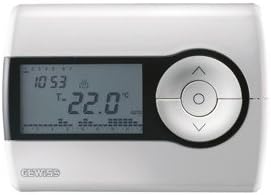
ຮູບທີ 1: ດ້ານໜ້າ view of the Gewiss GW10701 Thermostat. It features a clear LCD screen displaying time and temperature, alongside a circular control panel with directional buttons and a central confirmation button for easy navigation and setting adjustments.
3.1. ສ່ວນປະກອບ
- ຈໍ LCD: Shows current time, temperature, operating mode, and programming settings.
- ປຸ່ມຄວບຄຸມ: Typically include UP/DOWN arrows for temperature adjustment, MODE button for selecting operating modes (e.g., Heat, Cool, Auto, Off), and a SET/PROG button for accessing programming menus. (Note: Specific button functions may vary slightly; refer to on-screen prompts.)
- ຊ່ອງໃສ່ຫມໍ້ໄຟ: Located on the rear or side, houses the power supply batteries.
- ແຜ່ນຕິດ: ສຳລັບການຕິດຕັ້ງຝາຜະໜັງທີ່ປອດໄພ.
4. ການຕິດຕັ້ງ
4.1. ການເລືອກສະຖານທີ່
Select a central location on an interior wall, approximately 1.5 meters (5 feet) above the floor. Avoid locations near heat sources (lamps, direct sunlight, fireplaces), drafts (windows, doors), or areas with poor air circulation.
4.2. ການຕິດຕັ້ງເຄື່ອງຄວບຄຸມອຸນຫະພູມ
- ຕັດການເຊື່ອມຕໍ່ພະລັງງານ: Turn off the power to your heating/cooling system at the main circuit breaker.
- Separate Base Plate: Carefully detach the front cover of the thermostat from its base plate.
- ເຄື່ອງໝາຍ ແລະເຈາະ: Hold the base plate against the wall at your chosen location. Mark the drilling points. Drill holes and insert wall anchors if necessary.
- Secure Base Plate: Fasten the base plate to the wall using the provided screws.
- Wiring (if applicable): Connect the system wires to the appropriate terminals on the base plate. Refer to the wiring diagram provided with your heating/cooling system or consult a qualified electrician. Note: While the thermostat is battery-powered, it controls a 230V system. Ensure correct wiring.
- ຕິດຕັ້ງ ໝໍ້ ໄຟ: Insert the required batteries into the battery compartment, observing correct polarity (+/-).
- ແນບເຄື່ອງຄວບຄຸມອຸນຫະພູມ: Carefully reattach the thermostat front cover to the base plate, ensuring it clicks securely into place.
- ຟື້ນຟູພະລັງງານ: Turn on the power to your heating/cooling system at the main circuit breaker.
5. ການດໍາເນີນງານ
5.1. ການຕິດຕັ້ງເບື້ອງຕົ້ນ
Upon first power-up or after battery replacement, you may need to set the current time and date. Follow the on-screen prompts or refer to the programming section.
5.2. ການຕັ້ງຄ່າອຸນຫະພູມ
ໃຊ້ UP ແລະ ລົງ arrow buttons to adjust the desired temperature. The display will show the set temperature temporarily, then revert to the current room temperature.
5.3. ຮູບແບບການເຮັດວຽກ
ກົດ ໂໝດ button (or similar) to cycle through available operating modes:
- ຄວາມຮ້ອນ: ເຄື່ອງຄວບຄຸມອຸນຫະພູມຈະເປີດໃຊ້ລະບົບຄວາມຮ້ອນເມື່ອອຸນຫະພູມຫ້ອງຫຼຸດລົງຕໍ່າກວ່າອຸນຫະພູມທີ່ກໍານົດໄວ້.
- ເຢັນ: The thermostat will activate the air conditioning system when the room temperature rises above the set temperature.
- ອັດຕະໂນມັດ: ເຄື່ອງຄວບຄຸມອຸນຫະພູມຈະສະຫຼັບໂດຍອັດຕະໂນມັດລະຫວ່າງການໃຫ້ຄວາມຮ້ອນ ແລະ ການເຮັດໃຫ້ເຢັນເພື່ອຮັກສາລະດັບອຸນຫະພູມທີ່ຕັ້ງໄວ້.
- ປິດ: ລະບົບຄວາມຮ້ອນ ແລະ ລະບົບເຮັດຄວາມເຢັນຖືກປິດ.
6. ການຂຽນໂປຣແກຣມ
The Gewiss GW10701 allows you to create custom heating/cooling schedules for different times of the day and days of the week. This feature helps optimize energy consumption and comfort.
6.1. ກໍານົດເວລາແລະວັນທີ
- ກົດ SET or ໂຄງການ ປຸ່ມເພື່ອເຂົ້າໄປໃນເມນູການຕັ້ງຄ່າ.
- Navigate using the arrow buttons to find "Time" or "Date" settings.
- Use the arrow buttons to adjust the values (hour, minute, day, month, year).
- ຢືນຢັນການຕັ້ງຄ່າແຕ່ລະອັນດ້ວຍ SET or central button.
6.2. Creating a Program Schedule
The thermostat typically offers daily or weekly programming options. You can set different temperatures for various periods (e.g., Wake, Day, Evening, Sleep).
- ກົດ ໂຄງການ ປຸ່ມເພື່ອເຂົ້າສູ່ໂຫມດການຂຽນໂປຼແກຼມ.
- Select the day or group of days you wish to program (e.g., Mon-Fri, Sat-Sun, or individual days).
- For each period (e.g., "Wake"), set the desired start time and temperature using the arrow buttons.
- Advance to the next period and repeat the process.
- Save your program and exit programming mode.
Consult the on-screen menu and specific button labels on your device for precise programming steps, as interfaces can vary.
7. ບໍາລຸງຮັກສາ
7.1. ການທົດແທນຫມໍ້ໄຟ
The thermostat is powered by batteries. When the battery indicator appears on the display, replace the batteries promptly to ensure continuous operation. Typically, 2x AA or AAA alkaline batteries are required.
- ເອົາຝາປິດໜ້າຂອງເຄື່ອງຄວບຄຸມອຸນຫະພູມອອກຢ່າງລະມັດລະວັງ.
- ເອົາແບດເຕີລີ່ເກົ່າອອກແລະກໍາຈັດພວກມັນຢ່າງມີຄວາມຮັບຜິດຊອບ.
- ໃສ່ຫມໍ້ໄຟໃຫມ່, ຮັບປະກັນການຂົ້ວທີ່ຖືກຕ້ອງ.
- ຕິດcoverາປົກ ໜ້າ ຄືນໃ່.
7.2. ທໍາຄວາມສະອາດ
Clean the thermostat's exterior with a soft, dry cloth. Do not use abrasive cleaners, solvents, or spray cleaners directly onto the device, as this can damage the display or internal components.
8. ການແກ້ໄຂບັນຫາ
| ບັນຫາ | ສາເຫດທີ່ເປັນໄປໄດ້ | ການແກ້ໄຂ |
|---|---|---|
| ຈໍສະແດງຜົນຫວ່າງເປົ່າ ຫຼືມືດ. | ຫມໍ້ໄຟຕ່ໍາຫຼືຕາຍ. | ປ່ຽນແບັດໃໝ່. |
| ລະບົບທຳຄວາມຮ້ອນ/ຄວາມເຢັນບໍ່ຕອບສະໜອງ. |
|
|
| ການອ່ານອຸນຫະພູມເບິ່ງຄືວ່າບໍ່ຖືກຕ້ອງ. | ສະຖານທີ່ເຄື່ອງຄວບຄຸມອຸນຫະພູມໄດ້ຮັບຜົນກະທົບຈາກຮ່າງ ຫຼືແຫຼ່ງຄວາມຮ້ອນ. | ໃຫ້ແນ່ໃຈວ່າເຄື່ອງຄວບຄຸມອຸນຫະພູມບໍ່ໄດ້ສຳຜັດກັບແສງແດດໂດຍກົງ, ລົມພັດ ຫຼື ເຄື່ອງໃຊ້ທີ່ປ່ອຍຄວາມຮ້ອນ. |
9. ຂໍ້ມູນຈໍາເພາະ
- ຜູ້ຜະລິດ: Gewiss
- ໝາຍເລກຕົວແບບ: GW10701 (Chorus)
- ຂະໜາດ (L x W x H): 13 x 2.3 x 9.2 cm
- ນ້ຳໜັກ: 9.07 g
- ສີ: ສີຂາວ
- ວັດສະດຸ: ພາດສະຕິກ
- ການສະຫນອງພະລັງງານ: ແບັດເຕີຣີ
- ສະຫຼັບ Voltage: 230 Volt (for controlled system)
- ປະເພດການສະແດງ: LCD ຫຼື LED
- ປະເພດການຕິດຕັ້ງ: ຕິດຝາ
- ຄຸນນະສົມບັດການຄວບຄຸມ: Programmable, Button control
- ການນຳໃຊ້: Heating systems, Air conditioning systems
10. ການຮັບປະກັນແລະການສະຫນັບສະຫນູນ
For warranty information, technical support, or service inquiries regarding your Gewiss GW10701 Thermostat, please refer to the warranty card included with your product or visit the official Gewiss website. You may also contact your local Gewiss distributor or retailer for assistance.
Gewiss Official Webເວັບໄຊ: www.gewiss.com


