ແນະນຳ
This manual provides detailed instructions for the setup, operation, and maintenance of your One For All OARH01B Single Device Universal Remote Control. This remote is designed to provide simplified control for your television, featuring an intuitive layout and essential functions.
ຄຸນສົມບັດຜະລິດຕະພັນ
The One For All OARH01B remote control is engineered for ease of use and reliability. Key features include:
- Large, Easy-to-Use Buttons: Designed for comfortable handling and clear visibility.
- Intuitive Key Grouping: Buttons are logically arranged with easy-to-recognize icons for quick access to functions.
- Glow Keys: Volume, Channel, and Sleep keys illuminate for easy identification in low-light conditions.
- Braille Support: Tactile indicators for Power, Channel, and Volume buttons enhance accessibility.
- ການທໍາງານທີ່ສົມບູນແບບ: Includes dedicated keys for Menu, Sleep, Input, Closed Captioning (CC), and Previous Channel.
- Digital Sub-Channel Capability: Supports navigation of digital sub-channels (e.g., 59.1) for modern TV programming.
- ຊ່ອງໃສ່ຫມໍ້ໄຟທີ່ປອດໄພ: Features a secure screw for the battery door, preventing accidental opening.
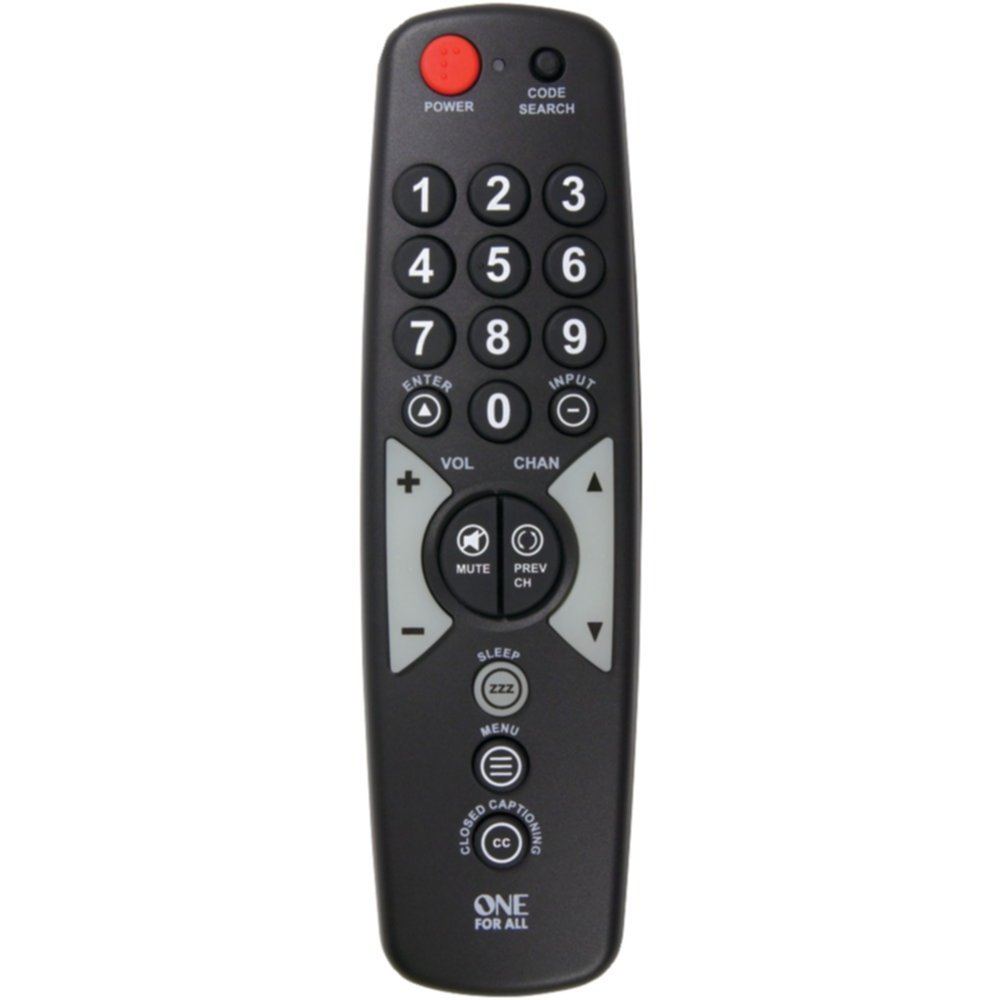
A black universal remote control with large, clearly labeled buttons. The top features a red power button and a code search button. Below are the numeric keypad (0-9), followed by navigation buttons for volume, channel, enter, and input. Mute and previous channel buttons are centrally located. Further down are buttons for sleep, menu, and closed captioning. The 'ONE FOR ALL' logo is at the bottom.
Getting Started: Battery Installation
ເພື່ອເລີ່ມຕົ້ນໃຊ້ຣີໂໝດຄວບຄຸມຂອງທ່ານ, ກ່ອນອື່ນໝົດທ່ານຕ້ອງຕິດຕັ້ງແບັດເຕີຣີກ່ອນ.
- ຊອກຫາຊ່ອງໃສ່ຫມໍ້ໄຟຢູ່ດ້ານຫຼັງຂອງການຄວບຄຸມໄລຍະໄກ.
- Using a small screwdriver, carefully remove the secure screw from the battery compartment door.
- ເລື່ອນປະຕູຊ່ອງໃສ່ແບັດເຕີຣີໃຫ້ເປີດ.
- Insert two (2) AAA batteries (not included), ensuring the positive (+) and negative (-) terminals align with the indicators inside the compartment.
- Close the battery compartment door and re-insert the secure screw to fasten it.
Note: Always use new batteries and dispose of old batteries responsibly.
Setup: Programming the Remote
Your One For All OARH01B remote control needs to be programmed to operate your specific television. There are typically two methods for programming:
ວິທີທີ່ 1: ການໃສ່ລະຫັດໂດຍກົງ
- Turn on the television you wish to control.
- ກົດຄ້າງໄວ້ ຄົ້ນຫາລະຫັດ button on the remote until the indicator light illuminates.
- Refer to the code list provided with your remote (or available online from One For All) and find the 3-digit code for your TV brand.
- Enter the 3-digit code using the number buttons on the remote. The indicator light should turn off after the last digit is entered.
- ຊີ້ຣີໂໝດໄປທີ່ໂທລະພາບຂອງທ່ານ ແລະ ກົດປຸ່ມ ພະລັງງານ button. If the TV turns off, the remote is successfully programmed.
- If the TV does not respond, repeat the process with the next code listed for your brand.
ວິທີທີ 2: ຄົ້ນຫາລະຫັດອັດຕະໂນມັດ
- Turn on the television you wish to control.
- ກົດຄ້າງໄວ້ ຄົ້ນຫາລະຫັດ button on the remote until the indicator light illuminates.
- ກົດ ພະລັງງານ button once. The indicator light will flash, indicating the remote is searching for a code.
- Point the remote at your TV and wait. The remote will send power codes to your TV every few seconds.
- As soon as your TV turns off, immediately press the ປ້ອນ button to save the code. If you wait too long, the remote may pass the correct code.
- Test the remote's functions (Volume, Channel, etc.). If all functions work correctly, programming is complete. If not, repeat the auto search process.
ປະຕິບັດການໄລຍະໄກ
Once programmed, your One For All OARH01B remote provides control over your television's primary functions.
- ພະລັງງານ: ເປີດ ຫຼືປິດໂທລະພາບຂອງທ່ານ.
- ໝາຍເລກ Pad (0-9): Used to directly enter channel numbers.
- ຕື່ມ: ຢືນຢັນການເລືອກຊ່ອງ ຫຼືຕົວເລືອກເມນູ.
- ການປ້ອນຂໍ້ມູນ: Cycles through available video inputs on your TV (e.g., HDMI 1, AV, Component).
- VOL (+/-): ເພີ່ມ ຫຼື ຫຼຸດລະດັບສຽງຂອງໂທລະພາບ.
- ປິດສຽງ: Silences the television's audio.
- CHAN (Up/Down): ປ່ຽນຊ່ອງໂທລະພາບຂຶ້ນ ຫຼື ລົງ.
- CH ກ່ອນໜ້ານີ້: Switches to the previously viewຊ່ອງ ed.
- ນອນ: Activates the TV's sleep timer function (if available).
- ເມນູ: Accesses the television's on-screen menu. Use VOL and CHAN buttons to navigate menu options, and ENTER to select.
- ຄຳບັນຍາຍປິດ (CC): ເປີດ ຫຼື ປິດຄຳບັນຍາຍ.
ການແກ້ໄຂບັນຫາ
ຖ້າທ່ານພົບບັນຫາກັບຣີໂໝດຄວບຄຸມຂອງທ່ານ, ໃຫ້ອ້າງອີງເຖິງວິທີແກ້ໄຂທົ່ວໄປຕໍ່ໄປນີ້:
- ໄລຍະໄກບໍ່ຕອບສະໜອງ:
- Check if the batteries are correctly installed and have sufficient power. Replace if necessary.
- Ensure there is a clear line of sight between the remote and the TV's infrared sensor. Remove any obstructions.
- Remote Not Controlling TV:
- The remote may not be programmed correctly for your TV. Re-attempt the programming steps (Direct Code Entry or Auto Code Search).
- If using Direct Code Entry, try other codes listed for your TV brand.
- Specific Functions Not Working (e.g., Input, Menu):
- Some advanced TV functions may not be fully supported by all universal remotes. Verify if your TV model is fully compatible with the remote's features.
- When navigating TV menus, remember that VOL and CHAN buttons often serve as navigation arrows. Press ENTER to confirm selections.
- Indicator Light Not Functioning:
- ໂດຍປົກກະຕິແລ້ວ ອັນນີ້ສະແດງເຖິງພະລັງງານແບັດເຕີຣີຕໍ່າ. ປ່ຽນແບັດເຕີລີ.
ບໍາລຸງຮັກສາ
ເພື່ອຮັບປະກັນອາຍຸຍືນ ແລະປະສິດທິພາບທີ່ດີທີ່ສຸດຂອງການຄວບຄຸມໄລຍະໄກຂອງທ່ານ, ປະຕິບັດຕາມຄໍາແນະນໍາການບໍາລຸງຮັກເຫຼົ່ານີ້:
- ທໍາຄວາມສະອາດ: ເຊັດຣີໂມດດ້ວຍຜ້າອ່ອນ, ແຫ້ງ. ສໍາລັບຝຸ່ນ stubborn, ເລັກນ້ອຍ dampen the cloth with water or a mild cleaning solution, then wipe dry immediately. Avoid abrasive cleaners or solvents.
- ການປ່ຽນແບັດເຕີຣີ: Replace batteries promptly when the remote's performance degrades or the indicator light fails to illuminate. Always replace both batteries at the same time.
- ການເກັບຮັກສາ: ເກັບຮັກສາຫ່າງໄກສອກຫຼີກໄວ້ໃນບ່ອນທີ່ເຢັນ, ແຫ້ງ, ຫ່າງຈາກແສງແດດໂດຍກົງ, ອຸນຫະພູມທີ່ຮຸນແຮງ, ແລະຄວາມຊຸ່ມຊື່ນສູງ.
- ຫຼີກລ້ຽງການຫຼຸດລົງ: ປົກປ້ອງຫ່າງໄກສອກຫຼີກຈາກຜົນກະທົບທາງດ້ານຮ່າງກາຍ, ຍ້ອນວ່າມັນສາມາດທໍາລາຍອົງປະກອບພາຍໃນ.
ຂໍ້ມູນຈໍາເພາະ
| ຂໍ້ມູນຈໍາເພາະ | ລາຍລະອຽດ |
|---|---|
| ຍີ່ຫໍ້ | ຫນຶ່ງສໍາລັບທຸກຄົນ |
| ຕົວແບບ | OARH01B |
| ອຸປະກອນທີ່ເຂົ້າກັນໄດ້ | ໂທລະພາບ |
| ຈຳນວນສູງສຸດຂອງອຸປະກອນທີ່ຮອງຮັບ | 1 |
| ແຫຼ່ງພະລັງງານ | ພະລັງງານຫມໍ້ໄຟ |
| ຕ້ອງໃຊ້ແບັດເຕີຣີ | 2 x AAA (ບໍ່ລວມ) |
| ປະເພດຕົວເຊື່ອມຕໍ່ | ອິນຟາເຣດ |
| ຂະໜາດ (LxWxH) | 17.8 x 2.5 x 5.1 ຊັງຕີແມັດ |
| ນ້ໍາຫນັກລາຍການ | 104 g |
ການຮັບປະກັນແລະການສະຫນັບສະຫນູນ
Your One For All OARH01B Universal Remote Control comes with a ການຮັບປະກັນຕະຫຼອດຊີວິດທີ່ຈໍາກັດ. For specific terms and conditions, please refer to the warranty documentation included with your purchase or visit the official One For All webເວັບໄຊ.
For further assistance, troubleshooting tips, or to find the latest device codes, please visit the One For All support webເວັບໄຊ. You may also contact their customer service for personalized support.


