1. ບົດແນະນຳ
The PAC RadioPRO4 Radio Replacement Interface RP4-FD11 is designed to integrate an aftermarket radio into select Ford vehicles while retaining factory features such as steering wheel controls (SWC) and providing data-controlled accessory and navigation outputs. This interface ensures seamless communication between your new radio and the vehicle's computer system.
The RP4-FD11 is compatible with select Ford vehicles. Please refer to the vehicle compatibility list in the full product documentation for specific models and years.
2. ເນື້ອໃນຊຸດ
- ໂມດູນການໂຕ້ຕອບ
- ແຖບຄວບຄຸມພວງມາໄລ
- Interface Harness
- ປື້ມຄູ່ມືການສອນ

Figure 1: The package includes the main interface module, various wiring harnesses for vehicle integration, and a detailed instruction booklet.
3. Wiring Connection Chart
Refer to the chart below for detailed wiring connections. Match the wire colors from the PAC interface to your aftermarket radio and vehicle harness.
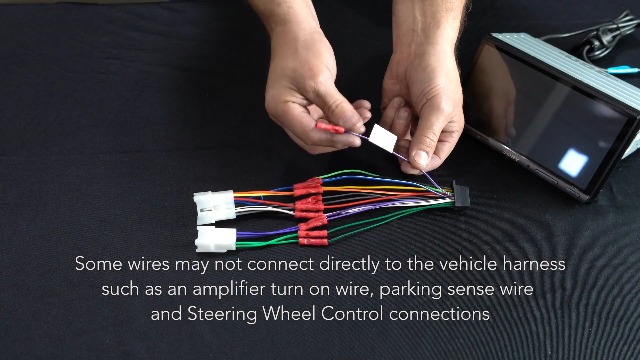
Figure 2: This chart details the color-coded wiring connections for the PAC RadioPRO4 interface, showing connections for power, ground, speaker outputs, and accessory functions.
| ຕົວເຊື່ອມຕໍ່ການໂຕ້ຕອບ | ຟັງຊັນ | ຕົວເຊື່ອມຕໍ່ລົດ | ຟັງຊັນ |
|---|---|---|---|
| ສີແດງ/ສີຂາວ | ເບຣກບ່ອນຈອດລົດ Output (-) | ສີເຫຼືອງ | ແບັດເຕີຣີ +12V |
| ສີມ່ວງ/ສີຂາວ | Vehicle Speed Output (VSS) | ດຳ | ດິນ |
| ສີຟ້າ/ສີຂາວ | Amp ເປີດການປ້ອນຂໍ້ມູນ | ສີຟ້າ | Antenna On Input |
| ສີແດງ | ຜົນຜະລິດອຸປະກອນເສີມ (1 amp) | ສີຂາວ | Front L + Input |
| ສີສົ້ມ/ສີຂາວ | ການອອກແສງ (+) | ຂາວ/ດຳ | Front L - Input |
| ສີຂຽວ | Reverse Output (+) | ສີເທົາ | Front R + Input |
| ສີເທົາ / ດຳ | Front R - Input | ||
| ສີຂຽວ | ດ້ານຫຼັງ L + Input | ||
| ສີຂຽວ / ສີດໍາ | Rear L - Input | ||
| ສີມ່ວງ | Rear R + Input | ||
| ສີມ່ວງ/ດຳ | Rear R - Input |
4. ຂັ້ນຕອນການຕິດຕັ້ງ
- ຕັດການເຊື່ອມຕໍ່ຫມໍ້ໄຟ: Disconnect the negative battery terminal before beginning installation to prevent electrical shorts.
- ລຶບວິທະຍຸໂຮງງານອອກ: Carefully remove the factory radio from the vehicle dashboard. This may require specialized tools and careful prying to avoid damaging the dashboard or trim pieces.
- ເຊື່ອມຕໍ່ສາຍໄຟອິນເຕີເຟດ: Connect the PAC RP4-FD11 interface harness to the aftermarket radio's harness, matching wire colors according to the provided wiring chart.
- Connect Vehicle Harness: Connect the vehicle-specific harness to the PAC interface module.
- ອົງປະກອບທີ່ປອດໄພ: Secure the aftermarket radio and PAC interface module in the dashboard, ensuring all connections are tucked away safely.
- ເຊື່ອມຕໍ່ແບັດເຕີຣີຄືນໃໝ່: ເຊື່ອມຕໍ່ສະຖານີແບັດເຕີລີລົບຄືນໃໝ່.
- ຟັງຊັນການທົດສອບ: Turn the vehicle ignition to the ACC or ON position (do not start the engine) and test all radio and steering wheel control functions.
Video 1: This video demonstrates the general installation process for a factory stereo replacement interface, including wiring connections and mounting.
Video 2: This video provides a detailed walkthrough of splicing and programming a PAC RadioPRO4 interface for an aftermarket Joying head unit, showcasing wiring connections.
5. Steering Wheel Control Programming
The RP4-FD11 interface comes pre-programmed for most factory SWC functions. If re-assignment or custom programming is desired, follow these steps:
- ໄຟໄໝ້ເປີດ: Turn the key to the ignition position (ACC or ON, but do not start the vehicle).
- Press Program Button: Press and release the programming button on the side of the interface module.
- Program SWC Button: Within 7 seconds, press the button on the steering wheel that you wish to program. The LED on the interface will turn off when the button is pressed.
- Short Press Functionality: For a short press function, release the steering wheel button within 1.5 seconds. The LED will turn back on.
- ການທໍາງານຂອງກົດຍາວ: For a long press function, hold the steering wheel button until the LED starts blinking. Release the button, and the LED will go back to solid.
- Repeat for More Buttons: ຖ້າທ່ານຕ້ອງການຕັ້ງປຸ່ມເພີ່ມເຕີມ, ເຮັດຊ້ໍາຂັ້ນຕອນທີ 3 ສໍາລັບແຕ່ລະຟັງຊັນສຽງເພີ່ມເຕີມໃນພວງມາໄລ.
- Skip Functions: If a function in the chart is not present on your steering wheel, or you do not wish to program it, press and release the program button on the side of the interface to skip that function.
- Complete Programming: Once all desired functions are programmed (or skipped), wait seven seconds. The LED will flash three times, indicating the end of programming.
- ການທໍາງານຂອງການທົດສອບ: Test the interface for proper functionality. Whenever a SWC button is pressed, the LED on the interface should blink. If any function does not work, repeat the programming steps.
Video 3: This video provides a technical tip on how to manually program the Axxess ASWC-1 steering wheel control interface, detailing button presses and LED feedback.
Video 4: This video demonstrates the remapping process for the Axxess ASWC-1 steering wheel control interface, showing how to assign custom functions to vehicle buttons.
6. ໝາຍເຫດສຳຄັນ ແລະ ຄວາມເຂົ້າກັນໄດ້
- ໂຮງງານ Amplified Systems: ໂຮງງານ amplified systems will not fade as neither the aftermarket radio nor the RP interface can control the ampfader ຂອງ lifier.
- 2008 F-250/350/450 Compatibility: Not compatible with model trim XL (fleet vehicles). These vehicles do not have the necessary CAN bus signals.
- 2006-2007 Ford Freestyle: Does not retain Rear Seat Entertainment (RSE).
- 2006 Lincoln Zephyr: Does not retain the THX ampມີຊີວິດຊີວາ.
7. ຂໍ້ມູນຈໍາເພາະ
- ນ້ໍາຫນັກລາຍການ: 3.52 ອອນ
- ຂະໜາດຜະລິດຕະພັນ: 9 x 9 x 2 ນິ້ວ
- ໝາຍເລກຕົວແບບ: RP4-FD11
- ແມ່ນຢຸດເຊົາໂດຍຜູ້ຜະລິດ: ແມ່ນແລ້ວ
- ການຮັບປະກັນ: ຜູ້ຜະລິດ 1 ປີ
- Height (inches): 8 ນິ້ວ
- ວັນທີທໍາອິດທີ່ມີ: ວັນທີ 27 ມັງກອນ 2012
8. ການແກ້ໄຂບັນຫາ
- Steering Wheel Controls Not Working Correctly: If steering wheel controls are reversed (e.g., volume down acts as volume up), ensure the interface is correctly programmed for your specific radio model. Refer to the 'Steering Wheel Control Programming' section and the radio selection switch settings.
- No Audio or Incorrect Fading with Factory Amplified Systems: As noted in the important notes, factory amplified systems may not support fading control through the aftermarket radio or RP interface. Verify all speaker connections are secure.
- ບໍ່ມີພະລັງງານໃຫ້ກັບວິທະຍຸຫຼັງການຂາຍ: Check all power and ground connections. Ensure the accessory output (red wire) is correctly connected and receiving power.
- ບັນຫາກ້ອງຖ່າຍຮູບສຳຮອງ: Verify the reverse output (green wire) from the interface is correctly connected to the aftermarket radio's reverse trigger input. Ensure the camera itself is properly powered and connected.
9. ການຮັບປະກັນແລະການສະຫນັບສະຫນູນ
This PAC product is covered by a 1-Year Manufacturer Warranty. For technical support or warranty claims, please refer to the contact information provided in your product packaging or visit the official PAC webເວັບໄຊ.


