1. ບົດແນະນຳ
The Zenith DTT900 Digital TV Tuner Converter Box allows you to receive digital television broadcasts on your analog television set. This device converts over-the-air digital signals (ATSC) into an analog format (NTSC) that older televisions can display, providing access to digital channels and improved picture quality without a subscription. This manual provides essential information for setting up, operating, and maintaining your converter box.
2. ເນື້ອໃນຊຸດ
ກ່ອນທີ່ທ່ານຈະເລີ່ມຕົ້ນ, ກະລຸນາກວດສອບວ່າລາຍການທັງໝົດຢູ່ໃນຊຸດ:
- Zenith DTT900 Digital TV Tuner Box Converter
- ການຄວບຄຸມໄລຍະໄກ (ມີຫມໍ້ໄຟ)
- ສາຍ RF
- ສາຍສຽງ/ວິດີໂອ (ປະເພດ RCA)
- ຄູ່ມືການຕິດຕັ້ງ
Note: An antenna is NOT included and must be purchased separately to receive digital broadcasts.

Figure 2.1: Zenith DTT900 Converter Box, remote control, and included cables.
3. ຕັ້ງຄ່າ
3.1 Connecting the Converter Box
Follow these steps to connect your Zenith DTT900 to your television:
- ເຊື່ອມຕໍ່ເສົາອາກາດ: Connect your outdoor or indoor antenna to the ANT IN port on the back of the converter box.
- Connect to TV (Option 1 - RF Cable): If your TV has an RF input (coaxial), connect one end of the RF cable to the ຕໍ່ຕ້ານ port on the converter box and the other end to the ANT IN or ສາຍເຂົ້າ port on your TV. Tune your TV to Channel 3 or 4.
- Connect to TV (Option 2 - Audio/Video Cables): If your TV has RCA (yellow, white, red) input jacks, connect the yellow video cable to the ວິດີໂອ output on the converter box and the yellow video input on your TV. Connect the white audio cable to the L-AUDIO output on the converter box and the white audio input on your TV. Connect the red audio cable to the R-AUDIO output on the converter box and the red audio input on your TV. Select the corresponding A/V input on your TV.
- ເປີດ: Plug the power adapter into the converter box and then into a wall outlet. Turn on your television and the converter box.

ຮູບ 3.1: ດ້ານຫລັງ view of the Zenith DTT900 showing connection ports.
3.2 Initial Channel Scan
After connecting the converter box, you need to scan for available digital channels:
- ກົດ ເມນູ ປຸ່ມໃນການຄວບຄຸມໄລຍະໄກ.
- Navigate to the 'Channel Search' or 'Auto Scan' option using the arrow buttons.
- Select 'Start Scan' or 'Auto Search' and press OK.
- The converter box will now search for all available digital channels. This process may take several minutes. Do not turn off the device during the scan.
- Once the scan is complete, the channels will be saved, and you can begin watching digital TV.
4. ຄໍາແນະນໍາການດໍາເນີນງານ
4.1 ການດໍາເນີນງານພື້ນຖານ
- ເປີດ/ປິດ: ກົດ ພະລັງງານ ປຸ່ມໃນການຄວບຄຸມໄລຍະໄກຫຼືແຜງດ້ານຫນ້າຂອງກ່ອງແປງ.
- ການເລືອກຊ່ອງ: ໃຊ້ CH +/- ເພື່ອປ່ຽນຊ່ອງຕາມລຳດັບ, ຫຼື ໃສ່ໝາຍເລກຊ່ອງໂດຍກົງໂດຍໃຊ້ແປ້ນພິມຕົວເລກ.
- ການຄວບຄຸມລະດັບສຽງ: ໃຊ້ VOL +/- ປຸ່ມເພື່ອປັບລະດັບສຽງ.
- ປິດສຽງ: ກົດ ປິດສຽງ ປຸ່ມເພື່ອປິດສຽງຊົ່ວຄາວ.
4.2 ຫນ້າທີ່ຄວບຄຸມໄລຍະໄກ
The remote control provides full functionality for your DTT900 converter box. Familiarize yourself with the buttons for menu navigation, channel selection, volume control, and other features.
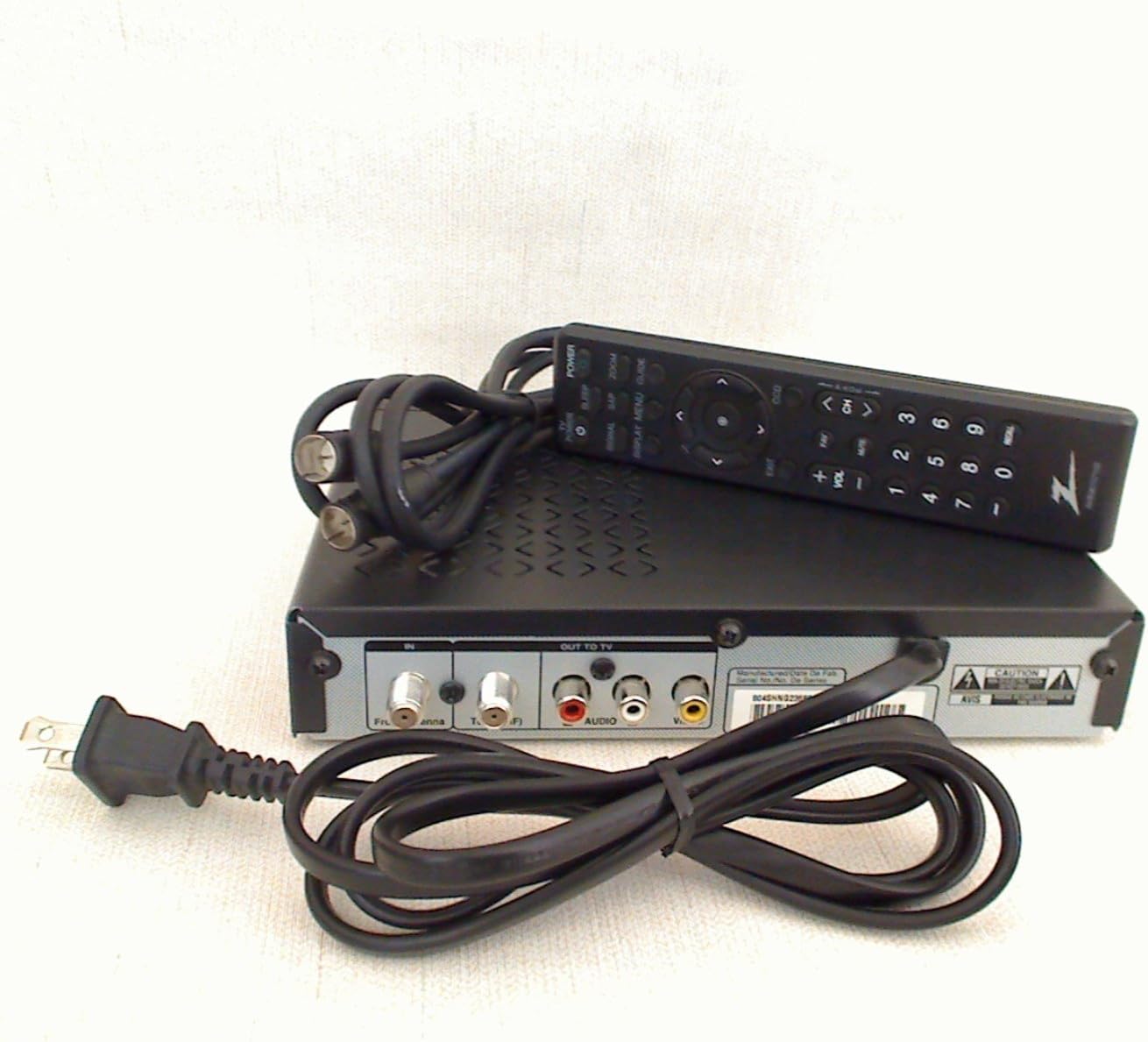
Figure 4.1: Zenith DTT900 remote control.
5. ບໍາລຸງຮັກສາ
To ensure the longevity and optimal performance of your Zenith DTT900 converter box, follow these maintenance guidelines:
- ທໍາຄວາມສະອາດ: Use a soft, dry cloth to clean the exterior of the converter box. Do not use liquid cleaners or aerosol sprays, as they may damage the device.
- ການລະບາຍອາກາດ: Ensure the converter box is placed in a well-ventilated area. Do not block any ventilation openings on the device.
- ພະລັງງານ: Disconnect the power cord from the wall outlet during lightning storms or when the device is left unattended for long periods.
- ການເກັບຮັກສາ: Store the converter box in a cool, dry place away from direct sunlight and extreme temperatures.
6. ການແກ້ໄຂບັນຫາ
If you encounter issues with your Zenith DTT900, refer to the following common problems and solutions:
| ບັນຫາ | ສາເຫດທີ່ເປັນໄປໄດ້ | ການແກ້ໄຂ |
|---|---|---|
| ບໍ່ມີຮູບພາບຫຼືສຽງ | Incorrect TV input selected, loose cable connections, converter box not powered on. | Verify TV input (e.g., AV1, Channel 3/4). Check all cable connections. Ensure converter box is plugged in and powered on. |
| Poor picture quality or missing channels | Weak antenna signal, antenna not positioned correctly, incomplete channel scan. | Adjust antenna position. Perform a new channel scan (refer to Section 3.2). Consider a stronger antenna or signal ampມີຊີວິດຊີວາ. |
| ການຄວບຄຸມໄລຍະໄກບໍ່ເຮັດວຽກ | Dead batteries, obstruction between remote and converter box, remote not pointed correctly. | Replace batteries. Remove any obstructions. Point the remote directly at the converter box's IR sensor. |
| ສຽງອອກຈາກການຊິງຄ໌ | Temporary signal issue. | Restart the converter box by unplugging it for 30 seconds and plugging it back in. |
7. ຂໍ້ມູນຈໍາເພາະ
Key technical specifications for the Zenith DTT900 Digital TV Tuner Converter Box:
- ຊື່ຍີ່ຫໍ້: ຊີນິດ
- ນ້ໍາຫນັກລາຍການ: 2.3 ປອນ
- ຂະໜາດຜະລິດຕະພັນ: 12.8 x 9.9 x 2.8 ນິ້ວ
- ໝາຍເລກຕົວແບບ: DTT900
- ແບັດເຕີຣີ: ຕ້ອງການແບັດເຕີຣີ AA 2 ກ້ອນ (ສຳລັບຣີໂໝດ)
- ສີ: ດຳ
- ອຸປະກອນທີ່ເຂົ້າກັນໄດ້: ໂທລະພາບ
- ປະເພດຕົວເຊື່ອມຕໍ່: RF Connector
- ເຕັກໂນໂລຍີການເຊື່ອມຕໍ່: ສາຍໄຟ

Figure 7.1: Product label displaying model and compliance information.
8. ການຮັບປະກັນແລະການສະຫນັບສະຫນູນ
8.1 ຂໍ້ມູນການຮັບປະກັນ
This product is covered by a limited manufacturer's warranty. Please refer to the included Basic Warranty Statement in your package for specific terms, conditions, and duration of coverage. Keep your proof of purchase for warranty claims.
8.2 ສະຫນັບສະຫນູນລູກຄ້າ
For technical assistance, troubleshooting, or general inquiries, please contact Zenith customer support. Contact information can typically be found in the included Setup Guide or on the official Zenith webເວັບໄຊ.


