1. ຂໍ້ມູນຄວາມປອດໄພທີ່ສໍາຄັນ
Please read this entire manual before assembling or operating your ZIPRO One S exercise bike. Retain this manual for future reference. Failure to follow these instructions can result in injury or damage to the product.
- ປຶກສາແພດຂອງທ່ານກ່ອນທີ່ຈະເລີ່ມໂຄງການອອກກຳລັງກາຍໃດໆ, ໂດຍສະເພາະຖ້າທ່ານມີບັນຫາສຸຂະພາບຢູ່ກ່ອນແລ້ວ.
- The maximum user weight for this device is 110 kg (242 lbs).
- ຮັບປະກັນວ່າລອດ, ແກ່ນ, ແລະການເຊື່ອມຕໍ່ທັງໝົດຖືກຮັດຢ່າງປອດໄພກ່ອນທີ່ຈະໃຊ້ແຕ່ລະຄັ້ງ.
- Place the exercise bike on a flat, stable surface. Use a protective mat if necessary.
- ຮັກສາເດັກນ້ອຍ ແລະສັດລ້ຽງຢູ່ຫ່າງຈາກອຸປະກອນໃນລະຫວ່າງການປະຕິບັດງານ.
- ໃສ່ເສື້ອຜ້າ ແລະ ເກີບອອກກຳລັງກາຍທີ່ເໝາະສົມ. ຫຼີກລ່ຽງເຄື່ອງນຸ່ງທີ່ຫຼວມໆທີ່ອາດຈະຕິດຢູ່ໃນຊິ້ນສ່ວນທີ່ເຄື່ອນທີ່.
- ຢຸດການອອກກໍາລັງກາຍທັນທີຖ້າທ່ານຮູ້ສຶກອ່ອນເພຍ, ວິນຫົວ, ຫຼືມີອາການປວດ.
- ຜະລິດຕະພັນນີ້ຖືກອອກແບບມາສໍາລັບການນໍາໃຊ້ພາຍໃນເຮືອນເທົ່ານັ້ນ.
2. ຜະລິດຕະພັນເກີນview
The ZIPRO One S is a compact exercise bike designed for home cardio training. It features 8 levels of magnetic resistance, an LCD display for tracking workout metrics, and an adjustable saddle for user comfort.

ຮູບພາບ 2.1: ດ້ານຫນ້າ view of the ZIPRO One S Exercise Bike.

Image 2.2: The ZIPRO One S Exercise Bike highlighting its compact dimensions (897mm length, 435mm width, 1100mm height) and key features such as modern design, silent operation, practical adjustment, and compact size.
3. ຄໍາແນະນໍາຂອງສະພາແຫ່ງ
Assembly typically takes 30-40 minutes. All necessary tools are included. Follow these steps carefully.
- Unpack ອົງປະກອບ: Carefully remove all parts from the packaging and lay them out. Check against the parts list (refer to included diagram in the box) to ensure all components are present.
- ຕິດຕົວກັນສະຖຽນລະພາບ: Secure the front and rear stabilizer bars to the main frame using the provided bolts and washers. Ensure they are firmly attached for stability.
- ຕິດຕັ້ງ pedals: Identify the left (L) and right (R) pedals. Thread the left pedal counter-clockwise and the right pedal clockwise into their respective crank arms. Tighten securely with a wrench. Ensure the pedal straps are correctly oriented.

ຮູບພາບທີ 3.1: ໄລຍະໃກ້ view of the pedal with an adjustable strap, ensuring proper foot positioning during exercise.
- Assemble Seat Post and Saddle: Insert the seat post into the main frame. Adjust the height to your preference and secure it with the adjustment knob. Attach the saddle to the seat post.

ຮູບພາບ 3.2: ລາຍລະອຽດ view of the saddle and its adjustment mechanism, allowing users to customize seat height for optimal comfort.
- Install Handlebars and Console: Attach the handlebar post to the main frame. Connect any necessary sensor cables from the main frame to the console. Mount the console onto the handlebar post and secure it. Insert 2 AAA batteries (included) into the console.
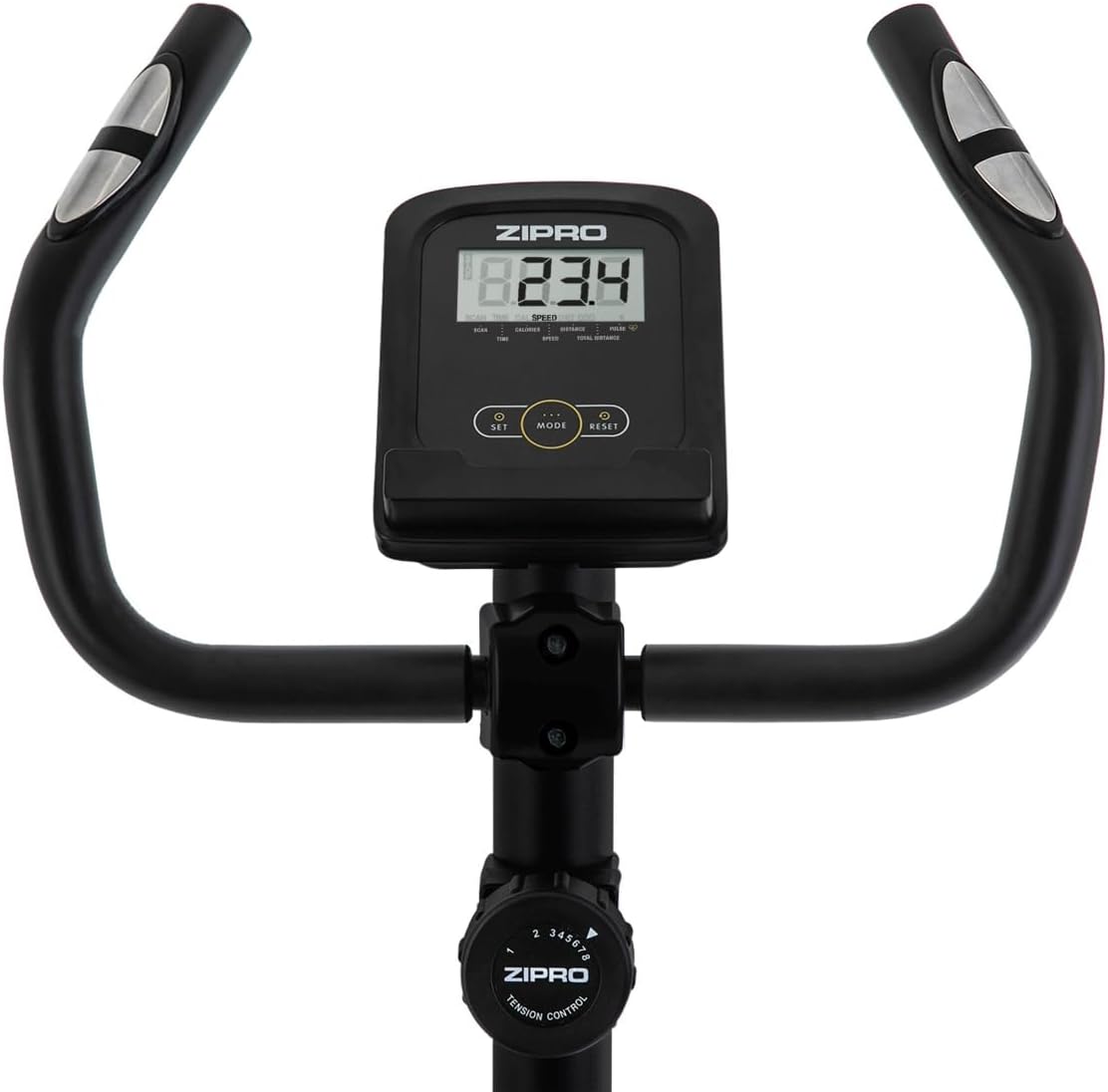
ຮູບພາບ 3.3: View of the handlebars, integrated LCD display, and the manual resistance control knob, showing the primary user interface.
- ກວດສອບຄັ້ງສຸດທ້າຍ: Before first use, double-check all connections and ensure the bike is stable.
4. ຄໍາແນະນໍາການດໍາເນີນງານ
4.1 ການປັບລົດຖີບ
- ຄວາມສູງຂອງອານ: Loosen the adjustment knob on the seat post, raise or lower the saddle to a comfortable height (recommended: 65-80 cm from the ground, 55-75 cm from pedals), and re-tighten the knob. Your leg should have a slight bend at the knee when the pedal is at its lowest point.
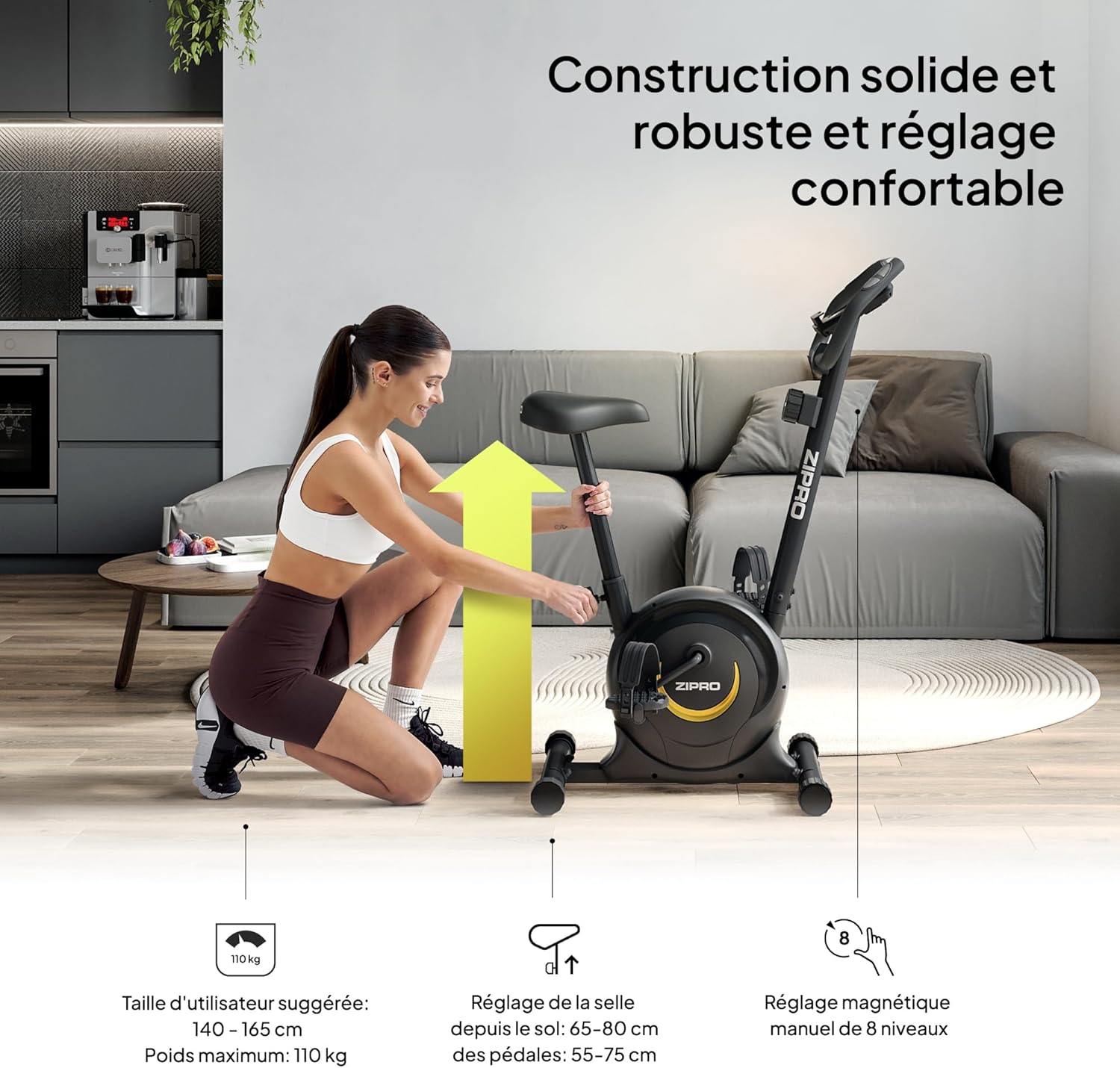
Image 4.1: A user demonstrating the saddle height adjustment, which is crucial for ergonomic and effective training. The image also indicates suggested user height (140-165 cm) and maximum weight (110 kg).
4.2 ການໃຊ້ຄອນໂຊນ
The LCD console tracks your workout data. It is powered by 2 AAA batteries.

ຮູບພາບ 4.2: ລາຍລະອຽດ view of the LCD display, showing various metrics, and the integrated pulse sensors on the handlebars for heart rate monitoring.
- ຟັງຊັນການສະແດງ: The console displays Time, Distance, Calories, and Pulse. It also features a SCAN function that cycles through these parameters automatically.
- ການວັດແທກກຳມະຈອນ: Grip the pulse sensors on the handlebars to measure your heart rate.
- ຜູ້ຖືໂທລະສັບສະຫຼາດ: Use the integrated holder to place your smartphone or tablet for entertainment or tracking during your workout.

Image 4.3: A smartphone securely placed in the integrated holder on the handlebars, allowing for easy access to media or fitness apps during a workout.
4.3 ການປັບຄວາມຕ້ານທານ
The ZIPRO One S offers 8 levels of magnetic resistance.
- ລູກບິດຕໍ່ຕ້ານ: Turn the resistance knob located below the console clockwise to increase resistance (harder pedaling) and counter-clockwise to decrease resistance (easier pedaling).
- Choose a resistance level that challenges you without causing excessive strain.

Image 4.4: This image illustrates the manual resistance adjustment knob, pedal straps, and saddle height adjustment, highlighting the bike's customizable features.
5. ບໍາລຸງຮັກສາ
ການບຳລຸງຮັກສາເປັນປະຈຳຮັບປະກັນອາຍຸການໃຊ້ງານທີ່ຍາວນານ ແລະ ປອດໄພຂອງລົດຖີບອອກກຳລັງກາຍຂອງທ່ານ.
- ທໍາຄວາມສະອາດ: ເຊັດລົດຖີບດ້ວຍການໂຄສະນາamp ເຊັດຜ້າຫຼັງຈາກໃຊ້ແຕ່ລະຄັ້ງເພື່ອກຳຈັດເຫື່ອ ແລະ ຝຸ່ນ. ຫຼີກລ່ຽງນໍ້າຢາເຮັດຄວາມສະອາດທີ່ມີສີຂັດ ຫຼື ຕົວລະລາຍ.
- ການກວດກາ: ກວດສອບສະລັອດທັງໝົດ, ແກ່ນໝາກໄມ້, ແລະຊິ້ນສ່ວນເຄື່ອນຍ້າຍເປັນໄລຍະເພື່ອຄວາມແໜ້ນໜາ ແລະສວມ. ຮັດເຄື່ອງທີ່ວ່າງໃຫ້ແໜ້ນ.
- ການລະບາຍສີ: The magnetic resistance system is generally maintenance-free. Do not attempt to lubricate internal components unless specifically instructed by customer support.
- ການເກັບຮັກສາ: When not in use, store the bike in a dry, cool place away from direct sunlight and moisture. The integrated transport wheels allow for easy relocation.

Image 5.1: A user easily moving the ZIPRO One S exercise bike, demonstrating its portability thanks to integrated transport wheels.
6. ການແກ້ໄຂບັນຫາ
ຖ້າທ່ານພົບບັນຫາໃດໆ, ໃຫ້ອ້າງອີງເຖິງຂັ້ນຕອນການແກ້ໄຂບັນຫາທົ່ວໄປຕໍ່ໄປນີ້:
- ຄອນໂຊນບໍ່ສະແດງ: ກວດສອບວ່າແບັດເຕີຣີ AAA 2 ກ້ອນຖືກຕິດຕັ້ງຢ່າງຖືກຕ້ອງ ແລະ ບໍ່ໝົດ. ປ່ຽນໃໝ່ຖ້າຈຳເປັນ.
- Inaccurate Pulse Reading: Ensure your hands are firmly gripping both pulse sensors. Dry hands or excessive movement can affect accuracy.
- ສິ່ງລົບກວນທີ່ຜິດປົກກະຕິ: Check all visible bolts and nuts for tightness. Ensure no parts are rubbing against each other. If the noise persists, discontinue use and contact customer support.
- ຄວາມຕ້ານທານບໍ່ປ່ຽນແປງ: Verify that the resistance knob is turning freely and engaging with the internal mechanism. If it feels stuck or unresponsive, contact customer support.
7. ຂໍ້ມູນຈໍາເພາະ
Detailed technical specifications for the ZIPRO One S Exercise Bike.
| ຄຸນສົມບັດ | ຂໍ້ມູນຈໍາເພາະ |
|---|---|
| ຊື່ຕົວແບບ | ຫນຶ່ງ S |
| ໝາຍເລກຕົວແບບ | 5941659 |
| ຍີ່ຫໍ້ | ZIPRO |
| ກົນໄກການຕໍ່ຕ້ານ | ແມ່ເຫຼັກ |
| ລະດັບຄວາມຕ້ານທານ | 8 (Manual Adjustment) |
| ປະເພດການສະແດງ | ຈໍ LCD |
| ສະແດງເມຕຣິກ | Time, Distance, Calories, Pulse, Scan |
| ແຫຼ່ງພະລັງງານ (ຄອນໂຊນ) | ແບດເຕີຣີ້ AAA 2 x (ລວມ) |
| ນ້ໍາຫນັກຜູ້ໃຊ້ສູງສຸດ | 110 ກິໂລ (242 ປອນ) |
| ຄວາມສູງຂອງຜູ້ໃຊ້ທີ່ແນະນໍາ | 140 - 165 ຊມ |
| Saddle Height Adjustment (from ground) | 65 - 80 ຊມ |
| Saddle Height Adjustment (from pedals) | 55 - 75 ຊມ |
| ຂະໜາດສິນຄ້າ (L x W x H) | 89.7 x 43.5 x 110 cm |
| ນ້ຳໜັກສິນຄ້າ | 15.5 ກິໂລ |
| ວັດສະດຸຫຼັກ | ເຫຼັກກາກບອນ |
| ຄຸນນະສົມບັດພິເສດ | Compact design, Adjustable saddle, Smartphone holder, Transport wheels |
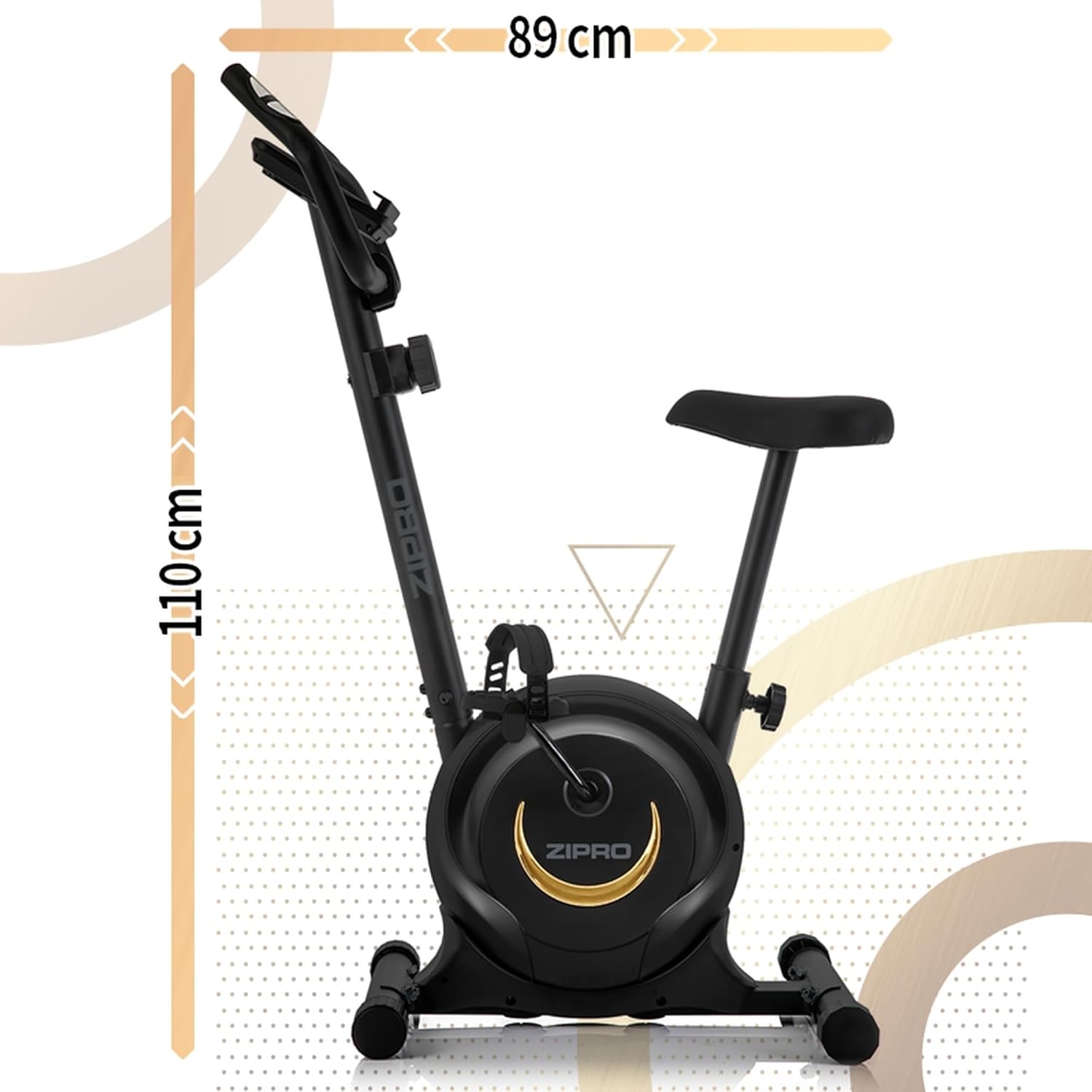
ຮູບພາບ 7.1: ຂ້າງ view of the ZIPRO One S Exercise Bike, illustrating its overall dimensions of approximately 110 cm in height and 89 cm in length.
8. ການຮັບປະກັນແລະການສະຫນັບສະຫນູນ
For warranty information, product support, or to order replacement parts, please contact ZIPRO customer service. Refer to your purchase documentation for specific warranty terms and contact details.
- Keep your proof of purchase (receipt or order confirmation) for warranty claims.
- Do not attempt to repair the product yourself if it is under warranty, as this may void the warranty.


