1. ບົດແນະນຳ
This manual provides essential information for the safe and efficient operation of your Datalogic PowerScan M8300-AR910RB Handheld Laser Bar Code Reader. Please read this manual thoroughly before using the device to ensure proper setup, operation, and maintenance. Keep this manual for future reference.
2. ຂໍ້ມູນຄວາມປອດໄພ
ປະຕິບັດຕາມຄວາມລະມັດລະວັງດ້ານຄວາມປອດໄພຕໍ່ໄປນີ້ສະເໝີເພື່ອປ້ອງກັນການບາດເຈັບ ຫຼືຄວາມເສຍຫາຍຕໍ່ອຸປະກອນ:
- ຄວາມປອດໄພເລເຊີ: This device emits a laser beam. Do not stare directly into the laser beam or point it at others. Avoid direct eye exposure.
- ຄວາມປອດໄພຫມໍ້ໄຟ: Use only Datalogic-approved batteries and charging accessories. Do not expose batteries to extreme temperatures, puncture, or disassemble them. Dispose of batteries according to local regulations.
- ເງື່ອນໄຂສິ່ງແວດລ້ອມ: Do not operate the device in explosive atmospheres or near flammable materials. Keep the device dry and away from extreme temperatures.
- ບໍາລຸງຮັກສາ: Refer all servicing to qualified service personnel. Do not attempt to open or modify the device.
3. ເນື້ອໃນຊຸດ
ກວດສອບວ່າລາຍການທັງຫມົດແມ່ນມີຢູ່ໃນຊຸດ:
- Datalogic PowerScan M8300-AR910RB Handheld Laser Bar Code Reader
- ແບັດເຕີຣີທີ່ຖອດອອກໄດ້
- Charging/Communication Cradle (may be sold separately depending on configuration)
- USB or Serial Cable (for cradle connection, may be sold separately)
- Power Supply (for cradle, may be sold separately)
- ຄູ່ມືເລີ່ມຕົ້ນດ່ວນ
4. ຜະລິດຕະພັນເກີນview
The Datalogic PowerScan M8300 is a robust, cordless handheld laser bar code reader designed for industrial applications. It features a durable casing and a 910MHz radio for reliable wireless communication.
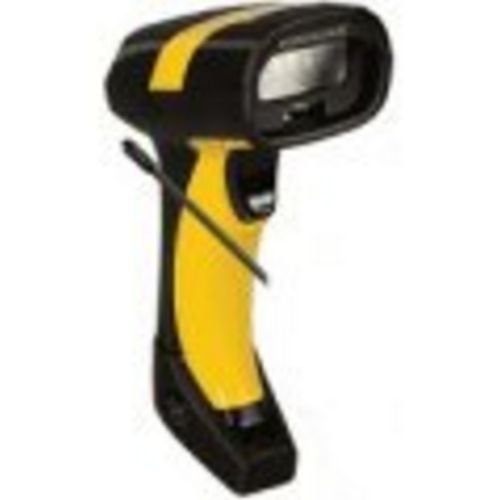
ຮູບພາບ 1: Datalogic PowerScan M8300 Handheld Laser Bar Code Reader. This image displays the front view of the scanner, highlighting its ergonomic design, scan window, and trigger button.
ອົງປະກອບທີ່ສໍາຄັນ:
- ສະແກນປ່ອງຢ້ຽມ: Located at the front, where the laser beam exits to read barcodes.
- ຕົວກະຕຸ້ນ: Activates the laser for scanning.
- ແສງຕົວຊີ້ວັດ: Provide feedback on scan status, battery level, and communication.
- ຊ່ອງໃສ່ຫມໍ້ໄຟ: Located at the base of the handle, housing the removable battery.
- ການໂຕ້ຕອບການສື່ສານ: For wireless data transmission via the 910MHz radio.
5. ຕັ້ງຄ່າ
5.1. ການຕິດຕັ້ງຫມໍ້ໄຟ
- ກວດໃຫ້ແນ່ໃຈວ່າເຄື່ອງສະແກນປິດຢູ່.
- Locate the battery compartment cover at the bottom of the handle.
- Open the cover and insert the removable battery, ensuring correct polarity.
- ປິດຝາປິດຊ່ອງໃສ່ຫມໍ້ໄຟຢ່າງປອດໄພ.
5.2. ການສາກແບັດເຕີຣີ
- Place the scanner into its charging cradle. Ensure the contacts on the scanner align with those on the cradle.
- Connect the power supply to the charging cradle and plug it into an electrical outlet.
- The scanner's indicator light will show charging status (typically amber for charging, green for fully charged).
- Allow the battery to fully charge before first use (approximately 4 hours).
5.3. Connecting to a Host System
The PowerScan M8300 uses a 910MHz radio for wireless communication. It typically connects to a host system (e.g., PC, laptop) via a base station or cradle connected by a USB or serial cable.
- Connect the communication cable (USB or serial) from the charging/communication cradle to your host system.
- Connect the power supply to the cradle and plug it in.
- Place the scanner in the cradle. The scanner and cradle will automatically establish a wireless link.
- Install any necessary drivers or software on your host system as prompted or as instructed by Datalogic documentation for your specific cradle model.
6. ຄໍາແນະນໍາການດໍາເນີນງານ
6.1. ເປີດ / ປິດພະລັງງານ
- ເພື່ອເປີດເຄື່ອງ: The scanner typically powers on automatically when removed from the cradle or when the trigger is pressed.
- ປິດເຄື່ອງ: The scanner will enter a low-power sleep mode after a period of inactivity. To fully power off, remove the battery.
6.2. ການສະແກນບາໂຄດ
- Aim the scan window at the barcode you wish to read.
- Press and hold the trigger button. A laser line will appear.
- Position the laser line across the entire barcode.
- Once the barcode is successfully read, the scanner will emit an audible beep and/or an indicator light will illuminate.
- Release the trigger. The scanned data will be transmitted to the connected host system.
6.3. ການສົ່ງຂໍ້ມູນ
The PowerScan M8300 transmits scanned data wirelessly to its paired base station/cradle. Ensure the scanner is within range of its base station for successful data transfer. Out-of-range scanning capabilities may vary by configuration; refer to advanced programming guides for details.
7. ບໍາລຸງຮັກສາ
7.1. ທຳ ຄວາມສະອາດອຸປະກອນ
- ໃຊ້ຜ້າສະອາດ ງampຜະສົມດ້ວຍນ້ໍາຫຼືການແກ້ໄຂການທໍາຄວາມສະອາດອ່ອນໆ.
- ຢ່າໃຊ້ເຄື່ອງເຮັດຄວາມສະອາດຂັດ, ສານລະລາຍ, ຫຼືສານເຄມີທີ່ຮຸນແຮງ.
- Gently wipe the scan window and the exterior of the scanner.
- ໃຫ້ແນ່ໃຈວ່າບໍ່ມີຂອງແຫຼວເຂົ້າໄປໃນຊ່ອງເປີດຂອງອຸປະກອນ.
7.2. ການດູແລຫມໍ້ໄຟ
- ສາກແບັດເຕີຣີເປັນປະຈຳ.
- ຫຼີກລ້ຽງການປະຈຸຫມໍ້ໄຟຢ່າງເຕັມທີ່ເລື້ອຍໆ.
- Store the scanner and spare batteries in a cool, dry place when not in use.
7.3. ການເກັບຮັກສາ
When storing the scanner for extended periods, ensure the battery is partially charged (around 50%) and remove it from the device if possible. Store in a temperature-controlled environment.
8. ການແກ້ໄຂບັນຫາ
If you encounter issues with your PowerScan M8300, refer to the following common problems and solutions:
| ບັນຫາ | ສາເຫດທີ່ເປັນໄປໄດ້ | ການແກ້ໄຂ |
|---|---|---|
| ເຄື່ອງສະແກນບໍ່ເປີດ. | ແບດເຕີລີ່ຕາຍຫຼືຕິດຕັ້ງບໍ່ຖືກຕ້ອງ. | Check battery installation. Charge the battery. Replace battery if necessary. |
| ເຄື່ອງສະແກນບໍ່ໄດ້ອ່ານບາໂຄດ. | Barcode damaged or poorly printed; scan window dirty; incorrect symbology enabled. | Try scanning a different barcode. Clean the scan window. Refer to the programming guide to enable/disable symbologies. |
| No data transmitted to host. | Scanner out of range; base station not connected; communication issue. | Move scanner closer to the base station. Verify base station connection to host. Check base station power. |
| ອາຍຸແບັດເຕີຣີສັ້ນ. | Battery nearing end of life; frequent use; improper charging. | Replace battery. Ensure full charges. Reduce backlight/power settings if configurable. |
If the problem persists, contact Datalogic technical support.
9. ຂໍ້ມູນຈໍາເພາະ
The following specifications apply to the Datalogic PowerScan M8300-AR910RB model:
- ໝາຍເລກຕົວແບບ: PM8300-AR910RB
- ຂະໜາດຜະລິດຕະພັນ: 2.72 x 4.49 x 8.15 ນິ້ວ
- ນ້ໍາຫນັກລາຍການ: 13.9 ອອນ
- ຜູ້ຜະລິດ: Datalogic ADC
- ແຫຼ່ງພະລັງງານ: ພະລັງງານຫມໍ້ໄຟ
- ເຕັກໂນໂລຍີການເຊື່ອມຕໍ່: Wireless (910MHz)
- ອຸປະກອນທີ່ເຂົ້າກັນໄດ້: ເດັສທັອບ, ແລັບທັອບ
- UPC: 053926383351
10. ຂໍ້ມູນການຮັບປະກັນ
Datalogic products are covered by a limited warranty against defects in materials and workmanship. The specific terms and duration of the warranty may vary by region and product. Please refer to the warranty card included with your product or visit the official Datalogic webສະຖານທີ່ສໍາລັບການຮັບປະກັນລາຍລະອຽດແລະຂັ້ນຕອນການລົງທະບຽນ.
11. ສະຫນັບສະຫນູນ
For technical assistance, product inquiries, or to report issues, please contact Datalogic customer support:
- Webເວັບໄຊ: Visit the official Datalogic website for support resources, FAQs, and driver downloads.
- ຕິດຕໍ່: Refer to the 'Contact Us' section on the Datalogic webເວັບໄຊທ໌ສຳລັບເບີໂທລະສັບ ແລະ ທີ່ຢູ່ອີເມວສະເພາະສຳລັບພາກພື້ນຂອງທ່ານ.
When contacting support, please have your product model number (PM8300-AR910RB) and serial number ready.


