1. ບົດແນະນຳ
ຂອບໃຈສໍາລັບການຊື້asing the RCA DHT235A 3.5-Inch LED-lit 720p 60Hz TV. This portable television is designed to provide digital television viewing on a compact screen. This manual provides instructions for the proper setup, operation, and maintenance of your device.
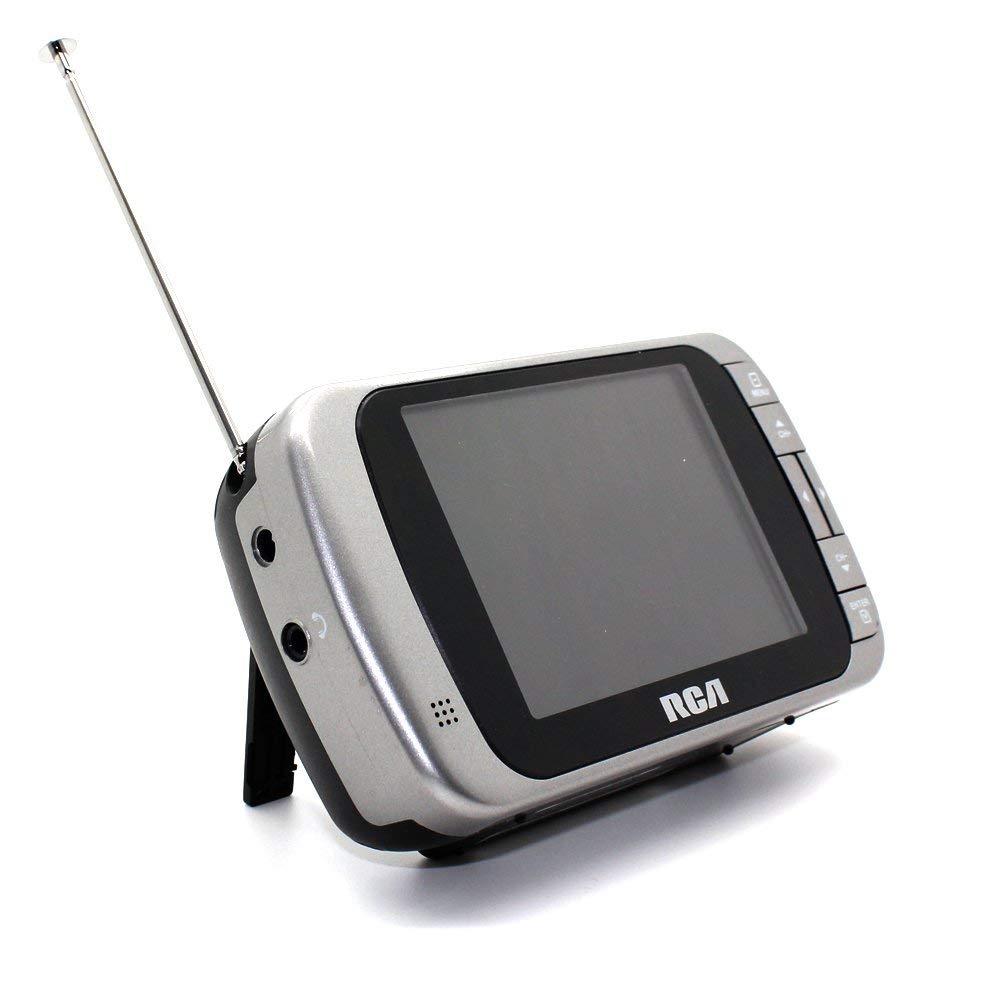
Image 1.1: The RCA DHT235A portable television, featuring its 3.5-inch screen and compact design.
2. ຂໍ້ມູນຄວາມປອດໄພ
- ອ່ານຄໍາແນະນໍາທັງຫມົດກ່ອນທີ່ຈະດໍາເນີນການອຸປະກອນ.
- ຫ້າມບໍ່ໃຫ້ອຸປະກອນຖືກຝົນ ຫຼື ຄວາມຊຸ່ມຊື້ນເພື່ອປ້ອງກັນໄຟ ຫຼື ໄຟຟ້າຊັອດ.
- ຫ້າມປິດຊ່ອງລະບາຍອາກາດ. ຮັບປະກັນພື້ນທີ່ພຽງພໍຮອບຫນ່ວຍສໍາລັບການໄຫຼຂອງອາກາດທີ່ເຫມາະສົມ.
- Use only specified power sources (4 AA batteries or compatible AC adapter).
- ຫຼີກລ້ຽງການລຸດລົງຫຼືເຮັດໃຫ້ຫນ່ວຍງານໄດ້ຮັບຜົນກະທົບທີ່ເຂັ້ມແຂງ.
- ຢ່າພະຍາຍາມບໍລິການຜະລິດຕະພັນນີ້ດ້ວຍຕົນເອງ. ອ້າງເຖິງການບໍລິການທັງtoົດໃຫ້ກັບພະນັກງານບໍລິການທີ່ມີຄຸນວຸດທິ.
- ຖິ້ມແບັດເຕີລີໃຫ້ຖືກຕ້ອງຕາມລະບຽບທ້ອງຖິ່ນ.
3. ເນື້ອໃນຊຸດ
ກວດສອບວ່າລາຍການທັງຫມົດແມ່ນມີຢູ່ໃນຊຸດ:
- RCA DHT235A Portable TV Unit
- ຢືນ
- Quick Guide (refer to this manual for detailed instructions)
- ຄູ່ມືເຈົ້າຂອງ (ເອກະສານສະບັບນີ້)
4. ຜະລິດຕະພັນເກີນview
The RCA DHT235A features a 3.5-inch LED-lit display, designed for portable digital television reception. Key components include:
- 3.5-Inch LED Backlit LCD Display: Provides clear visual output.
- ລຳໂພງໃນຕົວ: ສໍາລັບຜົນຜະລິດສຽງ.
- ຫູຟັງ Jack: ສໍາລັບການຟັງສ່ວນຕົວ.
- Embedded Monopole Antenna: For receiving terrestrial ATSC and NTSC signals.
- ຊ່ອງໃສ່ຫມໍ້ໄຟ: ສໍາລັບ 4 ຫມໍ້ໄຟ AA.
- AC Adapter Input (9-24VDC): For external power.
- ປຸ່ມຄວບຄຸມ: For power, channel, volume, and menu navigation.
5. ຕັ້ງຄ່າ
5.1 Powering the TV
The TV can be powered by 4 AA batteries or an optional AC adapter.
ການນໍາໃຊ້ຫມໍ້ໄຟ:
- Locate the battery compartment on the back of the TV.
- ເປີດຝາປິດຊ່ອງໃສ່ຫມໍ້ໄຟ.
- ໃສ່ໝໍ້ໄຟ AA 4 ອັນ, ຮັບປະກັນການຂົ້ວທີ່ຖືກຕ້ອງ (+/-).
- ປິດຝາປິດຊ່ອງໃສ່ຫມໍ້ໄຟຢ່າງປອດໄພ.
Using AC Adapter (Optional):
- Connect a compatible 9-24VDC AC adapter (not included) to the DC input jack on the TV.
- ສຽບອະແດບເຕີ AC ເຂົ້າໄປໃນເຕົ້າສຽບໄຟມາດຕະຖານ.
5.2 ການຕິດຕັ້ງເສົາອາກາດ
Extend the embedded monopole antenna fully for optimal signal reception. For improved reception, especially in areas with weak signals, an external antenna may be connected to the dedicated RCA connector input.
6. ຄໍາແນະນໍາການດໍາເນີນງານ
6.1 ເປີດ/ປິດ
ກົດ ພະລັງງານ ເພື່ອເປີດ ຫຼື ປິດໂທລະພາບ.
6.2 Initial Channel Scan
Upon first use or after moving to a new location, perform an auto channel scan to find available digital and analog channels.
- ກົດ ເມນູ ປຸ່ມ.
- Navigate to the "Channel" or "Setup" menu using the arrow buttons.
- Select "Auto Scan" or "Auto Program" and confirm.
- The TV will scan for available channels. This process may take several minutes.
6.3 ການເລືອກຊ່ອງ
- ໃຊ້ CH+ ແລະ CH- buttons to cycle through available channels.
- For direct channel input, use the numeric keypad (if available on your model) or the "Direct Channel Changing" option in the menu.
6.4 ການປັບລະດັບສຽງ
ໃຊ້ VOL+ ແລະ VOL- ປຸ່ມເພື່ອປັບລະດັບສຽງ.
6.5 ການ ນຳ ທາງເມນູ
ກົດ ເມນູ button to access settings. Use the arrow buttons to navigate and the OK or ປ້ອນ ເພື່ອຢືນຢັນການເລືອກ. ກົດ ເມນູ again or an ອອກ button to leave the menu.
Available menu options include:
- ການຕັ້ງຄ່າຮູບ: ປັບຄວາມສະຫວ່າງ, ຄວາມຄົມຊັດ, ສີ.
- ການຕັ້ງຄ່າສຽງ: Adjust audio mode, balance.
- ການຕັ້ງຄ່າຊ່ອງ: Auto scan, manual scan, channel editing.
- ການຕັ້ງຄ່າເວລາ: Auto time setting, time zone.
- ພາສາ: Select menu language (English, Spanish).
- ຄຳບັນຍາຍປິດ: Enable/disable digital closed captioning (E1A-708B compliant).
7. ບໍາລຸງຮັກສາ
7.1 ການທໍາຄວາມສະອາດ
- Before cleaning, ensure the TV is powered off and disconnected from any external power source.
- ໃຊ້ຜ້າອ່ອນ, ແຫ້ງເພື່ອເຊັດຫນ້າຈໍແລະດ້ານນອກ.
- ສໍາລັບຮອຍແຂງ, ເບົາບາງ dampen ຜ້າທີ່ມີນ້ໍາ. ຢ່າໃຊ້ເຄື່ອງເຮັດຄວາມສະອາດຂັດ, ຂີ້ເຜີ້ງ, ຫຼືສານລະລາຍ.
- ຫຼີກເວັ້ນການສີດນໍ້າໂດຍກົງໃສ່ໜ້າຈໍ ຫຼືໃສ່ຊ່ອງເປີດຕ່າງໆ.
7.2 ການເກັບຮັກສາ
When storing the TV for an extended period, remove the batteries to prevent leakage. Store the unit in a cool, dry place away from direct sunlight and extreme temperatures.
8. ການແກ້ໄຂບັນຫາ
| ບັນຫາ | ການແກ້ໄຂທີ່ເປັນໄປໄດ້ |
|---|---|
| ບໍ່ມີພະລັງງານ | Ensure batteries are correctly inserted and not depleted. If using AC adapter, verify it is properly connected and the outlet is functional. |
| No Picture/Weak Signal | Extend the antenna fully. Perform an auto channel scan. Try repositioning the TV or antenna. Consider using an external antenna for better reception. Check signal strength display in the menu. |
| ບໍ່ມີສຽງ | Increase the volume. Check if headphones are plugged in. Ensure the Mute function is not active. |
| ປຸ່ມບໍ່ຕອບສະໜອງ | Turn the TV off and then on again. If the issue persists, remove and reinsert batteries or disconnect/reconnect the AC adapter. |
| Screen Scratches Easily | Handle the screen with care. Use a screen protector if desired (not included). |
| ອາຍຸແບັດເຕີຣີສັ້ນ | Use fresh, high-quality alkaline or rechargeable batteries. Consider using the AC adapter for extended viewing. |
| Low Audio Volume | Ensure volume is set to maximum. For better audio, consider connecting external speakers to the headphone jack. |
9. ຂໍ້ມູນຈໍາເພາະ
- ຕົວແບບ: DHT235A
- ຂະຫນາດຈໍສະແດງຜົນ: 3.5 ນິ້ວ (ເສັ້ນຂວາງ)
- ປະເພດການສະແດງ: LED Backlit LCD
- ຄວາມລະອຽດ: 320 x 240 digital RGB (720p compatible)
- ອັດຕາການໂຫຼດຂໍ້ມູນຄືນໃໝ່: 60Hz
- ການຖອດລະຫັດວິດີໂອ: MPEG-2 (MP at ML, MP at HL)
- ການຖອດລະຫັດສຽງ: Dolby Digital Audio, Digital multi-lingual
- ຕົວຈູນເນີ: Terrestrial ATSC 8VSB, Terrestrial NTSC CH2 - CH69
- ແຫຼ່ງພະລັງງານ: 4 AA Batteries or 9-24VDC AC Adapter (optional)
- ຊີວິດຫມໍ້ໄຟ: Approximately 2+ hours of DTV playback on 4 AA batteries
- ສຽງອອກ: Headphone jack, Built-in speaker
- ຄຸນສົມບັດເພີ່ມເຕີມ: Real-time signal strength display, On-screen program information, Direct channel changing, Channel editing, Time zone setting, Auto channel scan, Digital Closed Captioning (E1A-708B compliant), Menu languages (English, Spanish).
- ຂະໜາດ: ປະມານ 4.84 x 1.34 x 2.83 ນິ້ວ
- ນ້ຳໜັກ: ປະມານ 5.6 ອອນສ໌
10. ຂໍ້ມູນການຮັບປະກັນ
This product is covered by a limited warranty. For detailed warranty terms and conditions, please refer to the warranty card included with your purchase or visit the official RCA webເວັບໄຊ. ຮັກສາຫຼັກຖານການຊື້ຂອງທ່ານສໍາລັບການຮ້ອງຂໍການຮັບປະກັນ.
11. ການຊ່ວຍເຫຼືອລູກຄ້າ
If you encounter any issues or have questions not covered in this manual, please contact RCA customer support. You can find contact information on the official RCA webເວັບໄຊທ໌ຫຼືຜ່ານເອກະສານທີ່ສະຫນອງໃຫ້ກັບຜະລິດຕະພັນຂອງທ່ານ.
ສະຫນັບສະຫນູນອອນໄລນ໌: ຢ້ຽມຢາມ RCA ຢ່າງເປັນທາງການ webເວັບໄຊທ໌ສໍາລັບ FAQs ແລະຊັບພະຍາກອນສະຫນັບສະຫນູນ.
ໂທລະສັບສະຫນັບສະຫນູນ: ອ້າງເຖິງການຫຸ້ມຫໍ່ຜະລິດຕະພັນຂອງທ່ານ ຫຼື RCA webເວັບໄຊສຳລັບເບີໂທຕິດຕໍ່ປັດຈຸບັນ.


