ແນະນຳ
The SkylinkHome TM-318 Snap-On Wireless Remote Lighting Control Transmitter is designed to provide convenient wireless control over your lighting and small appliances. It offers the flexibility to turn lights on and off, or dim and brighten them, from a distance of up to 500 feet in an open area. This transmitter is specifically designed to snap into the opening of the Skylink Wall Switches (WE-001 & WR-001) but can also work with other SkylinkHome Receivers.
ຄຸນນະສົມບັດທີ່ສໍາຄັນປະກອບມີ:
- Requires SkylinkHome Receivers for wireless remote home control (sold separately).
- Designed to fit and work with WE-001 and WR-001 SkylinkHome Wall Switch Receivers, and compatible with other SkylinkHome Receivers.
- Provides convenient wireless lighting control at your fingertips, ideal for bedside use.
- Easily snaps onto a SkylinkHome Wall Switch for local operation or snaps out for remote use.
- Operating range up to 500 feet.
- Includes a long-life lithium battery.
- ໝາຍເຫດ: This transmitter does not work by itself and requires a compatible SkylinkHome Receiver.
ການຕິດຕັ້ງແລະການຕິດຕັ້ງ
The TM-318 transmitter is designed for easy integration with your existing SkylinkHome system. It comes with a long-life lithium battery already included.
ຄວາມເຂົ້າກັນໄດ້
The TM-318 is compatible with SkylinkHome WE-001 and WR-001 Wall Switches, as well as other SkylinkHome Receivers. Ensure you have a compatible receiver for the transmitter to function.
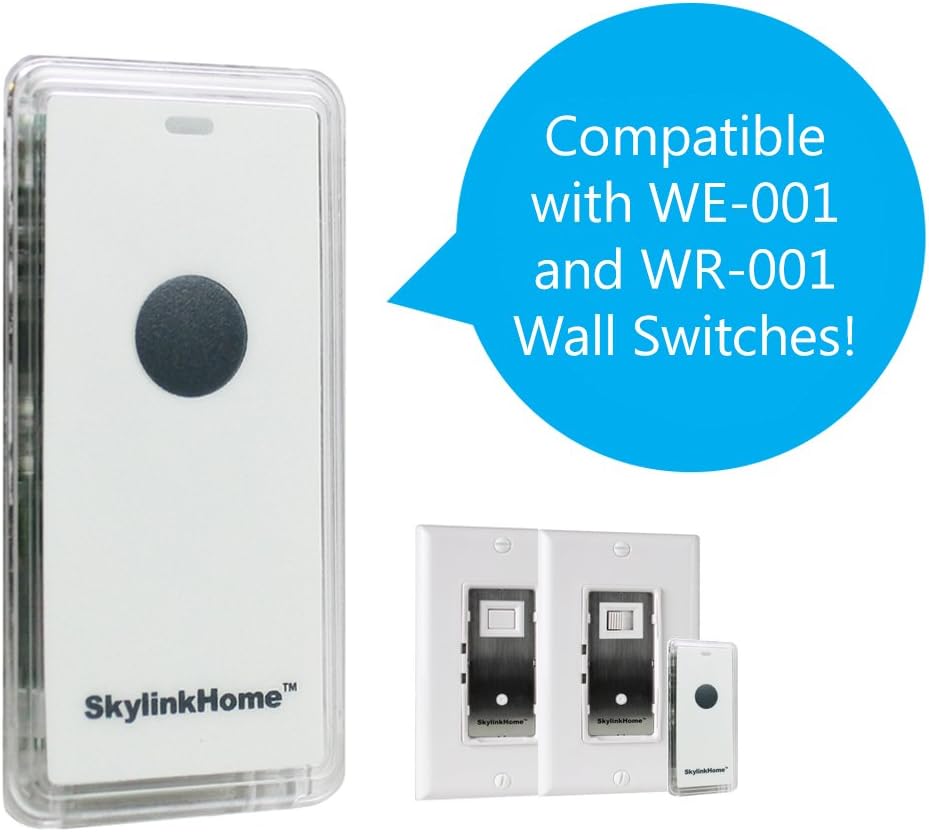
Image: The SkylinkHome TM-318 remote shown with compatible WE-001 and WR-001 Wall Switches.
Snapping into a Wall Switch
For local operation, the TM-318 can be easily snapped into the designated opening of a compatible SkylinkHome Wall Switch. This allows you to use the remote as a fixed switch on your wall.

Image: A hand demonstrating how to snap the TM-318 remote into a Skylink Wall Switch for integrated control.
When you need to use it as a portable remote, simply snap it out of the wall switch.
ຄໍາແນະນໍາການດໍາເນີນງານ
The TM-318 transmitter provides wireless control for various SkylinkHome receivers. Its simple push-button style allows for straightforward operation.
ການຄວບຄຸມພື້ນຖານ
Press the button on the TM-318 to send commands to your paired SkylinkHome receiver. Depending on the receiver, this will turn lights or appliances on/off, or dim/brighten them. The effective operating range is up to 500 feet in an open area.
ລະບົບຈົບview and Advanced Features
For a comprehensive understanding of the SkylinkHome system, including various receiver types, scene functions, all-on/all-off features, energy saving, motion sensor integration, and smartphone control via the Internet Hub, please watch the official product video below. This video illustrates how different components of the SkylinkHome system work together to provide complete home control.
ວິດີໂອ: ຫຼາຍກວ່າview of the SkylinkHome Control Product Line, demonstrating various receivers, control methods, and energy-saving features.
ບໍາລຸງຮັກສາ
ການປ່ຽນແບັດ
The TM-318 uses 1 Nonstandard Lithium battery (included). If the remote's performance degrades or it stops responding, the battery may need replacement. Refer to the full user manual (link in Support section) for specific instructions on how to open the unit and replace the battery safely.
ທໍາຄວາມສະອາດ
To clean the transmitter, wipe it gently with a soft, dry cloth. Do not use abrasive cleaners or solvents, as these may damage the unit.
ການແກ້ໄຂບັນຫາ
If you experience issues with your TM-318 transmitter, consider the following common troubleshooting steps:
- Remote Does Not Sync/Respond:
- Ensure the battery is properly installed and has sufficient charge. Replace the battery if necessary.
- Verify that the transmitter is within the 500-foot operating range of the receiver. Obstacles like walls and large metal objects can reduce range.
- Confirm that the transmitter is correctly paired with your SkylinkHome receiver. Refer to your receiver's manual for pairing instructions.
- If programming a second transmitter, ensure the first programmed transmitter is turned off or deactivated during the pairing process for the new one.
- Light Does Not Come On When Pushed:
- Check the receiver's status and power supply.
- Ensure the light bulb or appliance connected to the receiver is functioning correctly.
- Limited Durability/Button Wear:
While designed for regular use, excessive force or frequent drops may affect the lifespan of the unit. Handle with care to prolong its operational life.
For more detailed troubleshooting or complex issues, please consult the official user manual or contact Skylink customer support.
ຂໍ້ມູນຈໍາເພາະ
| ຄຸນສົມບັດ | ລາຍລະອຽດ |
|---|---|
| ຜູ້ຜະລິດ | Skylink |
| ເລກສ່ວນ | TM-318 |
| ນ້ໍາຫນັກລາຍການ | 1.6 ອອນ |
| ຂະໜາດສິນຄ້າ | 6.6 x 5.1 x 0.3 ນິ້ວ |
| ໝາຍເລກຕົວແບບ | TM-318 |
| ໝໍ້ໄຟ | 1 ຫມໍ້ໄຟທີ່ບໍ່ແມ່ນມາດຕະຖານ (ລວມ) |
| ສີ | ປິດສີຂາວ |
| ແບບ | TM-318 Snap-on Remote |
| ປະເພດການຕິດຕັ້ງ | ກຳແພງ |
| ປ່ຽນແບບ | ກົດປຸ່ມ |
| ວັນທີທໍາອິດທີ່ມີ | ວັນທີ 6 ມິຖຸນາ 2011 |
ຮັບປະກັນ
The SkylinkHome TM-318 Snap-On Wireless Remote Lighting Control Transmitter comes with a ຮັບປະກັນ 1 ປີ ຈາກຜູ້ຜະລິດ. ກະລຸນາຮັກສາຫຼັກຖານການຊື້ຂອງທ່ານສໍາລັບການຮຽກຮ້ອງການຮັບປະກັນ.
ສະຫນັບສະຫນູນ
For further assistance, detailed instructions, or to download the complete user manual, please visit the official Skylink website or refer to the PDF document provided by the manufacturer:
ນອກນັ້ນທ່ານຍັງສາມາດໄປຢ້ຽມຢາມໄດ້ SKYLINK Store on Amazon ສໍາລັບຂໍ້ມູນເພີ່ມເຕີມຜະລິດຕະພັນແລະຊັບພະຍາກອນສະຫນັບສະຫນູນ.


