1. ບົດແນະນຳ
The Grandstream GXP2100 is an enterprise-grade IP phone designed for business communication. It features support for four lines, a backlit graphical LCD, and various programmable keys to enhance user experience. This manual provides detailed instructions for the installation, configuration, and operation of your GXP2100 IP phone.
2. ເນື້ອໃນຊຸດ
Upon unpacking your Grandstream GXP2100, verify that all items are present and in good condition. The standard package typically includes:
- Grandstream GXP2100 IP Phone Unit
- ມືຖືທີ່ມີສາຍເຊືອກ
- ຂາຕັ້ງໂທລະສັບ
- ສາຍອີເທີເນັດ
- ອະແດັບເຕີພະລັງງານ
- Quick Installation Guide (this manual provides more detail)
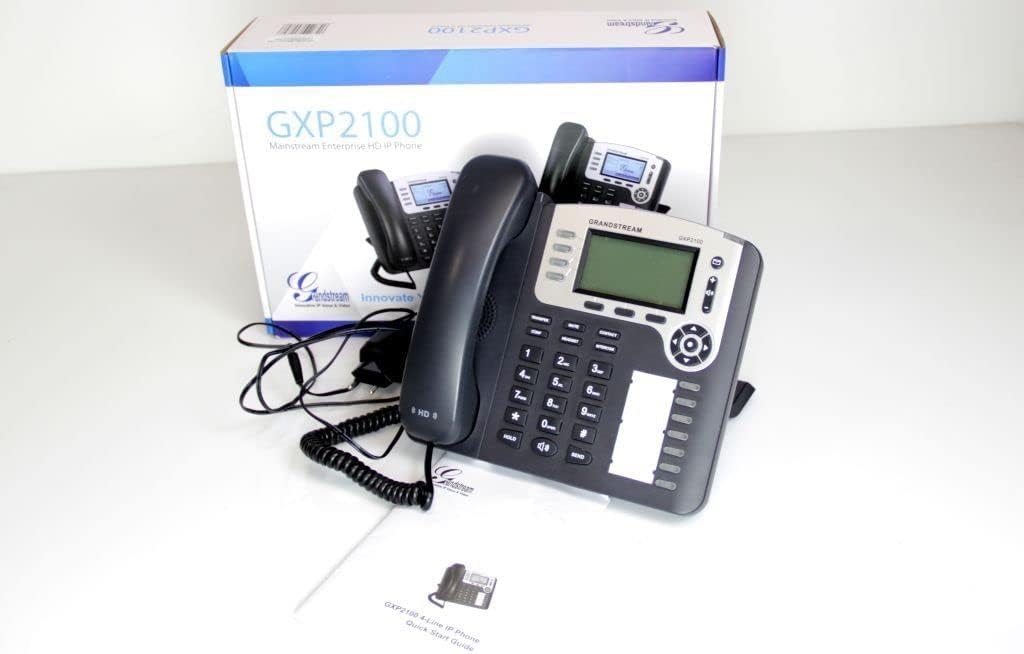
Image 2.1: Grandstream GXP2100 IP Phone unit, handset, coiled cord, power adapter, Ethernet cable, and quick start guide, displayed with its retail packaging.
3. ຄຸນລັກສະນະຂອງຜະລິດຕະພັນ
The GXP2100 IP phone offers a range of features designed for efficient business communication:
- ປຸ່ມເສັ້ນ: 4 dual-color line keys supporting up to 4 SIP accounts.
- Soft Keys: 3 XML programmable context-sensitive soft keys for dynamic functions.
- BLF Extension Keys: 7 dual-color BLF (Busy Lamp Field) extension keys, supporting up to 11 call appearances.
- ການໂທປະຊຸມ: Up to 5-way conference capability.
- ຄຸນະພາບສຽງ: HD wideband audio and a superb full-duplex hands-free speakerphone with advanced acoustic echo cancellation.
- ການເຊື່ອມຕໍ່ເຄືອຂ່າຍ: Dual network ports with integrated Power over Ethernet (PoE).
- ປຶ້ມໂທລະສັບ: Automated phone book synchronization with directory servers using XML.
- ແອັບພລິເຄຊັນ: Integrated real-time web applications (e.g., weather, stock, currency, RSS news).
- ຄວາມປອດໄພ: Advanced security protection for privacy.
- ການນຳໃຊ້: Supports automated provisioning for easy deployment.

ຮູບພາບ 3.1: ດ້ານຫນ້າ view of the Grandstream GXP2100 IP Phone, highlighting the display, keypad, and function buttons.
4. ຕັ້ງຄ່າ
4.1 ການເຊື່ອມຕໍ່ທາງດ້ານຮ່າງກາຍ
Follow these steps to connect your GXP2100 IP phone:
- ເຊື່ອມຕໍ່ໂທລະສັບມືຖື: Plug the coiled cord into the handset port on the side of the phone and into the handset.
- ເຊື່ອມຕໍ່ຫູຟັງ (ທາງເລືອກ): If using a headset, plug it into the dedicated headset port.
- ເຊື່ອມຕໍ່ກັບເຄືອຂ່າຍ:
- If using PoE: Connect one end of the Ethernet cable to the LAN port on the phone and the other end to a PoE-enabled switch or hub.
- If not using PoE: Connect one end of the Ethernet cable to the LAN port on the phone and the other end to your network switch/router. Then, connect the power adapter to the phone's power jack and to an electrical outlet.
- ເຊື່ອມຕໍ່ກັບ PC (ທາງເລືອກ): If you wish to connect a computer through the phone, connect an Ethernet cable from the PC port on the phone to your computer's Ethernet port.

ຮູບພາບ 4.1: ຂ້າງ view of the Grandstream GXP2100 IP Phone, showing the various connection ports for handset, headset, LAN, and PC.
4.2 ການຕັ້ງຄ່າເບື້ອງຕົ້ນ
After physical connection, the phone will attempt to obtain an IP address via DHCP. You can access the phone's web configuration interface for detailed setup:
- ໄດ້ຮັບທີ່ຢູ່ IP: ກົດ ເມນູ button on the phone, navigate to ສະຖານະ, ແລ້ວ ສະຖານະເຄືອຂ່າຍ to find the phone's IP address.
- ການເຂົ້າເຖິງ Web ການໂຕ້ຕອບ: ເປີດ ກ web browser on a computer connected to the same network and enter the phone's IP address in the address bar.
- ເຂົ້າສູ່ລະບົບ: Enter the administrator username and password (default values are typically 'admin' for both, refer to your network administrator or Grandstream documentation for specific defaults).
- Configure SIP Accounts: ທ່ອງໄປຫາ ບັນຊີ section to configure your SIP account details provided by your VoIP service provider. This includes SIP Server, SIP User ID, Authenticate ID, and Password.
- ບັນທຶກ ແລະນຳໃຊ້: After making changes, save and apply the configuration. The phone may reboot.
5. ຄໍາແນະນໍາການດໍາເນີນງານ
5.1 ຟັງຊັນການໂທພື້ນຖານ
- ໂທອອກ:
- ເອົາມືຖືຂຶ້ນ, ກົດທີ່ ລໍາໂພງ button, or press an available ສາຍ ກະແຈ.
- ກົດໝາຍເລກທີ່ຕ້ອງການ.
- ກົດ ສົ່ງ button or wait a few seconds for automatic dialing.
- ຕອບການໂທ:
- ເອົາໂທລະສັບມືຖື.
- ກົດກະພິບ ສາຍ ກະແຈ.
- ກົດ ລໍາໂພງ ປຸ່ມ.
- ສິ້ນສຸດການໂທ: ວາງສາຍໂທລະສັບ ຫຼືກົດປຸ່ມ ລໍາໂພງ button if using speakerphone.
5.2 Advanced Call Functions
- ຖື: ໃນລະຫວ່າງການໂທທີ່ມີການເຄື່ອນໄຫວ, ກົດປຸ່ມ ຖື button. The line key will flash. To resume, press the flashing ສາຍ ກະແຈ.
- ການໂອນຍ້າຍ:
- ໃນລະຫວ່າງການໂທທີ່ມີການເຄື່ອນໄຫວ, ກົດປຸ່ມ ໂອນຍ້າຍ ປຸ່ມຊອບ. ການໂທທີ່ກຳລັງໃຊ້ຢູ່ຈະຖືກພັກໄວ້.
- ກົດຫມາຍເລກທີ່ທ່ານຕ້ອງການທີ່ຈະໂອນສາຍ.
- ກົດ ໂອນຍ້າຍ soft key again to complete the transfer (blind transfer) or wait for the party to answer and announce the call before pressing ໂອນຍ້າຍ (ການຍົກຍ້າຍເຂົ້າຮ່ວມ).
- ກອງປະຊຸມ:
- ໃນລະຫວ່າງການໂທທີ່ມີການເຄື່ອນໄຫວ, ກົດປຸ່ມ ກອງປະຊຸມ ປຸ່ມຊອບ. ການໂທທີ່ກຳລັງໃຊ້ຢູ່ຈະຖືກພັກໄວ້.
- ໂທຫາຈໍານວນຜູ້ເຂົ້າຮ່ວມຕໍ່ໄປແລະກົດ ສົ່ງ.
- ເມື່ອparty່າຍທີສອງຕອບ, ກົດປຸ່ມ ກອງປະຊຸມ soft key again to establish the conference call. Repeat for additional participants (up to 5-way).
- ປິດສຽງ: ກົດ ປິດສຽງ ປຸ່ມເພື່ອປິດສຽງໄມໂຄຣໂຟນຂອງທ່ານໃນລະຫວ່າງການໂທ. ກົດອີກຄັ້ງເພື່ອປິດສຽງ.
- ລຳໂພງ: ກົດ ລໍາໂພງ ປຸ່ມເພື່ອເປີດ ຫຼື ປິດໂໝດລຳໂພງໂທລະສັບ.
- BLF Keys: The BLF (Busy Lamp Field) keys can be programmed to monitor the status of other extensions. A green light indicates idle, red indicates busy, and flashing red indicates ringing. Pressing a BLF key can initiate a call to that extension or pick up a ringing call.
- Soft Keys: The three soft keys below the LCD display change their function based on the phone's current state (e.g., during a call, idle, or in a menu). Their current function is displayed on the LCD directly above them.
6. ບໍາລຸງຮັກສາ
- ທໍາຄວາມສະອາດ: Use a soft, dry cloth to clean the phone's surface. Avoid abrasive cleaners or solvents.
- ການອັບເດດເຟີມແວ: Grandstream periodically releases firmware updates to improve performance and add features. Firmware updates are typically performed via the phone's web interface. Consult your network administrator or Grandstream's official support resources for the latest firmware and update procedures. Manual firmware updates often require downloading files from the manufacturer and hosting them on a local web ເຊີບເວີ.
- ເງື່ອນໄຂສິ່ງແວດລ້ອມ: Operate the phone within recommended temperature and humidity ranges to ensure optimal performance and longevity.
7. ການແກ້ໄຂບັນຫາ
This section addresses common issues you might encounter with your GXP2100 IP phone.
| ບັນຫາ | ສາເຫດທີ່ເປັນໄປໄດ້ | ການແກ້ໄຂ |
|---|---|---|
| ໂທລະສັບບໍ່ເປີດ. | No power from adapter or PoE switch. |
|
| ບໍ່ມີສຽງໂທອອກ / ບໍ່ສາມາດໂທອອກ ຫຼືຮັບສາຍໄດ້. | Network connectivity issue, SIP account not registered, incorrect configuration. |
|
| One-way audio (you can hear, but the other party cannot, or vice-versa). | Network firewall/NAT issues, incorrect audio codec settings. |
|
| Phone frequently loses registration. | Unstable network connection, SIP server issues, incorrect registration expiration. |
|
8. ຂໍ້ມູນຈໍາເພາະ
Key technical specifications for the Grandstream GXP2100 IP Business Phone:
| ຄຸນລັກສະນະ | ມູນຄ່າ |
|---|---|
| ໝາຍເລກຕົວແບບ | GXP2100 |
| ຍີ່ຫໍ້ | Grandstream |
| ຂະໜາດສິນຄ້າ (L x W x H) | 8.7 x 8.3 x 3.6 ນິ້ວ |
| ນ້ໍາຫນັກລາຍການ | 2.4 ປອນ |
| ສີ | ສີເທົາ |
| ປະເພດໂທລະສັບ | ສາຍບື |
| ແຫຼ່ງພະລັງງານ | ໄຟຟ້າມີສາຍ (PoE) |
| ປະເພດ Dialer | ປຸ່ມກົດດຽວ |
| ປະເພດລະບົບການຕອບ | ດິຈິຕອລ |
| ຄວາມສາມາດໃນການເອີ້ນກອງປະຊຸມ | 5 ທາງ |
| ການດໍາເນີນງານຫຼາຍແຖວ | Multi-Line Operation (4 lines) |
| ASIN | B004PAS3SM |
| ວັນທີທໍາອິດທີ່ມີ | ວັນທີ 9 ກຸມພາ 2011 |
9. ການຮັບປະກັນແລະການສະຫນັບສະຫນູນ
ສໍາລັບຂໍ້ມູນການຮັບປະກັນ, ການຊ່ວຍເຫຼືອດ້ານວິຊາການ, ຫຼືການຊ່ວຍເຫຼືອເພີ່ມເຕີມກັບໂທລະສັບ Grandstream GXP2100 IP ຂອງທ່ານ, ກະລຸນາເບິ່ງ Grandstream ຢ່າງເປັນທາງການ website or contact your product vendor. Keep your purchase receipt and product serial number handy when seeking support.
Official Grandstream Webເວັບໄຊ: www.grandstream.com


