ແນະນຳ
This manual provides comprehensive instructions for the safe and effective use of your SSE 3-Piece Tripod Package. This package includes a 75-inch tripod, a 72-inch monopod, and a flexible gripster tripod, designed to provide stable support for your camera equipment. Please read this manual thoroughly before operating the products to ensure proper setup and functionality.
ສ່ວນປະກອບຂອງຜະລິດຕະພັນ
The SSE 3-Piece Tripod Package includes the following items:
- 75-inch Photo/Video Tripod with Quick Release Plate
- 72-inch Professional Heavy Duty Monopod
- Flexible Gripster Tripod (approximately 6 inches)
- Carrying Case for 75-inch Tripod
- Carrying Case for 72-inch Monopod
- SSE Microfiber Cleaning Cloth

ຮູບພາບ 1: ຫຼາຍກວ່າview of the SSE 3-Piece Tripod Package components.
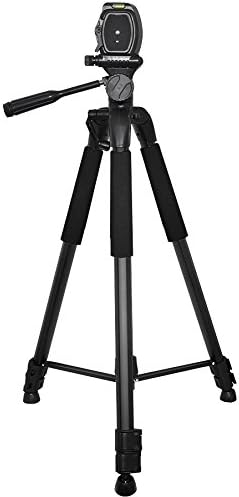
Image 2: The 75-inch Photo/Video Tripod, featuring adjustable legs and a pan-tilt head.

Image 3: The 72-inch Professional Heavy Duty Monopod, designed for quick support and portability.
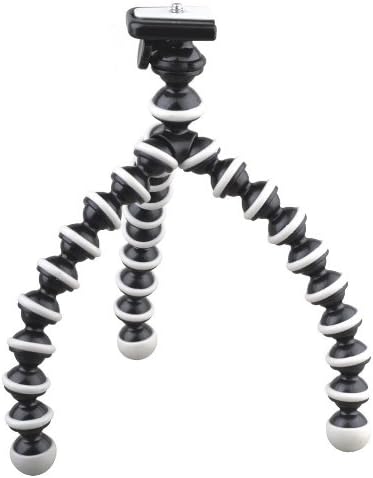
Image 4: The Flexible Gripster Tripod, featuring bendable legs for versatile mounting options.

Image 5: The included SSE Microfiber Cleaning Cloth for maintaining your camera and accessories.
ຄໍາແນະນໍາການຕິດຕັ້ງ
ການຕິດກ້ອງຂອງທ່ານ
- Locate the quick release plate on the tripod or monopod head.
- Press the release lever or button to detach the quick release plate.
- Screw the quick release plate securely into the tripod mount thread on the bottom of your camera. Ensure it is tight to prevent camera rotation.
- Slide the quick release plate with the attached camera back into the tripod or monopod head until it clicks into place. Verify that the camera is firmly seated and locked.

Image 6: Close-up of the tripod head showing the quick release plate mechanism.
75-inch Tripod Setup
- Extend the tripod legs by releasing the leg locks. Adjust each leg to the desired height and secure the leg locks.
- For maximum stability, ensure the tripod legs are spread wide and evenly.
- Adjust the center column height using the crank or locking collar. Do not over-extend the center column, as this can reduce stability.
- Use the pan and tilt handles to adjust the camera angle. Lock them once the desired position is achieved.
- Utilize the integrated bubble levels on the tripod head and base to ensure your camera is perfectly level.
72-inch Monopod Setup
- Extend the monopod sections by twisting or flipping the leg locks. Extend to the desired height.
- Ensure all sections are securely locked before mounting your camera.
- Hold the monopod firmly with one hand, using your body as a third point of contact for stability.
Flexible Gripster Tripod Setup
- Attach your camera to the Gripster's standard 1/4-inch screw mount.
- Bend the flexible legs to wrap around objects (e.g., tree branches, poles) or to stand on uneven surfaces.
- Ensure the legs are securely positioned and the camera is balanced before releasing ຈັບຂອງທ່ານ.
ຄໍາແນະນໍາການດໍາເນີນງານ
ຄໍາແນະນໍາການນໍາໃຊ້ທົ່ວໄປ
- Always ensure all locks (leg locks, pan/tilt locks, quick release plate lock) are securely fastened before leaving your camera unattended.
- When adjusting height, always support your camera to prevent accidental drops.
- For optimal stability, keep the center of gravity of your camera as low as possible.
- Avoid applying excessive force to any part of the tripod or monopod, especially when adjusting locks or extending sections.
Using the Pan-Tilt Head (75-inch Tripod)
- ການປັບກະດານ: Loosen the horizontal lock knob, rotate the camera to the desired horizontal position, then tighten the knob.
- ການປັບຕົວອຽງ: Loosen the vertical lock knob, tilt the camera up or down to the desired angle, then tighten the knob.
- ມືຈັບ: Use the pan handle for smooth, controlled movements during video recording or precise framing.
ບໍາລຸງຮັກສາ
ທໍາຄວາມສະອາດ
- Use the provided SSE Microfiber Cleaning Cloth to gently wipe down the surfaces of the tripods and monopod.
- ສໍາລັບຝຸ່ນ stubborn, dampen the cloth slightly with water. Avoid using harsh chemicals or abrasive cleaners.
- ໃຫ້ແນ່ໃຈວ່າທຸກພາກສ່ວນແຫ້ງກ່ອນທີ່ຈະເກັບຮັກສາ.
ການເກັບຮັກສາ
- Retract all legs and sections fully before storing.
- Store the 75-inch tripod and 72-inch monopod in their respective carrying cases to protect them from dust and damage.
- ເກັບຮັກສາໄວ້ໃນບ່ອນທີ່ເຢັນ, ແຫ້ງ, ຫ່າງຈາກແສງແດດໂດຍກົງແລະອຸນຫະພູມທີ່ສຸດ.
ການແກ້ໄຂບັນຫາ
| ບັນຫາ | ສາເຫດທີ່ເປັນໄປໄດ້ | ການແກ້ໄຂ |
|---|---|---|
| Camera unstable on tripod/monopod | Quick release plate not securely attached; leg locks not tightened; uneven surface. | Ensure quick release plate is fully locked. Tighten all leg locks. Adjust legs for stability on uneven ground. |
| Legs or sections not extending/retracting smoothly | Dirt or debris in leg mechanisms; over-tightened locks. | Clean leg sections with a damp cloth. Do not over-tighten leg locks. |
| Tripod head movement is stiff or loose | Locking knobs are too tight or too loose. | Adjust the tension of the pan and tilt locking knobs to achieve desired movement. |
| Gripster tripod cannot support camera weight | Camera is too heavy for the flexible legs. | The Gripster is designed for lighter cameras. Ensure your camera's weight is within its capacity. Use the 75-inch tripod or 72-inch monopod for heavier equipment. |
ຂໍ້ມູນຈໍາເພາະ
| ຄຸນສົມບັດ | ລາຍລະອຽດ |
|---|---|
| 75-inch Tripod Maximum Height | 75 ນິ້ວ |
| 72-inch Monopod Maximum Height | 72 ນິ້ວ |
| Flexible Gripster Tripod Size | Approximately 6 Inches |
| ວັດສະດຸ | ໂລຫະ, ຢາງ |
| Weight Limit (General) | 20 Pounds (Note: Individual component limits may vary, especially for Gripster) |
| ອຸປະກອນທີ່ເຂົ້າກັນໄດ້ | Camcorder, Camera (Nikon D Series, COOLPIX L, P, S, J, V, AW1 Series) |
| ນ້ຳໜັກສິນຄ້າ (ຊຸດ) | 3.89 ປອນ |
| ຂະໜາດແພັກເກັດ | 27 x 4.5 x 4.5 ນິ້ວ |
ການຮັບປະກັນແລະການສະຫນັບສະຫນູນ
For warranty information and customer support regarding your SSE 3-Piece Tripod Package, please refer to the documentation provided at the time of purchase or contact the seller directly. Keep your proof of purchase for any warranty claims.
For further assistance, please visit the official SSE webເວັບໄຊ ຫຼືຕິດຕໍ່ພະແນກບໍລິການລູກຄ້າຂອງເຂົາເຈົ້າ.


