ແນະນຳ
Welcome to the Greenlee DM-810A True RMS Digital Multimeter user manual. This document provides essential information for the safe and effective operation, maintenance, and troubleshooting of your device. The DM-810A is designed for accurate measurement of AC/DC voltage, AC/DC current, resistance, capacitance, frequency, and continuity, making it a versatile tool for electrical professionals.
ຂໍ້ມູນຄວາມປອດໄພ
ເພື່ອຮັບປະກັນການ ດຳ ເນີນງານແລະການບໍລິການຂອງວັດແທກຢ່າງປອດໄພ, ໃຫ້ເຮັດຕາມ ຄຳ ແນະ ນຳ ເຫຼົ່ານີ້. ການບໍ່ປະຕິບັດຕາມ ຄຳ ເຕືອນເຫລົ່ານີ້ສາມາດເຮັດໃຫ້ມີການບາດເຈັບສາຫັດຫລືເສຍຊີວິດໄດ້.
- Always read and understand the entire instruction manual before using the meter.
- ຢ່າໃຊ້ເກີນຂີດຈຳກັດການປ້ອນຂໍ້ມູນສູງສຸດສຳລັບຟັງຊັນໃດໆ.
- ໃຊ້ຄວາມລະມັດລະວັງໃນເວລາທີ່ເຮັດວຽກກັບ voltages ຂ້າງເທິງ 30V AC RMS, ສູງສຸດ 42V, ຫຼື 60V DC. vol ເຫຼົ່ານີ້tages ເຮັດໃຫ້ເກີດອັນຕະລາຍຊ໊ອກ.
- Always use the proper terminals, function, and range for your measurements. The DM-810A features a Beep-Jack audible and visible warning to guard against improper A and mA terminal plug-in.
- Inspect test leads for damaged insulation or exposed metal before each use. Replace if damaged.
- ຢ່າໃຊ້ມິເຕີຖ້າມັນເບິ່ງຄືວ່າເສຍຫາຍ ຫຼື ຖ້າກ່ອງເປີດຢູ່.
- ໃຫ້ແນ່ໃຈວ່າຝາປິດແບັດເຕີຣີຖືກປິດຢ່າງແໜ້ນໜາກ່ອນການນຳໃຊ້.
- Adhere to local and national safety codes. Use personal protective equipment (PPE) such as approved safety glasses and electrically insulated gloves when necessary.
ສິນຄ້າເກີນview
This section identifies the key parts and controls of your Greenlee DM-810A multimeter.

ຮູບທີ 1: ດ້ານໜ້າ view of the Greenlee DM-810A Digital Multimeter, showing the display, function selector dial, and input jacks.
- ຈໍສະແດງຜົນ: Large LCD for clear readings, often with dual display capability.
- Function Selector Dial: Used to select the desired measurement function (e.g., V~, V-, A~, A-, Ω, CAP, Hz, Continuity).
- Input Jacks:
- COM: ການປ້ອນຂໍ້ມູນທົ່ວໄປ (ລົບ) ສຳລັບການວັດແທກທັງໝົດ.
- VΩHz: ການປ້ອນຂໍ້ມູນທາງບວກສໍາລັບ voltage, ການວັດແທກຄວາມຕ້ານທານ, ຄວາມຖີ່, ແລະ ຄວາມຈຸ.
- mA: ການປ້ອນຂໍ້ມູນເປັນບວກສຳລັບມິນລິampere ແລະ microampການວັດແທກໃນປັດຈຸບັນ.
- A: Positive input for ampການວັດແທກໃນປັດຈຸບັນ.
- ປຸ່ມ:
- ເລືອກ: Toggles between functions on a single dial position (e.g., AC/DC voltagອີ, ໄດໂອດ/ຄວາມຕໍ່ເນື່ອງ).
- ຊ່ອງຫວ່າງ: Manually selects measurement range or returns to auto-ranging.
- △: Delta function for relative measurements.
- ຖື: ຢຸດການອ່ານໜ້າຈໍປັດຈຸບັນ.
ຕັ້ງຄ່າ
ການຕິດຕັ້ງຫມໍ້ໄຟ
The Greenlee DM-810A requires batteries for operation. Refer to the back of the meter for the battery compartment. Use a screwdriver to open the compartment, insert the specified batteries (typically AA or 9V, check the compartment label), observing correct polarity, and then securely close the cover.
ເຊື່ອມຕໍ່ Leads Test
Always ensure test leads are properly connected before taking measurements.
- ໃສ່ຫົວການທົດສອບສີດໍາເຂົ້າໄປໃນ COM (ທົ່ວໄປ) ຊ່ອງສຽບອິນພຸດ.
- Insert the red test lead into the appropriate positive input jack based on the measurement you intend to make:
- ສໍາລັບ voltage, resistance, capacitance, or frequency, use the VΩHz jack.
- ສຳລັບມິນລິampເອີຣີ ຫຼື ໄມໂຄຣampere current, use the mAμA jack.
- ສໍາລັບ ampere current, use the A jack.
- The meter's Beep-Jack feature will provide an audible and visible alert if the function selector is set to a current measurement (A or mA) but the test lead is incorrectly plugged into a voltage/resistance jack, or vice-versa. This helps prevent damage to the meter and ensures correct setup.
ຄໍາແນະນໍາການດໍາເນີນງານ
This section details how to perform various measurements with your DM-810A multimeter.
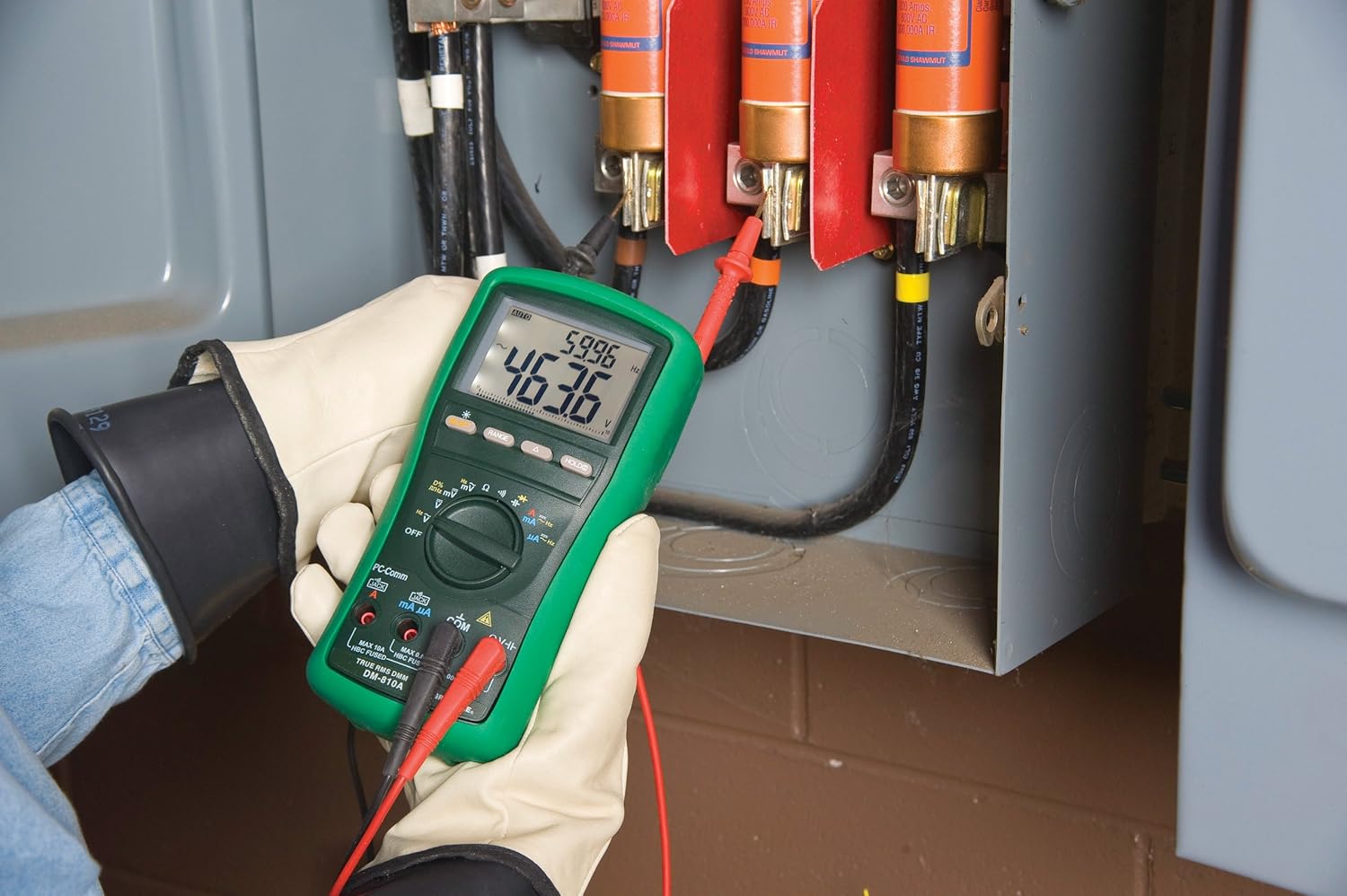
ຮູບທີ 2: The Greenlee DM-810A Digital Multimeter being used to take measurements within an electrical panel, demonstrating practical application.
ການວັດແທກ AC/DC Voltage
- Set the function selector to V~ (AC Voltage) ຫຼື V- (DC Voltage). Use the SELECT button to toggle if both are on one position.
- ເຊື່ອມຕໍ່ຜູ້ນໍາການທົດສອບສີດໍາກັບ COM ແລະ ການທົດສອບສີແດງນຳໄປສູ່ VΩHz.
- ເຊື່ອມຕໍ່ໂພຣບທົດສອບຂະໜານກັນທົ່ວວົງຈອນ ຫຼື ອົງປະກອບທີ່ຈະວັດແທກ.
- ອ່ານ voltage ມູນຄ່າໃນການສະແດງຜົນ.
ການວັດແທກກະແສໄຟຟ້າ AC/DC
ສຳຄັນ: Current measurements require the meter to be connected in series with the circuit. Ensure the circuit is de-energized before connecting the meter.
- De-energize ວົງຈອນ.
- Set the function selector to A~ (AC Current) or A- (DC Current), or mA~ / mA-.
- ເຊື່ອມຕໍ່ຜູ້ນໍາການທົດສອບສີດໍາກັບ COM. Connect the red test lead to mAμA for small currents or A for larger currents (up to 10A). The Beep-Jack warning will activate if leads are in the wrong jacks for the selected function.
- Open the circuit where the current is to be measured and connect the meter in series.
- Re-energize the circuit and read the current value.
- De-energize the circuit before disconnecting the meter.
ການວັດແທກຄວາມຕ້ານທານ (Ω)
- De-energize the circuit or component.
- Set the function selector to Ω.
- ເຊື່ອມຕໍ່ຜູ້ນໍາການທົດສອບສີດໍາກັບ COM ແລະ ການທົດສອບສີແດງນຳໄປສູ່ VΩHz.
- ເຊື່ອມຕໍ່ໂພຣບທົດສອບຜ່ານອົງປະກອບ.
- ອ່ານຄ່າຄວາມຕ້ານທານ.
Measuring Capacitance (CAP)
- ໃຫ້ແນ່ໃຈວ່າຕົວເກັບປະຈຸຖືກປ່ອຍອອກຢ່າງເຕັມທີ່ກ່ອນທີ່ຈະວັດແທກ.
- Set the function selector to CAP.
- ເຊື່ອມຕໍ່ຜູ້ນໍາການທົດສອບສີດໍາກັບ COM ແລະ ການທົດສອບສີແດງນຳໄປສູ່ VΩHz.
- ເຊື່ອມຕໍ່ໂພຣບທົດສອບຜ່ານຂົ້ວຂອງຕົວເກັບປະຈຸ.
- ອ່ານຄ່າຄວາມຈຸ.
ຄວາມຖີ່ໃນການວັດແທກ (Hz)
- Set the function selector to Hz.
- ເຊື່ອມຕໍ່ຜູ້ນໍາການທົດສອບສີດໍາກັບ COM ແລະ ການທົດສອບສີແດງນຳໄປສູ່ VΩHz.
- ເຊື່ອມຕໍ່ໂພຣບທົດສອບຜ່ານແຫຼ່ງສັນຍານ.
- ອ່ານຄ່າຄວາມຖີ່.
ການທົດສອບຕໍ່ເນື່ອງ
- De-energize the circuit or component.
- Set the function selector to the continuity symbol (often shared with diode test, use SELECT to toggle).
- ເຊື່ອມຕໍ່ຜູ້ນໍາການທົດສອບສີດໍາກັບ COM ແລະ ການທົດສອບສີແດງນຳໄປສູ່ VΩHz.
- Connect the test probes across the circuit path or component.
- An audible beep indicates continuity (low resistance). The display will show the resistance value.
ບໍາລຸງຮັກສາ
ທໍາຄວາມສະອາດ
ເຊັດແມັດດ້ວຍການໂຄສະນາamp ຜ້າແລະຢາຊັກຜ້າອ່ອນໆ. ຢ່າໃຊ້ສານຂັດຫຼືສານລະລາຍ. ໃຫ້ແນ່ໃຈວ່າເຄື່ອງວັດແທກແຫ້ງຫມົດກ່ອນການນໍາໃຊ້.
ການປ່ຽນແບັດ
When the battery indicator appears on the display, replace the batteries immediately to ensure accurate readings. Follow the battery installation steps outlined in the Setup section.
ການທົດແທນ Fuse
If the current measurement functions cease to work, the internal fuses may need replacement. Refer to the meter's internal diagram (usually accessible by opening the battery compartment or back casing) for fuse specifications and replacement instructions. Always replace fuses with those of the specified type and rating to maintain safety and performance.
ການແກ້ໄຂບັນຫາ
This section provides solutions for common issues encountered during the operation of your DM-810A multimeter.
| ບັນຫາ | ສາເຫດທີ່ເປັນໄປໄດ້ | ການແກ້ໄຂ |
|---|---|---|
| ບໍ່ມີຈໍສະແດງຜົນ ຫຼື ມືດ | ແບດເຕີຣີທີ່ຕາຍແລ້ວຫຼືຕໍ່າ | ປ່ຽນແບັດ. |
| ການອ່ານບໍ່ຖືກຕ້ອງ | Incorrect function/range selected; Damaged test leads; External interference | Verify function and range; Inspect and replace test leads; Move away from strong electromagnetic fields. |
| ການວັດແທກປັດຈຸບັນບໍ່ເຮັດວຽກ | Blown fuse; Incorrect lead connection | Check and replace fuses; Ensure leads are in the correct A or mA jacks. |
| Beep-Jack warning active | Test leads connected to incorrect input jacks for the selected function | Adjust test lead connections to match the selected function on the dial. |
| Continuity test not beeping | Open circuit; High resistance | Ensure the circuit is closed; Check for breaks in the circuit or component. |
ຂໍ້ມູນຈໍາເພາະ
The following table outlines the key technical specifications for the Greenlee DM-810A Digital Multimeter.
| ຄຸນສົມບັດ | ມູນຄ່າ |
|---|---|
| ຍີ່ຫໍ້ | ກຣີນລີ |
| ຕົວແບບ | DM-810A |
| ປະເພດການວັດແທກ | True RMS Digital Multimeter |
| ແຫຼ່ງພະລັງງານ | ພະລັງງານຫມໍ້ໄຟ |
| ແບບ | ດິຈິຕອລ |
| ນ້ໍາຫນັກລາຍການ | 16 ອອນສ ((1 ປອນ) |
| ຂະໜາດສິນຄ້າ (L x W x H) | 10 x 10 x 12 ນິ້ວ |
| ການຢັ້ງຢືນ | CE, CSA, UL |
| UPC | 783310087434 |
ການຮັບປະກັນແລະການສະຫນັບສະຫນູນ
ຂໍ້ມູນການຮັບປະກັນ
The Greenlee DM-810A Digital Multimeter comes with a ການຮັບປະກັນຂອງຜູ້ຜະລິດ 1 ປີ. ການຮັບປະກັນນີ້ກວມເອົາຂໍ້ບົກພ່ອງຂອງວັດສະດຸແລະການເຮັດວຽກພາຍໃຕ້ການນໍາໃຊ້ປົກກະຕິ. ກະລຸນາຮັກສາຫຼັກຖານການຊື້ຂອງທ່ານສໍາລັບການຮຽກຮ້ອງການຮັບປະກັນ.
ການຊ່ວຍເຫຼືອລູກຄ້າ
For technical assistance, warranty service, or to inquire about replacement parts, please contact Greenlee customer support. Refer to the official Greenlee webສະຖານທີ່ຫຼືການຫຸ້ມຫໍ່ຜະລິດຕະພັນສໍາລັບຂໍ້ມູນຕິດຕໍ່ໃນປະຈຸບັນຫຼາຍທີ່ສຸດ.


