ແນະນຳ
This manual provides detailed instructions for the setup, operation, and maintenance of your Supersonic SC371 Digital Projection Alarm Clock with AM/FM Radio. Please read this manual thoroughly before using the device to ensure proper function and to maximize your user experience.
ຂໍ້ມູນຄວາມປອດໄພ
- ຫ້າມບໍ່ໃຫ້ເຄື່ອງຢູ່ໃນອຸນຫະພູມສູງ, ແສງແດດໂດຍກົງ, dustຸ່ນ, ຫຼືຄວາມຊຸ່ມ.
- Ensure the power adapter is compatible with your local power supply (AC 120V, 60Hz).
- ຢ່າພະຍາຍາມຖອດປະກອບຫຼືດັດແປງຫນ່ວຍງານ. ອ້າງອີງການບໍລິການທັງໝົດໃຫ້ກັບບຸກຄະລາກອນທີ່ມີຄຸນວຸດທິ.
- ຮັກສາເຄື່ອງໃຫ້ຫ່າງຈາກນໍ້າ ຫຼື ຂອງແຫຼວອື່ນໆ.
- Use only the specified battery type for backup (9V, not included).
ເນື້ອໃນຊຸດ
ກະລຸນາກວດເບິ່ງວ່າລາຍການທັງໝົດມີຢູ່ໃນຊຸດ:
- Supersonic SC371 Digital Projection Alarm Clock with Radio
- ເຄື່ອງປັບໄຟຟ້າ AC
- ຄູ່ມືຜູ້ໃຊ້ (ເອກະສານນີ້)
ສິນຄ້າເກີນview
The Supersonic SC371 is a versatile digital alarm clock featuring a clear LED display, built-in time projection, and an integrated AM/FM radio. It includes an alarm with sleep/snooze timers and a 3.5mm audio input for external devices.
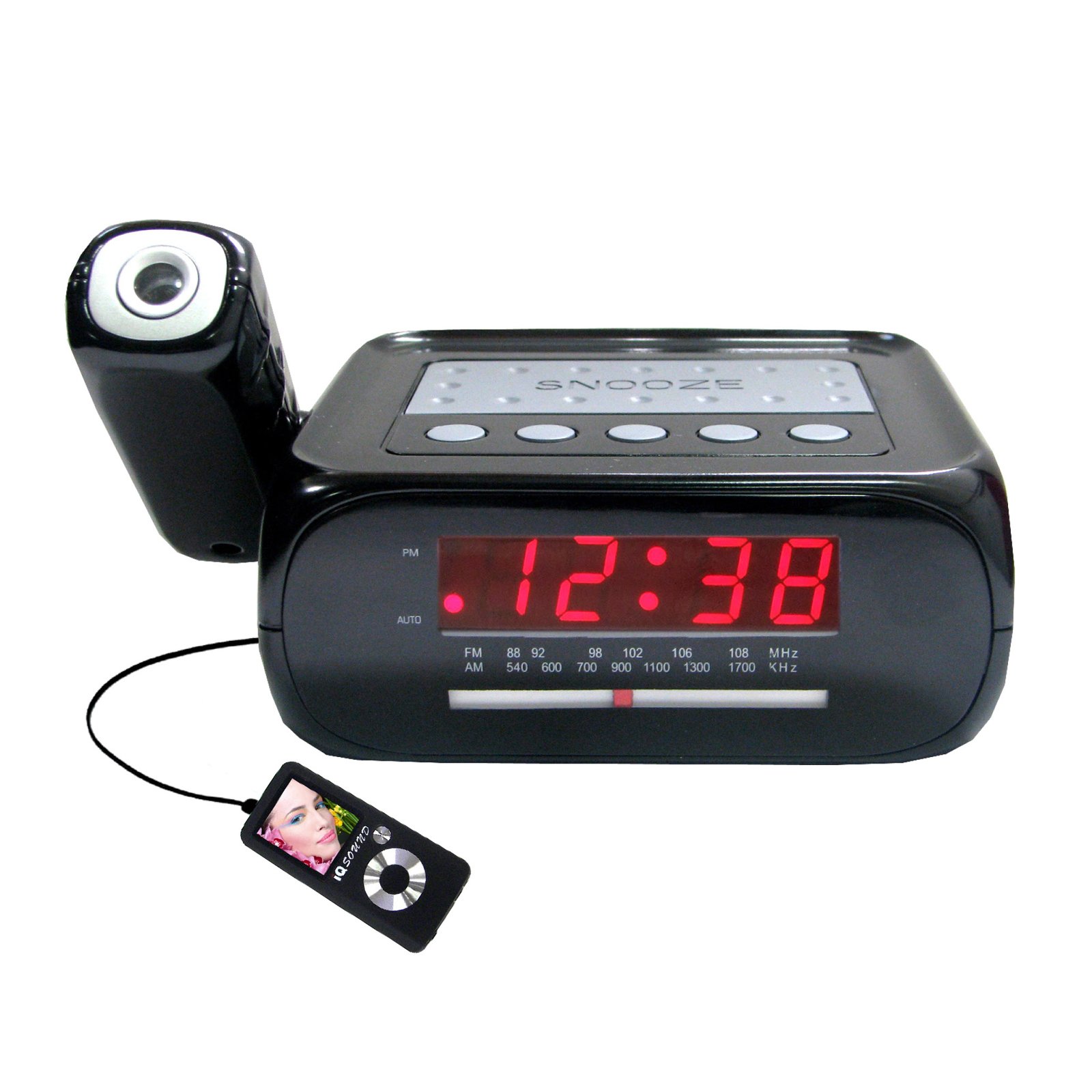
ຮູບພາບ: ທາງຫນ້າ view of the Supersonic SC371 Digital Projection Alarm Clock, showing the LED display and control buttons.
ຄຸນນະສົມບັດທີ່ສໍາຄັນ:
- Digital Clock with LED Display
- Built-in Time Projection
- ເຄື່ອງຮັບສັນຍານວິທະຍຸ AM/FM
- Alarm Clock with Sleep/Snooze Timers
- Wake Up to Music or Buzzer
- 3.5mm Audio Input Jack for Portable Audio Players
ຕັ້ງຄ່າ
1. ການເຊື່ອມຕໍ່ພະລັງງານ
Connect the AC power adapter to the DC IN jack on the back of the unit, then plug the adapter into a standard AC 120V, 60Hz wall outlet. The unit will power on and the LED display will illuminate.
2. ແບັດເຕີຣີສຳຮອງ (ທາງເລືອກ)
For battery backup functionality, insert one 9V battery (not included) into the battery compartment located on the bottom of the unit. This battery will preserve time and alarm settings during a power outage, but the display and projection will not operate.
ຄໍາແນະນໍາການດໍາເນີນງານ
ກໍານົດເວລາ
- ກົດຄ້າງໄວ້ ເວລາ ກຳ ນົດ ປຸ່ມ. ຕົວເລກຊົ່ວໂມງຈະເລີ່ມກະພິບ.
- ໃຊ້ ຊົ່ວໂມງ ປຸ່ມເພື່ອປັບຊົ່ວໂມງ.
- ໃຊ້ ນາທີ ປຸ່ມເພື່ອປັບນາທີ.
- ກົດ ເວລາ ກຳ ນົດ ອີກເທື່ອໜຶ່ງເພື່ອຢືນຢັນ ແລະອອກຈາກໂໝດການຕັ້ງຄ່າເວລາ.
ການຕັ້ງຄ່າປຸກ
- ກົດຄ້າງໄວ້ ຕັ້ງໂມງປຸກ ປຸ່ມ. ຕົວເລກໂມງປຸກຈະກະພິບ.
- ໃຊ້ ຊົ່ວໂມງ ປຸ່ມເພື່ອຕັ້ງໂມງປຸກທີ່ຕ້ອງການ.
- ໃຊ້ ນາທີ ກົດປຸ່ມເພື່ອ ກຳ ນົດນາທີແຈ້ງການທີ່ຕ້ອງການ.
- ກົດ ຕັ້ງໂມງປຸກ ອີກເທື່ອໜຶ່ງເພື່ອຢືນຢັນເວລາປຸກ.
- ກົດ ເປີດ / ປິດ button to activate or deactivate the alarm. An indicator will appear on the display when the alarm is active.
ຟັງຊັນເລື່ອນ
ເມື່ອສຽງສັນຍານເຕືອນ, ກົດປຸ່ມ ງອກ ກົດປຸ່ມເພື່ອປິດສຽງໂມງປຸກຊົ່ວຄາວເປັນເວລາປະມານ 9 ນາທີ. ສັນຍານເຕືອນຈະດັງອີກຄັ້ງຫຼັງຈາກໄລຍະປິດສຽງ.
ປະຕິບັດການວິທະຍຸ (AM/FM)
- ກົດ ວິທະຍຸເປີດ/ປິດ ປຸ່ມເພື່ອເປີດວິທະຍຸ.
- ກົດ ແຖບ ປຸ່ມເພື່ອປ່ຽນລະຫວ່າງແຖບ AM ແລະ FM.
- ໃຊ້ Tuning knob or buttons (if available) to select your desired station.
- ປັບລະດັບສຽງໂດຍໃຊ້ ປະລິມານ ລູກບິດ.
- ເພື່ອປິດວິທະຍຸ, ກົດປຸ່ມ ວິທະຍຸເປີດ/ປິດ ປຸ່ມອີກເທື່ອຫນຶ່ງ.
ການຄາດຄະເນເວລາ
The unit features a built-in projector to display the time on a wall or ceiling. Locate the ໂຄງການ button or switch. Press or slide it to activate the projection. You may be able to adjust the focus and angle of the projection using dedicated controls on the unit.
ການນໍາໃຊ້ Aux Input
Connect an external audio device (e.g., MP3 player, smartphone) to the 3.5mm Audio Input Jack using a standard 3.5mm audio cable (not included). The unit will automatically switch to AUX mode, allowing you to play audio from your connected device through the clock's speaker.
ບໍາລຸງຮັກສາ
ທໍາຄວາມສະອາດ
To clean the unit, gently wipe the surfaces with a soft, dry cloth. Do not use abrasive cleaners, waxes, or solvents, as these can damage the finish. Ensure the unit is unplugged before cleaning.
ການປ່ຽນແບັດ
If the battery backup feature is used, replace the 9V battery annually or when the unit fails to retain settings during a power interruption.
ການແກ້ໄຂບັນຫາ
| ບັນຫາ | ສາເຫດທີ່ເປັນໄປໄດ້ | ການແກ້ໄຂ |
|---|---|---|
| ຫນ່ວຍບໍລິການບໍ່ເປີດ. | ອະແດັບເຕີໄຟບໍ່ໄດ້ເຊື່ອມຕໍ່ ຫຼື ມີບັນຫາ. | ໃຫ້ແນ່ໃຈວ່າອະແດບເຕີ AC ໄດ້ສຽບເຂົ້າກັບເຄື່ອງຢ່າງແໜ້ນໜາ ແລະ ປລັກສຽບທີ່ໃຊ້ງານໄດ້. |
| Projection does not work or is dim. | Projection feature not activated; unit too far from surface; projector lens obstructed. | Activate the projection feature. Adjust the unit's distance from the projection surface. Clean the projector lens if necessary. |
| ວິທະຍຸຄົງທີ່ ຫຼື ຮັບສັນຍານບໍ່ດີ. | ສັນຍານອ່ອນ; ເສົາອາກາດບໍ່ໄດ້ຂະຫຍາຍ. | ຂະຫຍາຍສາຍອາກາດ FM ເຕັມ. ປັບຕັ້ງໜ່ວຍບໍລິການຄືນໃໝ່ເພື່ອຮັບທີ່ດີກວ່າ. |
| ໂມງປຸກບໍ່ມີສຽງ. | ປຸກບໍ່ໄດ້ຕັ້ງ ຫຼືປິດໃຊ້ງານ; ປະລິມານຕ່ໍາເກີນໄປ. | Ensure the alarm is set and activated (check display indicator). Increase the volume. |
ຂໍ້ມູນຈໍາເພາະ
| ຄຸນສົມບັດ | ຂໍ້ມູນຈໍາເພາະ |
|---|---|
| ໝາຍເລກຕົວແບບ | SC371 |
| ປະເພດການສະແດງ | LED ດິຈິຕອລ |
| ແຫຼ່ງພະລັງງານ | AC 120V, 60Hz (Corded Electric) |
| ແບັດເຕີຣີສຳຮອງ | 1 x 9V (not included) |
| ຄຸນນະສົມບັດພິເສດ | Alarm, Audio Input, Projection Clock, Radio, Snooze |
| ຂະໜາດ (LxWxH) | 18.52 x 9.42 x 8.71 ຊມ (7.29 x 3.71 x 3.43 ນິ້ວ) |
| ນ້ໍາຫນັກລາຍການ | 517 ກຣາມ (1.14 ປອນ) |
| ປະເພດການຕິດຕັ້ງ | ໂຕະ |
ການຮັບປະກັນແລະການສະຫນັບສະຫນູນ
Supersonic products are designed for reliability and performance. For warranty information or technical support, please refer to the warranty card included with your purchase or visit the official Supersonic webເວັບໄຊ. ຮັກສາໃບຮັບເງິນການຊື້ຂອງທ່ານໄວ້ເປັນຫຼັກຖານການຊື້ສໍາລັບການຮຽກຮ້ອງການຮັບປະກັນໃດໆ.


