1. ບົດແນະນຳ
The VTech Disney Princess Magical Learn and Go is an electronic learning toy designed to engage children in educational play. This device emulates a smartphone and features four Disney Princesses who guide the child through various learning activities. It is designed to help develop skills such as letter recognition, alphabet order, spelling, logic, and music. The toy incorporates an LCD screen, gem-style arrow buttons, and a QWERTY keyboard layout for an interactive learning experience.
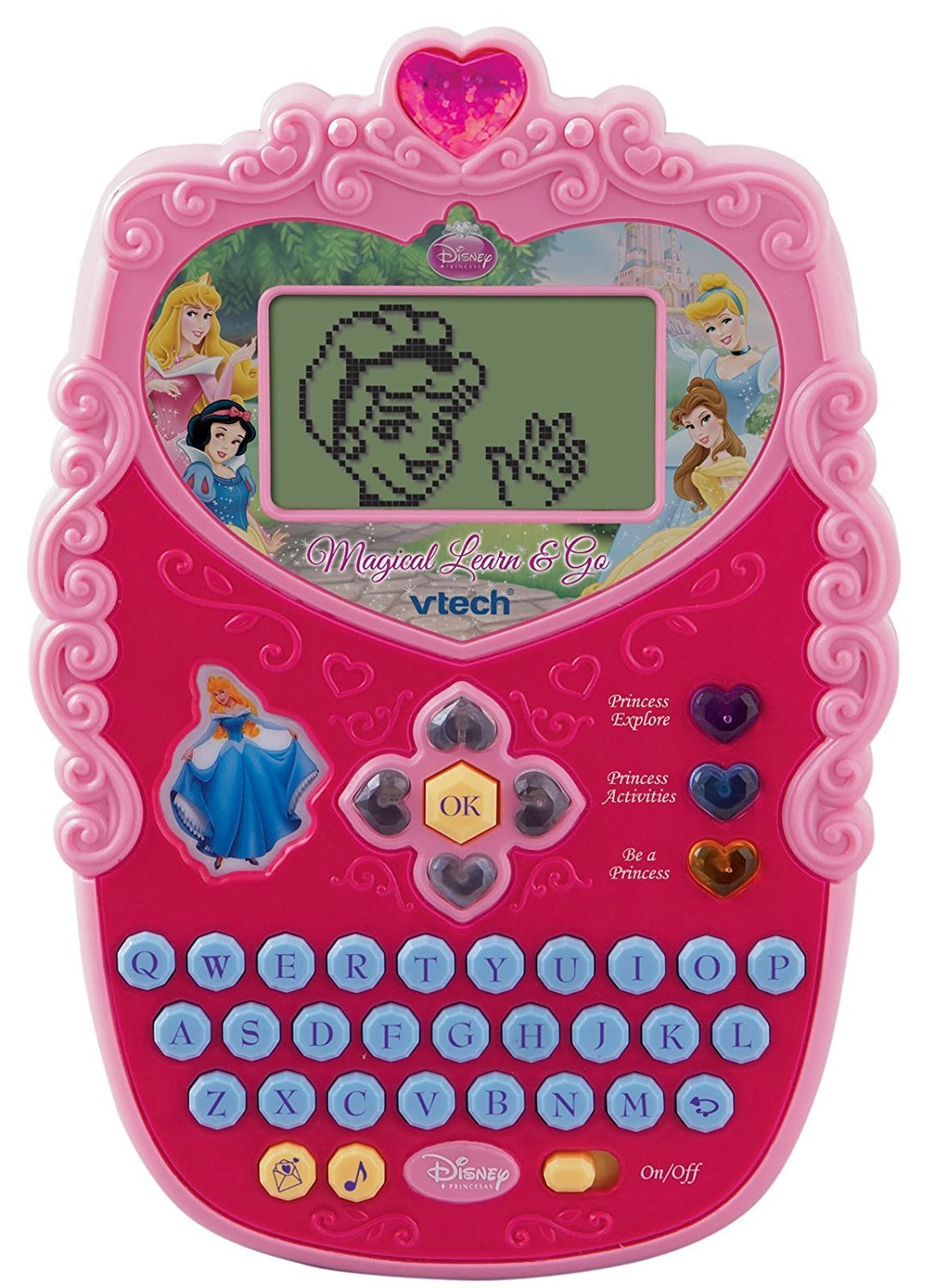
Image 1.1: The VTech Disney Princess Magical Learn and Go device. This image displays the overall design of the electronic learning toy, highlighting its compact, princess-themed appearance.
2. ເນື້ອໃນຊຸດ
Upon opening the package, ensure all components are present. The box should contain:
- One VTech Disney Princess Magical Learn and Go electronic learning toy.
- Three AA batteries (pre-installed or included separately).
- ຄູ່ມືການສອນນີ້.

Image 2.1: The VTech Disney Princess Magical Learn and Go toy shown in its retail packaging. The packaging highlights key features and the Disney Princess branding.
3. ຄຸນລັກສະນະຂອງຜະລິດຕະພັນ
The VTech Disney Princess Magical Learn and Go offers several features designed for educational engagement:
- Interactive Princesses: Features Cinderella, Belle, Snow White, and Aurora to guide learning.
- E-Card Reception: Girls can receive virtual e-cards from their favorite princesses.
- ແປ້ນພິມ QWERTY: A full QWERTY keyboard layout for familiar computer-like play and typing practice.
- ຈໍ LCD: A clear LCD screen displays activities and animations.
- Gem-Style Arrow Buttons: Intuitive navigation buttons for selecting options and interacting with games.
- ໂໝດຫຼິ້ນຫຼາຍຮູບແບບ: Three distinct modes of play to vary the learning experience.
- Eight Learning Activities: Includes activities focusing on letter recognition, alphabet order, spelling, logic, and music.
- ການອອກແບບທີ່ສະຫງ່າງາມ: A princess-themed design to appeal to young users.
4. ຕັ້ງຄ່າ
4.1 ການຕິດຕັ້ງຫມໍ້ໄຟ
The VTech Disney Princess Magical Learn and Go requires three (3) AA batteries for operation. Batteries may be pre-installed for demonstration purposes. If replacing batteries:
- ຊອກຫາຊ່ອງໃສ່ຫມໍ້ໄຟຢູ່ດ້ານຫຼັງຂອງໜ່ວຍ.
- ດ້ວຍການໃຊ້ສະກູ, ຖອດສະກູອອກຈາກຝາປິດຊ່ອງແບັດເຕີຣີ ແລະຖອດຝາປິດອອກ.
- Insert three new AA batteries, ensuring correct polarity (+/-) as indicated inside the compartment.
- ປ່ຽນຝາປິດຊ່ອງໃສ່ແບັດເຕີລີ ແລະຮັດສະກູໃຫ້ແໜ້ນ.
ຂໍ້ມູນຫມໍ້ໄຟທີ່ສໍາຄັນ:
- Use only fresh batteries of the required type.
- ຢ່າປະສົມແບັດເກົ່າ ແລະ ໃໝ່.
- ຢ່າປະສົມແບັດເຕີລີ່ທີ່ເປັນດ່າງ, ມາດຕະຖານ (ຄາບອນ-ສັງກະສີ), ຫຼືສາກໄຟໄດ້ (nickel-cadmium).
- ເອົາແບດເຕີລີ່ທີ່ຫມົດໄປອອກຈາກເຄື່ອງຫຼິ້ນ.
- ຖອດແບດເຕີຣີອອກຖ້າເຄື່ອງຫຼິ້ນຈະບໍ່ຖືກໃຊ້ເປັນໄລຍະເວລາ.
- ຖິ້ມແບັດເຕີລີ່ຢ່າງປອດໄພ. ຫ້າມຖິ້ມແບັດເຕີລີໃນໄຟ.
4.2 ເປີດ/ປິດ
To turn the unit on, locate the On/Off switch, typically found on the side or bottom of the device, and slide it to the "On" position. To turn the unit off, slide the switch to the "Off" position.
5. ຄໍາແນະນໍາການດໍາເນີນງານ
The Magical Learn and Go toy is designed for intuitive play. Familiarize yourself with the main controls:
- ຈໍ LCD: Displays all visual content, including activities, letters, and princess animations.
- ແປ້ນພິມ QWERTY: Used for typing letters, words, and interacting with spelling activities.
- Gem-Style Arrow Buttons: Navigate through menus, select options, and move characters within games.
- ປຸ່ມຕົກລົງ: ຢືນຢັນການເລືອກ ຫຼືການກະທຳ.
- Princess Buttons: Dedicated buttons to interact with specific princesses or access princess-themed content.
5.1 Modes of Play
The toy features three distinct modes of play. Use the mode selection buttons (if present) or navigate through the main menu to choose a mode:
- ຮູບແບບການຮຽນຮູ້: Focuses on educational activities like letter recognition, spelling, and logic puzzles.
- ໂໝດດົນຕີ: Engages children with melodies, sounds, and musical activities.
- Creative/Role-Play Mode: Allows for imaginative play, such as receiving e-cards from princesses or engaging in princess-themed scenarios.
5.2 Learning Activities
There are eight built-in learning activities. Select an activity from the main menu using the arrow buttons and the OK button. Examples of activities include:
- Letter identification and pronunciation.
- Alphabetical order challenges.
- Basic spelling games.
- Logic puzzles.
- Musical note recognition.

Image 5.1: A child interacting with the VTech Disney Princess Magical Learn and Go toy. This demonstrates the product in use, highlighting its handheld design and user interface.
6. ບໍາລຸງຮັກສາ
6.1 ການທໍາຄວາມສະອາດ
To clean the toy, wipe it with a slightly damp cloth. Do not use harsh chemicals or abrasive cleaners. Ensure the toy is completely dry before storage or further use.
6.2 ການເກັບຮັກສາ
Store the toy in a cool, dry place away from direct sunlight and moisture. If the toy will not be used for an extended period, remove the batteries to prevent leakage.
7. ການແກ້ໄຂບັນຫາ
If the VTech Disney Princess Magical Learn and Go is not functioning as expected, please refer to the following common issues and solutions:
| ບັນຫາ | ການແກ້ໄຂ |
|---|---|
| ຫນ່ວຍບໍລິການບໍ່ເປີດ. |
|
| ໜ້າຈໍຫວ່າງເປົ່າ ຫຼືກະພິບ. |
|
| Sound is distorted or absent. |
|
| ປຸ່ມບໍ່ຕອບສະໜອງ. |
|
8. ຂໍ້ມູນຈໍາເພາະ
| ຄຸນສົມບັດ | ລາຍລະອຽດ |
|---|---|
| ຂະໜາດສິນຄ້າ | 4.78 x 7.06 x 1.44 ນິ້ວ |
| ນ້ໍາຫນັກລາຍການ | 13.6 ອອນ |
| ໝາຍເລກຕົວແບບ | 80-116900 |
| ອາຍຸທີ່ແນະນໍາ | 4 - 7 ປີ |
| ຕ້ອງໃຊ້ແບັດເຕີຣີ | ໝໍ້ໄຟ AA 3 ໜ່ວຍ (ລວມ) |
| ຜູ້ຜະລິດ | VTech |
| ວັນທີປ່ອຍ | ວັນທີ 12 ມິຖຸນາ 2010 |
9. ຂໍ້ມູນຄວາມປອດໄພ
Please read and follow these safety precautions to ensure safe operation of the toy:
- This toy is intended for children aged 4-7 years. Adult supervision is recommended.
- ຢ່າຈຸ່ມເຄື່ອງຫຼິ້ນລົງໃນນໍ້າ ຫຼື ໃຫ້ມັນຖືກຄວາມຊຸ່ມຊື່ນຫຼາຍເກີນໄປ.
- Avoid dropping the toy or subjecting it to strong impacts.
- Do not attempt to disassemble or modify the toy, as this may cause damage or injury.
- ເກັບຮັກສາແບັດເຕີຣີໃຫ້ໄກຈາກເດັກນ້ອຍ. ຖ້າກືນກິນ, ໃຫ້ໄປພົບແພດທັນທີ.
- In rare cases, prolonged use of electronic toys may cause skin irritation. If irritation occurs, discontinue use.
10. ການຮັບປະກັນແລະການສະຫນັບສະຫນູນ
VTech products are manufactured with high-quality materials and undergo rigorous testing. For detailed warranty information, please refer to the warranty card included with your purchase or visit the official VTech website. For technical support or customer service inquiries, please contact VTech customer support through their official channels.
VTech ຢ່າງເປັນທາງການ Webເວັບໄຊ: www.vtechkids.com


