1. ບົດແນະນຳ
Thank you for choosing the Varta 57662 Battery Charger. This manual provides essential information for the safe and effective use of your new charger. Please read all instructions carefully before operating the device and retain this manual for future reference.
2. ຄໍາແນະນໍາຄວາມປອດໄພທີ່ສໍາຄັນ
ຄຳເຕືອນ: ການບໍ່ປະຕິບັດຕາມຄຳແນະນຳດ້ານຄວາມປອດໄພເຫຼົ່ານີ້ອາດຈະເຮັດໃຫ້ເກີດໄຟໄໝ້, ໄຟຟ້າຊັອດ ຫຼື ການບາດເຈັບ.
- Always read the label, warnings, and instructions provided with the product before use.
- ຫ້າມບໍ່ໃຫ້ສາຍສາກຖືກຝົນ ຫຼືຄວາມຊຸ່ມຊື້ນຫຼາຍເກີນໄປ.
- ຫ້າມໃຊ້ເຄື່ອງສາກ ຖ້າມັນໄດ້ຮັບແຮງສັ່ນສະເທືອນ, ຕົກ, ຫຼືເສຍຫາຍຢ່າງອື່ນ.
- ຢ່າຖອດອຸປະກອນສາກໄຟອອກ. ໃຫ້ຕິດຕໍ່ພະນັກງານບໍລິການທີ່ມີຄຸນວຸດທິເພື່ອສ້ອມແປງທຸກຢ່າງ.
- ໃຫ້ແນ່ໃຈວ່າເຄື່ອງສາກຖືກໃຊ້ໃນພື້ນທີ່ທີ່ມີລະບາຍອາກາດໄດ້ດີ.
- ຮັກສາໃຫ້ໄກຈາກເດັກນ້ອຍ.
- Only charge battery types specified by the manufacturer. Charging other battery types may cause them to burst, leading to injury and damage.
3. ຜະລິດຕະພັນເກີນview
The Varta 57662 is a compact and efficient battery charger designed for various battery types. Its robust construction ensures reliable performance.
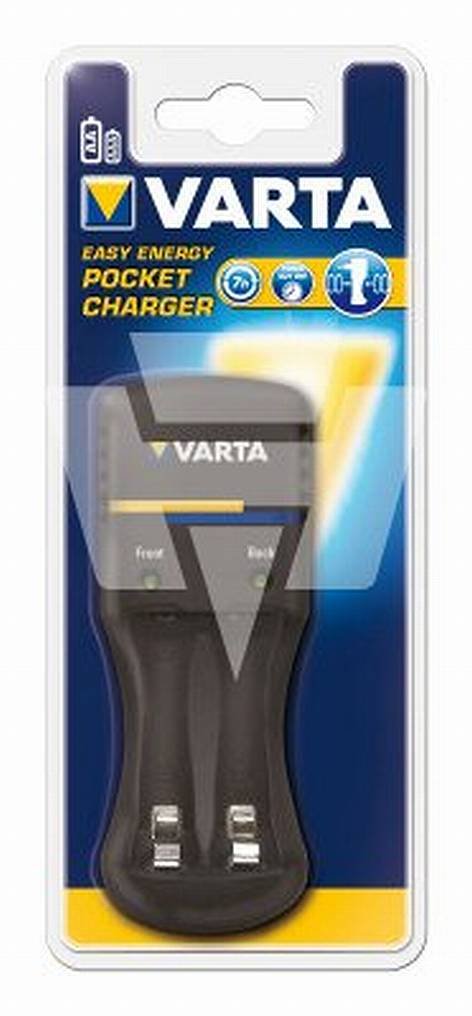
Figure 1: Varta 57662 Battery Charger. This image displays the main unit of the Varta 57662 Battery Charger, highlighting its compact design and essential features.
4. ຄໍາແນະນໍາການຕິດຕັ້ງ
- ຖອດເຄື່ອງສາກອອກ: Carefully remove the Varta 57662 Battery Charger from its packaging. Inspect for any signs of damage.
- ເລືອກສະຖານທີ່: ວາງສາຍສາກໃສ່ພື້ນທີ່ຄົງທີ່, ຮາບພຽງຢູ່ໃນພື້ນທີ່ລະບາຍອາກາດໄດ້ດີ, ຫ່າງຈາກແສງແດດໂດຍກົງ, ແຫຼ່ງຄວາມຮ້ອນ, ແລະຄວາມຊຸ່ມຊື່ນ.
- ເຊື່ອມຕໍ່ກັບພະລັງງານ: Plug the charger's power cord into a standard electrical outlet. Ensure the outlet voltage ກົງກັບຂໍ້ສະເພາະຂອງເຄື່ອງສາກ.
- ກະກຽມຫມໍ້ໄຟ: Ensure the batteries to be charged are clean and free from corrosion. Refer to your battery's manual for specific preparation steps.
5. ຄໍາແນະນໍາການດໍາເນີນງານ
Follow these steps to safely charge your batteries:
- ໃສ່ແບັດເຕີລີ: Carefully insert the batteries into the charging slots, observing the correct polarity (+ and -). Incorrect insertion can damage the batteries and the charger.
- ເລີ່ມສາກໄຟ: The charger will typically begin charging automatically once batteries are inserted and power is connected. Refer to the charger's indicator lights for charging status.
- ຕິດຕາມການສາກໄຟ: Do not leave the charger unattended for extended periods. Observe the charging indicators.
- ເອົາແບັດເຕີລີອອກ: Once charging is complete (indicated by the charger's lights), unplug the charger from the power outlet before removing the batteries.
- ເກັບຮັກສາຫມໍ້ໄຟ: Store charged batteries in a cool, dry place.
6. ການບໍາລຸງຮັກສາແລະການດູແລ
- ທໍາຄວາມສະອາດ: Disconnect the charger from the power supply before cleaning. Use a soft, dry cloth to wipe the exterior. Do not use liquid cleaners or solvents.
- ການເກັບຮັກສາ: When not in use, store the charger in a dry, dust-free environment.
- ການກວດກາ: Periodically inspect the power cord and charger casing for any signs of damage. If damage is found, discontinue use and contact customer support.
7. ການແກ້ໄຂບັນຫາ
| ບັນຫາ | ສາເຫດທີ່ເປັນໄປໄດ້ | ການແກ້ໄຂ |
|---|---|---|
| ເຄື່ອງສາກໄຟບໍ່ເປີດ | No power supply; Faulty outlet; Damaged power cord | Check power connection; Try a different outlet; Inspect power cord for damage |
| ແບັດເຕີຣີບໍ່ໄດ້ສາກ | Incorrect battery insertion; Incompatible battery type; Batteries are fully charged or defective | Ensure correct polarity; Verify battery compatibility; Test batteries in another device or replace |
| ເຄື່ອງສາກຮ້ອນເກີນໄປ | Poor ventilation; Overloaded charger; Internal fault | Ensure adequate ventilation; Do not charge incompatible batteries; Discontinue use and contact support |
8. ຂໍ້ກໍານົດດ້ານວິຊາການ
- ຍີ່ຫໍ້: ວາຕາ
- ໝາຍເລກຕົວແບບ: 57662
- ຂະໜາດຜະລິດຕະພັນ: 8 x 8.5 x 19.5 cm
- ນ້ໍາຫນັກລາຍການ: 223 ກຣາມ
- ASIN: B003AQEUUW
- ຜູ້ຜະລິດ: ວາຕາ
- ວັນທີທີ່ມີໃຫ້ທໍາອິດ: ວັນທີ 28 ກັນຍາ 2010
9. ການຮັບປະກັນແລະການສະຫນັບສະຫນູນ
For warranty information and customer support, please refer to the documentation included with your purchase or visit the official Varta webເວັບໄຊ. ຮັກສາຫຼັກຖານການຊື້ຂອງທ່ານສໍາລັບການຮຽກຮ້ອງການຮັບປະກັນໃດໆ.


