1. ບົດແນະນຳ
This manual provides essential information for the safe and effective use of your Kodak Easyshare M530 Digital Camera. Please read it thoroughly before operating the device and retain it for future reference. The Kodak Easyshare M530 is a compact digital camera featuring a 12-megapixel sensor, 3x optical zoom, and a 2.7-inch LCD screen, designed for capturing high-quality photos and videos with ease.
2. ສິ່ງທີ່ຢູ່ໃນກ່ອງ
- ກ້ອງຖ່າຍຮູບດິຈິຕອນ Kodak Easyshare M530
- ສາຍ USB
- ແບັດເຕີຣີ Lithium-Ion ສາມາດສາກໄດ້
- ສາຍແຂນ
- ຄູ່ມືແນະ ນຳ (ເອກະສານນີ້)
3. ກ້ອງຜ່ານview
ເຮັດຄວາມຄຸ້ນເຄີຍກັບອົງປະກອບຕົ້ນຕໍຂອງກ້ອງຖ່າຍຮູບຂອງທ່ານ.

ຮູບທີ 1: ດ້ານໜ້າ view of the Kodak Easyshare M530 Digital Camera, showing the lens, flash, and brand logo.

ຮູບທີ 2: ກັບຄືນໄປບ່ອນ view of the Kodak Easyshare M530 Digital Camera, displaying the 2.7-inch LCD screen and control buttons.

ຮູບທີ 3: ເທິງ view of the Kodak Easyshare M530 Digital Camera, highlighting the power button and shutter release.

ຮູບທີ 4: ຂ້າງ view of the Kodak Easyshare M530 Digital Camera, illustrating the USB port for connectivity.
4. ຕັ້ງຄ່າ
4.1. ການຕິດຕັ້ງຫມໍ້ໄຟ
- ເປີດຝາປິດຊ່ອງໃສ່ຫມໍ້ໄຟທີ່ຕັ້ງຢູ່ດ້ານລຸ່ມຂອງກ້ອງຖ່າຍຮູບ.
- Insert the rechargeable Lithium-Ion battery with the contacts facing the correct direction, as indicated inside the compartment.
- ປິດຝາປິດຊ່ອງໃສ່ແບັດໄວ້ຢ່າງປອດໄພຈົນກວ່າມັນຈະກົດໃສ່ບ່ອນ.
4.2. ການຕິດຕັ້ງກາດຫນ່ວຍຄວາມຈໍາ
The camera supports SD/SDHC memory cards (not included).
- ເປີດຝາປິດຊ່ອງໃສ່ກາດຫນ່ວຍຄວາມຈໍາ, ໂດຍປົກກະຕິແລ້ວຕັ້ງຢູ່ໃກ້ກັບຊ່ອງໃສ່ຫມໍ້ໄຟ.
- ໃສ່ກາດ SD/SDHC ໂດຍໃຫ້ປ້າຍຫັນໜ້າໄປທາງໜ້າຂອງກ້ອງຖ່າຍຮູບຈົນກວ່າມັນຈະເຂົ້າທີ່.
- ປິດຝາປິດຊ່ອງສຽບກາດຄວາມຈຳ.
4.3. ການສາກແບັດເຕີຣີ
- Ensure the battery is correctly installed in the camera.
- Connect the supplied USB cable to the camera's USB port.
- ເຊື່ອມຕໍ່ປາຍອີກດ້ານໜຶ່ງຂອງສາຍ USB ເຂົ້າກັບອະແດບເຕີໄຟ USB ທີ່ເຂົ້າກັນໄດ້ ຫຼື ພອດ USB ຂອງຄອມພິວເຕີ.
- The charging indicator light will illuminate. Charging is complete when the light turns off or changes color (refer to camera display for exact status).
5. ປະຕິບັດການກ້ອງຖ່າຍຮູບ
5.1. ເປີດ/ປິດ
- ເພື່ອເປີດເຄື່ອງ: ກົດປຸ່ມ ພະລັງງານ ປຸ່ມຕັ້ງຢູ່ເທິງສຸດຂອງກ້ອງຖ່າຍຮູບ.
- ເພື່ອປິດເຄື່ອງ: ກົດຄ້າງໄວ້ ພະລັງງານ button until the camera shuts down.
5.2. ຖ່າຍຮູບ
- ເປີດກ້ອງຖ່າຍຮູບ.
- ຂອບຮູບຂອງທ່ານໂດຍໃຊ້ຈໍ LCD 2.7 ນິ້ວ.
- ກົດ ຊັດເຕີ ກົດປຸ່ມລົງເຄິ່ງໜຶ່ງເພື່ອໂຟກັສ. ກອບໂຟກັສຈະປ່ຽນເປັນສີຂຽວເມື່ອໂຟກັສສຳເລັດແລ້ວ.
- ກົດ ຊັດເຕີ button all the way down to capture the photo.
5.3. ການບັນທຶກວິດີໂອ
- Switch the camera to video mode (refer to your camera's specific mode dial or menu for this option).
- ກົດ ຊັດເຕີ button to start recording. A red indicator will typically appear on the screen.
- ກົດ ຊັດເຕີ ປຸ່ມອີກເທື່ອ ໜຶ່ງ ເພື່ອຢຸດການບັນທຶກ.
5.4. ຟັງຊັນຊູມ
Use the zoom lever (often labeled W for Wide and T for Telephoto) to adjust the 3x optical zoom.
- ຍູ້ lever ໄປສູ່ T to zoom in (telephoto).
- ຍູ້ lever ໄປສູ່ W to zoom out (wide-angle).
5.5. ໂໝດແຟລດ
ກົດ Flash button (often indicated by a lightning bolt icon) to cycle through available flash modes:
- ແຟລດອັດຕະໂນມັດ: ກ້ອງຖ່າຍຮູບຈະກຳນົດໂດຍອັດຕະໂນມັດວ່າຕ້ອງການແຟລດຫຼືບໍ່.
- ຕື່ມແຟລດ: ໄຟ Flash ສໍາລັບທຸກໆການສັກຢາ.
- ການຫຼຸດຜ່ອນຕາແດງ: ຍິງແຟລດກ່ອນເພື່ອຫຼຸດຜ່ອນຜົນກະທົບຂອງຕາແດງ.
- ປິດແຟລດ: Flash ຖືກປິດໃຊ້ງານ.
5.6. ຣviewໃນຮູບພາບແລະວິດີໂອ
- ກົດ Review ປຸ່ມ (ມັກຈະສະແດງໂດຍໄອຄອນຫຼິ້ນ).
- ໃຊ້ແຜງທິດທາງເພື່ອນຳທາງຜ່ານຮູບພາບ ແລະ ວິດີໂອທີ່ທ່ານຖ່າຍ.
- ກົດ OK or ເລືອກ ປຸ່ມ view ລາຍການທີ່ເລືອກ.
5.7. Smart Capture and Face Recognition
The Kodak Easyshare M530 features Smart Capture, which automatically adjusts camera settings for optimal results, and Face Recognition, which detects and optimizes settings for faces in your shots.
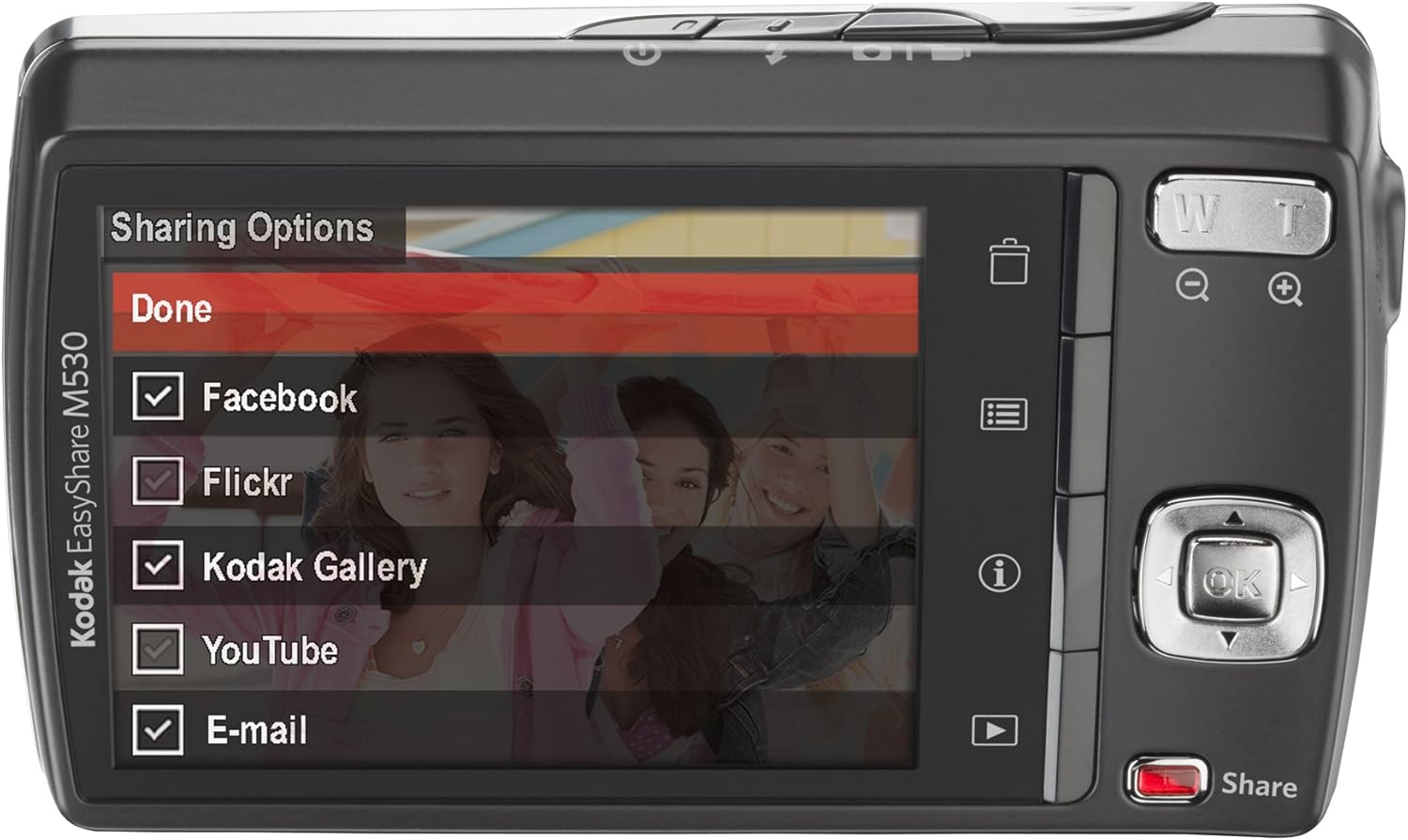
ຮູບທີ 5: The camera's LCD screen displaying sharing options, including Facebook, Flickr, Kodak Gallery, YouTube, and Email.
5.8. Sharing Your Content
Utilize the dedicated Share button for easy uploading of your photos and videos to various platforms when connected to a computer with Kodak's EasyShare software.
6. ບໍາລຸງຮັກສາ
6.1. ການເຮັດຄວາມສະອາດກ້ອງຖ່າຍຮູບ
- ໃຊ້ຜ້າທີ່ອ່ອນໆ, ບໍ່ມີສານດ່າງເພື່ອເຮັດຄວາມສະອາດຕົວກ້ອງຖ່າຍຮູບ.
- ສຳລັບເລນ ແລະ ໜ້າຈໍ LCD, ໃຫ້ໃຊ້ຜ້າເຊັດເລນ ແລະ ນ້ຳຢາທຳຄວາມສະອາດເລນພິເສດ. ຫຼີກລ່ຽງສານເຄມີທີ່ຮຸນແຮງ.
6.2. ການດູແລຫມໍ້ໄຟ
- ເກັບຮັກສາຫມໍ້ໄຟໃນບ່ອນທີ່ເຢັນ, ແຫ້ງໃນເວລາທີ່ບໍ່ໄດ້ໃຊ້.
- ຫຼີກເວັ້ນການເປີດເຜີຍແບດເຕີລີ່ກັບອຸນຫະພູມທີ່ຮຸນແຮງ.
- ສາກແບັດເຕີຣີໃຫ້ເຕັມກ່ອນການເກັບຂໍ້ມູນຂະຫຍາຍ.
6.3. ການເກັບຮັກສາ
When storing the camera for long periods, remove the battery and memory card. Store the camera in a dry, dust-free environment, preferably in a camera bag.
7. ການແກ້ໄຂບັນຫາ
| ບັນຫາ | ສາເຫດທີ່ເປັນໄປໄດ້ | ການແກ້ໄຂ |
|---|---|---|
| ກ້ອງບໍ່ເປີດ | ແບັດເຕີຣີເຫຼືອໜ້ອຍ ຫຼືໝົດແລ້ວ | ໄລ່ແບັດເຕີຣີໃຫ້ເຕັມ. |
| Battery incorrectly inserted | Reinsert the battery correctly. | |
| ຮູບພາບທີ່ມົວ | ກ້ອງສັ່ນ | Hold the camera steady or use a tripod. |
| Subject out of focus | Ensure the camera focuses before fully pressing the shutter. | |
| ກາດຄວາມຈຳຜິດພາດ | Card not inserted correctly or corrupted | Reinsert the card. If the problem persists, try formatting the card (this will erase all data) or use a different card. |
| Flash ບໍ່ຍິງ | Flash mode set to 'Off' | Change the flash mode to Auto or Fill Flash. |
8. ຂໍ້ມູນຈໍາເພາະ
- ຄວາມລະອຽດເຊັນເຊີຮູບ: 12 MP
- Optical Zoom: 3x
- ຂະໜາດໜ້າຈໍ: 2.7 ນິ້ວ (LCD)
- ຄວາມລະອຽດວິດີໂອ: 640 x 480 (30 fps)
- ປະເພດຫມໍ້ໄຟ: ລີທຽມໄອອອນ
- ສະຖຽນລະພາບຮູບພາບ: ບໍ່ມີ
- ສະຫນັບສະຫນູນ File ຮູບແບບ: ດິບ
- ເຕັກໂນໂລຍີການເຊື່ອມຕໍ່: USB
- ນ້ໍາຫນັກລາຍການ: 0.33 ປອນ
- ສີ: Blue (for this specific model variant)
9. ການຮັບປະກັນແລະການສະຫນັບສະຫນູນ
Your Kodak Easyshare M530 Digital Camera comes with a 30-day warranty from the manufacturer, Eastman Kodak Company. This warranty covers defects in materials and workmanship under normal use. For warranty claims or technical support, please refer to the contact information provided with your purchase documentation or visit the official Kodak support webເວັບໄຊ.
ສໍາລັບການສະຫນັບສະຫນູນແລະຊັບພະຍາກອນເພີ່ມເຕີມ, ທ່ານອາດຈະໄປຢ້ຽມຢາມ ຮ້ານ KODAK ໃນ Amazon.