ແນະນຳ
ຂອບໃຈສໍາລັບການຊື້asing the KLH AUDIO KL-300i Nostalgia 5-n-1 System. This integrated audio system combines classic and modern audio playback capabilities, including a turntable, CD player, cassette player, AM/FM radio, and an iPod dock. This manual provides essential information for setting up, operating, and maintaining your system to ensure optimal performance and longevity.
ຂໍ້ມູນຄວາມປອດໄພ
ກະລຸນາອ່ານຄໍາແນະນໍາດ້ານຄວາມປອດໄພທັງໝົດຢ່າງລະມັດລະວັງກ່ອນທີ່ຈະປະຕິບັດຜະລິດຕະພັນນີ້. ຮັກສາຄູ່ມືນີ້ໄວ້ສໍາລັບການອ້າງອີງໃນອະນາຄົດ.
- ແຫຼ່ງພະລັງງານ: ເຊື່ອມຕໍ່ຫນ່ວຍບໍລິການພຽງແຕ່ກັບປສຽບໄຟ AC ຂອງ vol ທີ່ລະບຸtage.
- ການລະບາຍອາກາດ: ຮັບປະກັນການລະບາຍອາກາດທີ່ພຽງພໍ. ຫ້າມປິດຊ່ອງລະບາຍອາກາດ.
- ນ້ໍາແລະຄວາມຊຸ່ມ: ຫ້າມບໍ່ໃຫ້ອຸປະກອນຖືກຝົນ ຫຼື ຄວາມຊຸ່ມຊື່ນ. ຫ້າມວາງສິ່ງຂອງທີ່ເຕັມໄປດ້ວຍຂອງແຫຼວ, ເຊັ່ນ vases, ໃສ່ເຄື່ອງ.
- ຄວາມຮ້ອນ: ຫ້າມວາງເຄື່ອງໄວ້ໃກ້ກັບແຫຼ່ງຄວາມຮ້ອນເຊັ່ນ: ລັງສີ, ເຄື່ອງບັນທຶກຄວາມຮ້ອນ, ເຕົາ ຫຼື ອຸປະກອນອື່ນໆ (ລວມທັງ amplifiers) ທີ່ຜະລິດຄວາມຮ້ອນ.
- ທໍາຄວາມສະອາດ: ຖອດປລັກໜ່ວຍອອກຈາກປລັກສຽບໃສ່ຝາກ່ອນທຳຄວາມສະອາດ. ໃຊ້ຜ້າແຫ້ງເທົ່ານັ້ນ.
- ການບໍລິການ: ຢ່າພະຍາຍາມບໍລິການຜະລິດຕະພັນນີ້ດ້ວຍຕົນເອງ. ອ້າງເຖິງການບໍລິການທັງtoົດໃຫ້ກັບພະນັກງານບໍລິການທີ່ມີຄຸນວຸດທິ.
ເນື້ອໃນຊຸດ
ກວດສອບວ່າລາຍການທັງຫມົດທີ່ລະບຸໄວ້ຂ້າງລຸ່ມນີ້ແມ່ນລວມຢູ່ໃນຊຸດ:
- KLH AUDIO KL-300i Main Unit
- ການຄວບຄຸມໄລຍະໄກ
- ສາຍປ້ອນເຂົ້າຊ່ວຍ
- AM/FM Antenna Wire
- ຄູ່ມືແນະ ນຳ (ເອກະສານນີ້)
ສິນຄ້າເກີນview
Familiarize yourself with the various components and controls of your KLH AUDIO KL-300i system.
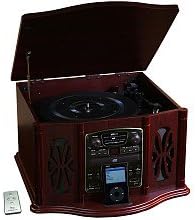
This image displays the KLH AUDIO KL-300i Nostalgia 5-n-1 System. The unit features a dark wood finish. The top lid is open, revealing a turntable. Below the turntable, the front panel includes controls for the CD player, AM/FM radio tuner, and an iPod dock. A small remote control is visible to the left of the main unit.
ແຜງຄວບຄຸມດ້ານໜ້າ:
- ປຸ່ມເປີດປິດ: ເປີດ ຫຼືປິດເຄື່ອງ.
- ຕົວເລືອກຟັງຊັນ: Switches between Phono, CD, Radio, iPod, and Aux modes.
- ປຸ່ມລະດັບສຽງ: ປັບລະດັບສຽງຕົ້ນສະບັບ.
- ການຄວບຄຸມເຄື່ອງຫຼິ້ນ CD: ຫຼິ້ນ/ຢຸດຊົ່ວຄາວ, ຢຸດ, ຂ້າມ ໄປໜ້າ/ກັບຫຼັງ.
- ເຄື່ອງຮັບສັນຍານວິທະຍຸ: AM/FM band selector, Tuning knob.
- ດັອກ iPod: Connector for iPod devices.
- Aux-In Jack: ສຽບ 3.5 ມມ ສຳລັບອຸປະກອນສຽງພາຍນອກ.
- ຫູຟັງ Jack: ຜົນຜະລິດ 3.5mm ສໍາລັບການຟັງສ່ວນຕົວ.
ກະດານຊັ້ນຍອດ:
- ແຜ່ນພັບ: ສຳລັບການຫຼິ້ນແຜ່ນສຽງໄວນິລ.
- ຝາປິດ: Protects the turntable when not in use.
ກະດານຂ້າງ:
- ດາດຄາສເຊັດ (Casset Deck): For playing audio cassette tapes.
ຕັ້ງຄ່າ
Follow these steps for initial setup of your audio system.
- ການຈັດວາງ: Place the unit on a stable, flat surface away from direct sunlight, heat sources, and excessive dust or moisture. Ensure there is adequate space around the unit for ventilation.
- ເຊື່ອມຕໍ່ເສົາອາກາດ: For optimal AM/FM radio reception, connect the supplied antenna wire to the antenna terminal on the rear of the unit. Extend the wire fully for better reception.
- ການເຊື່ອມຕໍ່ພະລັງງານ: ສຽບສາຍໄຟ AC ເຂົ້າໄປໃນທໍ່ປະຕູຜະ ໜັງ.
- ການເປີດເຄື່ອງເບື້ອງຕົ້ນ: Press the Power button on the front panel to turn on the unit.
ຄໍາແນະນໍາການດໍາເນີນງານ
ການດໍາເນີນງານທົ່ວໄປ:
- ເປີດ/ປິດ: ກົດປຸ່ມເປີດປິດເພື່ອເປີດ ຫຼືປິດເຄື່ອງ.
- ການເລືອກຟັງຊັນ: Use the Function Selector knob or buttons to choose your desired audio source (Phono, CD, Radio, iPod, Aux).
- ການປັບລະດັບສຽງ: Rotate the Volume knob to increase or decrease the sound level.
ການດໍາເນີນງານຕາຕະລາງ:
- Lift the lid of the unit.
- ວາງບັນທຶກ vinyl ເທິງແຜ່ນແຜ່ນ.
- Select the appropriate speed (33 1/3, 45, or 78 RPM) using the speed selector switch. For 45 RPM records, place the included adapter on the spindle if needed.
- Gently lift the tonearm and position the stylus over the desired starting groove of the record.
- ຄ່ອຍໆຫຼຸດໂທນອາມລົງໃສ່ແຜ່ນສຽງ. ການຫຼິ້ນຈະເລີ່ມຕົ້ນໂດຍອັດຕະໂນມັດ.
- To stop playback, gently lift the tonearm and return it to its rest.
ການດໍາເນີນງານ CD Player:
- Press the Function Selector to CD mode.
- Press the Eject button to open the CD tray.
- ວາງແຜ່ນຊີດີໂດຍໃຫ້ດ້ານທີ່ມີປ້າຍຫັນຂຶ້ນໃສ່ຖາດ.
- Press the Eject button again to close the tray. The CD will begin playing automatically or display the track count.
- Use the Play/Pause, Stop, and Skip buttons to control playback.
ການເຮັດວຽກຂອງເຄື່ອງຫຼິ້ນເທບ:
- ໃສ່ເທບຄາເຊັດເຂົ້າໄປໃນຊ່ອງໃສ່ເທບຄາເຊັດທີ່ຢູ່ດ້ານຂ້າງຂອງຕົວເຄື່ອງ.
- ກົດປຸ່ມຫຼິ້ນເພື່ອເລີ່ມຕົ້ນການຫຼິ້ນ.
- Use the Fast Forward (FF) button to advance the tape quickly.
- To stop playback, press the Stop/Eject button. Pressing it halfway will eject the tape.
ການດໍາເນີນງານວິທະຍຸ AM/FM:
- Press the Function Selector to Radio mode.
- Select either AM or FM band using the band selector switch.
- Rotate the Tuning knob to search for radio stations.
- Adjust the antenna wire for best reception.
iPod Dock Operation:
- Press the Function Selector to iPod mode.
- Carefully place your compatible iPod device onto the iPod dock connector.
- Use your iPod's controls to select and play music. Audio will be routed through the KLH AUDIO system's speakers.
Aux-In Operation:
- Press the Function Selector to Aux mode.
- Connect an external audio device (e.g., MP3 player, smartphone) to the Aux-In jack on the front panel using the supplied 3.5mm auxiliary cable.
- Play audio from your external device. The sound will be played through the KLH AUDIO system's speakers.
ການນໍາໃຊ້ການຄວບຄຸມໄລຍະໄກ:
The remote control primarily operates the CD player functions (Play, Pause, Stop, Skip). Note that the remote cannot turn the unit on or off.
ບໍາລຸງຮັກສາ
ການດູແລທີ່ເໝາະສົມຈະຮັບປະກັນອາຍຸການໃຊ້ງານຂອງລະບົບຂອງທ່ານ.
- ທໍາຄວາມສະອາດຫນ່ວຍບໍລິການ: ເຊັດດ້ານນອກຂອງເຄື່ອງດ້ວຍຜ້າອ່ອນ, ແຫ້ງ. ຢ່າໃຊ້ເຄື່ອງເຮັດຄວາມສະອາດຂັດ, ຂີ້ເຜີ້ງ, ຫຼືສານລະລາຍ.
- ການດູແລສະໄຕລັດ: Handle the turntable stylus with extreme care. Clean the stylus periodically with a soft brush, brushing from back to front.
- ການດູແລຊີດີ/ເຄັດເຊັດ: Keep CDs and cassette tapes clean and free of dust. Store them in their cases when not in use.
ການແກ້ໄຂບັນຫາ
If you experience issues with your system, refer to the following common problems and solutions.
| ບັນຫາ | ສາເຫດທີ່ເປັນໄປໄດ້ | ການແກ້ໄຂ |
|---|---|---|
| ບໍ່ມີພະລັງງານ | ສາຍໄຟບໍ່ໄດ້ສຽບຢ່າງປອດໄພ. | ກວດສອບການເຊື່ອມຕໍ່ສາຍໄຟກັບຫນ່ວຍບໍລິການແລະຝາຜະຫນັງ. |
| ບໍ່ມີສຽງ | ລະດັບສຽງຕໍ່າເກີນໄປ; ເລືອກຟັງຊັນບໍ່ຖືກຕ້ອງ; ເຊື່ອມຕໍ່ຫູຟັງແລ້ວ. | Increase volume; Select correct function; Disconnect headphones. |
| turntable ບໍ່ spinning | Unit not powered on; Belt dislodged. | Ensure unit is on; Contact service if belt issue suspected. |
| ການຮັບວິທະຍຸທີ່ບໍ່ດີ | ເສົາອາກາດບໍ່ໄດ້ຂະຫຍາຍ ຫຼືຕັ້ງຕຳແໜ່ງຢ່າງຖືກຕ້ອງ. | Extend and adjust the antenna wire for better signal. |
| CD ບໍ່ໄດ້ຫຼິ້ນ | CD inserted incorrectly; CD is scratched or dirty. | Ensure CD is label-side up; Clean or replace CD. |
ຂໍ້ມູນຈໍາເພາະ
| ຄຸນສົມບັດ | ຂໍ້ມູນຈໍາເພາະ |
|---|---|
| ແຫຼ່ງພະລັງງານ | AC 120V ~ 60Hz |
| ຂະໜາດ (ກວ້າງ x ສູງ) | Approx. 17" x 17" x 10.5" (43.2 cm x 43.2 cm x 26.7 cm) |
| ຄວາມໄວຕາຕະລາງ | 33 1/3, 45, 78 RPM |
| ລະດັບຄວາມຖີ່ວິທະຍຸ | AM: 530-1710 kHz, FM: 88-108 MHz |
| ຄວາມເຂົ້າກັນໄດ້ຂອງ CD | ແຜ່ນ CD, CD-R / RW |
| iPod Dock | Compatible with older generation iPods (30-pin connector) |
ການຮັບປະກັນແລະການສະຫນັບສະຫນູນ
This product is covered by a limited manufacturer's warranty. For specific warranty terms and conditions, please refer to the warranty card included with your purchase or contact KLH customer support. If you require technical assistance or have questions not covered in this manual, please contact KLH customer service through their official webເວັບໄຊ ຫຼືຂໍ້ມູນຕິດຕໍ່ທີ່ສະໜອງໃຫ້ກັບຜະລິດຕະພັນຂອງເຈົ້າ.


