ແນະນຳ
This manual provides detailed instructions for the setup, operation, and maintenance of your Supersonic SC-380 AM/FM Clock Radio. Please read this manual thoroughly before using the device to ensure proper function and to maximize your user experience. Keep this manual for future reference.
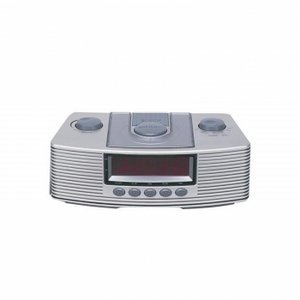
This image shows the front of the Supersonic SC-380 AM/FM Clock Radio, displaying its compact design and control buttons.
ຕັ້ງຄ່າ
1. ການຫຸ້ມຫໍ່
- Carefully remove the clock radio from its packaging.
- ກວດເບິ່ງຄວາມເສຍຫາຍໃດໆໃນລະຫວ່າງການຂົນສົ່ງ. ຖ້າເສຍຫາຍ, ຢ່າດໍາເນີນການແລະຕິດຕໍ່ສະຫນັບສະຫນູນລູກຄ້າ.
- Ensure all components are present: SC-380 unit, power adapter (if included), and this instruction manual.
2. ການເຊື່ອມຕໍ່ພະລັງງານ
The SC-380 operates on battery power. For continuous operation, ensure fresh batteries are installed.
- Locate the battery compartment on the bottom or rear of the unit.
- ເປີດຝາປິດຊ່ອງໃສ່ຫມໍ້ໄຟ.
- Insert the required batteries (e.g., 3 x AA, not included) according to the polarity indicators (+ and -).
- ປິດຝາປິດຊ່ອງໃສ່ຫມໍ້ໄຟຢ່າງປອດໄພ.
3. ການຕິດຕັ້ງເສົາອາກາດ
For optimal radio reception, position the antenna correctly.
- ເສົາອາກາດ FM: Extend the telescopic FM antenna fully and adjust its direction for the best reception.
- ເສົາອາກາດ AM: The AM antenna is built-in. Rotate the entire unit for optimal AM reception.
4. ການຕັ້ງເວລາເບື້ອງຕົ້ນ
After connecting power, set the current time.
- ກົດຄ້າງໄວ້ ເວລາ ກຳ ນົດ button (or similar, refer to unit labels).
- ໃນຂະນະທີ່ຖື, ໃຫ້ໃຊ້ ຊົ່ວໂມງ ແລະ ນາທີ ປຸ່ມເພື່ອປັບເວລາ.
- ປ່ອຍຕົວ ເວລາ ກຳ ນົດ ປຸ່ມເພື່ອຢືນຢັນ.
ຄໍາແນະນໍາການດໍາເນີນງານ
1. ເປີດ/ປິດ
- ກົດ ພະລັງງານ ປຸ່ມເພື່ອເປີດຫຼືປິດເຄື່ອງ.
2. ປະຕິບັດການວິທະຍຸ (AM/FM)
- ກົດ ແຖບ ເພື່ອເລືອກວິທະຍຸ AM ຫຼື FM.
- ໃຊ້ Tuning knob or buttons to select your desired radio station.
- ປັບລະດັບສຽງໂດຍໃຊ້ ປະລິມານ knob or buttons.
3. ຕັ້ງຄ່າປຸກ
The SC-380 features an alarm function to wake you up.
- ກົດຄ້າງໄວ້ ຕັ້ງໂມງປຸກ ປຸ່ມ.
- ໃນຂະນະທີ່ຖື, ໃຫ້ໃຊ້ ຊົ່ວໂມງ ແລະ ນາທີ ປຸ່ມເພື່ອຕັ້ງເວລາປຸກທີ່ຕ້ອງການ.
- ປ່ອຍຕົວ ຕັ້ງໂມງປຸກ ປຸ່ມ.
- ກົດ ແບບ ALARM button to select the alarm source (e.g., Radio, Buzzer, Nature Sound).
- To activate/deactivate the alarm, use the ເປີດ / ປິດ switch or button.
4. ສຽງທຳມະຊາດ
Your SC-380 includes 10 built-in nature sounds for relaxation or as an alarm.
- ກົດ ສຽງ ທຳ ມະຊາດ button to cycle through the available sounds.
- ປັບລະດັບສຽງໂດຍໃຊ້ ປະລິມານ ການຄວບຄຸມ.
- To turn off the nature sound, press the ພະລັງງານ ປຸ່ມ ຫຼື ສຽງ ທຳ ມະຊາດ button again until it stops.
5. ເຄື່ອງຈັບເວລານອນ
The sleep timer allows the radio or nature sound to play for a set duration before automatically turning off.
- While the radio or nature sound is playing, press the ນອນ ກົດປຸ່ມຊ້ຳໆເພື່ອໝຸນວຽນເວລານອນທີ່ມີຢູ່ (ເຊັ່ນ: 10, 30, 60, 90 ນາທີ).
- The display will show the selected sleep time.
- The unit will automatically turn off after the set time.
ບໍາລຸງຮັກສາ
1. ທໍາຄວາມສະອາດ
- ສະເຫມີຕັດການເຊື່ອມຕໍ່ໄຟຟ້າກ່ອນທີ່ຈະທໍາຄວາມສະອາດ.
- ເຊັດດ້ານນອກຂອງຕົວເຄື່ອງດ້ວຍຜ້າທີ່ອ່ອນນຸ້ມແລະຄ່ອຍໆເຊັດອອກ.amp ຜ້າ.
- ຢ່າໃຊ້ເຄື່ອງເຮັດຄວາມສະອາດຂັດ, ຂີ້ເຜີ້ງ, ຫຼືສານລະລາຍເພາະວ່າພວກມັນອາດຈະທໍາລາຍການສໍາເລັດຮູບ.
2. ການທົດແທນຫມໍ້ໄຟ
- When the display dims or the unit functions intermittently, it's time to replace the batteries.
- Follow the battery installation steps outlined in the ຕັ້ງຄ່າ ພາກ.
- ຖິ້ມແບດເຕີຣີເກົ່າຢ່າງມີຄວາມຮັບຜິດຊອບຕາມກົດລະບຽບທ້ອງຖິ່ນ.
3. ການເກັບຮັກສາ
- ຖ້າເກັບຮັກສາເຄື່ອງໄວ້ເປັນເວລາດົນ, ໃຫ້ຖອດແບດເຕີລີ່ອອກເພື່ອປ້ອງກັນການຮົ່ວໄຫຼ.
- ເກັບຮັກສາໄວ້ໃນບ່ອນທີ່ເຢັນ, ແຫ້ງ, ຫ່າງຈາກແສງແດດໂດຍກົງແລະອຸນຫະພູມທີ່ສຸດ.
ການແກ້ໄຂບັນຫາ
If you encounter issues with your SC-380, please refer to the following common problems and solutions:
- ບໍ່ມີໄຟ / ໜ້າຈໍປິດ:
- Check if batteries are correctly installed and not depleted. Replace if necessary.
- Ensure the unit is turned on. - ການຮັບວິທະຍຸທີ່ບໍ່ດີ:
- Fully extend and adjust the FM telescopic antenna.
- For AM, rotate the entire unit to find the best signal.
- Move the unit away from other electronic devices that may cause interference. - ໂມງປຸກບໍ່ມີສຽງ:
- Verify that the alarm time is set correctly.
- Ensure the alarm is activated (Alarm ON/OFF switch/button).
- Check that the alarm volume is not set to minimum. - Time Not Keeping Correctly:
- Replace batteries with fresh ones.
If the problem persists after trying these solutions, please contact Supersonic customer support.
ຂໍ້ມູນຈໍາເພາະ
| ຄຸນສົມບັດ | ລາຍລະອຽດ |
|---|---|
| ໝາຍເລກຕົວແບບ | SC380 |
| ແຖບວິທະຍຸ | AM/FM |
| ສຽງທໍາມະຊາດ | 10 ສຽງໃນຕົວ |
| ແຫຼ່ງພະລັງງານ | ພະລັງງານຫມໍ້ໄຟ |
| ນ້ໍາຫນັກລາຍການ | 1.9 ປອນ |
| ຂະໜາດແພັກເກັດ | 9.8 x 5.7 x 4.5 ນິ້ວ |
| UPC | 063913103800 |
ການຮັບປະກັນແລະການສະຫນັບສະຫນູນ
Supersonic products are designed for reliability and performance. For specific warranty information, please refer to the warranty card included with your purchase or visit the official Supersonic website. For technical support or service inquiries, please contact Supersonic customer service through their official channels.


