ແນະນຳ
This manual provides essential information for the proper setup, operation, and maintenance of your Mackie 1202-VLZ3 12-Channel Compact Mixer. The 1202-VLZ3 is designed for professional audio applications, offering high-quality sound and robust construction for live sound, recording studios, and project studios. Please read this manual thoroughly before operating the unit to ensure optimal performance and longevity.
ຕັ້ງຄ່າ
Proper setup is crucial for achieving the best audio quality and preventing damage to your equipment. Follow these steps to connect your mixer.
1. ການຈັດວາງທາງດ້ານຮ່າງກາຍ
Place the mixer on a stable, flat surface. Ensure adequate ventilation around the unit to prevent overheating. Avoid placing it near sources of electromagnetic interference, such as power transformers or computer monitors.
2. ການເຊື່ອມຕໍ່ພະລັງງານ
Connect the supplied AC power cord to the mixer's power input and then to a grounded AC outlet. The 1202-VLZ3 features a multi-voltage power supply for worldwide use. Ensure the power switch is in the OFF position before connecting or disconnecting power.
3. ການເຊື່ອມຕໍ່ຂາເຂົ້າ
The 1202-VLZ3 offers various input options for microphones and line-level devices.
- ການປ້ອນຂໍ້ມູນໄມໂຄຣໂຟນ (MIC 1-4): Use XLR cables to connect microphones to the MIC inputs. These inputs feature Mackie's XDR2 mic preamps. Phantom power (+48V) can be engaged for condenser microphones via a global switch.
- ເສັ້ນເຂົ້າ (ຊ່ອງ 1-4): Use 1/4-inch TRS or TS cables for line-level sources such as keyboards, drum machines, or preampຜູ້ຊ່ວຍຊີວິດ.
- Stereo Line Inputs (Channels 5-6, 7-8, 9-10, 11-12): These stereo channels accept 1/4-inch TRS or TS cables for stereo line-level sources. Channels 5-6 and 7-8 also have mono XLR inputs for microphones.
4. ການເຊື່ອມຕໍ່ຂາອອກ
Connect your monitoring and recording devices to the mixer's outputs.
- ຜົນຜະລິດຫຼັກ (MAIN OUT L/R): Connect these balanced XLR or 1/4-inch TRS outputs to your main power ampເຄື່ອງຂະຫຍາຍສຽງ, ລຳໂພງທີ່ໃຊ້ໄຟຟ້າ, ຫຼື ອິນເຕີເຟດບັນທຶກສຽງ.
- Control Room Outputs (CTL ROOM OUT L/R): Connect these 1/4-inch TRS outputs to your studio monitor speakers.
- Aux Sends (AUX SEND 1/2): Use these 1/4-inch TS outputs to send signals to external effects processors or monitor mixes.
- Tape Outputs (TAPE OUT L/R): These RCA outputs are suitable for connecting to a stereo recording device.
- ຫູຟັງ Output: Connect your headphones to the 1/4-inch stereo headphone jack.
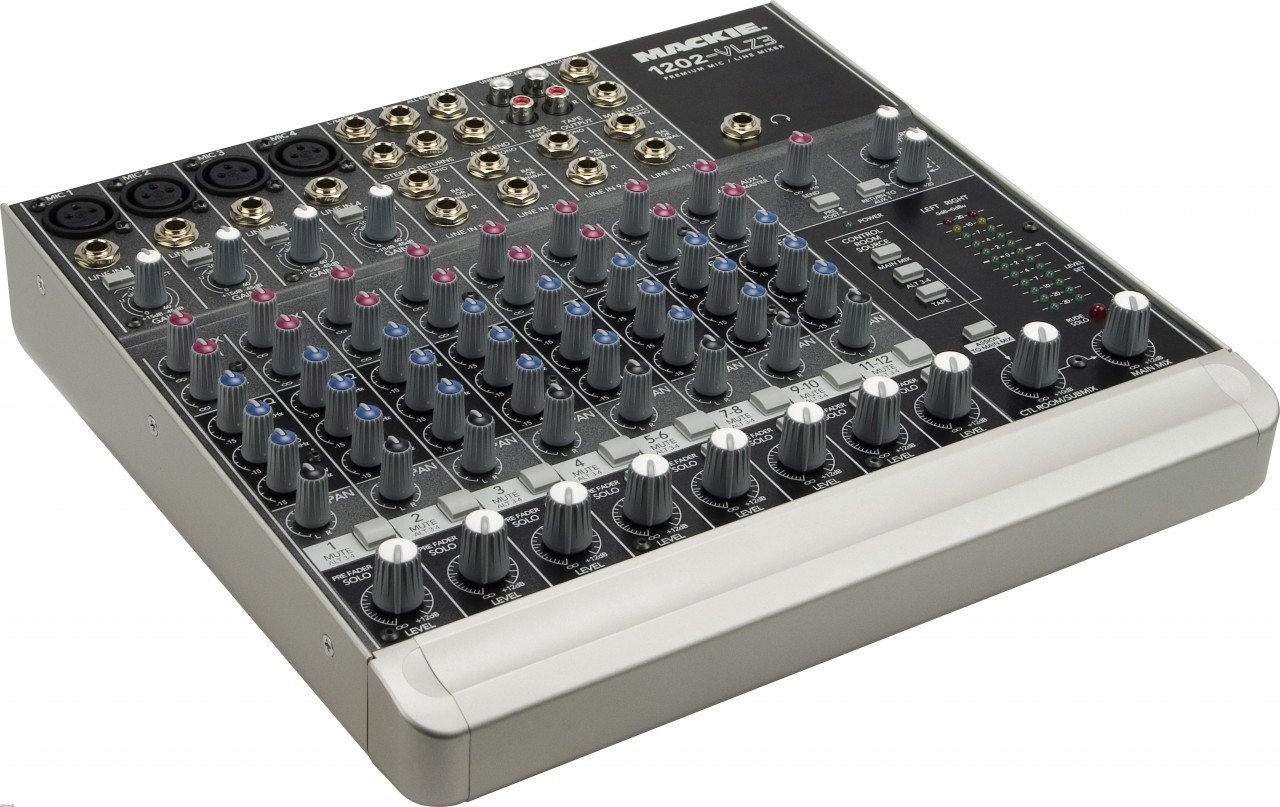
ຮູບທີ 1: ເກີນview of the Mackie 1202-VLZ3 mixer. This image displays the entire control surface, including microphone and line inputs, channel strips with EQ and auxiliary controls, master section, and various output connections. Familiarize yourself with the layout before proceeding with operation.
ການດໍາເນີນງານ
This section details the functions of the various controls on your 1202-VLZ3 mixer.
1. ການຄວບຄຸມຊ່ອງ (ຊ່ອງ Mono 1-4)
Each mono input channel features the following controls:
- ຮັບການຄວບຄຸມ: ປັບຄວາມອ່ອນໄຫວຂອງອິນພຸດສຳລັບໄມໂຄຣໂຟນ ຫຼື ສາຍອິນພຸດ. ຕັ້ງຄ່ານີ້ເພື່ອໃຫ້ບັນລຸລະດັບສັນຍານທີ່ດີໂດຍບໍ່ຕ້ອງຕັດ.
- Low-Cut Filter (75Hz): Engages an 18dB/octave high-pass filter at 75Hz to remove unwanted low-frequency rumble.
- ຄວາມສະເໝີພາບ (EQ): A 3-band active EQ with High (12kHz), Mid (2.5kHz), and Low (80Hz) controls. Provides up to 15dB boost or cut.
- Aux Sends (AUX 1, AUX 2): Controls the amount of channel signal sent to the respective Aux Send outputs. AUX 1 is pre-fader, AUX 2 is post-fader.
- ການຄວບຄຸມ Pan: ຕຳແໜ່ງສັນຍານຊ່ອງສຽງພາຍໃນພາກສະໜາມສະເຕີລິໂອ (ຈາກຊ້າຍຫາຂວາ).
- Mute / ALT 3-4 Button: Mutes the channel from the main mix and sends it to the ALT 3-4 bus.
- PFL (Pre-Fader Listen) Solo Button: Routes the channel's pre-fader signal to the headphones and control room outputs for monitoring without affecting the main mix.
- Level Fader: Adjusts the overall output level of the channel to the main mix.
ຮູບທີ 2: Detail of a single channel strip on the Mackie 1202-VLZ3. This view highlights the Gain, Low-Cut, EQ (High, Mid, Low), Aux Send, Pan, Mute/ALT 3-4, PFL, and Level controls for an individual input channel.
2. Master Section Controls
The master section provides overall control and monitoring capabilities.
- Aux Returns (STEREO RETURNS 1/2): Controls the level of signals returning from external effects processors connected to the Aux Returns.
- Control Room/Phones Source Matrix: Allows selection of the source for the Control Room outputs and Headphone output (Main Mix, ALT 3-4, Tape).
- Main Mix Fader: Adjusts the overall output level of the main stereo mix.
- ALT 3-4 Level Control: Adjusts the output level of the ALT 3-4 bus.
- ລະດັບແມັດ: Provides visual indication of the main mix output level. Aim for levels around 0 dBVU during normal operation, avoiding consistent clipping.
ຮູບທີ 3: Close-up of the master section of the Mackie 1202-VLZ3. This image shows the Aux Return controls, Control Room Source selection buttons, Main Mix fader, ALT 3-4 level, and the stereo LED level meters.
ບໍາລຸງຮັກສາ
ການບຳລຸງຮັກສາເປັນປະຈຳຮັບປະກັນອາຍຸການໃຊ້ງານທີ່ຍາວນານ ແລະ ປະສິດທິພາບທີ່ດີທີ່ສຸດຂອງເຄື່ອງປະສົມຂອງທ່ານ.
- ທໍາຄວາມສະອາດ: ໃຊ້ຜ້າປຽກແຫ້ງເພື່ອເຮັດຄວາມສະອາດດ້ານນອກຂອງເຄື່ອງປະສົມ. ສໍາລັບຝຸ່ນ stubborn, a ເລັກນ້ອຍ damp ສາມາດໃຊ້ຜ້າທີ່ມີສະບູອ່ອນໆໄດ້, ເພື່ອຮັບປະກັນວ່າບໍ່ມີນໍ້າໃດໆເຂົ້າໄປໃນເຄື່ອງ. ຫຼີກລ່ຽງນໍ້າຢາທໍາຄວາມສະອາດທີ່ມີສີຂັດ ຫຼື ຕົວລະລາຍ.
- ປ້ອງກັນຝຸ່ນ: Keep the mixer covered when not in use to prevent dust and grime from accumulating, especially around the sealed rotary controls.
- ການເກັບຮັກສາ: If storing the mixer for an extended period, ensure it is in a dry, temperature-controlled environment.
- ການຄຸ້ມຄອງສາຍໄຟ: Use proper cable management to prevent strain on connectors and accidental disconnections.
ການແກ້ໄຂບັນຫາ
If you encounter issues with your Mackie 1202-VLZ3, refer to the following common problems and solutions before seeking professional service.
| ບັນຫາ | ສາເຫດທີ່ເປັນໄປໄດ້ | ການແກ້ໄຂ |
|---|---|---|
| ບໍ່ມີສຽງອອກ |
|
|
| Hum or noise in audio |
|
|
| ສຽງບິດເບືອນ |
|
|
ຂໍ້ມູນຈໍາເພາະ
Key technical specifications for the Mackie 1202-VLZ3 mixer:
- ຊ່ອງ: 12 (4 ໄມໂຄຣໂມໂນ/ສາຍ, 4 ສາຍສະເຕີຣິໂອ)
- ໄມກ່ອນamps: 4 x XDR2 Extended Dynamic Range mic preamps
- ໄລຍະການໄດ້ຮັບ: Ultra-wide 60dB gain range
- ຊ່ວງໄດນາມິກ: 130dB
- THD (Mic Pre): Under 0.0007% (20Hz - 20kHz)
- EQ: 3-Band Active EQ (80Hz, 2.5kHz, 12kHz) with 15dB boost/cut
- ການກັ່ນຕອງຕ່ໍາ: 18dB/octave 75Hz on mic input channels
- Aux ສົ່ງ: 2 (1 pre-fader, 1 post-fader)
- ການປ້ອນຂໍ້ມູນເສັ້ນ: 12 high-headroom line inputs
- ພະລັງງານ Phantom: +48V (global)
- ຂະໜາດ: ຂະໜາດປະມານ 19 x 17 x 9 ນິ້ວ (48.3 x 43.2 x 22.9 cm)
- ນ້ຳໜັກ: ປະມານ 11.6 ປອນ (5.26 ກິໂລ)
- ການສະຫນອງພະລັງງານ: Multi-Voltage (worldwide use)
- ການກໍ່ສ້າງ: Rugged steel chassis, co-molded potentiometers
ການຮັບປະກັນ & ສະຫນັບສະຫນູນ
For detailed warranty information, please refer to the warranty card included with your product or visit the official Mackie website. Mackie products are known for their robust construction and reliability. If you require technical support or service, please contact Mackie customer support through their official webສະຖານທີ່ ຫຼືສູນບໍລິການທີ່ໄດ້ຮັບອະນຸຍາດ. ຮັກສາໃບຮັບເງິນການຊື້ຂອງທ່ານໄວ້ເປັນຫຼັກຖານການຊື້ສໍາລັບການຮ້ອງຂໍການຮັບປະກັນ.
Mackie Official Webເວັບໄຊ: www.mackie.com


