1. ບົດແນະນຳ
Thank you for choosing the Citizen SDC 8430te professional desktop calculator. This manual provides essential information for the proper setup, operation, and maintenance of your calculator. Please read it thoroughly before use and keep it for future reference.
2. ຂໍ້ມູນຄວາມປອດໄພ
- Do not expose the calculator to extreme temperatures, direct sunlight for prolonged periods (beyond normal operation), or high humidity.
- Avoid dropping the calculator or subjecting it to strong impacts.
- Do not attempt to disassemble or modify the calculator. This may void the warranty and cause damage.
- Keep the calculator away from liquids.
- ໃຊ້ຜ້າອ່ອນໆ, ແຫ້ງເພື່ອທໍາຄວາມສະອາດ. ຢ່າໃຊ້ເຄື່ອງເຮັດຄວາມສະອາດຂັດຫຼືສານລະລາຍ.
3. ຜະລິດຕະພັນເກີນview
The Citizen SDC 8430te is a professional desktop calculator designed for efficiency and ease of use. Key features include:
- ປະເພດ: Professional desktop/display calculator
- ແຫຼ່ງພະລັງງານ: ພະລັງງານແສງຕາເວັນ
- ຈໍສະແດງຜົນ: Inclined display for improved visibility
- Printing Functionality: ບໍ່
- ວັດສະດຸ: ພາດສະຕິກ ຄasing
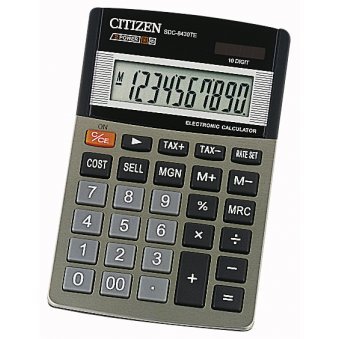
ຮູບພາບສະແດງໃຫ້ເຫັນທາງຫນ້າ view of the Citizen SDC 8430te calculator, highlighting its display and keypad.
4. ຕັ້ງຄ່າ
The Citizen SDC 8430te calculator is solar-powered and requires no external power source or batteries for typical operation. To begin using your calculator:
- ແກະກ່ອງ: Carefully remove the calculator from its packaging.
- ການຮັບແສງ: Place the calculator in a well-lit area. The solar panel, typically located above the display, will convert light into power. The display should activate automatically.
- ກວດສອບເບື້ອງຕົ້ນ: ກົດ ເປີດ/AC button (if present) or any number key to ensure the display is functioning correctly.
5. ຄໍາແນະນໍາການດໍາເນີນງານ
This section covers basic operations of your calculator.
5.1 ການຄິດໄລ່ພື້ນຖານ
- ເພີ່ມ: ໃສ່ຕົວເລກທໍາອິດ, ກົດ +, ໃສ່ຕົວເລກທີສອງ, ກົດ =.
- ການຫັກລົບ: ໃສ່ຕົວເລກທໍາອິດ, ກົດ -, ໃສ່ຕົວເລກທີສອງ, ກົດ =.
- ການຄູນ: ໃສ່ຕົວເລກທໍາອິດ, ກົດ x, ໃສ່ຕົວເລກທີສອງ, ກົດ =.
- ພະແນກ: ໃສ່ຕົວເລກທໍາອິດ, ກົດ ÷, ໃສ່ຕົວເລກທີສອງ, ກົດ =.
5.2 Clearing Entries
- ກົດ AC (All Clear) to clear all entries and reset the calculator.
- ກົດ CE (Clear Entry) to clear the last entered number without affecting previous calculations.
5.3 ການທໍາງານຂອງຫນ່ວຍຄວາມຈໍາ
Your calculator may include memory functions (M+, M-, MR, MC). Refer to the key labels on your specific unit for exact functionality.
- M+: ເພີ່ມຄ່າທີ່ສະແດງໃຫ້ກັບຫນ່ວຍຄວາມຈໍາ.
- M-: ລົບຄ່າທີ່ສະແດງອອກຈາກຫນ່ວຍຄວາມຈໍາ.
- ທ່ານ: ຈື່ຈໍາຄ່າທີ່ເກັບໄວ້ໃນຫນ່ວຍຄວາມຈໍາກັບຈໍສະແດງຜົນ.
- MC: ລຶບຄວາມຊົງຈຳ.
6. ບໍາລຸງຮັກສາ
- ທໍາຄວາມສະອາດ: Wipe the calculator with a soft, dry cloth. For stubborn dirt, slightly dampen the cloth with water and then wipe dry immediately. Do not use chemical cleaners.
- ການເກັບຮັກສາ: When not in use for extended periods, store the calculator in a cool, dry place away from direct sunlight and extreme temperatures.
- ແຜງແສງອາທິດ: Ensure the solar panel remains clean and unobstructed for optimal performance.
7. ການແກ້ໄຂບັນຫາ
| ບັນຫາ | ສາເຫດທີ່ເປັນໄປໄດ້ | ການແກ້ໄຂ |
|---|---|---|
| ຈໍສະແດງຜົນຫວ່າງເປົ່າ ຫຼືມືດ. | Insufficient light for the solar panel. | Move the calculator to a brighter area. Allow a few moments for it to power up. |
| ຜົນໄດ້ຮັບການຄິດໄລ່ບໍ່ຖືກຕ້ອງ. | Incorrect key input or sequence. | ກົດ AC ເພື່ອລຶບລ້າງລາຍການທັງໝົດ ແລະເລີ່ມການຄຳນວນຄືນໃໝ່. ກວດເບິ່ງການປ້ອນຂໍ້ມູນຂອງທ່ານຄືນໃໝ່. |
| ປຸ່ມບໍ່ຕອບສະໜອງ. | Calculator may be in a low power state or a temporary malfunction. | Ensure adequate light. If the problem persists, try pressing AC. |
8. ຂໍ້ມູນຈໍາເພາະ
- ຕົວແບບ: SDC 8430te
- ຍີ່ຫໍ້: ພົນລະເມືອງ
- ຜູ້ຜະລິດ: ພົນລະເມືອງ
- ແຫຼ່ງພະລັງງານ: ພະລັງງານແສງຕາເວັນ
- ວັດສະດຸ: ພາດສະຕິກ
- ຈໍສະແດງຜົນ: ທ່າທາງ
- Printing Function: ບໍ່
- GTIN (ໝາຍເລກລາຍການການຄ້າທົ່ວໂລກ): 04966006706215
- ASIN: B000E13GSS
9. ການຮັບປະກັນແລະການສະຫນັບສະຫນູນ
For warranty information and customer support, please refer to the documentation included with your purchase or visit the official Citizen webເວັບໄຊ. ຮັກສາຫຼັກຖານການຊື້ຂອງທ່ານສໍາລັບການຮ້ອງຂໍການຮັບປະກັນ.
If you encounter issues not covered in this manual, please contact Citizen customer service for assistance.
ທາງການ Webເວັບໄຊ: www.citizen-systems.co.jp/english/calculator/


