1. ບົດແນະນຳ
This manual provides essential instructions for the safe and efficient operation, setup, and maintenance of your Ohaus ES50R ES Industrial Bench Scale. The Ohaus ES50R is designed for industrial weighing applications, offering a capacity of 50 kg (110 lb) with a readability of 20 g (0.05 lb). Please read this manual thoroughly before using the scale to ensure proper functionality and to prevent damage.
2. ຂໍ້ມູນຄວາມປອດໄພ
ປະຕິບັດຕາມຄວາມລະມັດລະວັງດ້ານຄວາມປອດໄພຕໍ່ໄປນີ້ສະເໝີ:
- ຢ່າໃສ່ນ້ຳໜັກເກີນຄວາມຈຸສູງສຸດ 50 ກິໂລກຣາມ (110 ປອນ).
- Ensure the scale is placed on a stable, level surface to achieve accurate readings.
- Operate the scale only with the specified 120 V power supply.
- ຫຼີກລ່ຽງການໃຫ້ເຄື່ອງຊັ່ງນໍ້າໜັກຖືກອຸນຫະພູມ, ຄວາມຊຸ່ມຊື່ນ ຫຼື ແສງແດດໂດຍກົງ.
- ຫ້າມຈ້ຳຂະໜາດໃນນ້ຳ ຫຼືຂອງແຫຼວອື່ນໆ.
- ຮັກສາຂະໜາດໃຫ້ສະອາດ ແລະ ບໍ່ມີຝຸ່ນ ແລະ ສິ່ງເສດເຫຼືອ.
- Only qualified personnel should perform repairs or maintenance beyond routine cleaning.
3. ເນື້ອໃນຊຸດ
ກວດສອບວ່າອົງປະກອບທັງຫມົດແມ່ນມີຢູ່ໃນການຍົກເລີກການຫຸ້ມຫໍ່:
- Ohaus ES50R ES Industrial Bench Scale unit
- Power Adapter (for 120 V operation)
- ຄູ່ມືຜູ້ໃຊ້ (ເອກະສານນີ້)
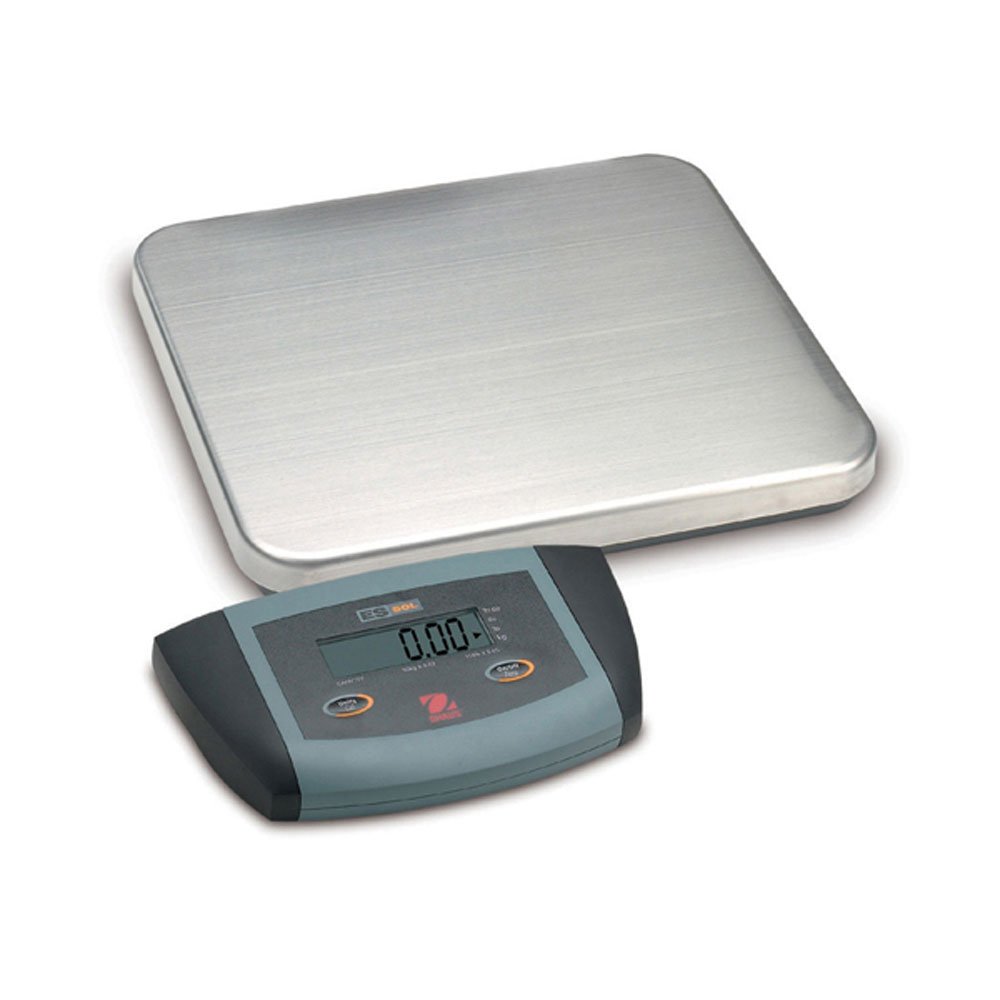
ຮູບທີ 1: Ohaus ES50R ES Industrial Bench Scale. This image shows the complete bench scale unit, including the weighing platform and the display unit.
4. ຕັ້ງຄ່າ
- ການຫຸ້ມຫໍ່: ເອົາສ່ວນປະກອບທັງຫມົດອອກຈາກການຫຸ້ມຫໍ່ຢ່າງລະມັດລະວັງ. ຮັກສາການຫຸ້ມຫໍ່ສໍາລັບການຂົນສົ່ງຫຼືການເກັບຮັກສາໃນອະນາຄົດ.
- ການຈັດວາງ: Place the scale on a firm, level, and stable surface, free from vibrations, drafts, and rapid temperature changes. Ensure adequate space around the scale for safe operation.
- ການເຊື່ອມຕໍ່ພະລັງງານ: Connect the power adapter to the scale's power input port. Plug the adapter into a standard 120 V AC power outlet.
- ການເປີດເຄື່ອງເບື້ອງຕົ້ນ: ກົດ ເປີດ/ປິດ button to power on the scale. The display will perform a self-test and then show "0.00" or "0.0".
- ການປັບລະດັບ: If your scale includes adjustable feet, rotate them until the bubble in the spirit level (if present) is centered.
5. ຄໍາແນະນໍາການດໍາເນີນງານ
5.1 ການຊັ່ງນໍ້າໜັກພື້ນຖານ
- Ensure the scale is powered on and the display shows "0.00" or "0.0".
- Place the item to be weighed gently in the center of the weighing platform.
- Wait for the display to stabilize. The stable weight reading will be shown on the large LCD display.
- ເອົາລາຍການອອກຈາກແພລດຟອມ. ໜ້າຈໍຄວນຈະກັບຄືນສູ່ສູນ.
5.2 ຟັງຊັນ Tare
The tare function allows you to subtract the weight of a container, so only the net weight of the contents is displayed.
- ວາງຖັງເປົ່າໃສ່ເວທີຊັ່ງນໍ້າໜັກ.
- ກົດ ແບ່ງປັນ button. The display will reset to "0.00" or "0.0", indicating the container's weight has been tared.
- Add the material to be weighed into the container. The display will show the net weight of the material.
- ເພື່ອລ້າງຂີ້ເຫຍື້ອ, ໃຫ້ເອົາພາຊະນະອອກຈາກເວທີ ແລະ ກົດປຸ່ມ ແບ່ງປັນ ປຸ່ມອີກເທື່ອຫນຶ່ງ.
5.3 ລັກສະນະພິເສດ
- ປິດອັດຕະໂນມັດ: The scale is equipped with an auto shut-off feature to conserve power. If no activity is detected for a set period, the scale will automatically turn off.
- ຈໍສະແດງຜົນຂະຫນາດໃຫຍ່: The LCD display provides clear and easy-to-read weight indications.
- ການປິດດ້ວຍມື: To manually turn off the scale, press and hold the ເປີດ/ປິດ ກົດປຸ່ມຈົນກ່ວາຈໍສະແດງຜົນປິດ.
6. ບໍາລຸງຮັກສາ
6.1 ການທໍາຄວາມສະອາດ
ເພື່ອຮັກສາຄວາມແມ່ນຍຳ ແລະ ຍືດອາຍຸການໃຊ້ງານຂອງເຄື່ອງຊັ່ງຂອງທ່ານ:
- Disconnect the scale from the power supply before cleaning.
- Wipe the scale surfaces with a damp ຜ້າ ແລະ ຜົງຊັກຟອກອ່ອນໆ.
- ຢ່າໃຊ້ເຄື່ອງເຮັດຄວາມສະອາດຂັດ, ສານລະລາຍ, ຫຼືສານເຄມີທີ່ຮຸນແຮງ.
- Ensure no liquid enters the scale's internal components.
- ເຊັດເກັດໃຫ້ແຫ້ງດີຫຼັງຈາກເຮັດຄວາມສະອາດ.
6.2 ການປັບທຽບ
Regular calibration ensures the accuracy of your scale. Refer to the full technical manual or contact Ohaus customer support for detailed calibration procedures. Calibration typically requires certified weights.
7. ການແກ້ໄຂບັນຫາ
| ບັນຫາ | ສາເຫດທີ່ເປັນໄປໄດ້ | ການແກ້ໄຂ |
|---|---|---|
| ຂະໜາດບໍ່ເປີດ. | No power supply; faulty power adapter. | Check power connection and outlet. Ensure power adapter is functioning correctly. |
| ການອ່ານບໍ່ຖືກຕ້ອງ. | Scale not level; unstable surface; overload; calibration required. | Ensure scale is level and on a stable surface. Do not exceed capacity. Perform calibration if necessary. |
| ຈໍສະແດງຜົນສະແດງ "Err" ຫຼືລະຫັດຄວາມຜິດພາດ. | Overload; internal malfunction. | Remove weight from platform. If error persists, power cycle the scale. If still present, contact customer support. |
| Auto shut-off too soon/not at all. | Auto shut-off settings. | Refer to the full technical manual for adjusting auto shut-off settings, if available. |
8. ຂໍ້ມູນຈໍາເພາະ
| ຄຸນສົມບັດ | ລາຍລະອຽດ |
|---|---|
| ຕົວແບບ | ES50R |
| ຍີ່ຫໍ້ | ໂອໂຮສ |
| ຄວາມອາດສາມາດ | 50 kg / 110 lb |
| ຄວາມສາມາດໃນການອ່ານ | 20 g / 0.05 lb |
| ປະເພດການສະແດງ | LCD (Large Display) |
| ຄຸນນະສົມບັດພິເສດ | Auto Shut Off, Manual Shutdown |
| ປັດໄຈແບບຟອມ | Bench Scale |
| ການສະຫນອງພະລັງງານ | 120 V AC (via adapter) |
| ຂະໜາດສິນຄ້າ | 15 x 13 x 5.5 ນິ້ວ |
| ນ້ໍາຫນັກລາຍການ | 9.64 ປອນ |
| ຜູ້ຜະລິດ | ໂຄລ-ພາເມີ |
9. ການຮັບປະກັນ
The Ohaus ES50R ES Industrial Bench Scale comes with a ຮັບປະກັນ 1 ປີ from the date of purchase. This warranty covers defects in materials and workmanship under normal use. It does not cover damage resulting from misuse, accident, unauthorized modification, or operation outside the specified environmental and electrical limits. For warranty claims, please retain your proof of purchase and contact Ohaus customer support.
10. ການຊ່ວຍເຫຼືອລູກຄ້າ
For technical assistance, service, or to inquire about replacement parts, please contact Ohaus customer support. Visit the official Ohaus website for the most up-to-date contact information and additional resources.
ໝາຍເຫດ: Always provide your product model number (ES50R) and serial number (if applicable) when contacting support.


