ແນະນຳ
This manual provides comprehensive instructions for the setup, operation, and maintenance of your Coby CT-P9040 5.8 GHz Analog Cordless Phone. Please read this manual thoroughly before using your phone to ensure proper functionality and to prevent damage.
ເນື້ອໃນແລະສ່ວນປະກອບຂອງຊຸດ
ກ່ອນທີ່ທ່ານຈະເລີ່ມຕົ້ນ, ໃຫ້ແນ່ໃຈວ່າອົງປະກອບທັງຫມົດມີຢູ່ໃນຊຸດ:
- ໂທລະສັບໄຮ້ສາຍ
- ຫນ່ວຍງານພື້ນຖານ
- ເຄື່ອງປັບໄຟຟ້າ AC
- ສາຍໂທລະສັບ
- ຊຸດແບັດເຕີຣີທີ່ສາມາດສາກໄດ້
- ຄູ່ມືຜູ້ໃຊ້ (ເອກະສານນີ້)
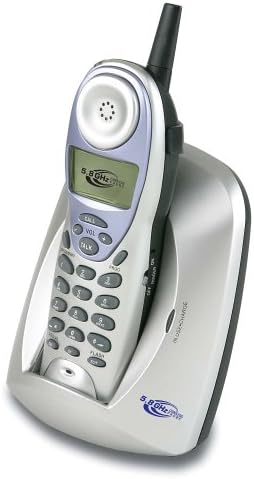
Image: The Coby CT-P9040 cordless phone, showing the handset docked in its silver base unit. The handset features a display screen, numeric keypad, and function buttons. The base unit has a charging cradle for the handset.
ຄູ່ມືການຕິດຕັ້ງ
1. ການຕິດຕັ້ງຫມໍ້ໄຟ
- ຊອກຫາຊ່ອງໃສ່ຫມໍ້ໄຟຢູ່ດ້ານຫຼັງຂອງມືຖື.
- ເປີດຝາປິດຊ່ອງໃສ່ຫມໍ້ໄຟ.
- Connect the rechargeable battery pack connector to the jack inside the compartment.
- Place the battery pack into the compartment and close the cover securely.
2. ການເຊື່ອມຕໍ່ຫນ່ວຍພື້ນຖານ
- Connect one end of the telephone line cord to the "LINE" jack on the back of the base unit.
- ເຊື່ອມຕໍ່ປາຍອີກດ້ານໜຶ່ງຂອງສາຍໂທລະສັບເຂົ້າກັບຊ່ອງສຽບໂທລະສັບມາດຕະຖານທີ່ຕິດຝາ.
- Connect the AC power adapter to the "DC IN" jack on the back of the base unit.
- ສຽບອະແດບເຕີໄຟ AC ເຂົ້າໄປໃນເຕົ້າສຽບໄຟຟ້າມາດຕະຖານ.
3. ການສາກໄຟເບື້ອງຕົ້ນ
Place the handset in the base unit's charging cradle. Ensure the "IN CHARGE" indicator light on the base unit illuminates, indicating proper charging. For optimal battery performance, charge the handset for at least 12-14 hours before initial use.
ຄໍາແນະນໍາການດໍາເນີນງານ
ໂທອອກ
- Pick up the handset from the base unit or press the ສົນທະນາ ປຸ່ມ.
- ຟັງສຽງໂທອອກ.
- ກົດເບີໂທລະສັບທີ່ຕ້ອງການ.
- ເພື່ອສິ້ນສຸດການໂທ, ກົດປຸ່ມ ສົນທະນາ ກົດປຸ່ມອີກຄັ້ງ ຫຼື ວາງຫູຟັງກັບຄືນໃນໜ່ວຍພື້ນຖານ.
ຮັບສາຍ
ເມື່ອໂທລະສັບດັງຂຶ້ນ, ເອົາໂທລະສັບຂຶ້ນມາ ຫຼືກົດປຸ່ມ ສົນທະນາ ປຸ່ມເພື່ອຮັບສາຍ.
ຟັງຊັນ Redial
ເພື່ອປ່ຽນເລກສຸດທ້າຍທີ່ເອີ້ນວ່າ, ກົດປຸ່ມ ເຣດ ປຸ່ມໃນໂທລະສັບມືຖື.
ການປັບລະດັບສຽງ
ໃນລະຫວ່າງການໂທ, ໃຊ້ VOL+ ແລະ VOL - buttons on the handset to adjust the earpiece volume.
ຟັງຊັນ Flash
ກົດ ແຟລດ button to use call waiting or transfer calls if supported by your telephone service provider.
Storing Phone Numbers (Speed Dial)
Your phone can store up to 10 numbers for frequently called contacts. Refer to the detailed instructions in the full manual for programming speed dial entries.
ການບໍາລຸງຮັກສາແລະການດູແລ
- ຮັກສາໂທລະສັບໃຫ້ຫ່າງຈາກແຫຼ່ງຄວາມຮ້ອນ, ແສງແດດໂດຍກົງ, ແລະຄວາມຊຸ່ມຊື່ນ.
- ເຊັດພື້ນຜິວໂທລະສັບດ້ວຍຜ້າທີ່ອ່ອນນຸ້ມ, ເຊັດໃຫ້ສະອາດ.amp ຜ້າ. ຢ່າໃຊ້ເຄື່ອງເຮັດຄວາມສະອາດຂັດຫຼືສານລະລາຍ.
- Ensure the charging contacts on the handset and base unit are clean to maintain proper charging.
- ຖ້າໂທລະສັບຈະບໍ່ຖືກໃຊ້ເປັນເວລາດົນ, ໃຫ້ຖອດແບັດເຕີຣີອອກຈາກມືຖື.
ການແກ້ໄຂບັນຫາ
| ບັນຫາ | ສາເຫດທີ່ເປັນໄປໄດ້ | ການແກ້ໄຂ |
|---|---|---|
| ບໍ່ມີສຽງໂທອອກ | ສາຍໂທລະສັບຖືກຕັດການເຊື່ອມຕໍ່. | ໃຫ້ແນ່ໃຈວ່າສາຍໂທລະສັບໄດ້ເຊື່ອມຕໍ່ກັບທັງຕົວເຄື່ອງ ແລະ ຊ່ອງສຽບຝາຢ່າງແໜ້ນໜາແລ້ວ. |
| ມືຖືບໍ່ໄດ້ສາກ | Handset not properly seated in cradle or dirty charging contacts. | Reseat the handset in the base unit. Clean the charging contacts on both the handset and base unit with a dry cloth. |
| ຄຸນນະພາບສຽງບໍ່ດີ / Static | Interference from other electronic devices or out of range. | Move the base unit away from other electronic devices (e.g., microwaves, Wi-Fi routers). Move closer to the base unit. |
| ບໍ່ສາມາດໂທ/ຮັບສາຍໄດ້ | Power adapter disconnected or battery low. | Check if the AC power adapter is securely plugged in. Ensure the handset battery is fully charged. |
ຂໍ້ມູນຈໍາເພາະ
- ຕົວແບບ: CT-P9040 SVR
- ຄວາມຖີ່: 5.8 GHz Analog
- ຊ່ອງ: 40 Channel Auto Scan
- ໜ່ວຍຄວາມຈຳ: 10-number speed dial storage
- ຟັງຊັນ: Flash, Redial, Pause, Tone/Pulse Switch
- Jack ຫູຟັງ: Built-in 2.5mm
- ການຕິດຕັ້ງ: Desk and Wall Mountable
- ຂະໜາດ (L x W x H): 5 x 8 x 4 ນິ້ວ
- ນ້ຳໜັກ: 1.8 ປອນ
- ສີ: ເງິນ
- ໝາຍເລກຜູ້ໂທ: ບໍ່ຮອງຮັບ
- ການດໍາເນີນງານຫຼາຍແຖວ: ການດໍາເນີນງານສາຍດຽວ
ການຮັບປະກັນແລະການສະຫນັບສະຫນູນ
For warranty information and technical support, please refer to the warranty card included with your product or visit the official Coby webເວັບໄຊ. ຮັກສາໃບຮັບເງິນການຊື້ຂອງທ່ານໄວ້ເປັນຫຼັກຖານການຊື້ສໍາລັບການຮ້ອງຂໍການຮັບປະກັນ.
For further assistance, you may contact Coby customer service. Contact details are typically available on the manufacturer's webສະຖານທີ່ຫຼືຢູ່ໃນການຫຸ້ມຫໍ່ຜະລິດຕະພັນ.


