ແນະນຳ
This manual provides comprehensive instructions for the setup, operation, maintenance, and troubleshooting of your RCA RS2650 Bookshelf Stereo System with 5-Disc CD Changer. Please read this manual thoroughly before using the system to ensure proper operation and to maximize your listening experience. Keep this manual for future reference.
ຂໍ້ມູນຄວາມປອດໄພ
ປະຕິບັດຕາມຄວາມລະມັດລະວັງດ້ານຄວາມປອດໄພຂັ້ນພື້ນຖານສະເໝີເມື່ອໃຊ້ຜະລິດຕະພັນນີ້ເພື່ອຫຼຸດຜ່ອນຄວາມສ່ຽງຕໍ່ການເກີດອັກຄີໄພ, ໄຟໄໝ້, ແລະການບາດເຈັບຕໍ່ຄົນ. ນີ້ປະກອບມີ, ແຕ່ບໍ່ຈໍາກັດພຽງແຕ່:
- ຢ່າເຮັດໃຫ້ເຄື່ອງໃຊ້ນີ້ຖືກຝົນ ຫຼືຄວາມຊຸ່ມຊື່ນ.
- ຫ້າມປິດຊ່ອງລະບາຍອາກາດໃດໆ.
- ຢ່າຕິດຕັ້ງຢູ່ໃກ້ກັບແຫຼ່ງຄວາມຮ້ອນໃດໆ.
- ປົກປ້ອງສາຍໄຟຈາກການຖືກເປີດ ຫຼື ສຽບ.
- ໃຊ້ໄຟລ໌ແນບ/ອຸປະກອນເສີມທີ່ຜູ້ຜະລິດລະບຸໄວ້ເທົ່ານັ້ນ.
- ອ້າງອີງການບໍລິການທັງໝົດໃຫ້ກັບພະນັກງານບໍລິການທີ່ມີຄຸນວຸດທິ.
ເນື້ອໃນຊຸດ
ກວດສອບວ່າລາຍການທັງຫມົດແມ່ນມີຢູ່ໃນຊຸດ:
- RCA RS2650 Bookshelf Stereo System Main Unit
- Two (2) Stereo Speakers
- ການຄວບຄຸມໄລຍະໄກ (ມີຫມໍ້ໄຟ)
- AM Loop Antenna
- ເສົາອາກາດສາຍ FM
- ຄູ່ມືຜູ້ໃຊ້ (ເອກະສານນີ້)
ຕັ້ງຄ່າ
1. ການຫຸ້ມຫໍ່ແລະການຈັດວາງ
Carefully remove all components from the packaging. Place the main unit on a stable, flat surface. Position the speakers on either side of the main unit, ensuring they are at an equal distance for optimal stereo sound. Allow adequate ventilation around the unit.
2. ການເຊື່ອມຕໍ່ລໍາໂພງ
Connect the speaker wires from the main unit to the corresponding terminals on the back of each speaker. Ensure that the positive (+) and negative (-) terminals are matched correctly for each speaker to maintain proper audio phasing.
3. ການເຊື່ອມຕໍ່ເສົາອາກາດ
- ເສົາອາກາດ FM: Connect the supplied FM wire antenna to the FM antenna terminal on the rear of the main unit. Extend the wire for best reception.
- ເສົາອາກາດ AM: Assemble the AM loop antenna and connect it to the AM antenna terminals on the rear of the main unit. Rotate the antenna for optimal AM reception.
4. ການເຊື່ອມຕໍ່ພະລັງງານ
Plug the AC power cord into a standard wall outlet. The system is now ready for operation.
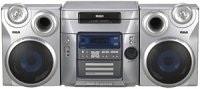
ຮູບທີ 1: ດ້ານໜ້າ view of the RCA RS2650 Bookshelf Stereo System, showing the main unit with its 5-disc CD changer tray and control panel, flanked by two stereo speakers. This image illustrates the typical setup configuration.
ຄໍາແນະນໍາການດໍາເນີນງານ
1. ເປີດ/ປິດ
ກົດ ພະລັງງານ button on the front panel or remote control to turn the system on or off.
2. ການດໍາເນີນງານ CD Player
The system features a 5-disc CD changer compatible with CD, CD-R, CD-RW, MP3, and WMA formats.
- ກົດ ເປີດ/ປິດ ປຸ່ມເພື່ອເປີດຖາດ CD.
- ວາງແຜ່ນດິດບໍ່ເກີນຫ້າແຜ່ນລົງໃນຖາດ, ໂດຍໃຫ້ດ້ານທີ່ຕິດສະຫຼາກຂຶ້ນເທິງ.
- ກົດ ເປີດ/ປິດ ອີກເທື່ອຫນຶ່ງເພື່ອປິດຖາດ.
- ກົດ CD ປຸ່ມເພື່ອເລືອກຟັງຊັນ CD.
- ກົດ ຫຼິ້ນ/ຢຸດຊົ່ວຄາວ ເພື່ອເລີ່ມຕົ້ນການຫຼິ້ນ.
- ໃຊ້ ຂ້າມ buttons to navigate between tracks or discs.
- ການຂຽນໂປຣແກຣມ: While in stop mode, press ໂປຣແກຣມ to create a custom playback sequence.
- ຫຼິ້ນແບບສຸ່ມ: ກົດ Random to play tracks in a random order.
- ຫຼິ້ນຊ້ຳ: ກົດ ເຮັດຊ້ຳ to repeat the current track, current disc, or all discs.
3. AM/FM Tuner Operation
The digital AM/FM tuner allows you to listen to your favorite radio stations.
- ກົດ Tuner/BAND ປຸ່ມເພື່ອເລືອກແຖບ AM ຫຼື FM.
- ກົດ tune +/- ປຸ່ມເພື່ອປບັໄປຫາສະຖານີດ້ວຍຕົນເອງ.
- ກົດຄ້າງໄວ້ tune +/- ສຳລັບການຄົ້ນຫາສະຖານີອັດຕະໂນມັດ.
- ສະຖານີທີ່ຕັ້ງໄວ້ລ່ວງໜ້າ: The system supports 32 AM/FM presets. To store a station, tune to the desired frequency, then press ໂປຣແກຣມ followed by a preset number button. To recall a preset, press the corresponding preset number.
4. Equalizer and Bass Boost
Customize your audio experience with the built-in equalizer and bass boost system.
- ກົດ EQ button repeatedly to cycle through 5 preset equalization settings: Rock, Pop, Jazz, Classic, and Flat.
- ກົດ ເບດສບູສ button to enhance low-frequency sounds. Press again to deactivate.
5. Front A/V Inputs
The front A/V inputs allow you to connect external audio/video devices, such as game consoles or MP3 players, to the stereo system. Connect the audio output of your device to the corresponding input jacks on the front panel. Select the AUX input source to listen to the connected device.
ບໍາລຸງຮັກສາ
ທໍາຄວາມສະອາດຫນ່ວຍງານ
ເຊັດດ້ານນອກຂອງເຄື່ອງດ້ວຍຜ້າອ່ອນ, ແຫ້ງ. ສໍາລັບຮອຍເປື້ອນທີ່ແຂງ, ໃຫ້ໃຊ້ຜ້າບາງໆ dampened with water. Do not use abrasive cleaners, waxes, or solvents as they may damage the finish. Ensure the unit is unplugged before cleaning.
CD Care
Handle CDs by their edges. Keep them clean and free of scratches. Store discs in their cases when not in use. If a disc is dirty, wipe it gently with a soft, lint-free cloth from the center outwards.
ການແກ້ໄຂບັນຫາ
If you experience problems with your stereo system, refer to the following table for possible solutions.
| ບັນຫາ | ສາເຫດທີ່ເປັນໄປໄດ້ | ການແກ້ໄຂ |
|---|---|---|
| ບໍ່ມີພະລັງງານ | ສາຍໄຟບໍ່ໄດ້ສຽບຢ່າງປອດໄພ. | Check power cord connection to the wall outlet and the unit. |
| ບໍ່ມີສຽງ | Volume is too low or muted. Speakers not connected properly. | Increase volume. Check speaker wire connections. Ensure correct input source is selected. |
| CD ບໍ່ໄດ້ຫຼິ້ນ | Disc is dirty, scratched, or inserted incorrectly. Incorrect format. | Clean the disc. Insert disc label side up. Ensure disc format is compatible (CD, CD-R, CD-RW, MP3, WMA). |
| ການຮັບວິທະຍຸທີ່ບໍ່ດີ | Antenna not properly positioned or connected. Interference. | Adjust the position of the AM/FM antennas. Move unit away from other electronic devices. |
ຂໍ້ມູນຈໍາເພາະ
- ໝາຍເລກຕົວແບບ: RS2650
- ຍີ່ຫໍ້: RCA
- ພະລັງງານອອກ: 100 ວັດ (ລວມ)
- ເຄື່ອງປ່ຽນ CD: 5-Disc Carousel
- ຮູບແບບແຜ່ນທີ່ສະຫນັບສະຫນູນ: CD, CD-R, CD-RW, MP3, WMA
- ຕົວຈູນເນີ: Digital AM/FM with 32 Presets
- ຄວາມສະ ເໝີ ພາບ: 5 Preset Modes (Rock, Pop, Jazz, Classic, Flat) + Bass Boost
- ວັດສະດຸປ້ອນ: Front A/V (for MP3 players, game consoles)
- ປະເພດລຳໂພງ: ສະເຕຣິໂອ
- ແຫຼ່ງພະລັງງານ: AC Cable Electric
- ຂະໜາດສິນຄ້າ (L x W x H): 63.5 x 45.72 x 38.1 cm
- ນ້ຳໜັກສິນຄ້າ: 12.29 ກິໂລ
ຂໍ້ມູນການຮັບປະກັນ
This RCA RS2650 Bookshelf Stereo System comes with a ຮັບປະກັນ 1 ປີຈໍາກັດ from the date of purchase. This warranty covers manufacturing defects in materials and workmanship under normal use. It does not cover damage caused by misuse, accident, unauthorized modification, or external causes. Please retain your proof of purchase for warranty claims.
ການຊ່ວຍເຫຼືອລູກຄ້າ
For further assistance, technical support, or warranty service, please contact RCA customer support. Refer to the contact information provided with your product packaging or visit the official RCA webເວັບໄຊທ໌ສໍາລັບລາຍລະອຽດສະຫນັບສະຫນູນທີ່ທັນສະໄຫມທີ່ສຸດ.


