ແນະນຳ
The MATRIX MR800 is a versatile LED accent metronome designed to assist musicians with timing and rhythm practice. This manual provides essential information for setting up, operating, and maintaining your device.

ຮູບ 1: ດ້ານຫນ້າ view of the MATRIX MR800 Tuner Metronome.
ຄຸນນະສົມບັດທີ່ສໍາຄັນ:
- 8 LED for pendulum simulation
- Fully adjustable tempo
- ຜົນຜະລິດຫູຟັງ
ຕັ້ງຄ່າ
ການຕິດຕັ້ງຫມໍ້ໄຟ
The MATRIX MR800 operates on alkaline batteries. To install or replace batteries, locate the battery compartment on the back of the unit. Insert the batteries according to the polarity indicators. Ensure the compartment cover is securely closed.
ເປີດ/ປິດ
To power on the device, locate the power button, typically on the side of the unit. Press and hold for a few seconds until the display activates. To power off, press and hold the same button.
ປະຕິບັດການ
ການປັບເວລາ
Adjust the tempo using the central dial. Rotate the dial clockwise to increase the beats per minute (BPM) and counter-clockwise to decrease it. The tempo range is fully adjustable to suit various musical needs.
Beat and Rhythm Selection
The metronome offers different beat and rhythm patterns. Use the designated buttons or switches to cycle through available options, such as different time signatures or rhythmic subdivisions.
Sound and Visual Indicators
The MR800 provides an audible click to mark the tempo. It also features 8 LEDs that simulate a pendulum, offering a visual cue for the beat. The volume can be adjusted using the volume control on the side of the unit. For private practice, connect headphones to the earphone output jack.
ໃຊ້ Kickstand
The device includes a built-in kickstand for convenient tabletop use. Extend the kickstand from the back of the unit to prop it up at an optimal viewing angle. Fold it back in for portability.
ບໍາລຸງຮັກສາ
ທໍາຄວາມສະອາດ
Wipe the unit with a soft, dry cloth. Do not use liquid cleaners or abrasive materials, as these may damage the surface or internal components.
ການເກັບຮັກສາ
When not in use for extended periods, remove the batteries to prevent leakage and store the metronome in a cool, dry place away from direct sunlight.
ການແກ້ໄຂບັນຫາ
No Sound or Irregular Beat
- ກວດເບິ່ງລະດັບຫມໍ້ໄຟແລະປ່ຽນແທນຖ້າຈໍາເປັນ.
- ໃຫ້ແນ່ໃຈວ່າລະດັບສຽງບໍ່ໄດ້ຖືກຕັ້ງໄວ້ທີ່ລະດັບສຽງຕໍ່າສຸດ ຫຼື ປິດສຽງໄວ້.
- Verify that the tempo is set to an audible range.
Volume Too Loud
The MATRIX MR800 is known for its loud output. Use the volume control slider on the side to adjust the sound level. If using headphones, adjust the volume to a comfortable level to protect your hearing.
ຂໍ້ມູນຈໍາເພາະ
ລາຍລະອຽດຜະລິດຕະພັນ:
- ນ້ໍາຫນັກລາຍການ: 5.6 ອອນ
- ຂະໜາດຜະລິດຕະພັນ: 8 x 5.5 x 1.9 ນິ້ວ
- ໝາຍເລກຕົວແບບ: MR800
- ປະເພດຫມໍ້ໄຟ: ດ່າງ
- ສີ: ດຳ
- ເຕັກໂນໂລຍີການເຊື່ອມຕໍ່: 3.5 mm Jack (for earphone output)
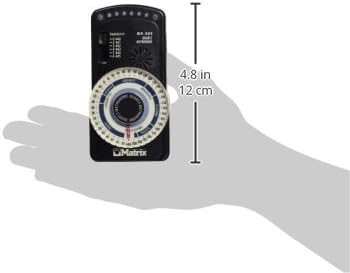
Figure 2: Dimensions of the MATRIX MR800 Tuner Metronome.
ການຮັບປະກັນ & ສະຫນັບສະຫນູນ
ຂໍ້ມູນການຮັບປະກັນ
For warranty details and support, please refer to the documentation included with your purchase or contact MATRIX customer service directly.


