ແນະນຳ
This manual provides detailed instructions for the proper use and care of your Audiovox CE-145G Personal CD Player. Please read this manual thoroughly before operating the device to ensure optimal performance and longevity.
ຄຸນສົມບັດຜະລິດຕະພັນ
- 40-Second Anti-Skip Protection: Ensures continuous audio playback even during movement, utilizing a digital buffer.
- Multi-Directional Anti-Roll Sensors: Provides additional protection against playback interruption from various movements.
- 22-Track Programmable Memory: Allows customization of CD playback order.
- ລະບົບເພີ່ມສຽງເບສ: ປັບປຸງສຽງອອກຄວາມຖີ່ຕໍ່າ.
- 3-Beam Laser Pickup: Designed for accurate CD tracking and clear sound reproduction.
- ໂໝດການຫຼິ້ນຫຼາຍຮູບແບບ: Includes random play and various repeat functions.
- ຖືປຸ່ມ: Prevents accidental button presses and program changes.
- ປິດເຄື່ອງອັດຕະໂນມັດ: Conserves battery life by automatically shutting down the player when not in use.
- Line-Out Jack: For connecting to external audio systems or power adapters.
- Built-in Rechargeable Circuitry: Supports the use of rechargeable Ni-Cad batteries (not included).
- ຫູຟັງສະເຕີລິໂອ: Included for immediate listening.
ຕັ້ງຄ່າ
1. ການຕິດຕັ້ງຫມໍ້ໄຟ
The Audiovox CE-145G operates on two (2) AA batteries (not included) or an optional AC/car adapter (not included) connected via the line-out jack. For rechargeable Ni-Cad batteries, the unit features built-in charging circuitry.
- ຊອກຫາຊ່ອງໃສ່ແບັດເຕີຣີຢູ່ດ້ານລຸ່ມຂອງເຄື່ອງຫຼິ້ນຊີດີ.
- ເລື່ອນຝາປິດຊ່ອງໃສ່ຫມໍ້ໄຟເປີດ.
- ໃສ່ຫມໍ້ໄຟ AA ສອງ (2) ໜ່ວຍ, ຮັບປະກັນຄວາມຂົ້ວທີ່ຖືກຕ້ອງ (+/-) ຕາມທີ່ລະບຸໄວ້ພາຍໃນຊ່ອງ.
- ປິດຝາປິດຊ່ອງໃສ່ຫມໍ້ໄຟຢ່າງປອດໄພ.

Image: The Audiovox CE-145G Personal CD Player in translucent green, shown with included stereo headphones. This image illustrates the overall product design and the headphones that come with the unit.
2. ການເຊື່ອມຕໍ່ຫູຟັງ
Insert the stereo headphone plug into the headphone jack located on the side of the CD player.

Image: A close-up of the stereo headphones included with the Audiovox CE-145G CD player, showing the earcups and the 3.5mm audio jack.
ຄໍາແນະນໍາການດໍາເນີນງານ
1. ການຫຼິ້ນຊີດີພື້ນຖານ
- Open the CD compartment lid by pressing the "OPEN" button or sliding the latch.
- ວາງແຜ່ນ CD ໃສ່ແກນກາງຂອງເຄື່ອງຕັດໂດຍໃຫ້ດ້ານທີ່ມີປ້າຍຫງາຍຂຶ້ນເທິງ.
- ປິດຝາປິດຊ່ອງໃສ່ຊີດີໃຫ້ແໜ້ນຈົນກວ່າມັນຈະມີສຽງຄລິກ.
- ກົດ ຫຼິ້ນ/ຢຸດຊົ່ວຄາວ button to begin playback. The track number and elapsed time will display.
- ເພື່ອຢຸດຊົ່ວຄາວການຫຼິ້ນ, ກົດ ຫຼິ້ນ/ຢຸດຊົ່ວຄາວ ອີກເທື່ອຫນຶ່ງ. ກົດມັນອີກຄັ້ງເພື່ອສືບຕໍ່.
- ເພື່ອຢຸດການຫຼີ້ນ, ກົດປຸ່ມ ຢຸດ ປຸ່ມ.
- ເພື່ອຂ້າມໄປຫາເພງຕໍ່ໄປ, ກົດປຸ່ມ ຂ້າມໄປທາງ ໜ້າ ປຸ່ມ (►►|).
- To return to the beginning of the current track or go to the previous track, press the ຂ້າມຄືນ ປຸ່ມ (|◄◄).
- ເພື່ອໄວໄປໜ້າ ຫຼື ຖອຍຫຼັງພາຍໃນແທຣັກ, ໃຫ້ກົດປຸ່ມຄ້າງໄວ້ ຂ້າມໄປທາງ ໜ້າ or ຂ້າມຄືນ ປຸ່ມ, ຕາມລໍາດັບ.
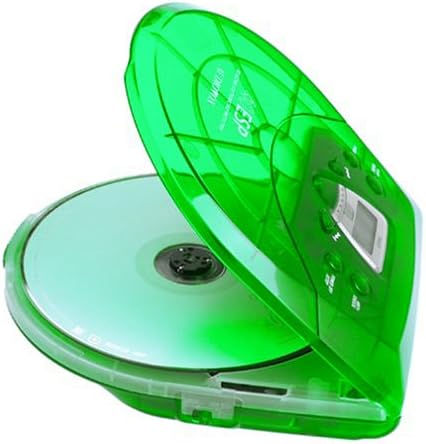
Image: The Audiovox CE-145G Personal CD Player with its translucent green lid open, revealing a compact disc placed inside the compartment.
2. ການປ້ອງກັນການຂ້າມ (ESP)
The CE-145G features a 40-second Electronic Skip Protection (ESP) buffer. This system stores up to 40 seconds of audio data, allowing for uninterrupted playback even if the player experiences minor shocks or vibrations. This feature is automatically active during playback.
3. Programmable Memory (22 Tracks)
ທ່ານສາມາດຕັ້ງໂປຣແກຣມໄດ້ສູງສຸດ 22 ເພງເພື່ອຫຼິ້ນຕາມລຳດັບສະເພາະ.
- ໃນໂຫມດ STOP, ກົດປຸ່ມ ໂປຣແກຣມ button. The display will show "PROG" and "01".
- ໃຊ້ ຂ້າມໄປທາງ ໜ້າ or ຂ້າມຄືນ buttons to select the desired first track.
- ກົດ ໂປຣແກຣມ again to confirm the track. The display will show "02".
- ເຮັດຊ້ຳຂັ້ນຕອນທີ 2 ແລະ 3 ເພື່ອເພີ່ມໄດ້ສູງສຸດ 22 ແທຣັກໃສ່ໂປຣແກຣມຂອງທ່ານ.
- After programming the last track, press ຫຼິ້ນ/ຢຸດຊົ່ວຄາວ to start playback of your programmed sequence.
- To clear the program, press the ຢຸດ ປຸ່ມສອງເທື່ອ.
4. Bass Boost
To enhance the bass frequencies, locate the ເບດສບູສ switch (or button) on the unit and activate it. Deactivate it to return to standard audio output.
5. ຟັງຊັນຄ້າງໄວ້
ໄດ້ ຖື switch prevents accidental button presses. Slide the ຖື switch to the "ON" position to disable all control buttons. Slide it to "OFF" to re-enable controls.
6. ປິດເຄື່ອງອັດຕະໂນມັດ
To conserve battery life, the CD player will automatically power off after a period of inactivity (e.g., when a CD finishes playing and no buttons are pressed). To restart, press the ຫຼິ້ນ/ຢຸດຊົ່ວຄາວ ປຸ່ມ.
ບໍາລຸງຮັກສາ
- ທໍາຄວາມສະອາດຫນ່ວຍບໍລິການ: Wipe the exterior of the player with a soft, damp ຜ້າ. ຢ່າໃຊ້ເຄື່ອງເຮັດຄວາມສະອາດຂັດຫຼືສານລະລາຍ.
- ທໍາຄວາມສະອາດ CD Lens: If playback issues occur due to a dirty lens, use a specialized CD lens cleaning kit. Do not touch the lens directly.
- CD Care: ຈັດການແຜ່ນຊີດີໂດຍແຄມຂອງພວກມັນ. ຮັກສາໃຫ້ເຂົາເຈົ້າສະອາດແລະບໍ່ມີຮອຍຂີດຂ່ວນ. ເກັບຮັກສາພວກມັນໄວ້ໃນກໍລະນີຂອງພວກເຂົາເມື່ອບໍ່ໄດ້ໃຊ້.
- ການດູແລຫມໍ້ໄຟ: ຖອດແບດເຕີຣີອອກຖ້າຫນ່ວຍງານຈະບໍ່ຖືກໃຊ້ເປັນໄລຍະເວລາທີ່ຍາວນານເພື່ອປ້ອງກັນການຮົ່ວໄຫຼ.
ການແກ້ໄຂບັນຫາ
| ບັນຫາ | ສາເຫດທີ່ເປັນໄປໄດ້ | ການແກ້ໄຂ |
|---|---|---|
| ບໍ່ມີພະລັງງານ | ຫມໍ້ໄຟແມ່ນຕາຍຫຼືໃສ່ບໍ່ຖືກຕ້ອງ; ອະແດບເຕີ AC ບໍ່ເຊື່ອມຕໍ່ ຫຼື ຂັດຂ້ອງ. | Replace batteries, check polarity, or ensure AC adapter is properly connected and functional. |
| CD skips or stops | CD is dirty or scratched; unit is subjected to excessive shock; lens is dirty. | Clean CD, use a different CD, avoid strong impacts, clean the CD lens. |
| ບໍ່ມີສຽງ | Headphones not connected properly; volume too low; headphones faulty. | Ensure headphones are fully plugged in, increase volume, try different headphones. |
| ປຸ່ມບໍ່ຕອບສະໜອງ | HOLD switch is engaged. | Slide the HOLD switch to the "OFF" position. |
ຂໍ້ມູນຈໍາເພາະ
- ຕົວແບບ: CE-145G
- ຍີ່ຫໍ້: ສຽງສຽງ
- ການປ້ອງກັນການຂ້າມຜ່ານ: 40 seconds (Electronic Skip Protection)
- Programmable Tracks: 22
- ແຫຼ່ງພະລັງງານ: 2 x AA batteries (not included) or optional AC/car adapter
- ສຽງອອກ: 3.5mm headphone jack, Line-out jack
- ຂະໜາດ (ປະມານ): 11.8 x 8.3 x 2.6 ນິ້ວ (ຂະໜາດບັນຈຸ)
- ນ້ຳໜັກ (ປະມານ): 1.35 ປອນ (ນ້ໍາຫນັກສິນຄ້າ)
- ສີ: ສີຂຽວໂປ່ງໃສ
ການຮັບປະກັນແລະການສະຫນັບສະຫນູນ
The Audiovox CE-145G Personal CD Player is backed by a 90-day parts-and-labor warranty ຈາກວັນທີ່ຊື້. ກະລຸນາຮັກສາຫຼັກຖານການຊື້ຂອງທ່ານສໍາລັບການຮຽກຮ້ອງການຮັບປະກັນ.
For technical support or warranty service, please refer to the contact information provided with your product packaging or visit the official Audiovox webເວັບໄຊ.


