ແນະນຳ
This manual provides instructions for the setup, operation, and maintenance of your Logitech Wingman Force Joystick, model 963155-0403. This device is designed to enhance your PC gaming experience with force feedback technology and programmable controls.
ເນື້ອໃນຊຸດ
ກວດສອບວ່າຊຸດຂອງທ່ານມີລາຍການດັ່ງຕໍ່ໄປນີ້:
- Logitech Wingman Force Joystick
- Power Adapter
- USB Cable (integrated or separate)
- Software CD (if applicable, for WingMan Software)
- ຄູ່ມືຜູ້ໃຊ້ (ເອກະສານນີ້)
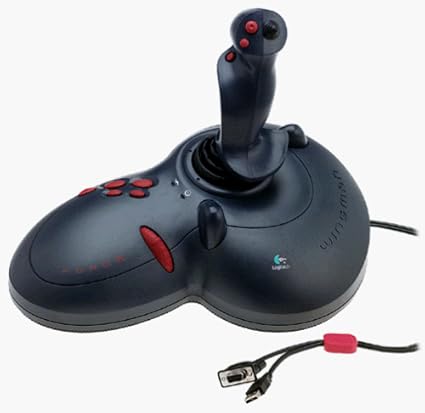
Figure 1: The Logitech Wingman Force Joystick packaging, showing the joystick and its features.
ຕັ້ງຄ່າ
- ເຊື່ອມຕໍ່ພະລັງງານ: Plug the power adapter into the joystick and then into a standard electrical outlet.
- ເຊື່ອມຕໍ່ກັບ PC: Connect the joystick's USB cable to an available USB port on your computer. The joystick also supports serial interfaces.
- ຕິດຕັ້ງຊອບແວ: Insert the WingMan Software CD (if provided) into your computer's CD-ROM drive and follow the on-screen instructions to install the drivers and WingMan Software. If no CD is provided, drivers may be automatically installed by your operating system or available for download from the Logitech support webເວັບໄຊ.
- ຄວາມຕ້ອງການລະບົບ: Ensure your computer runs a compatible Windows operating system.
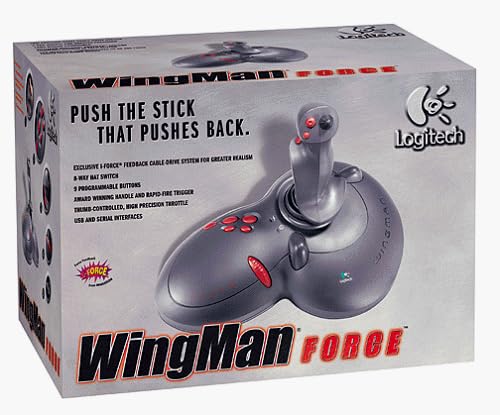
Figure 2: The Logitech Wingman Force Joystick, illustrating its ergonomic design and button layout.
ຄໍາແນະນໍາການດໍາເນີນງານ
ການຄວບຄຸມview
- Joystick Handle: Provides precise control for in-game movement.
- 9 ປຸ່ມຕັ້ງໂຄງການ: Customize these buttons using the WingMan Software for various in-game actions.
- 8-Way Hat Switch: Located on top of the joystick, this switch allows for quick camera views or directional commands.
- Thumb-Controlled Throttle: Adjust speed or thrust with the integrated throttle control.
Force Feedback Technology
The Wingman Force Joystick utilizes Logitech's exclusive I-Force force feedback technology with a cable-drive system. This system provides realistic tactile feedback, such as vibrations from impacts, recoil from weapons, and resistance during maneuvers, enhancing immersion in compatible games.
Using WingMan Software
The WingMan Software allows you to:
- Program the 9 buttons for specific game functions.
- ສ້າງ ແລະ ບັນທຶກຫຼາຍມືອາຊີບfiles ສໍາລັບເກມທີ່ແຕກຕ່າງກັນ.
- Adjust force feedback intensity settings.
- Calibrate the joystick for optimal performance.
Refer to the WingMan Software's help documentation for detailed instructions on customization and profile ການຄຸ້ມຄອງ.
ບໍາລຸງຮັກສາ
To ensure the longevity and optimal performance of your joystick:
- ທໍາຄວາມສະອາດ: Use a soft, dry cloth to wipe the surface of the joystick. Avoid using abrasive cleaners or solvents.
- ການເກັບຮັກສາ: Store the joystick in a clean, dry environment away from extreme temperatures and direct sunlight.
- ການດູແລສາຍໄຟ: Avoid bending or crimping the cables excessively.
ການແກ້ໄຂບັນຫາ
- Problem: Joystick not recognized by computer.
- ການແກ້ໄຂ:
- Ensure the USB cable is securely connected to both the joystick and the computer.
- ລອງເຊື່ອມຕໍ່ກັບຜອດ USB ອື່ນ.
- Verify that the power adapter is properly connected and the joystick is receiving power.
- Reinstall the WingMan Software drivers.
- Problem: Inconsistent or absent force feedback.
- ການແກ້ໄຂ:
- Check the force feedback settings within the WingMan Software and ensure they are set to an appropriate level.
- Ensure the game you are playing supports force feedback and that it is enabled in the game's settings.
- Restart your computer and the game.
- ກວດສອບການເຊື່ອມຕໍ່ທັງຫມົດແມ່ນປອດໄພ.
- Problem: Buttons or controls are unresponsive.
- ການແກ້ໄຂ:
- Calibrate the joystick using the WingMan Software.
- Ensure the joystick drivers are up to date.
- Test the joystick in a different game or application to determine if the issue is game-specific.
ຂໍ້ມູນຈໍາເພາະ
| ຄຸນສົມບັດ | ລາຍລະອຽດ |
|---|---|
| ໝາຍເລກຕົວແບບ | 963155-0403 |
| ຍີ່ຫໍ້ | Logitech |
| ປະເພດການຄວບຄຸມ | ຢອດສະຕິກ |
| ເຕັກໂນໂລຊີການເຊື່ອມຕໍ່ | USB, Serial |
| ອຸປະກອນທີ່ເຂົ້າກັນໄດ້ | ຄອມພິວເຕີ Windows |
| ຂະໜາດສິນຄ້າ | 13.5 x 9.63 x 9.25 ນິ້ວ |
| ນ້ໍາຫນັກລາຍການ | 4.14 ປອນ |
| ບັງຄັບໃຫ້ຄໍາຄິດເຫັນ | I-Force feedback cable-drive system |
| ປຸ່ມ | 9 ປຸ່ມຕັ້ງໂຄງການ |
| ສະຫຼັບໝວກ | ສະຫຼັບໝວກ 8 ທາງ |
| ລໍ້ຍູ້ | Thumb-controlled, high precision throttle |
ການຮັບປະກັນແລະການສະຫນັບສະຫນູນ
For warranty information and technical support, please refer to the documentation included with your product or visit the official Logitech support webເວັບໄຊທ໌. ໂດຍປົກກະຕິແລ້ວທ່ານສາມາດຊອກຫາຄົນຂັບລົດ, ຄຳຖາມທີ່ຖືກຖາມເລື້ອຍໆ ແລະ ຂໍ້ມູນຕິດຕໍ່ສຳລັບການບໍລິການລູກຄ້າໄດ້ຢູ່ທີ່ນັ້ນ.
ສະຫນັບສະຫນູນ Logitech Webເວັບໄຊ: www.logitech.com/Support