
1. ບົດແນະນຳ
This manual provides instructions for the proper setup, operation, and maintenance of your BCZWLWCND Air Conditioner Remote Control. Please read this manual thoroughly before using the remote control to ensure optimal performance and longevity. This remote is designed to be compatible with various air conditioner models, including YR-M10, YR-M02, YR-M05, YR-M07, YR-M09, and YL-M10.
2. ຜະລິດຕະພັນເກີນview
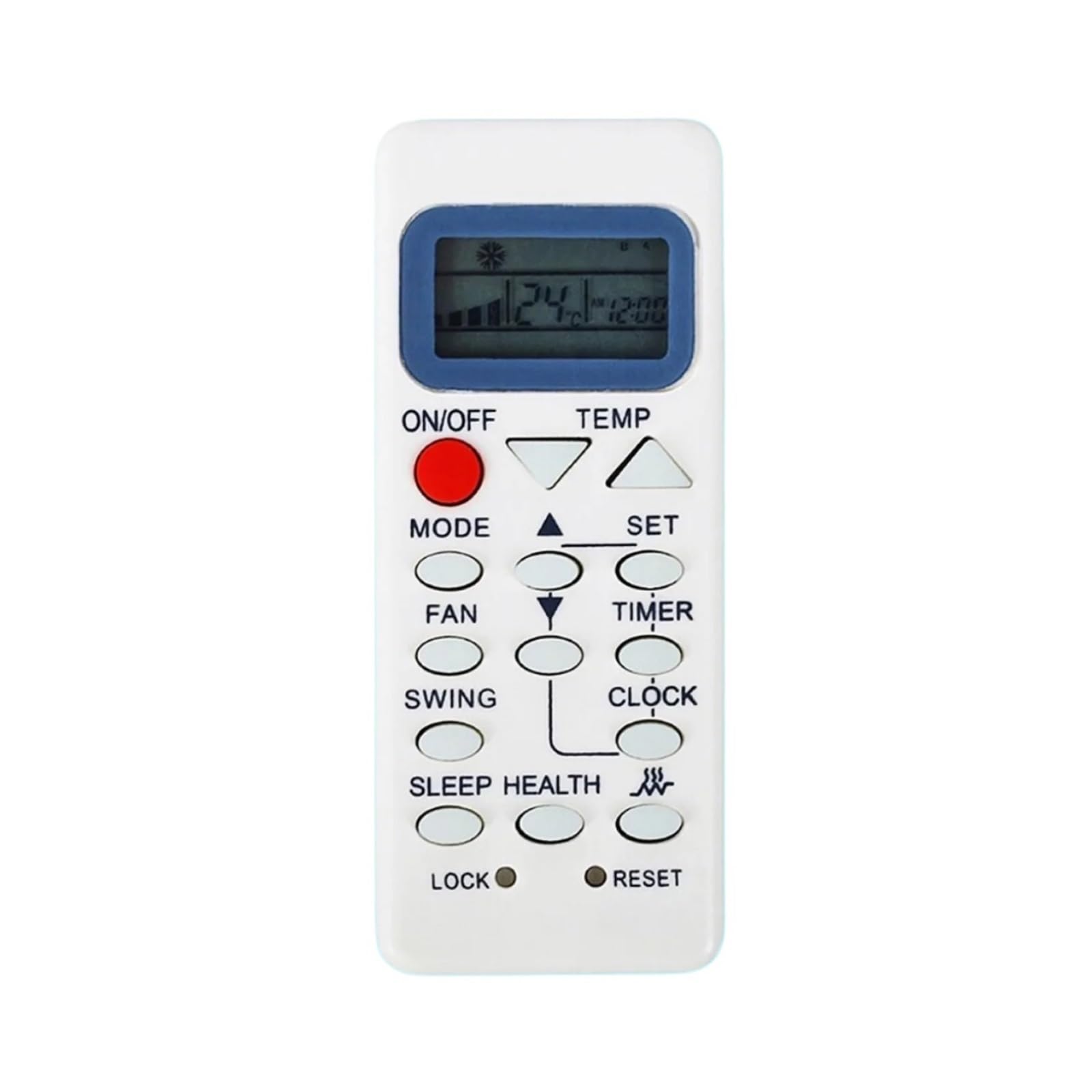
The BCZWLWCND remote control is a replacement unit designed for specific air conditioner models. It features a simple, ergonomic design for comfortable handling and ease of use. The primary function is to control your air conditioner's settings, including power, mode, temperature, and fan speed.
This image displays the back of the BCZWLWCND air conditioner remote control. The design is simple and ergonomic, featuring a removable cover for the battery compartment located at the bottom half of the remote. The top half shows a smooth, slightly recessed area, possibly for grip or internal components. The overall color is white.
3. ຕັ້ງຄ່າ
3.1 ການຕິດຕັ້ງຫມໍ້ໄຟ
- ຊອກຫາຝາປິດຊ່ອງໃສ່ຫມໍ້ໄຟຢູ່ດ້ານຫຼັງຂອງຣີໂໝດຄວບຄຸມ.
- ເລື່ອນຝາປິດລົງລຸ່ມ ຫຼືກົດປຸ່ມ (ຖ້າມີ) ເພື່ອເປີດຊ່ອງໃສ່.
- ໃສ່ແບັດເຕີຣີ AAA ໃໝ່ສອງກ້ອນ (ບໍ່ລວມໃຫ້), ຮັບປະກັນວ່າຂົ້ວບວກ (+) ແລະຂົ້ວລົບ (-) ກົງກັບແຜນວາດພາຍໃນຊ່ອງ.
- ເລື່ອນຝາປິດຊ່ອງໃສ່ໝໍ້ໄຟຄືນໃສ່ບ່ອນເກົ່າຈົນກວ່າມັນຈະກົດຢ່າງປອດໄພ.
ໝາຍເຫດ: ປ່ຽນແບັດເຕີລີທັງສອງໃນເວລາດຽວກັນດ້ວຍເຄື່ອງໃໝ່ສະເໝີ. ຫ້າມເອົາແບດເຕີລີ່ເກົ່າແລະໃຫມ່ປະສົມກັບແບດເຕີຣີ້ປະເພດຕ່າງໆ.
4. ຄໍາແນະນໍາການດໍາເນີນງານ
ເມື່ອໃຊ້ງານ, ໃຫ້ຊີ້ຣີໂໝດຄວບຄຸມໄປທີ່ເຄື່ອງຮັບສັນຍານຂອງເຄື່ອງປັບອາກາດໂດຍກົງ.
4.1 ຫນ້າທີ່ພື້ນຖານ
- ເປີດ/ປິດ: ກົດ ເປີດ/ປິດ ເພື່ອເປີດ ຫຼື ປິດເຄື່ອງປັບອາກາດ.
- ການເລືອກໂໝດ: ກົດ ໂໝດ button repeatedly to cycle through available modes: Auto, Cool, Dry, Fan, Heat (if applicable).
- ການປັບອຸນຫະພູມ: ໃຊ້ TEMP UP (▲) ແລະ TEMP DOWN (▼) ປຸ່ມເພື່ອເພີ່ມຫຼືຫຼຸດລົງອຸນຫະພູມທີ່ຕ້ອງການ.
- ຄວາມໄວພັດລົມ: ກົດ ແຟນAN ປຸ່ມເພື່ອປັບຄວາມໄວພັດລົມ (ເຊັ່ນ: ຕ່ໍາ, ປານກາງ, ສູງ, ອັດຕະໂນມັດ).
- ຟັງຊັນ Swing: If your air conditioner supports it, press the ແກວ່ງ button to activate or adjust the louver swing.
Refer to your air conditioner's original manual for specific functions and their corresponding remote control buttons if this remote has additional features.
5. ບໍາລຸງຮັກສາ
5.1 ການທໍາຄວາມສະອາດການຄວບຄຸມໄລຍະໄກ
To clean the remote control, wipe it gently with a soft, dry cloth. Do not use liquid cleaners, sprays, or chemical solvents, as these may damage the remote's surface or internal components.
5.2 ການທົດແທນຫມໍ້ໄຟ
Replace the batteries when the remote control's range decreases significantly or if the air conditioner does not respond to commands. Follow the battery installation steps outlined in Section 3.1.
6. ການແກ້ໄຂບັນຫາ
- ໄລຍະໄກບໍ່ເຮັດວຽກ:
- ກວດເບິ່ງວ່າໃສ່ແບັດເຕີລີ່ຖືກໃສ່ຢ່າງຖືກຕ້ອງກັບຂົ້ວທີ່ຖືກຕ້ອງຫຼືບໍ່.
- ປ່ຽນແບັດເກົ່າດ້ວຍອັນໃໝ່.
- ໃຫ້ແນ່ໃຈວ່າບໍ່ມີສິ່ງກີດຂວາງລະຫວ່າງການຄວບຄຸມໄລຍະໄກ ແລະເຄື່ອງຮັບເຄື່ອງປັບອາກາດ.
- ຂອບເຂດຈໍາກັດ:
- ປ່ຽນແບັດເຕີລີ.
- Ensure you are within the effective operating range (typically 8-10 meters) and pointing directly at the unit.
- ເຄື່ອງປັບອາກາດບໍ່ຕອບສະໜອງຕໍ່ໜ້າທີ່ສະເພາະ:
- ກວດສອບວ່າເຄື່ອງປັບອາກາດຮຸ່ນຂອງທ່ານຮອງຮັບໜ້າທີ່ສະເພາະທີ່ທ່ານກຳລັງພະຍາຍາມໃຊ້.
- Some advanced functions may require specific programming or may not be supported by a universal replacement remote.
7. ຂໍ້ມູນຈໍາເພາະ
| ຍີ່ຫໍ້ | BCZWLWCND |
| ຮູບແບບທີ່ເຂົ້າກັນໄດ້ | YR-M10, YR-M02, YR-M05, YR-M07, YR-M09, YL-M10 |
| ສີ | One Color (White) |
| ຈໍານວນລາຍການ | 1 |
8. ການຮັບປະກັນແລະການສະຫນັບສະຫນູນ
For warranty information or technical support, please refer to the retailer or platform where the product was purchased. Keep your purchase receipt as proof of purchase.


