
ແນະນຳ
The Moondrop x Wuthering Waves U.C.T.S. is an Ultra HiFi Sound Open Wireless System (OWS) headset designed for gaming and high-fidelity audio. It features hybrid dual drivers, AI noise cancelling, LHDC-V transmission, and LE Audio support. This manual provides essential information for the proper use and care of your U.C.T.S. headset.
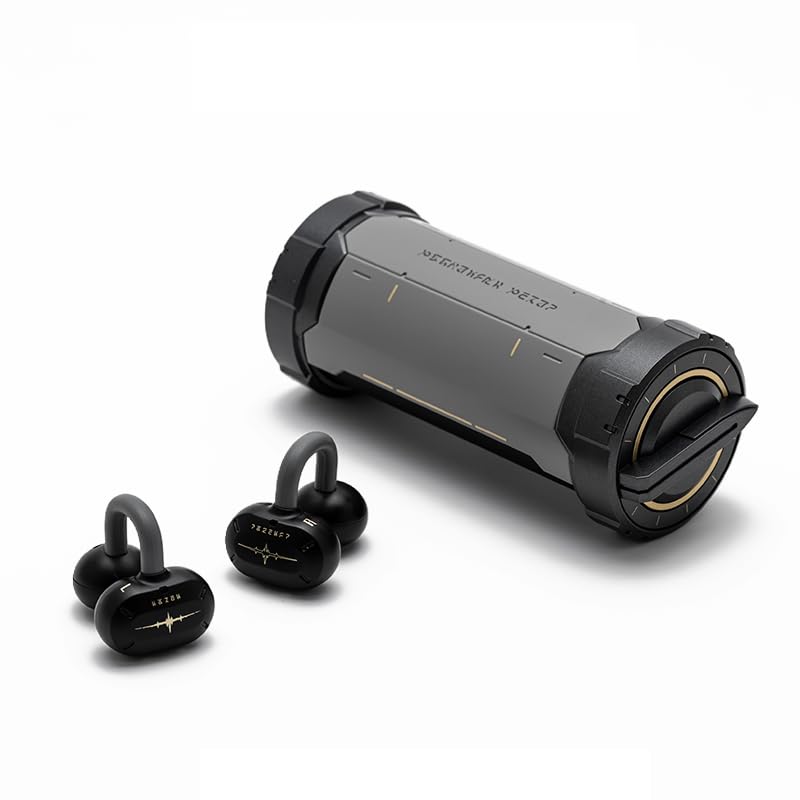
Image: The Moondrop x Wuthering Waves U.C.T.S. gaming headset with its cylindrical charging case.
ແມ່ນຫຍັງຢູ່ໃນກ່ອງ
ກວດສອບວ່າລາຍການທັງຫມົດແມ່ນມີຢູ່ໃນຊຸດ:
- ຫູຟັງຫູຟັງ (ຊ້າຍ ແລະຂວາ)
- ກ່ອງສາກ
- ສາຍສາກ USB-C (ບໍ່ໄດ້ລະບຸໄວ້ຢ່າງຊັດເຈນ ແຕ່ມາດຕະຖານ)
- ຄູ່ມື
- ຄໍາແນະນໍາກ່ຽວກັບການນຸ່ງເສື້ອ
- ບັດແນະນຳ
- ບັດບໍລິການ
- Collaboration Badge x2
- Laser Ticket x2
- ສາຍສາກ x1

Image: The complete package contents, including the headset, charging case, and various collaboration merchandise.
ຕັ້ງຄ່າ
1. ການສາກໄຟເບື້ອງຕົ້ນ
Before first use, fully charge the earbuds and charging case. Connect the USB-C cable to the charging port on the case and to a power source. The earbuds will charge automatically when placed inside the case.
- Earbud Charging Time: Approximately 1.7 Hours
- Charging Case Charging Time: Approximately 2 Hours

Image: The charging case opened, revealing the earbuds securely placed inside for charging.
2. ການຈັບຄູ່ Bluetooth
- ກວດໃຫ້ແນ່ໃຈວ່າໄດ້ສາກຫູຟັງເອຍບັດແລ້ວ ແລະວາງໃສ່ກ່ອງສາກ.
- ເປີດກ່ອງສາກໄຟ. ຫູຟັງເອຍບັດຈະເຂົ້າສູ່ໂໝດຈັບຄູ່ໂດຍອັດຕະໂນມັດ.
- ໃນອຸປະກອນຂອງທ່ານ (ໂທລະສັບສະຫຼາດ, ແທັບເລັດ, ຄອມພິວເຕີ), ເປີດ Bluetooth ແລະຊອກຫາອຸປະກອນທີ່ມີຢູ່.
- Select "Moondrop U.C.T.S." from the list of found devices to connect.
- For LC3 codec, connect to "Moondrop U.C.T.S.-LEA" after activating it in the app.
3. Moondrop App Installation
For full customization and advanced features, download the Moondrop App. The app allows you to adjust sound settings, customize touch controls, and manage dual-device connectivity.
- Android users: Download from moondroplab.com or Google Play Store.
- iOS users: Download from the App Store.

Image: A smartphone displaying the Moondrop U.C.T.S. application interface, showing earbud status and settings.
ຄໍາແນະນໍາການດໍາເນີນງານ
ໃສ່ຫູຟັງ
The U.C.T.S. earbuds feature a C-shaped bridge design for comfortable and secure open-ear placement. Ensure the earbuds are positioned correctly over your ears for optimal sound and stability.

Image: A user wearing the Moondrop U.C.T.S. earbuds, demonstrating their open-ear fit.
ແຕະການຄວບຄຸມ
The earbuds feature touch-sensitive areas for control. Default controls include:
- ແຕະສອງເທື່ອ: ຫຼິ້ນ/ຢຸດສຽງ.
- Triple Tap (Left): ເພງກ່ອນ.
- Triple Tap (Right): ເພງຕໍ່ໄປ.
- ແຕະສີ່ຄັ້ງ: Switch between Low Latency Game Mode and High-Fidelity Music Mode.
Customization of touch controls is available through the Moondrop App.
ໂໝດສຽງ
- ໂໝດເກມການຕອບສະໜອງຕໍ່າ: Provides a 55ms low-latency experience, suitable for gaming. Activate by four taps on the earbud.
- High-Fidelity Music Mode: Standard audio mode for music playback.
ການເຊື່ອມຕໍ່ສອງອຸປະກອນ
The U.C.T.S. supports simultaneous connection to two devices. Switch between connected devices using the Moondrop App for a seamless experience.
AI Noise Cancelling (ENC)
Equipped with a built-in NPU core and an AI ENC algorithm, the headset effectively reduces environmental noise during calls, enhancing vocal clarity.
Dipole Directional Sound Transmission
This technology minimizes sound leakage by directing sound towards the ear canal, reducing up to 97% of sound leakage at 15cm from the ear.
ບໍາລຸງຮັກສາ
ກຳລັງສາກໄຟ
Recharge the earbuds by placing them in the charging case. Recharge the case using a USB-C cable. Regular charging ensures optimal battery performance.
- Earbud Battery Life: Approximately 9 hours (AAC)
- Charging Case Battery Life: Approximately 21.5 Hours (AAC)
- Total Playback Time: 9 + 21.5 hours
- Standby Time: 50 + 120 hours
ທໍາຄວາມສະອາດ
Gently wipe the earbuds and charging case with a soft, dry, lint-free cloth. Avoid using abrasive materials, alcohol, or chemical cleaners. Do not immerse the device in water.
ການແກ້ໄຂບັນຫາ
ບັນຫາການເຊື່ອມຕໍ່
- ຫູຟັງບໍ່ຈັບຄູ່: Ensure earbuds are charged. Place them in the case, close, then open to re-enter pairing mode. Check your device's Bluetooth settings.
- ແອັບບໍ່ເຊື່ອມຕໍ່: If the Moondrop App struggles to connect, try restarting the app or your device. Ensure Bluetooth is active and the earbuds are connected to your phone.
- ການເຊື່ອມຕໍ່ບໍ່ສະຖຽນ: Ensure you are within the 10-meter working distance (or up to 40 meters in open environments). Avoid physical obstructions between the earbuds and your device.
ບັນຫາສຽງ
- ບໍ່ມີສຽງ: Check device volume and earbud battery level. Ensure earbuds are properly connected via Bluetooth.
- ລະດັບສຽງຕໍ່າ: Adjust volume on both your device and through the app.
- ສຽງຮົ່ວ: Ensure earbuds are correctly positioned on your ears.
ຂໍ້ມູນຈໍາເພາະ
- ປະເພດຜະລິດຕະພັນ:
- Ultra HiFi Sound OWS
- ຕົວແບບ:
- MD-OWS-014 (WUTHERING WAVES xMOONDROP U.C.T.S.)
- ລຸ້ນ Bluetooth:
- Bluetooth 6.0
- Bluetooth Profiles:
- A2DP/AVRCP/HFP/HSP
- ຕົວແປງສັນຍານສຽງ:
- SBC/AAC/LC3/LHDC-V
- ຊ່ອງສາກໄຟ:
- USB-C
- ໄລຍະທາງເຮັດວຽກ:
- 10 Meters (Barrier-free Environment)
- ຄວາມອາດສາມາດ Earbud:
- 3.7V / 40mAh
- ຄວາມສາມາດສາກໄຟແບດເຕີລີ້ກໍລະນີ:
- 3.7V / 300mAh
- ການວາງຫູ:
- ເປີດຫູ
- ປັດໄຈແບບຟອມ:
- True Wireless
- ເຕັກໂນໂລຍີການເຊື່ອມຕໍ່:
- ໄຮ້ສາຍ
ຮັບປະກັນ
ຜະລິດຕະພັນນີ້ມາພ້ອມກັບ a ຮັບປະກັນ 1 ປີ ນັບຈາກວັນທີ່ຊື້. ກະລຸນາເກັບຫຼັກຖານການຊື້ຂອງທ່ານໄວ້ເພື່ອການຮຽກຮ້ອງການຮັບປະກັນ. ການຮັບປະກັນກວມເອົາຂໍ້ບົກພ່ອງຈາກການຜະລິດແຕ່ບໍ່ກວມເອົາຄວາມເສຍຫາຍທີ່ເກີດຈາກການໃຊ້ຜິດ, ອຸບັດຕິເຫດ, ຫຼືການດັດແປງທີ່ບໍ່ໄດ້ຮັບອະນຸຍາດ.
ສະຫນັບສະຫນູນ
For further assistance, technical support, or warranty inquiries, please refer to the service card included in your package or visit the official Moondrop store: