
1. ບົດແນະນຳ
This manual provides essential information for the safe and effective use of your LIGE EF18 Smartwatch. Please read it thoroughly before using the device and retain it for future reference. The LIGE EF18 is a versatile smartwatch designed for daily wear, fitness tracking, and communication, compatible with both iOS and Android smartphones.
2. ເນື້ອໃນຊຸດ
ກວດສອບວ່າລາຍການທັງຫມົດແມ່ນມີຢູ່ໃນຊຸດຂອງທ່ານ:
- LIGE EF18 Smartwatch (with 1 stainless steel band attached)
- 2 x Silicone Bands (additional)
- Charging Cable (USB-A)
- ສາຍສາກ (USB-C)
- Band Adjustment Tool (for stainless steel band)
- ຄູ່ມືຜູ້ໃຊ້

Image: The LIGE EF18 Smartwatch, showing its large round display, accompanied by two additional silicone bands, two charging cables (USB-A and USB-C), and a band adjustment tool.
3. ຜະລິດຕະພັນເກີນview
The LIGE EF18 Smartwatch features a robust design with a 1.85-inch high-definition touch display. It includes physical buttons for navigation and quick access to features.
3.1. ອົງປະກອບສັງເກດເບິ່ງ
- ຈໍສະແດງຜົນ: 1.85-inch LCD touchscreen with 2000 nits peak brightness.
- ປຸ່ມ: Side buttons for power, menu navigation, and LED flashlight activation.
- ເຊັນເຊີ: Heart rate, blood oxygen, accelerometer, sleep tracker.
- ລຳໂພງ ແລະໄມໂຄຣໂຟນ: For Bluetooth calling and voice assistant.
- ຜອດສາກໄຟ: Magnetic charging pins on the back.
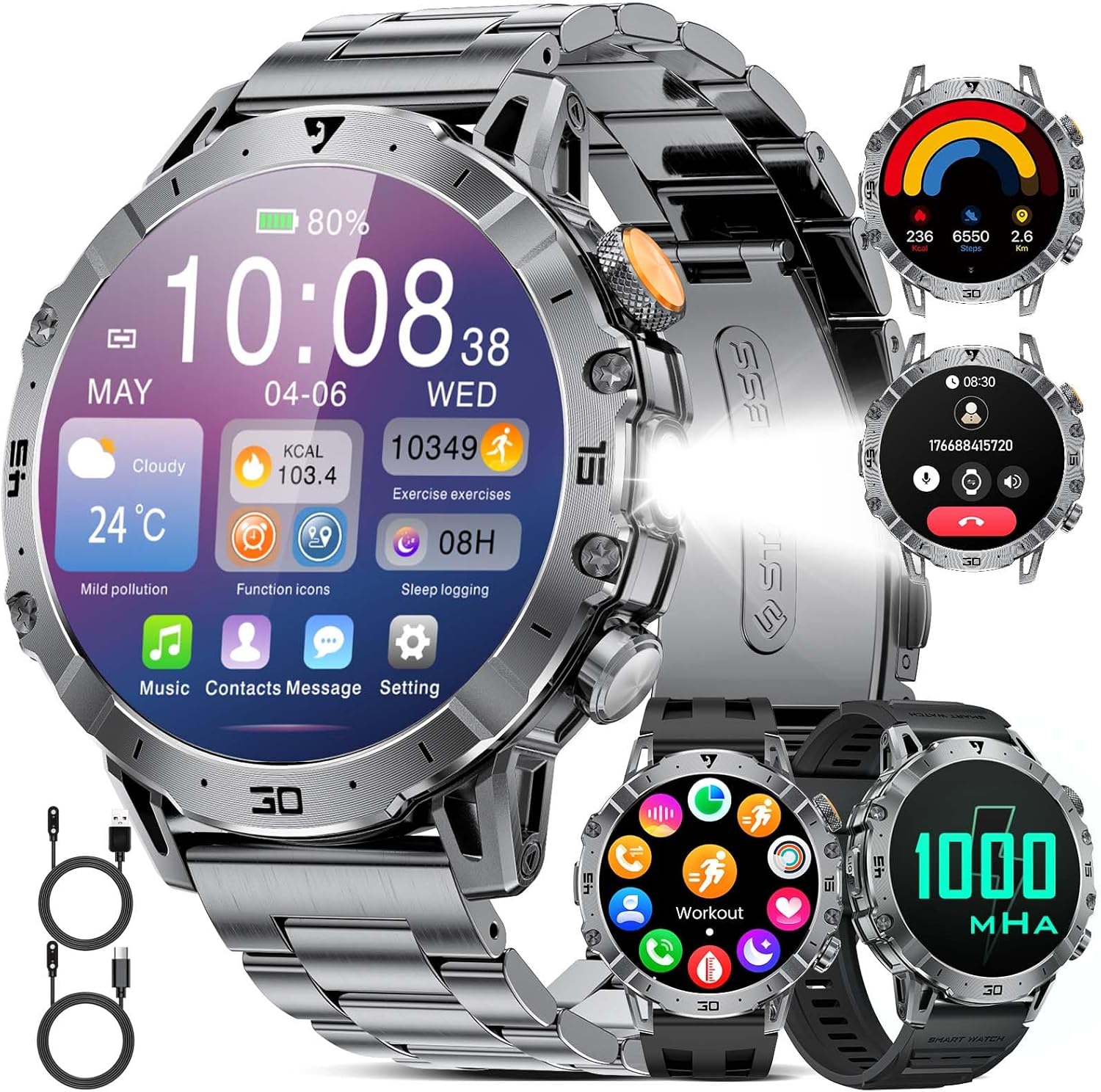
Image: A close-up of the LIGE EF18 Smartwatch, highlighting its large 1.85-inch display, metallic casing, and side buttons. The screen shows various health metrics and time.
4. ຕັ້ງຄ່າ
4.1. ການສາກ Smartwatch
Before first use, fully charge your smartwatch. Connect the magnetic charging cable to the charging pins on the back of the watch and plug the USB end into a power adapter (not included) or a computer USB port. A full charge takes approximately 3 hours.

Image: The LIGE EF18 Smartwatch connected to its magnetic charging cable, illustrating the charging process. The screen displays a charging animation.
4.2. ການຕິດຕັ້ງແອັບ ແລະ ການຈັບຄູ່
- Scan the QR code in the manual or on the watch screen to download the companion app (e.g., FitCloudPro).
- Install the app on your iOS (11.0 or higher) or Android (5.0 or higher) smartphone.
- Open the app and follow the on-screen instructions to create an account and set up your profile.
- ເປີດໃຊ້ Bluetooth ໃນໂທລະສັບສະຫຼາດຂອງທ່ານ.
- In the app, search for your LIGE EF18 device and pair it. Ensure the watch is powered on and near your phone.
- For Bluetooth calling functionality, ensure your iOS device is running iOS 13 or higher and follow any additional pairing prompts for call audio.
4.3. ການຕິດຕັ້ງ ແລະ ການປັບແຕ່ງແຖບ
The smartwatch comes with one stainless steel band and two silicone bands. You can easily swap them to suit your style or activity.
- Changing Bands: Use the quick-release pins to detach the current band and attach a new one.
- Adjusting Stainless Steel Band: Use the provided band adjustment tool to remove or add links for a comfortable fit.

Image: The LIGE EF18 Smartwatch displayed with its three interchangeable bands: a sleek stainless steel band and two flexible silicone bands, offering versatility for different occasions.
5. ຄໍາແນະນໍາການດໍາເນີນງານ
5.1. ການດໍາເນີນງານພື້ນຖານ
- ເປີດ/ປິດ: Press and hold the power button on the side.
- ປຸກໜ້າຈໍ: Raise your wrist or press any button.
- ການນໍາທາງ: Swipe left/right, up/down on the touchscreen to navigate menus. Press the side buttons for quick access or to return to the previous screen.
- ເບິ່ງ ໜ້າ: Customize your watch face through the app or by long-pressing the watch screen. Over 200 online watch faces are available.

Image: The LIGE EF18 Smartwatch showcasing a selection of its over 200 customizable watch faces, allowing users to personalize their device's appearance.
5.2. ໂທ Bluetooth
Once paired with your smartphone, you can make and receive calls directly from your smartwatch.
- ໂທອອກ: Access the dial pad or contact list on the watch.
- ຮັບສາຍ: ຮັບສາຍ ຫຼື ປະຕິເສດສາຍໂທເຂົ້າໂດຍກົງຈາກໜ້າຈໍໂມງ.

Image: The LIGE EF18 Smartwatch worn on a wrist, showing an active incoming call notification on its display, demonstrating its Bluetooth calling capability.
5.3. ການແຈ້ງເຕືອນ
Receive real-time notifications from various apps (LINE, email, SMS, SNS) directly on your watch. Manage which app notifications appear via the companion app settings.

Image: The LIGE EF18 Smartwatch screen showing multiple notification icons from popular messaging and social media applications, indicating its notification feature.
5.4. ຮູບແບບກິລາ
The smartwatch supports over 100 sports modes, including walking, running, cycling, strength training, yoga, and more. It automatically records your activity data such as steps, distance, and calories burned.
- Select your desired sport mode from the watch menu to start tracking.
- Review your exercise records and progress in the companion app.

Image: A LIGE EF18 Smartwatch on a user's wrist during a cycling activity, with the screen showing real-time exercise data such as duration, calories, and distance.
5.5. ການຕິດຕາມສຸຂະພາບ
The EF18 smartwatch provides comprehensive health monitoring features:
- ຈໍພາບການນອນ: ຕິດຕາມຮູບແບບການນອນຂອງທ່ານ, ລວມທັງການນອນເລິກ, ນອນອ່ອນ, ແລະເວລາຕື່ນນອນ. View ການວິເຄາະລະອຽດໃນ app ໄດ້.
- Pedometer & Calorie Counter: Automatically counts your steps and estimates calories burned throughout the day.
- ອັດຕາການເຕັ້ນຫົວໃຈ: Monitors your heart rate continuously or on demand.
- ອົກຊີໃນເລືອດ: ວັດແທກລະດັບຄວາມອີ່ມຕົວຂອງອົກຊີໃນເລືອດຂອງທ່ານ.
- ເຕືອນປະຈຳຕົວ: ແຈ້ງເຕືອນທ່ານໃຫ້ເຄື່ອນຍ້າຍຫຼັງຈາກໄລຍະເວລາທີ່ບໍ່ມີການເຄື່ອນໄຫວ.
- ເຕືອນໃຈດື່ມນ້ໍາ: ກະຕຸ້ນໃຫ້ທ່ານດື່ມນໍ້າເປັນໄລຍະໆ.

Image: A user sleeping with the LIGE EF18 Smartwatch on their wrist, illustrating the device's sleep tracking capabilities and displaying sleep data on the screen.
5.6. ໄຟ LED
The smartwatch is equipped with a built-in LED flashlight for convenience in dark environments.
- Activate the LED light via a dedicated button or menu option.
- Useful for night activities, finding items in the dark, or as an emergency light.

Image: The LIGE EF18 Smartwatch with its powerful LED flashlight turned on, projecting a beam of light, useful for outdoor activities or in emergencies.
5.7. ຫນ້າທີ່ອື່ນໆ
The LIGE EF18 Smartwatch offers a variety of additional features:
- ພະຍາກອນອາກາດ: Displays current weather and forecasts when connected to your phone.
- ການຄວບຄຸມດົນຕີ: ຄວບຄຸມການຫຼິ້ນເພງໃນໂທລະສັບສະຫຼາດຂອງທ່ານ (ຫຼິ້ນ, ຢຸດຊົ່ວຄາວ, ຂ້າມເພງ).
- ການຄວບຄຸມກ້ອງຖ່າຍຮູບທາງໄກ: ໃຊ້ໂມງຂອງເຈົ້າເປັນເຄື່ອງປິດປະຕູທາງໄກສຳລັບກ້ອງຖ່າຍຮູບຂອງໂທລະສັບຂອງທ່ານ.
- ຊອກຫາໂທລະສັບ: ຊ່ວຍຊອກຫາສະມາດໂຟນທີ່ຈັບຄູ່ຂອງເຈົ້າໂດຍການເຮັດໃຫ້ມັນດັງ.
- ໂມງປຸກ: Set multiple alarms with vibration alerts.
- ເຄື່ອງຄິດໄລ່: ຟັງຊັນເຄື່ອງຄິດເລກພື້ນຖານ.
- ຜູ້ຊ່ວຍສຽງ: Access your phone's voice assistant (e.g., Siri, Google Assistant) through the watch.
- ໂໝດຫ້າມລົບກວນ: ປິດສຽງການແຈ້ງເຕືອນໃນຊ່ວງເວລາທີ່ກຳນົດ.

Image: The LIGE EF18 Smartwatch showcasing its multi-functional capabilities, including weather display, music control interface, and remote camera activation, among others.
6. ກັນນ້ຳ (IP68)
The LIGE EF18 Smartwatch is IP68 rated, meaning it is resistant to dust and can withstand immersion in water up to 1.5 meters for 30 minutes. It is suitable for daily use such as hand washing, rain, and splashes during sports activities.
ໝາຍເຫດສຳຄັນ:
- Do not use the watch for prolonged periods underwater.
- Not suitable for diving, hot water, seawater, or sauna environments.
- ຄວາມຕ້ານທານຂອງນ້ໍາອາດຈະຫຼຸດລົງຕາມເວລາທີ່ມີການສວມໃສ່ແລະ້ໍາຕາປົກກະຕິ.

Image: The LIGE EF18 Smartwatch with water splashing on it, visually representing its IP68 water-resistant design, suitable for everyday exposure to water.
7. ຊີວິດຫມໍ້ໄຟ
The LIGE EF18 is equipped with a 1000mAh ultra-large capacity lithium polymer battery, offering extended usage times.
- ການນໍາໃຊ້ສະເລ່ຍ: Up to 10-20 days depending on feature usage.
- ເວລາສະແຕນບາຍ: Over 40 days.
- ເວລາສາກໄຟ: ປະມານ 3 ຊົ່ວໂມງສຳລັບການສາກເຕັມ.

Image: The LIGE EF18 Smartwatch with a prominent graphic emphasizing its 1000mAh battery, illustrating its long-lasting power for extended use.
8. ບໍາລຸງຮັກສາ
To ensure the longevity and optimal performance of your LIGE EF18 Smartwatch, follow these maintenance guidelines:
- Keep the watch clean and dry. Wipe it with a soft, dry cloth regularly.
- Avoid exposing the watch to extreme temperatures, direct sunlight for prolonged periods, or harsh chemicals.
- ເຮັດຄວາມສະອາດການສາກໄຟເປັນໄລຍະໆເພື່ອຮັບປະກັນການສາກໄຟຢ່າງຖືກຕ້ອງ.
- If the bands become dirty, clean them according to their material type (e.g., mild soap and water for silicone, dry cloth for stainless steel).
9. ການແກ້ໄຂບັນຫາ
If you encounter issues with your LIGE EF18 Smartwatch, refer to the following common solutions:
| ບັນຫາ | ການແກ້ໄຂທີ່ເປັນໄປໄດ້ |
|---|---|
| ໂມງບໍ່ເປີດ | ໃຫ້ແນ່ໃຈວ່າໂມງສາກໄຟເຕັມແລ້ວ. ກົດປຸ່ມເປີດປິດຄ້າງໄວ້ສອງສາມວິນາທີ. |
| ບໍ່ສາມາດຈັບຄູ່ກັບສະມາດໂຟນໄດ້ | Ensure Bluetooth is enabled on your phone. Make sure the watch is within range. Restart both the watch and phone. Check app permissions. |
| ບໍ່ໄດ້ຮັບການແຈ້ງເຕືອນ | Check app notification settings on your phone and in the smartwatch app. Ensure the watch is connected via Bluetooth. Disable 'Do Not Disturb' mode. |
| ຂໍ້ມູນສຸຂະພາບບໍ່ຖືກຕ້ອງ | Ensure the watch is worn snugly on your wrist. Clean the sensor on the back of the watch. Note that smartwatch data is for reference and not for medical use. |
| ອາຍຸແບັດເຕີຣີສັ້ນ | Reduce screen brightness, turn off unnecessary features, limit frequent heart rate monitoring. Ensure background app usage is optimized. |
10. ຂໍ້ມູນຈໍາເພາະ
| ຄຸນສົມບັດ | ລາຍລະອຽດ |
|---|---|
| ຕົວແບບ | EF18 (AK80) |
| ຈໍສະແດງຜົນ | 1.85-inch LCD Touchscreen, 2000 nits max brightness |
| ຄວາມອາດສາມາດຫມໍ້ໄຟ | 1000 mAh Lithium Polymer |
| ອາຍຸຫມໍ້ໄຟສະເລ່ຍ | 10-20 days (usage), 40+ days (standby) |
| ເວລາສາກໄຟ | ປະມານ. 3 ຊົ່ວໂມງ |
| ການເຊື່ອມຕໍ່ | Bluetooth (BT4.0) |
| ການຕໍ່ຕ້ານນ້ໍາ | IP68 |
| ລະບົບປະຕິບັດການ | AsteroidOS |
| ການເກັບຮັກສາຄວາມຈໍາ | 512 MB |
| ອຸປະກອນທີ່ເຂົ້າກັນໄດ້ | iOS 11.0+ (iOS 13+ for calls), Android 5.0+ |
| ແຖບວັດສະດຸ | ສະແຕນເລດ, ຊິລິໂຄນ |
| ວັດສະດຸກໍລະນີ | ໂລຫະ |
| ຄຸນສົມບັດ | LED Flashlight, Bluetooth Call, 100+ Sports Modes, Health Monitoring (Sleep, Steps, Calories, Heart Rate, Blood Oxygen), Notifications, Weather, Music Control, Remote Camera, Find Phone, Alarm, Calculator, Voice Assistant, Drink Water Reminder, Sedentary Reminder, Do Not Disturb Mode |
11. ການຮັບປະກັນແລະການສະຫນັບສະຫນູນ
LIGE provides comprehensive support for your EF18 Smartwatch:
- ການຮັບປະກັນ: 24-month (2-year) limited warranty from the date of purchase.
- ສະຫນັບສະຫນູນອອນໄລນ໌: 24-hour online customer support is available.
- ບໍລິການສົ່ງຄືນ: 6-month return service is offered.
If you encounter any issues with parts, quality, operation, or charging, please contact customer support within 24 hours for a resolution.

Image: A graphic displaying the LIGE brand logo and details about their customer service, including 24-hour online support, 6-month return service, and a 2-year quality warranty.


