
1. ເກີນview
The Philips TAZ2200 is a versatile portable sound machine designed for enjoying various audio formats. It features a top-loading CD player, a front-loading cassette player, FM radio, Bluetooth 6.0 connectivity, USB playback, and a 3.5mm audio input. Equipped with dynamic bass boost and 6W stereo speakers, it delivers rich sound. The unit can be powered by AC mains or batteries and includes a carrying handle for portability.
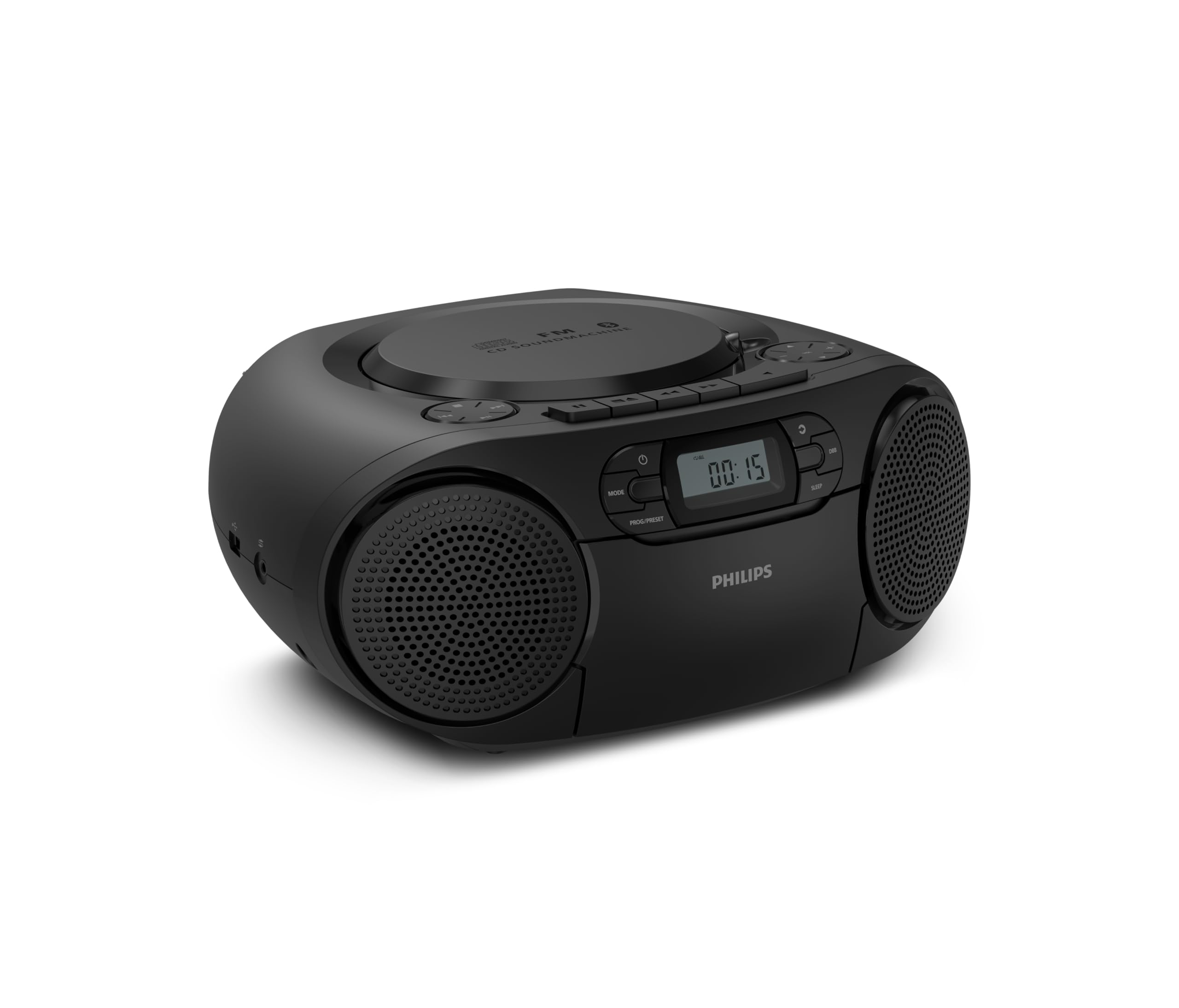
ດ້ານໜ້າ view of the Philips TAZ2200 CD Soundmachine, showing the main display and control buttons.
2. ຂໍ້ມູນຄວາມປອດໄພ
Please read these safety instructions carefully before using your device and keep them for future reference. Incorrect use may result in hazards.
- ແຫຼ່ງພະລັງງານ: ໃຊ້ພຽງແຕ່ອະແດບເຕີໄຟຟ້າ ຫຼື ແບັດເຕີຣີທີ່ລະບຸໄວ້ເທົ່ານັ້ນ.tage ກົງກັບຄວາມຕ້ອງການຂອງຫນ່ວຍງານ.
- ນ້ໍາແລະຄວາມຊຸ່ມ: ຢ່າໃຫ້ເຄື່ອງຖືກຝົນ, ຄວາມຊຸ່ມ, ນ້ຳຢອດ ຫຼື ນ້ຳກະເດັນ. ຢ່າວາງວັດຖຸທີ່ເຕັມໄປດ້ວຍຂອງແຫຼວ ເຊັ່ນ: ແຈກັນ ເທິງເຄື່ອງ.
- ການລະບາຍອາກາດ: Ensure adequate ventilation. Do not block any ventilation openings. Maintain a minimum distance around the unit for sufficient ventilation.
- ຄວາມຮ້ອນ: ຫ້າມວາງເຄື່ອງໄວ້ໃກ້ກັບແຫຼ່ງຄວາມຮ້ອນເຊັ່ນ: ລັງສີ, ເຄື່ອງບັນທຶກຄວາມຮ້ອນ, ເຕົາ ຫຼື ອຸປະກອນອື່ນໆ (ລວມທັງ amplifiers) ທີ່ຜະລິດຄວາມຮ້ອນ.
- ແບັດເຕີຣີ: Follow correct polarity when inserting batteries. Do not mix old and new batteries, or different types of batteries. Remove batteries if the unit is not used for a long period.
- ທໍາຄວາມສະອາດ: ຖອດປລັກເຄື່ອງອອກຈາກປລັກໄຟກ່ອນທຳຄວາມສະອາດ. ໃຊ້ຜ້າອ່ອນແລະແຫ້ງ. ຢ່າໃຊ້ນ້ຳຢາທຳຄວາມສະອາດຂອງແຫຼວ ຫຼື ນ້ຳຢາທຳຄວາມສະອາດແບບສະເປຣ.
- ການບໍລິການ: ຢ່າພະຍາຍາມບໍລິການຜະລິດຕະພັນນີ້ດ້ວຍຕົນເອງ. ອ້າງເຖິງການບໍລິການທັງtoົດໃຫ້ກັບພະນັກງານບໍລິການທີ່ມີຄຸນວຸດທິ.
3. ສິ່ງທີ່ຢູ່ໃນກ່ອງ
ຫຼັງຈາກການຍົກເລີກການຫຸ້ມຫໍ່, ກະລຸນາແນ່ໃຈວ່າລາຍການທັງຫມົດທີ່ລະບຸໄວ້ຂ້າງລຸ່ມນີ້ແມ່ນມີ:
- Philips TAZ2200 CD Soundmachine
- ສາຍໄຟ
- ຄູ່ມືເລີ່ມຕົ້ນໄວ
- ປື້ມຄູ່ມືການຮັບປະກັນ
- ໃບຄວາມປອດໄພ
4. ການຄວບຄຸມແລະການເຊື່ອມຕໍ່
ການຄວບຄຸມກະດານດ້ານຫນ້າ
The front panel features the main display, power button, mode selection, program/preset buttons, and dynamic bass boost (DBB) control. Playback controls for CD and USB are also located here.

ລາຍລະອຽດດ້ານໜ້າ view showing the display, power, mode, program/preset, and DBB buttons.
Side and Rear Connections
The side of the unit provides a USB port for digital audio playback and a 3.5mm audio input jack for connecting external devices.

ຂ້າງ view illustrating the USB port and Audio Input jack.
The top of the unit houses the CD compartment and additional playback controls, while the rear features the AC power input and the FM antenna.

ເທິງ view showing the CD compartment and associated controls.

ຫລັງ view displaying the AC power input and the telescopic FM antenna.
5. ຕັ້ງຄ່າ
5.1 ການສະຫນອງພະລັງງານ
ໄຟຟ້າ AC
- ໃຫ້ແນ່ໃຈວ່າເຄື່ອງຖືກປິດ.
- Connect the supplied power cable to the AC IN socket on the rear of the sound machine.
- Plug the other end of the power cable into a wall power outlet.
ພະລັງງານຫມໍ້ໄຟ
For portable use, the unit can operate on 6 x C-type batteries (not included).
- ເປີດຝາປິດຝາປິດທີ່ຕັ້ງຢູ່ດ້ານລຸ່ມຂອງ ໜ່ວຍ.
- Insert 6 C-type batteries, ensuring correct polarity (+/-) as indicated inside the compartment.
- ປິດຝາປິດຊ່ອງໃສ່ຫມໍ້ໄຟຢ່າງປອດໄພ.
5.2 ການປັບສາຍອາກາດ
For optimal FM radio reception, fully extend the telescopic antenna located at the rear of the unit. Adjust its position and angle to achieve the clearest signal.
6. ຄໍາແນະນໍາການດໍາເນີນງານ
6.1 ການດໍາເນີນງານທົ່ວໄປ
- ເປີດ/ປິດ: ກົດ ພະລັງງານ ປຸ່ມເພື່ອເປີດຫຼືປິດເຄື່ອງ.
- ການຄວບຄຸມລະດັບສຽງ: ໃຊ້ VOL+ or VOL - ປຸ່ມເພື່ອປັບລະດັບສຽງ.
- Dynamic Bass Boost (DBB): ກົດ ດີບີ button to activate or deactivate the dynamic bass boost feature for enhanced bass sound.
- ການເລືອກໂໝດ: ກົດ ໂໝດ button repeatedly to switch between CD, Cassette, FM Radio, Bluetooth, USB, and Audio Input modes.
6.2 ການຫຼິ້ນ CD
- ເປີດຝາປິດຊ່ອງໃສ່ຊີດີທີ່ຢູ່ເທິງສຸດຂອງຕົວເຄື່ອງ.
- Place a CD (CD, CD-R, or CD-RW) with the label side facing up onto the spindle.
- ປິດຝາປິດຊ່ອງ CD.
- ກົດ ໂໝດ ປຸ່ມເພື່ອເລືອກຮູບແບບຊີດີ.
- ກົດ ຫຼິ້ນ/ຢຸດຊົ່ວຄາວ ປຸ່ມເພື່ອເລີ່ມຕົ້ນການຫຼິ້ນ
- ໃຊ້ ຂ້າມ ປຸ່ມ (|< or >> |) ເພື່ອຂ້າມການຕິດຕາມ.
- ກົດຄ້າງໄວ້ |< or >> | to search within a track.
- ກົດ ຢຸດ ປຸ່ມເພື່ອຢຸດການຫລີ້ນການຫລີ້ນ.
6.3 ການຫຼິ້ນ Cassette
- Open the cassette compartment door on the front of the unit.
- ໃສ່ເທບເທບທີ່ມີຂອບເປີດຫັນໄປທາງເທິງ.
- ປິດປະຕູຊ່ອງໃສ່ເທບ.
- ກົດ ໂໝດ ເພື່ອເລືອກໂໝດເທບຄາເຊັດ.
- ກົດ ຫຼິ້ນ ປຸ່ມເພື່ອເລີ່ມຕົ້ນການຫຼິ້ນ
- ໃຊ້ ເດີນໜ້າໄວ or ກັບຄືນ ປຸ່ມເພື່ອເລື່ອນເທບໄປໜ້າ ຫຼື ຖອຍຫຼັງໄດ້ຢ່າງວ່ອງໄວ.
- ກົດ ຢຸດ ປຸ່ມເພື່ອຢຸດການຫລີ້ນການຫລີ້ນ.
ວິທະຍຸ 6.4 FM
- ກົດ ໂໝດ ເພື່ອເລືອກໂໝດວິທະຍຸ FM.
- ສະແກນອັດຕະໂນມັດ: ກົດຄ້າງໄວ້ PROG/PRESET ປຸ່ມເພື່ອສະແກນ ແລະເກັບຮັກສາສະຖານີ FM ທີ່ມີຢູ່ໂດຍອັດຕະໂນມັດ.
- ຄູ່ມືການປບັຄູ່ມື: ກົດ Tuning ປຸ່ມ (|< or >> |) ເພື່ອປັບຄວາມຖີ່ທີ່ຕ້ອງການດ້ວຍຕົນເອງ.
- ບັນທຶກການຕັ້ງຄ່າໄວ້ລ່ວງໜ້າ: After tuning to a station, press PROG/PRESET once, then use |< or >> | to select a preset number, and press PROG/PRESET ອີກເທື່ອຫນຶ່ງເພື່ອຢືນຢັນ.
- Presets ທີ່ລະລຶກ: ໃນໂຫມດ FM, ກົດ PROG/PRESET repeatedly to cycle through saved preset stations.
6.5 ການຫຼິ້ນ Bluetooth
- ກົດ ໂໝດ button to select Bluetooth mode. The display will show 'BT' and flash, indicating it's in pairing mode.
- ໃນອຸປະກອນທີ່ເປີດໃຊ້ Bluetooth ຂອງທ່ານ (ໂທລະສັບສະຫຼາດ, ແທັບເລັດ), ເປີດໃຊ້ Bluetooth ແລະຄົ້ນຫາອຸປະກອນທີ່ມີຢູ່.
- Select "Philips TAZ2200" from the list of devices.
- Once paired, the unit will emit a confirmation sound, and 'BT' will stop flashing.
- Start playing audio on your connected device. The sound will be streamed to the sound machine.
6.6 ການຫຼິ້ນ USB
- Insert a USB flash drive into the USB port on the side of the unit.
- ກົດ ໂໝດ ປຸ່ມເພື່ອເລືອກໂຫມດ USB.
- ເຄື່ອງຈະກວດຫາ ແລະ ເລີ່ມຫຼິ້ນສຽງທີ່ເຂົ້າກັນໄດ້ໂດຍອັດຕະໂນມັດ file(MP3, WAV, WMA).
- ໃຊ້ຕົວຄວບຄຸມການຫຼິ້ນຄືນ (ຫຼິ້ນ/ຢຸດຊົ່ວຄາວ, ຂ້າມ, ຢຸດ) as you would for CD playback.
6.7 ການປ້ອນຂໍ້ມູນສຽງ (AUX)
- Connect one end of a 3.5mm audio cable (not included) to the AUDIO IN jack on the side of the sound machine.
- Connect the other end of the audio cable to the headphone jack or audio output of your external device (e.g., MP3 player, turntable).
- ກົດ ໂໝດ button to select Audio Input mode.
- Start playing audio on your external device. The sound will be played through the sound machine.
7. ບໍາລຸງຮັກສາ
- ທໍາຄວາມສະອາດຫນ່ວຍບໍລິການ: ເຊັດດ້ານນອກຂອງຕົວເຄື່ອງດ້ວຍຜ້າທີ່ອ່ອນນຸ້ມແລະຄ່ອຍໆເຊັດອອກ.amp ຜ້າ. ຢ່າໃຊ້ເຄື່ອງເຮັດຄວາມສະອາດຂັດຫຼືສານລະລາຍ.
- ການດູແລ CD Player: Keep the CD compartment clean. If the lens is dirty, use a specialized CD lens cleaner. Avoid touching the lens.
- ການດູແລເຄື່ອງຫຼິ້ນ Cassette: ອະນາໄມຫົວເທບເປັນໄລຍະໆ ແລະຕີລູກກິ້ງດ້ວຍຜ້າຝ້າຍເບົາໆ dampປະກອບດ້ວຍເຫຼົ້າ isopropyl.
- ການປ່ຽນແບັດເຕີຣີ: If using batteries, replace all 6 C-type batteries when the unit's performance diminishes or if the unit will not be used for an extended period.
- ການເກັບຮັກສາ: ເມື່ອບໍ່ໄດ້ໃຊ້ງານ, ໃຫ້ເກັບຮັກສາອຸປະກອນໄວ້ໃນບ່ອນທີ່ສະອາດ, ແຫ້ງ, ຫ່າງຈາກແສງແດດໂດຍກົງ ແລະ ອຸນຫະພູມສູງ ຫຼື ຕ່ຳ.
8. ການແກ້ໄຂບັນຫາ
If you encounter any issues with your Philips TAZ2200, please refer to the table below for common problems and solutions.
| ບັນຫາ | ສາເຫດທີ່ເປັນໄປໄດ້ | ການແກ້ໄຂ |
|---|---|---|
| ບໍ່ມີພະລັງງານ | ສາຍໄຟບໍ່ໄດ້ເຊື່ອມຕໍ່; ແບັດເຕີຣີໝົດ ຫຼືໃສ່ບໍ່ຖືກຕ້ອງ. | Check AC power connection; Replace batteries or ensure correct polarity. |
| ບໍ່ມີສຽງ | ລະດັບສຽງຕໍ່າເກີນໄປ; ເລືອກໂໝດບໍ່ຖືກຕ້ອງ; ເຊື່ອມຕໍ່ຫູຟັງແລ້ວ. | Increase volume; Select the correct source mode (CD, FM, BT, etc.); Disconnect headphones. |
| CD ບໍ່ໄດ້ຫຼິ້ນ | ໃສ່ຊີດີບໍ່ຖືກຕ້ອງ; ຊີດີເປື້ອນ ຫຼື ມີຮອຍຂີດຂ່ວນ; ບໍ່ຮອງຮັບຮູບແບບຊີດີ. | Insert CD with label side up; Clean or replace CD; Ensure CD is CD-R/RW compatible. |
| Cassette not playing | Cassette inserted incorrectly; Tape is damaged. | Insert cassette correctly; Try a different cassette. |
| ການຮັບ FM ບໍ່ດີ | ແອນເຕນນາບໍ່ໄດ້ຍືດອອກ ຫຼື ບໍ່ໄດ້ວາງຕຳແໜ່ງຢ່າງຖືກຕ້ອງ; ສັນຍານອ່ອນ. | ຂະຫຍາຍອອກຢ່າງເຕັມສ່ວນແລະປັບສາຍອາກາດ telescopic; ລອງຍ້າຍໜ່ວຍໄປບ່ອນອື່ນ. |
| Bluetooth ບໍ່ເຊື່ອມຕໍ່ | Unit not in pairing mode; Bluetooth device too far; Device already paired with another unit. | Ensure unit is in Bluetooth mode and flashing; Move device closer; Disconnect from other devices. |
| ບັນຫາການຫຼິ້ນ USB | ໄດຣຟ໌ USB ບໍ່ໄດ້ສຽບຢ່າງຖືກຕ້ອງ; ເຂົ້າກັນບໍ່ໄດ້ file ຟໍແມັດ; ໄດຣຟ໌ USB ເສຍຫາຍ. | ໃສ່ໄດຣຟ໌ USB ຄືນໃໝ່; ໃຫ້ແນ່ໃຈວ່າ files are MP3, WAV, or WMA; Try a different USB drive. |
9. ຂໍ້ມູນຈໍາເພາະ
| ຄຸນສົມບັດ | ຂໍ້ມູນຈໍາເພາະ |
|---|---|
| ຍີ່ຫໍ້ | ຟີລິບ |
| ໝາຍເລກຕົວແບບ | TAZ2200/10 |
| ເຕັກໂນໂລຊີການເຊື່ອມຕໍ່ | Bluetooth 6.0, USB, Audio Input (3.5mm) |
| ປະເພດລຳໂພງ | Stereo (2 speakers) |
| ພະລັງງານຜົນຜະລິດ | 6 ວັດ (ສູງສຸດ) |
| ສື່ທີ່ຮອງຮັບ | CD, CD-R, CD-RW, Cassette, USB (MP3, WAV, WMA) |
| ເຄື່ອງຮັບສັນຍານວິທະຍຸ | Digital FM with 20 presets |
| ແຫຼ່ງພະລັງງານ | AC (wired), 6 x C-type batteries (not included) |
| ຂະໜາດ (LxWxH) | 24.5 x 28.5 x 12.5 cm |
| ນ້ຳໜັກ | 1.35 ກິໂລກຣາມ |
| ສີ | ເງິນ |
10. ການຮັບປະກັນແລະການສະຫນັບສະຫນູນ
10.1 ການຮັບປະກັນຜະລິດຕະພັນ
This Philips TAZ2200 CD Soundmachine comes with a ຮັບປະກັນ 2 ປີ ຈາກວັນທີ່ຊື້. ກະລຸນາຮັກສາຫຼັກຖານການຊື້ຂອງທ່ານສໍາລັບການຮຽກຮ້ອງການຮັບປະກັນ. ການຮັບປະກັນກວມເອົາຄວາມບົກຜ່ອງດ້ານການຜະລິດແລະການເຮັດວຽກຜິດປົກກະຕິພາຍໃຕ້ເງື່ອນໄຂການນໍາໃຊ້ປົກກະຕິ.
10.2 ສະຫນັບສະຫນູນລູກຄ້າ
For technical assistance, troubleshooting beyond this manual, or warranty service, please refer to the contact information provided in the warranty booklet included with your product. You can also visit the official Philips support website for your region for further assistance and FAQs.


